MeetGeek Review (2026)20 Hours, Then $0.50 an Hour
 By Daan Haket · Researched and written with an AI assistant · who does what
The meter is transcription hours and Pro gives you twenty a month, which is about an hour a working day.
people who run many external meetings and need a searchable record — the summaries earn their keep when you cannot remember which of four calls a detail came from.
your meetings are internal and few, because the note-taking in your existing conferencing tool covers that; also skip Pro if you record daily, since twenty hours will not last.
Transparency: the “Visit” links on this page are affiliate links — we may earn a commission if you sign up, at no extra cost to you. No vendor can pay for a better review or verdict. How we make money →
Pricing (2026)
✓ Pricing re-verified 19 Sep 2026
| Plan | Price | What you get |
|---|---|---|
| Basic | free | 3 hours of transcription a month |
| Pro | $9.99 per user per month billed annually, $15.99 billed monthly | 20 hours of transcription |
| Business | $17 per user per month billed annually, $27 billed monthly | unlimited transcription and team multi-meeting analytics |
| Enterprise | quote-only | SSO, SCIM, org-wide settings, on-premise storage, custom retention, custom voice agents, dedicated account manager |
Summarised from the pricing notes below; the notes carry the conditions.
The page loads on annual billing, so the figures it shows first are the annual ones; both terms are given here. Basic is free with 3 hours of transcription a month. Pro $9.99 per user per month billed annually, $15.99 billed monthly, with 20 hours of transcription. Business $17 per user per month billed annually, $27 billed monthly, with unlimited transcription and team multi-meeting analytics.
Enterprise is quote-only: SSO, SCIM, org-wide settings, on-premise storage, custom retention, custom voice agents and a dedicated account manager. Extra transcription hours are $0.50 each. Downloads and exports and admin user management start on Pro, not Business; API and MCP access are listed on the free Basic plan. A 14-day free trial runs on Pro. Two limits sit beside the hours and neither is in the plan blurb.
Full pricing notes (2 more paragraphs)
A separate cap ends the individual meeting: two hours on Basic and Pro, three on Business, four on Enterprise. And your recordings expire on a schedule — transcripts are kept three months on Basic, a year on Pro and indefinitely above that, audio one month, six months and twelve, with video stored only from Business. On the same page, the annual badge claims up to 40% off, the actual step from monthly to annual is about 37% on both paid tiers, and a line under the heading offers 30% off for startups, non-profits and education on request.
Data can be stored in the EU or the US on every plan, the page claims SOC 2, GDPR and HIPAA compliance and states that customer data is not used to train external models, but recording-consent notifications with approval tracking start on Business.
Plans change — always verify the live price on their site.
What the pricing page doesn’t say
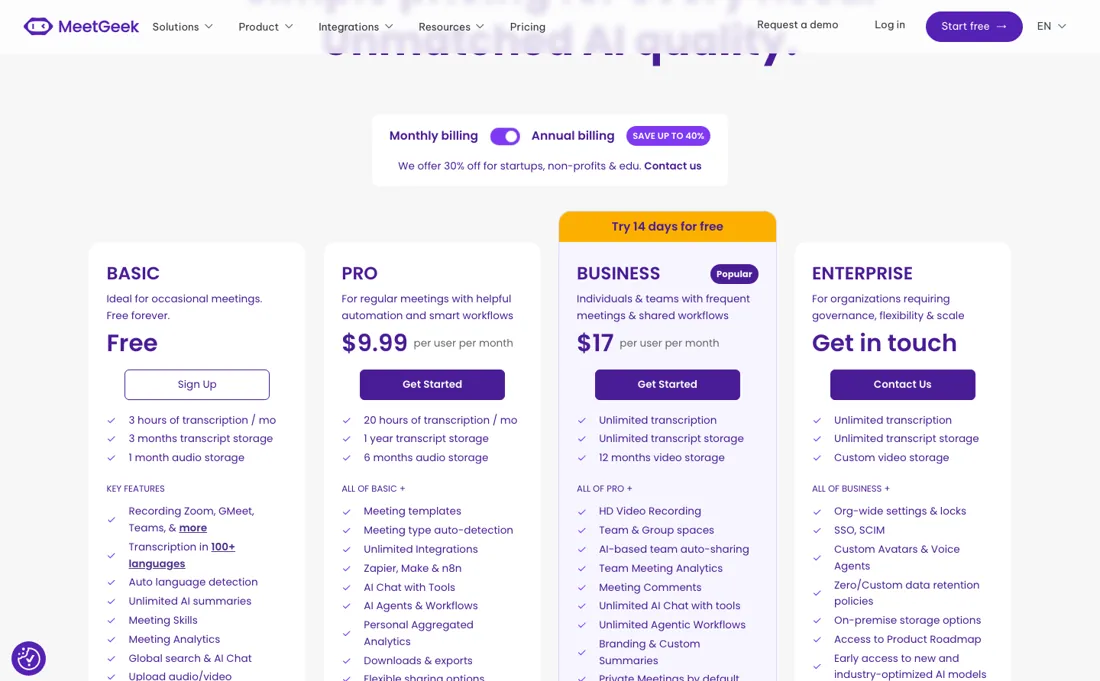
That sounds generous until you count the meetings you would actually record — a sales rep on four calls a day passes it in the first week, and the overage is $0.50 an hour. Unlimited transcription is the real reason to be on Business at $17, so treat Pro as a plan for occasional recording rather than a cheaper version of the same thing. Worth checking before you buy: consent.
A recorder that joins every meeting changes what people say in them, and that is a policy decision rather than a pricing one.
Watch the video review
The video version of this review, from our YouTube channel.
⚡ Short on time? Watch the 30-second verdict Short.
What MeetGeek does
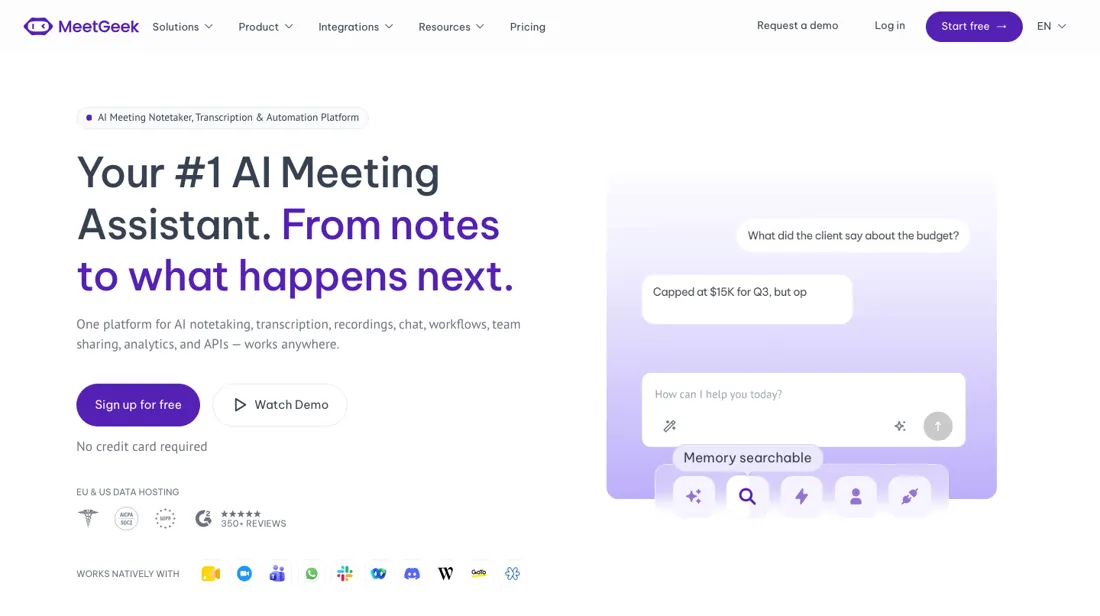
Meeting recorder and note-taker: transcription, summaries and searchable meeting history.
What buyers report about MeetGeek
Hands-on: not tested by usReported by buyers: G2, Capterra and practitioner reviews, read August 2026
Themes from the buyer-review sites listed at the foot of this page, read in August 2026. We have not run MeetGeek ourselves, so this is other buyers' experience rather than ours. We summarise it here because the complaints are usually the part a vendor page leaves out.
- • Cross-meeting analytics is the standout — reviewers say it goes deeper than competitors at the same price.
- • It removes note-taking from the call entirely, which is the whole point. Overall score around 4.0.
- • Transcription accuracy is the most common complaint and it degrades noticeably on noisy calls, crosstalk, accents and non-English audio. If your meetings are multilingual, test before committing.
- • The free tier is 3 hours a month with 3-month storage — occasional use only.
- • Pro is $9.99 per user annually but $15.99 monthly; Business $17 annually and $27 monthly. That monthly premium is steep.
When the paid plan is worth it
Basic is free with three hours of transcription a month, Pro is $9.99 a user a month with twenty hours, and Business is $17 with unlimited transcription. Those two figures are the annual prices, which is what the pricing page shows before anyone touches the billing switch; paying monthly makes them $15.99 and $27. Extra hours are $0.50 each. Those numbers make the choice arithmetic rather than instinct, and the answer depends on the switch.
Twenty hours is about an hour a working day, and the overage closes the gap fast. On annual billing, Pro plus fourteen extra hours costs exactly what Business costs, so thirty-four hours a month is the line. On monthly billing the gap is wider — $15.99 against $27 — and the line moves to about forty-two hours. Below it Pro is cheaper; above it you are paying more than Business costs for less than Business gives.
Count the meetings you would actually record rather than the ones you attend, because that is where the estimate goes wrong. A sales rep on four calls a day passes twenty hours in the first week of the month. For that profile Pro is not a cheaper version of Business — it is a plan for occasional recording, and treating it as the budget option produces a bigger bill than the plan above it.
What Business adds beyond the meter is narrower than it looks. Team multi-meeting analytics is the feature that starts there; downloads and exports and admin user management are already on Pro, so a team that moves up for those is paying $17 for something it has at $9.99. Nor is the API a reason to climb: API and MCP access are listed on the free Basic plan. Enterprise is bought for governance instead — SSO, SCIM, org-wide settings, on-premise storage and custom retention.
There is a 14-day trial on Pro. One thing no tier settles: a recorder that joins every meeting changes what people say in them. Consent is a policy decision to make before the rollout, not a setting to find afterwards.
How to actually use MeetGeek
Settle consent before you switch it on, because a recorder that joins every meeting changes what people say in them — and in several jurisdictions it changes what is lawful. Write down who gets told, how they are told, and which meetings are excluded. This is a policy decision rather than a pricing one and it is the step most teams skip. Then count the meetings you would actually record, in hours.
Pro's twenty hours a month is about an hour a working day, which sounds generous until you apply it: a sales rep on four calls a day passes it in the first week. Overage runs $0.50 an hour, and Business with unlimited transcription becomes the cheaper plan past about 34 hours a month on annual billing ($9.99 against $17) or about 42 hours on monthly billing ($15.99 against $27) — so treat Pro as a plan for occasional recording rather than a cheaper version of the same thing.
Use the 14-day trial on your real meeting mix rather than a scheduled test call. Accents, crosstalk, a bad connection and someone dialling in from a car are what transcription accuracy actually has to survive, and every summary built on a poor transcript is confidently wrong.
Distilled from MeetGeek plans and pricing, including the per-plan feature table and the monthly/annual billing switch, https://meetgeek.ai/pricing (read 2026-08-30, re-read in a rendered browser 2026-09-04); MeetGeek help centre, https://support.meetgeek.ai/en/ (read 2026-08-30); MeetGeek API documentation, https://docs.meetgeek.ai/api/getting-started/introduction (read 2026-08-30). Re-read 19 September 2026 from the page's own HTML: plan blocks, the full per-plan comparison table, the billing toggle and the discount lines. API and MCP availability per plan read in the homepage FAQ on 27 October 2026: https://meetgeek.ai/.
The natural comparison is Fireflies or Otter — the direct meeting-recorder peers — compare the transcription-hour allowance at your real meeting load, since that is the only meter that moves.
Frequently asked questions
Which limit will I hit first — the hours or something else?
Probably the hours, but two other limits catch people out and neither is in the plan summary. The first is a cap on the single meeting: two hours on Basic and on Pro, three on Business, four on Enterprise. A monthly allowance of twenty hours does not help you through a three-hour workshop on Pro, and that is the sort of meeting you most want a record of. The second is storage, which expires by tier: transcripts are held three months on Basic, a year on Pro and without limit on Business, while audio lasts one month, six months and twelve, and video is only stored from Business at all. So a free account is not an archive — anything you want to keep past a quarter has to be exported, and downloads and transcript exports themselves start on Pro. Decide what you are buying: a note-taker for this week, or a searchable record you will still have next year.
What do I need for consent, and where does my data sit?
The compliance answers are good; the tooling that enforces them is tiered, and that is the part to plan around. Every plan lets you choose whether your data is stored in the EU or the US, and the page claims SOC 2, GDPR and HIPAA compliance and states that your meetings are not used to train external models. What arrives only on Business at $17 a user is the machinery for consent: recording-consent notifications with approval tracking, meetings that stay private by default, rules to skip meetings you do not want recorded, and a customisable recording disclaimer. On Pro you can still tell people you are recording — you just have to do it yourself, every time, and keep your own evidence. In a two-party-consent state, or for client calls under European rules, that difference is the difference between a policy you can show an auditor and a promise you made in a meeting. Price the tier by the policy you need, not only by the transcription hours.
Is the annual discount really 40%?
Close, but the badge rounds in its own favour, and the real answer is on the same page. Read 19 September 2026, the toggle promises up to 40% off for yearly billing. Work it through: Pro is $15.99 a user monthly against $9.99 on the annual term, which is 37.5% off, and Business is $27 against $17, which is 37%. So the discount is real, it is worth roughly $72 and $120 per user per year, and it is a little smaller than the sticker. The trade is the usual one — you commit for twelve months to a tool whose value depends on whether your team actually keeps using it after week three, so run the 14-day trial on your real meeting mix first. One more line worth knowing before you pay list price: the pricing page offers 30% off for startups, non-profits and education, on request rather than by button, and the worst answer you get by asking is no.
Is API and MCP access only for paid plans?
No, on MeetGeek's own word. The FAQ on meetgeek.ai, read 27 October 2026, answers the API and MCP question with 'Yes, on every plan including Free', and describes a REST and webhook API for transcripts, summaries, highlights and meeting KPIs. Rate limits or call caps per plan are not stated in that answer, and access was not tested here, so how far the Free plan gets you through the API is not confirmed.
Is this a hands-on review of MeetGeek?
This is a researched assessment, not a hands-on test — where we've used a tool ourselves, we say so explicitly. We name what each tool is good and bad at, and we earn a commission only if you sign up, at no cost to you.
- Buyer reviews on G2, Capterra and practitioner reviews, read August 2026.
- Re-verified 2026-09-19 on meetgeek.ai/pricing; amounts unchanged since 2026-09-04.
- A dated screenshot of that pricing page, kept on this site as the receipt.
Others in this category
Reviewed video & audio tools that share ground with MeetGeek — comparable in what they do, not drop-in swaps:
Also in video & audio, for browsing rather than as an alternative:
New reviews, price changes we recorded, and the cost conditions we found. No sponsored placements. Unsubscribe anytime.
This is our researched assessment — not a paid placement. The “Visit” links on this page are affiliate links: we may earn a commission if you sign up, at no extra cost to you, and it never changes our take. How we review →