 Castmagic Review (2026)
Transparency: the “Visit” links on this page are affiliate links — we may earn a commission if you sign up, at no extra cost to you. No vendor can pay for a better review or verdict. How we make money →
The prices on the page are the annual prices.
Visit Castmagic → Affiliate link — we may earn a commission if you sign up; it does not change what this page says.
Watch the 2-minute review
The video version of this review, from our YouTube channel.
Pricing (2026)
✓ Pricing re-verified 18 Sep 2026
Three published tiers plus an enterprise band. The page opens on “Annually — Save 30% Annually”, and it now labels each card in words: “per month, billed annually”. Hobby $19 a month billed annually, $239 a year: 30 transcribed hours, up to 3 Spaces, 50GB storage, max team size 3 seats, no API access, no onboarding call, standard support. Starter $48 a month billed annually, $579 a year: 100 hours, 10 Spaces, 250GB, 5 seats, API access, onboarding call, standard support.
Team $139 a month billed annually, $1,669 a year: 400 hours, 25 Spaces, 1TB, unlimited team size with 5 seats included and extras at $159 a year or $19 a month each, priority support. Business & Scale from $699 a month on annual billing and $999 a month on monthly billing, by demo, for custom volume, seats, storage, SLA and dedicated support.
The monthly-billing prices ARE readable now, which they were not on 19 August 2026: the page carries both figures as data attributes on each amount and swaps them with script, giving Hobby $29, Starter $69 and Team $199 a month when billed monthly. Against the annual rates that is a 34% saving on Hobby and about 30% on Starter, Team and Business & Scale, so the “Save 30%” chip understates the entry tier.
Unlimited AI outputs, re-generations, media clipping, audiograms, AI image generation, custom prompts, community prompts and 2000+ word outputs are on all three published tiers, as are 60+ transcription languages, unlimited file uploads, a 10GB maximum file size, 50 maximum concurrent uploads, the Media Library, and the Zoom, Google Drive, Zapier, RSS and YouTube/TikTok/Instagram imports. The hours still need care. The table calls them “transcribed hours (library total)” and the FAQ says every plan includes “a growing library of transcribed hours — 30 on Hobby, 100 on Starter, and 400 on Team — that you build up over time”, which still never states whether the allowance renews each month or is a running ceiling.
Extra hours can be bought at any time on every tier, and the FAQ says you can upgrade or downgrade whenever you like. New on the site since 19 August 2026: Audience Chat (a chatbot for your own site trained on your episodes, citing the moment and capturing the lead), an API plus a Claude MCP server, an AI content strategist, async interviews, carousels and vertical clips, and a claim of “130+ tools”. Plans change — always verify the live price on their site.
What the pricing page doesn’t say
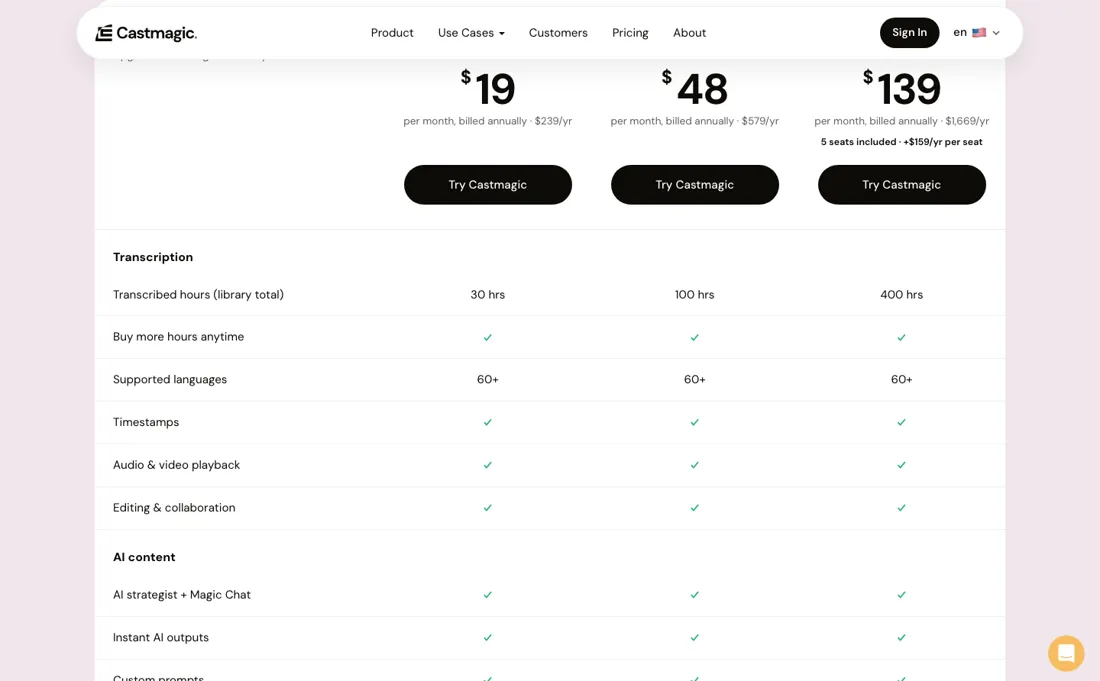
The toggle sits on “Annually — Save 30% Annually” by default, so $19, $48 and $139 are what you pay when you commit for a year. The month-to-month figures are readable in the page source and they are $29, $69 and $199, so the gap is real and on the entry tier it is wider than advertised: Hobby is about 34% cheaper annually, not 30%. The hours are the part to pin down before you subscribe.
The comparison table labels them “transcribed hours (library total)”, and the FAQ describes “a growing library of transcribed hours ... that you build up over time”. That wording fits a monthly allowance and a lifetime ceiling equally well, and the difference between the two is enormous. 30 hours every month at $19 is a bargain for a weekly podcast. 30 hours in total is about seven episodes, and then you are buying top-ups.
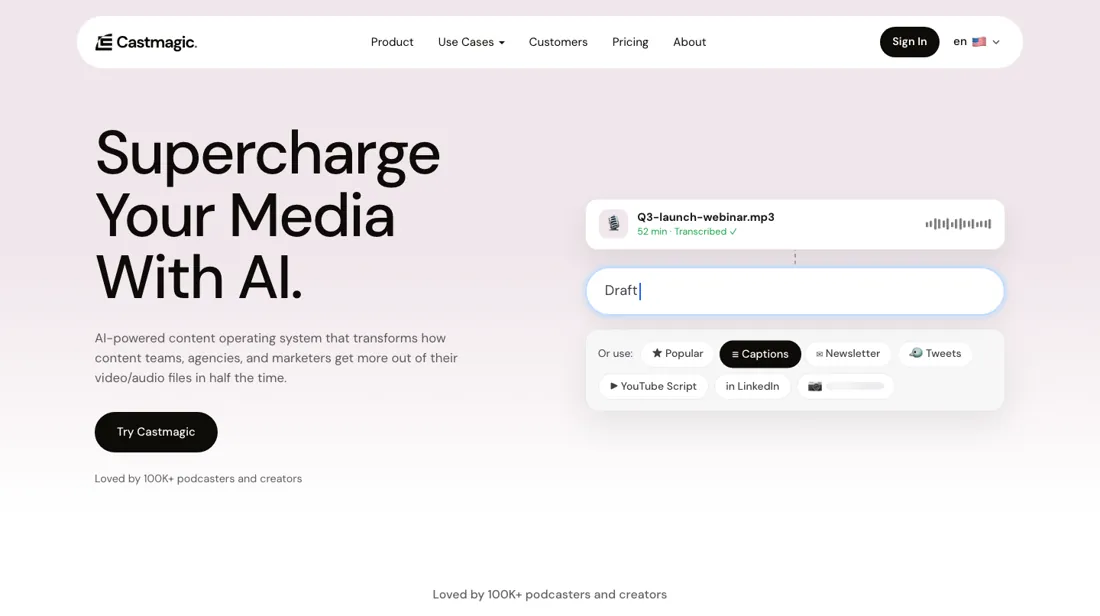
Ask before you pay, and ask what happens to the hours when you downgrade. And the social proof does not agree with itself — now in three directions. The pricing page says “75k+ Creators Served” and “75,000+ Creators & Businesses”; the homepage hero says “Loved by 100K+ podcasters and creators”; and the site's own llms.txt claims “200,000+ creators — including 100,000+ podcasters and 75,000+ creators and teams”. Three numbers, one site, and they cannot all be current.
It is a small thing, and the kind of small thing that tells you which numbers on a marketing site have been checked recently. Treat the totals, the 10M minutes and the named logos as marketing, and judge the product on the trial.
What Castmagic does
Turns recorded audio and video into a stack of ready-to-use assets: transcripts in 60+ languages, show notes, summaries, newsletters, social posts, clips and audiograms, with custom prompts and an AI chat across your whole library.
What buyers report about Castmagic
Recurring themes from the buyer-review sites listed at the foot of this page, read in August 2026. We have not run Castmagic ourselves, so this is other buyers' experience rather than ours. We summarise it here because the complaints are usually the part a vendor page leaves out.
- • On Capterra the recurring claim is hours back rather than a better transcript. A marketing director (August 2023) says it saved hundreds of hours; a business systems coach (September 2023) uses it on coaching sessions as well as podcasts and cites custom prompts; a CEO in advertising (August 2023) puts the automated output at '95% of the way to perfect show notes'.
- • The derived assets, not the transcription, are what people describe buying: Twitter threads, show notes, pull quotes and YouTube timestamps generated per upload (September and August 2023), and Magic Chat for querying a recording afterwards.
- • Several reviewers single out how reachable the team was in 2023 — an accessible executive team and a Slack community (August 2023), and 'responsive leadership' (September 2023).
- • The Capterra objections are all integration-shaped and small: no API into Buzzsprout (August 2023), limited export options and no WordPress or social publishing (January 2024), a weak mobile experience (September 2023), transcription that is occasionally imperfect (September 2023), and one reviewer's worry that the feature list would outgrow the simplicity (September 2023).
- • The single Trustpilot review is the only recent one and it is the substantive one. A US producer (July 2026, two stars) says Castmagic was an early mover that has not kept pace with LLM competitors, and raises two concrete process complaints: that in their experience the subscription converted before the advertised seven-day trial had run out and a refund after the charge was refused, and that there is no way to recover credits when an episode uploads twice or lands missing a few minutes. On the first point, castmagic.io/pricing does not publish a trial length at all (checked 24 August 2026), so the seven days is that reviewer's account of what they were offered, not something the page states.
Where the ratings disagree. The two platforms are almost three years apart, and that gap is the finding. All nine Capterra reviews are five stars, all were written between August 2023 and January 2024, and most come from people under six months in — the shape of a launch-window review drive rather than a running record. Trustpilot has exactly one review, on an unclaimed profile that Trustpilot flags as having no history of asking for reviews, and it is the detailed two-star from July 2026. So the product has a glowing public record from the year it launched and virtually nothing from the market it is being sold into now, where the competition is a general-purpose model. Read the 2023 reviews as evidence the workflow works, not as evidence of what it is worth today.
Pages read (August 2026): Trustpilot
When the paid plan is worth it
The three tiers move four things at once — hours, Spaces, storage, seats — but only one of them will decide it for you, and it is the hours. 30, 100, 400. Everything AI-shaped is unlimited on all three: outputs, regenerations, custom prompts, clips, audiograms, image generation. You are not buying better AI at $48 or $139, you are buying more raw material to point it at. So do the arithmetic on your own recordings.
A weekly hour-long podcast is roughly 4 hours a month and sits on Hobby. A team putting through two or three long recordings a week is at 20 to 40 hours a month, and Starter's 100 is the honest floor. Four hundred is an agency or a network. The headline prices are the annual ones; the monthly figures are now in the page source: $29, $69 and $199 against $19, $48 and $139.
That is about 30% off on Starter and Team but nearer 34% on Hobby, so the entry tier rewards a yearly commitment most. Two lines to price against your own need rather than the tier. API access does not exist on Hobby, so wiring this into a pipeline starts at $48. And Team includes five seats and charges $159 a year for each one after, so a ten-person team is $139 plus roughly $66 a month in seats.
How to actually use Castmagic
Settle the hours question first, in writing, with support: whether the 30, 100 or 400 transcribed hours renew each month or accumulate as a lifetime library total, and what happens to them if you downgrade. Everything else about sizing this tool depends on that one answer and the site words it both ways. Then run your most awkward recording through it rather than your cleanest — several speakers, crosstalk, jargon, an accent — because transcription accuracy is the foundation every generated asset sits on, and a summary built on a poor transcript is confidently wrong.
Set up your custom prompts early; the stock outputs are competent and generic, and the difference between this being a novelty and a workflow is a handful of prompts that produce your show notes in your format. If you intend to wire it into anything, note that API access starts at Starter, not Hobby. And if you are buying for a team, price the seats before the tier: Team includes five and charges $159 a year for each one after that.
Distilled from castmagic.io/pricing (cards, comparison table and FAQ, including the monthly-billing figures carried in the page source) and castmagic.io/llms.txt, first read 19 August 2026 and re-read 18 September 2026.
Frequently asked questions
What does Castmagic cost month to month, not annually?
$29 for Hobby, $69 for Starter and $199 for Team, and $999 a month for Business & Scale. That is worth stating plainly because the page does not show it: it opens on annual billing, prints “$19 per month, billed annually”, and swaps in the monthly figures with script. Read out of the page source on 18 September 2026, each amount carries both values, which is how those numbers are known. Against the annual rates of $19, $48 and $139 the saving is about 30% on Starter and Team but roughly 34% on Hobby, so the “Save 30%” chip actually understates the entry tier. Team seats shift too: $19 a month each on monthly billing against $159 a year on annual.
Do the transcribed hours reset every month?
Nobody can tell you from what they publish, and that is the single most important thing to settle before paying. The comparison table calls the allowance “transcribed hours (library total)”. The FAQ, re-read on 18 September 2026, says every plan includes “a growing library of transcribed hours — 30 on Hobby, 100 on Starter, and 400 on Team — that you build up over time”. Both phrasings fit a monthly allowance and a lifetime ceiling equally well, and a month of wording changes has not resolved it. The difference is enormous: 30 hours every month at $19 is a bargain for a weekly show, while 30 hours in total is about seven episodes before you start buying top-ups. Get it in writing, and ask what happens to unused hours if you downgrade.
Which tier do I need if I want to plug this into something else?
Starter at minimum. API access is the one hard feature gate in the published ladder: it is marked absent on Hobby and present on Starter and Team, so an integration project starts at $48 a month billed annually rather than $19. Since 19 August the vendor has also added an MCP server alongside the API, which is what you would point an AI assistant at to work across your own library. The other Starter additions are an onboarding call, 100 hours instead of 30, 10 Spaces instead of 3 and 250GB instead of 50GB. Priority support and unlimited team size wait until Team; Hobby and Starter both sit on standard support, and all three tiers share the same 10GB file-size ceiling and 50 concurrent uploads.
What does a ten-person team actually pay?
About $205 a month on annual billing, not $139. Team includes five seats and charges $159 a year for each seat after that, so five extra seats is $795 a year, which is roughly $66 a month on top of the $139. Price the seats before comparing tiers, because that is where the ladder stops being about hours: Hobby caps team size at 3 and Starter at 5, so a ten-person team cannot use the cheaper tiers regardless of how few hours it records. On monthly billing the extra seats are $19 each instead, which is $95 a month on top of $199. Above that sits Business & Scale, by demo, from $699 a month annually or $999 monthly.
What should I weigh before buying Video & Audio software?
Judge it on evidence rather than adjectives. Look for a published security page, single sign-on and role controls on the plan you would actually buy (they are often gated to higher tiers), a status page with real incident history, and a clear answer on where your data is stored. If the tool will hold anything sensitive, those four answers matter more than any feature comparison.
Is this a hands-on review of Castmagic?
This is a researched assessment, not a hands-on test — where we've used a tool ourselves, we say so explicitly. We name what each tool is good and bad at, and we earn a commission only if you sign up, at no cost to you.
- Buyer reviews on Capterra, Trustpilot, read August 2026.
- Re-read 2026-09-18 on castmagic.io/pricing.
- A dated screenshot of that pricing page, kept on this site as the receipt.
Others in this category
Reviewed video & audio tools that share ground with Castmagic — comparable in what they do, not drop-in swaps:
New reviews, price changes we recorded, and the cost conditions we found. No sponsored placements. Unsubscribe anytime.
This is our researched assessment — not a paid placement. The “Visit” links on this page are affiliate links: we may earn a commission if you sign up, at no extra cost to you, and it never changes our take. How we review →