Wistia Review (2026)Free to 25 GB, Then $79/mo
 By Daan Haket · Tested hands-on · written with an AI assistant · who does what
Bandwidth is the meter that decides your bill, and it is the one number you cannot predict before you publish.
marketing teams who want video on their own site with real analytics and lead capture, and who care that the player does not recommend a competitor's video afterwards.
you just need somewhere to put videos — an unlisted upload to a free platform does that, and the reason to pay here is the analytics and the branding control, not the hosting.
Transparency: we earn nothing from Wistia; the links to it are plain links. How we make money →
Exit test (measured 2026-10-30)
- Export route
- Media menu > Download > Video > mp4
- Formats
- Not tested
- Attachments included
- Not tested
- Re-import tested
- With our own file, not the standard kit (see below)
- Lost on export
- Bytes and dimensions change. An AAC audio track is added. No original-file download.
Formats describe this export route; offered formats may not have been inspected. Full exit test and scope ↓
Tested by our team on 30 October 2026 on the free plan: Daan created the account and our AI assistant ran the test in Daan's browser. We uploaded two short test videos we made ourselves, added a description and tags, and downloaded a video back.
How we tested
- Uploaded two 10-second videos made from our test images
- Added a description and tags to one of them
- Downloaded it again and compared it with the original
- After the first upload Wistia offered a 14-day Business trial with no card; we stayed on Free.
- Uploading a 10-second video took seconds. Description and tags save on Free.
- A new folder is set to 'Anyone with the link — Can view' by default.
Pricing (2026)
✓ Pricing re-verified 19 Oct 2026
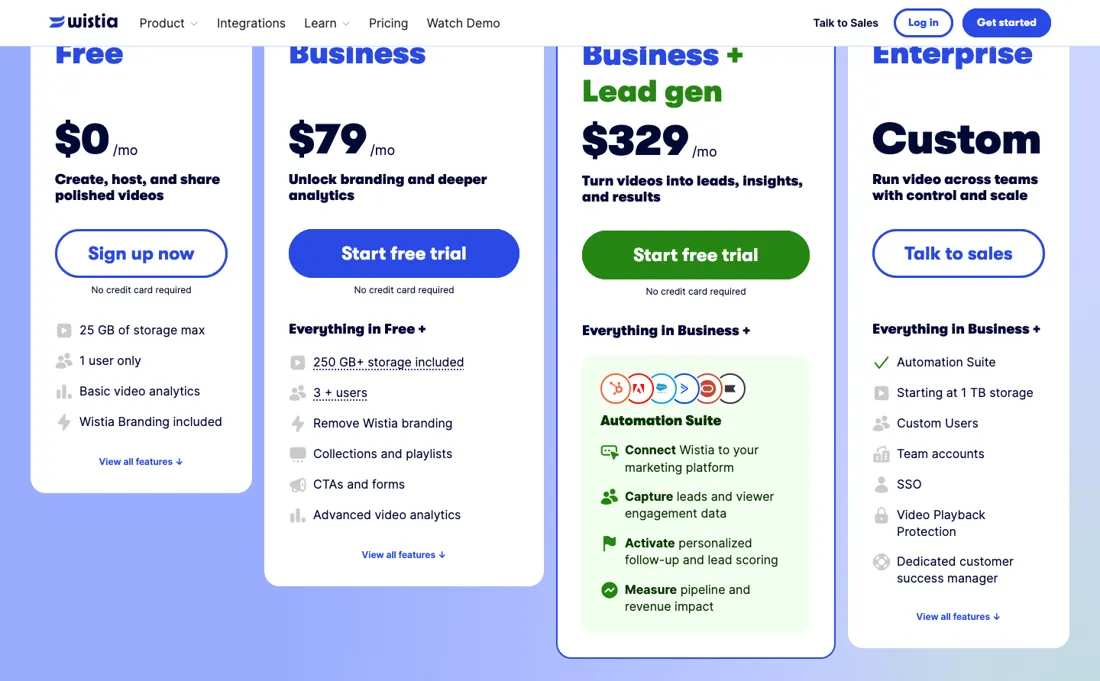
Four tiers, and the headline numbers are the ANNUAL rates: the billing toggle on the page is set to Annual with a “Save 20%” chip, so Business at $79 a month and Business + Signals at $329 a month are what you pay when you commit for a year. On 19 September 2026, with the toggle set to Monthly, the same three cards read $0, $99 and $412 a month, with the per-extra-user rate moving from $25 to $31.
Since that reading Wistia has renamed the $329 tier from Business + Lead gen to Business + Signals and added an AI credit allowance to every card; the prices, storage, users and bandwidth did not change. Free $0: 25 GB storage, 1 user, 200 GB bandwidth, 3,000+ lifetime credits, basic analytics, Wistia branding on the player. Business $79: 250 GB+ storage, 3+ users, 1 TB bandwidth, 5,000+ monthly credits, branding removed, collections and playlists, CTAs and forms, advanced analytics.
Full pricing notes (3 more paragraphs)
Business + Signals $329 is Business plus Signals — marketing-automation integrations (HubSpot, Marketo, Pardot), video engagement data on contact records, automated lead scoring, audience segmentation, triggered email nurtures, sales alerts and pipeline and revenue attribution — and the FAQ calls Signals an add-on for the Business plan that is included with every webinar plan. Enterprise is quote-only: from 1 TB storage, 2 TB bandwidth, custom users, 12,500+ monthly credits, Signals, team accounts, SSO, video playback protection, a dedicated customer success manager.
Price per additional user $25. Dubbing and AI audio descriptions are an add-on on both Business cards and included only on Enterprise. The page does not say what a credit buys. Storage beyond the plan is prepaid upfront or billed as usage. The FAQ as read on 19 September 2026 also said bandwidth resets monthly and is billed as usage past the allowance on paid plans (free accounts are hard-capped instead), and priced webinar overages at $0.20 per extra attendee and $2.00 per extra minute, per event; the shortened FAQ of 19 October 2026 repeats neither, so treat both as the last confirmed reading rather than current page text.
You can cancel at any time unless you are on Enterprise or a signed order form, either at the end of the billing cycle or immediately, and no refund is issued either way. Webinar plans have their own tab on the same page and carry no price in the source.
Plans change — always verify the live price on their site.
What the pricing page doesn’t say
A single video that does well can move you from Free to Business in a month, which is arguably the product working — but budget for it rather than being surprised. Their FAQ, as read on 19 September 2026, was precise about which way it cuts: free accounts cannot exceed their bandwidth limit, while paid plans are billed for usage beyond what is included or prepaid. The free tier carries Wistia branding on the player, so it is a trial with no time limit rather than a plan you can ship a brand on.
The published prices are the annual ones; the page's toggle sits on Annual with a 20% saving and the month-to-month figures are not in its source, so a monthly subscriber cannot price the plan from the pricing page. The webinar overages were the sharpest edge on that reading: $2.00 per extra minute means a session that runs long costs real money, the allowance is per event rather than cumulative, and the shortened FAQ of 19 October 2026 no longer prints either figure, so confirm them before you book a long session.
Watch the video review
The video version of this review, from our YouTube channel.
⚡ Short on time? Watch the 30-second verdict Short.
What Wistia does
Video hosting built for marketing — player customisation, viewer analytics and lead capture.
What buyers report about Wistia
Hands-on: tested 2026-10-30Reported by buyers: GetApp, Capterra and pricing analyses, read August 2026
Themes from the buyer-review sites listed at the foot of this page, read in August 2026. We tested Wistia ourselves on 2026-10-30, but one test is a narrow sample, so here is what other buyers report. We summarise it here because the complaints are usually the part a vendor page leaves out.
- • Video hosting built for marketers rather than viewers — player customisation, lead capture and analytics that tie back to the funnel.
- • Business at $79/month annually includes 3 users, 250 GB storage and 1 TB bandwidth.
- • Exceed your storage and Wistia adds a block automatically to cover what you used — and the charge appears at the end of the billing cycle, not when you upload. Teams upload freely all month and find out on the invoice.
- • There is no published per-GB overage rate for bandwidth. High-traffic sites cannot model the cost; you find out via an upgrade conversation.
- • Extra Business users are $25/month each.
- • Reviewers report steep jumps as usage grows, and integration charges reducing transparency.
When the paid plan is worth it
Free is a real workspace with two hard edges: 25 GB, one user only, and Wistia branding on the player. Business is what removes both — 250 GB+, three users included, branding off, collections and playlists, CTAs and forms, advanced analytics. That is the upgrade most people are actually buying. Check what the $79 is before you budget it. The pricing page's toggle is set to Annual with a “Save 20%” chip, so that figure is a per-month rate for a yearly commitment.
Switched to Monthly on 19 September 2026, Business read $99 and what is now Business + Signals $412, with extra users at $31 instead of $25 — so a monthly trial is a known $20 more per month, not an unknown. What $79 does not settle is everything the table marks separately. Additional users are $25 each beyond the three, so a six-person team is $154 before anything else. SSO, video playback protection, team accounts and a dedicated customer success manager sit only on Enterprise, which is quote-only.
AI audio descriptions and video dubbing are an add-on on Business and included only on Enterprise, and webinars are priced on a separate tab. And bandwidth is the meter behind all of it: 1 TB on Business, billed as usage once you pass it according to the FAQ as read on 19 September 2026, and the number you cannot forecast before the video is published.
What we found running Wistia ourselves
The first findings are at the top of this page. The rest:
- The download offered only converted versions (540p, 360p or 288p), not the file we uploaded. The 540p file was a different size, picked up an audio track and kept the full 10 seconds.
- The description and tags do not come with the download, and the plan table lists CSV export as a paid feature.
- Business came to €92.35 a month at checkout, converted from $99; tax only appears once you enter an address.
Claim vs. what we measured
We set a claim from Wistia's own pages next to what we saw in our test, on the plan named. The status says whether the two describe the same thing and match; it is not a verdict on the product. Confirmations are listed too.
| What the vendor says | What we measured | Status | What it means if you buy |
|---|---|---|---|
| $0/moSource: wistia.com, read 30 Oct 2026 | Measured 2026-10-30: Plans identifies Free as the current plan. The fourteen-day Business offer was declined.Our test, 30 Oct 2026; Free; Business trial skipped | ConfirmedWistia zero-price access is checked against the explicit current Free label after choosing Maybe later on the Business offer. | Video upload was tested on Free, not a Business trial. |
| No credit card requiredSource: wistia.com, read 30 Oct 2026 | Measured 2026-10-30: No card was requested according to source notes, and no payment details were entered in the observed route. Complete signup screens were not counted.Our test, 30 Oct 2026; Free; Business trial skipped | ConfirmedWistia upload and the skipped Business offer required no card in the recorded route. | The recorded session proceeded without card entry; this does not promise payment-free access to every feature. |
| $99/monthSource: wistia.com, read 30 Oct 2026The vendor's page no longer shows this wording (checked 2026-10-31) — original claim: “$99/month” | Measured 2026-10-30: Page USD 99 versus EUR 92.35 at displayed USD/EUR 0.9328; tax and total require address. Rounded display exchange rate is not an exact price guarantee.Our test, 30 Oct 2026; Free; Business trial skipped | Not testableBusiness monthly crosses USD pricing and EUR Stripe conversion; missing address-based tax and an unverified cost rule prevent an equal final-total comparison. | EUR subtotal may increase after billing address; original video export remains unproven on Free. |
| Anyone with the link — Can viewSource: wistia.com, read 30 Oct 2026The vendor's page no longer shows this wording (checked 2026-10-31) — original claim: “Anyone with the link — Can view” | Measured 2026-10-30: Folder details shows link viewers can view, while people in the account have No access.Our test, 30 Oct 2026; Free; Business trial skipped | ConfirmedThis checks the recorded Wistia folder access default itself, without inferring that a live anonymous request succeeded. | Check folder access before sharing a link; anonymous reachability was not separately tested. |
Exit test: can you take your data out?
Uploaded two ten-second test videos derived from the kit PNGs on Free, then downloaded the first video. Test date: 30 Oct 2026. We describe the friction rather than score it; this is one run with synthetic records, not a verdict on Wistia.
| What we checked | What we saw |
|---|---|
| Came along in the export |
|
| Lost in the export |
|
| Awkward but not lost | The kit contains PNGs rather than videos; source videos were created for this test. The missing accented glyph in the first image originates in the kit font. The Business trial offer was skipped. Folder access defaults to Anyone with the link — Can view; actual anonymous access was not tested. CSV metadata export is excluded from Free in the plan comparison. The second video received no description or tags and was not downloaded. |
| Export route | Media menu > Download > Video > mp4; resolutions shown are 540p, 360p and 288p. |
| Export format | First download: H.264 video at 960 by 690 with AAC audio, versus a 1000 by 720 source with no audio. Both are ten seconds long. |
| Re-importing the export | Replace is offered for a media file; metadata restoration or fixed-ID record reimport was not tested. |
| Cancelling | Actual cancellation, trial expiry and account deletion were not tested. |
What the exit test does not show:
- Complete signup screen count and human first-result setup time.
- Actual cancellation, expiry, deletion and follow-up mail.
- Kit fields that were not entered.
- Application reimport or restoration.
Kit check counts
Kit content-media 1.0.0; run wistia-2026-10-30; observed 2026-10-30.
- export / AIBM-001: Of 10 checks: 0 kept, 1 changed, 0 lost, 3 not offered, 6 not tested
- export / AIBM-002: Of 10 checks: 0 kept, 0 changed, 0 lost, 1 not offered, 9 not tested
- reimport / AIBM-001: Of 10 checks: 0 kept, 0 changed, 0 lost, 0 not offered, 10 not tested
- reimport / AIBM-002: Of 10 checks: 0 kept, 0 changed, 0 lost, 0 not offered, 10 not tested
Each record and phase uses this kit’s checks. Counts describe this run; they are not a score or a comparison between kits.
Mail in the first 14 days
Measurement running until 2026-11-12T23:00:00Z (last observed 2026-11-01T02:18:01.954052Z).
2 emails in the 14-day window so far; first email after signup: unknown (exact signup time not recorded); 0 with an explicit offer.
Retained inbox and junk only; removed or archived mail is outside this observation. Ambiguous supplier attribution is excluded. Day numbers use elapsed 24-hour periods since the recorded signup date at midnight Europe/Amsterdam; the signup hour is unknown. Offer flags quote literal subject/body text. Replies in our own correspondence (support tickets, our comment requests) are excluded; one-time codes, our own address, our account name and our name are replaced in brackets.
| Day | Time (UTC) | Sender | Literal subject | Folder | Offer evidence |
|---|---|---|---|---|---|
| Day 0 | 2026-10-30 14:25:06 UTC | Wistia team / wistia.com | Welcome to Wistia - Please Verify Your Account | inbox | |
| Day 0 | 2026-10-30 15:19:14 UTC | Wistia team / wistia.com | 👋 Welcome to your Free Wistia account | inbox |
What this test does not show:
- Embedding on a website and the analytics
- The Business trial features
- Inviting other users
- Contacting support
Most of our reviews are researched rather than run — how we review explains which is which, and why we do not pretend otherwise.
How to actually use Wistia
Upload, then embed, then read the analytics — the order matters less than knowing embedding is where the choices are. Their help centre walks the embed flow: open a video's manage page, click Embed, pick a style and options, then Copy Code and paste it into your site. The recommended default for most platforms is an inline embed with responsive sizing, and inline is also what they recommend for accessibility and video SEO because the player is prominent on the page.
Popover is the alternative, showing a thumbnail that opens a player over the page, launchable from an image, link or button. Channels embeds a whole gallery and can carry a podcast. One thing that saves rework later: customisations made in Wistia propagate to embeds already live, so the player settings are not baked into the code you pasted.
Distilled from Vendor pricing page including the full feature table and FAQ (wistia.com/pricing) and the vendor help centre, in particular the Embed Your Media article (support.wistia.com/en/articles/8233354-embed-your-media). Pricing page first read 18 August 2026 and re-read 18 September 2026; help-centre article read 18 August 2026. Pricing page re-read 19 October 2026 (plan cards, feature table and FAQ); help-centre articles User Roles (support.wistia.com/en/articles/9899531-user-roles) and Manage Team (support.wistia.com/en/articles/8265028-manage-team), read 19 October 2026.
The natural comparison is Vidyard or Loom — the closest marketing-video peers — compare on bandwidth included and what the free tier puts on your player.
Frequently asked questions
Can you export your data from Wistia?
Exit check 2026-10-30; route excerpt: Media menu > Download > Video > mp4 …; came along (excerpts): The first downloaded video retains the static test image and ten-second duration …; lost (excerpts): Bytes and dimensions change …; re-import: not tested.
Is the $79 Business price monthly or annual?
Annual, and the page does not say so in words. Read on wistia.com/pricing, the billing toggle is set to Annual and carries a “Save 20%” chip, so $79 a month for Business and $329 a month for Business + Signals are the rates for a yearly commitment. Flip the toggle to Monthly — which takes a browser, because the figures are rendered rather than written into the page — and the same cards read $99 and $412 a month, with additional users going from $25 to $31. Read that way on 19 September 2026. So month-to-month costs about a fifth more, exactly as the chip promises, and starting monthly to test a bandwidth-metered product costs you $20 a month on Business rather than an unknown.
What gets billed on top of the plan?
Four things, and three of them are usage. Additional users are $25 each beyond the three Business includes, so a six-person team is $154 a month before anything else. Per the pricing FAQ as read on 19 September 2026 (the shortened FAQ of 19 October no longer repeats it), bandwidth resets monthly and paid plans are billed for usage past what the plan includes or what you have prepaid — 1 TB on Business, 200 GB on Free, and Free is hard-capped instead of billed. Storage behaves identically and can be bought upfront to avoid the usage charge. Webinars were the sharpest on that same reading: the attendee and duration allowances were per event rather than cumulative, and past them it was $0.20 per extra attendee and $2.00 per extra minute, billed on your next monthly date. AI audio descriptions and video dubbing are an add-on on both Business cards and included only on Enterprise, per the feature table read 19 October 2026.
Do I need the $329 plan to get the lead-generation features?
Not necessarily, and the FAQ is clearer about this than the pricing cards. Business + Signals at $329 (it was called Business + Lead gen until a rename we first saw on 19 October 2026) is Business plus Signals: marketing-automation integrations with HubSpot, Marketo or Pardot, engagement data on contact records, automated lead scoring, audience segmentation, triggered nurtures, sales alerts and pipeline attribution. The FAQ, read 19 October 2026, calls Signals an add-on for the Business plan and says it is included with every webinar plan. So the honest way to read the ladder is one core plan with an add-on, not four tiers. CTAs and forms are already on Business, so if all you need is lead capture inside the player, $79 covers it; the $250 step is for routing that data into a marketing automation platform.
Can I cancel, and do I get money back?
You can cancel at any time unless you are on an Enterprise plan or have signed an order form, and you choose between stopping at the end of the billing cycle or stopping immediately. Either way, their FAQ states plainly that no refund is issued. Combined with the annual-by-default pricing that is worth planning around: a year committed at $79 a month is a year paid whatever happens in month three. Upgrades and add-ons can be applied later and are managed as subscriptions in Billing Settings, though on Enterprise some changes need a customer success manager. The free plan needs no credit card and keeps 25 GB indefinitely, so the low-risk order is to prove the workflow there, then buy the shortest term you can negotiate.
Who counts as a paid seat, and what happens to a leaver's videos?
Wistia's User Roles article, read 19 October 2026, says Viewer seats are free and do not count towards account seat limits, and that Viewer seats are not available on the Free plan. A Viewer can watch, browse and comment on what has been shared with them, but cannot upload, record, edit, embed, open the analytics dashboards or use integrations — so on Business the $25 per extra user applies to the people who make and measure video, not to colleagues who only watch. The Manage Team article, read the same day, says deleting a user does not delete any content they uploaded and that it keeps playing, so removing a leaver to free a paid seat does not take their videos with them.
Is this a hands-on review of Wistia?
Yes. We tested Wistia ourselves on 2026-10-30; the section above says what we tested, what we found and what we did not test, and where a figure comes from the vendor's own documentation instead. Most of our reviews are researched rather than run; we say which is which. We name what each tool is good and bad at, and we have no affiliate relationship with Wistia — we earn nothing whether you sign up or not.
- Buyer reviews on GetApp, Capterra and pricing analyses, read August 2026.
- Re-verified 2026-10-19 on wistia.com/pricing, Video Platform tab; the monthly-toggle rates below are from the 19 September 2026 reading and were not re-read, because the page renders them rather than writing them into its source.
- A dated screenshot of that pricing page, kept on this site as the receipt.
- Our own hands-on session with Wistia (2026-10-30), written up in full further down this page.
Others in this category
Reviewed video & audio tools that share ground with Wistia — comparable in what they do, not drop-in swaps:
Also in video & audio, for browsing rather than as an alternative:
New reviews, price changes we recorded, and the cost conditions we found. No sponsored placements. Unsubscribe anytime.
This is our researched assessment — not a paid placement. How we review →