Gamma Review (2026)400 Credits Free, Then Metered
 By Daan Haket · Tested hands-on · written with an AI assistant · who does what
The credit model means heavy generation eats your monthly allowance, and outputs still need a human polish for high-stakes decks — it's a brilliant first-draft engine, not a finished-deck button. The free tier's watermark pushes you to paid quickly. Throughout this review we weigh it against PowerPoint.
anyone who wants to turn a prompt or notes into a good-looking presentation, doc or webpage draft in minutes.
you need pixel-perfect, brand-controlled decks — you'll spend the saved time re-polishing the AI output.
Transparency: the “Visit” links on this page are affiliate links — we may earn a commission if you sign up, at no extra cost to you. No vendor can pay for a better review or verdict. How we make money →
On 28 September 2026 we gave Gamma, Beautiful.ai, Prezi and Canva the same brief for a ten-slide investor deck: eleven facts about a made-up bakery chain and the rule to add no other numbers. We checked every deck against 15 tests written down before the first one was generated. Gamma ran on a new Free account.
- Gamma asked us to pick a style, then its outline pane stayed empty until we wrote 'Please draft the outline.'; the finished deck was ready about seven minutes after the prompt.
- It added no numbers of its own, kept both charts to scale and marked the missing market figures as [MARKET SIZE] and [COMPETITIVE LANDSCAPE]. It left out the founding year.
- Asked once to 'Change the ask to €450,000 for 12%', it updated all three places the amount appeared and showed the old and new slide side by side. It was the only one of the four to change the deck completely from one prompt.
Pricing (2026)
✓ Pricing re-verified 29 Sep 2026
| Plan | Price | What you get |
|---|---|---|
| Free | €0 | 400 credits at signup, up to 10 slides per prompt |
| Plus | €8 per seat/mo billed annually | €10 monthly; 1,000 credits, Gamma branding removed |
| Pro | €18 per seat/mo billed annually | €24 monthly; 4,000 credits, API access, 10 custom domains |
| Ultra | €77.33 per seat/mo billed annually | €86 monthly; that annual figure is €928 a year divided by twelve |
| Business | €35 per seat/mo billed annually | €420 a seat a year; 10,000 credits per seat, shared workspace credits, SSO |
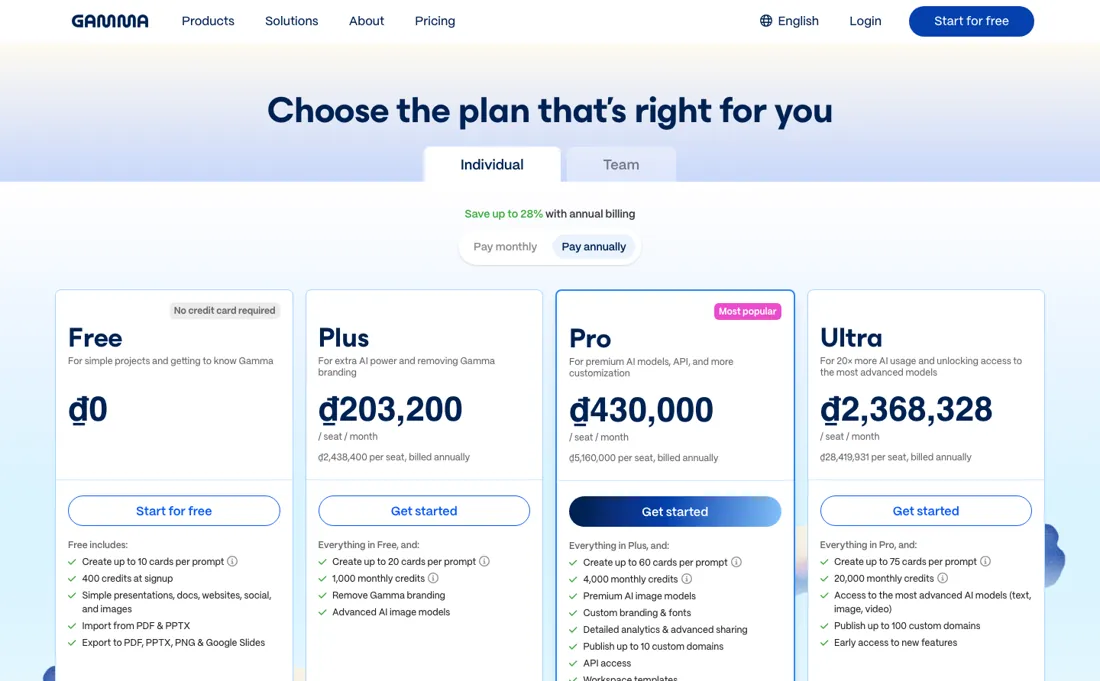
Free €0 with 400 one-time credits at signup and up to 10 slides per generation. These are the individual plans, monthly / annual per seat per month. Plus is €10 / €8 with 1,000 monthly credits and Gamma branding removed. Pro is €24 / €18 with 4,000 credits, API access and up to 10 custom domains. Ultra is €86 / €77.33 with 20,000 credits and the most advanced models.
Read the annual column carefully: that €77.33 is not a rate Gamma charges but €928 a seat a year divided by twelve, and the same arithmetic sits behind €8 and €18. On the business side the page now lists only Business, at €35 per seat a month billed annually (€420 a year) with 10,000 credits per seat, shared workspace credits and SSO, and Enterprise on a custom annual agreement; the Team plan (€18 a seat, 6,000 credits) that stood beside it in August is gone.
Annual billing is advertised as saving up to 25%, and unused credits roll over up to twice the monthly allowance. Plans change — always verify the live price on their site.
Category context: Operations & Workflow. Across the 51 tools in this category that we researched with a public US-dollar price, the median entry price is $25 a month (lowest paid plan as listed, per seat where the vendor prices per seat). Compare pricing conditions in the Software Cost Atlas →
Correction after re-checking: Re-read 29 September 2026 on gamma.app/pricing in a rendered browser, in euros from a Dutch address. Free: 400 one-time credits, up to 10 slides per prompt. Plus: €10 monthly or €8 a month billed annually (€96), 1,000 credits a month, up to 100 slides per prompt, Gamma branding removed. Pro: €24 or €18 (€216), 4,000 credits, API access, up to 10 custom domains. Ultra: €86 or €77.33 (€928), 20,000 credits, up to 100 custom domains. Business: €35 a seat a month billed annually (€420), 10,000 credits per seat, SSO. Enterprise: custom annual agreement. Annual billing saves up to 25%; unused credits roll over up to 2x the monthly amount. The dollar figures from Gamma's help centre that stood here until today (Teams $240 a seat with a 2-seat minimum, Business $480 with a 10-seat minimum, a 28% annual discount) are no longer what the pricing page shows.
What the price did
We capture Gamma’s own pricing page every month and keep the figures, so this is our record of the page — not a forecast, and not someone else’s summary.
Three readings of gamma.app/pricing, all in euros from a Dutch address. On 16 and 26 August 2026: Plus €10 monthly or €8 annual, Pro €24 or €18, Ultra €86 or €77.33, and on the business side Team at €18 a seat a month with 6,000 credits per seat beside Business at €35. On 29 September 2026 the four individual prices are the same, and the Team plan has gone: the business tab shows only Business (€35 a seat a month, €420 a year) and Enterprise.
Gamma’s pricing page, as we read it
Watch the video review
The video version of this review, from our YouTube channel.
⚡ Short on time? Watch the 30-second verdict Short.
What Gamma does
Turns a prompt or rough notes into a deck, document or webpage draft. Output still needs a human pass for high-stakes decks.
What buyers report about Gamma
Hands-on: tested 2026-09-28Reported by buyers: G2, Capterra and Trustpilot, read August 2026
Themes from the buyer-review sites listed at the foot of this page, read in August 2026. We tested Gamma ourselves on 2026-09-28, but one test is a narrow sample, so here is what other buyers report. We summarise it here because the complaints are usually the part a vendor page leaves out.
- • Nothing at this price gets you from prompt to a good-looking deck faster, and for anything shared as a link it is genuinely excellent. 4.3 on G2.
- • Free to start with 400 credits, then three paid tiers and a separate per-seat team plan.
- • PowerPoint export is the number one complaint everywhere. Content shifts, overlaps, or flattens into uneditable images. If you hand .pptx files to clients or executives, the cleanup will cost you what the generation saved.
- • The 400 free credits are one-time, not monthly, and cover roughly 3-10 presentations. Every AI edit spends more.
- • There is no genuinely unlimited tier, so heavy teams hit the meter.
Where the ratings disagree. 4.3 on G2 against 3.7 on Capterra and 2.0 on Trustpilot. The split is not about quality — it is about what you do with the deck. G2 reviewers share links; the low ratings come from people who needed a PowerPoint file. Decide which one you are before you buy.
Pages read (August 2026): Trustpilot
When the paid plan is worth it
Gamma's free tier works as a sampler rather than a workspace: the vendor's help centre states each new free user receives 400 credits at signup, and those credits do not refresh, so the meter simply stops. A paid plan repays itself for anyone publishing decks or sites on a routine basis, since credits refill every month. The pricing page lists 1,000 monthly credits on Plus, 4,000 on Pro, 20,000 on Ultra and 10,000 per seat on Business, and unused credits roll over up to twice the monthly amount.
Plus also raises the single-prompt ceiling from 10 slides to 100 and removes Gamma branding. Annual billing is advertised as saving up to 25%. What upgrading pointedly does not buy is unlimited AI. The developer docs price generation at 1-3 credits per card and 34-75 credits for a premium image, and estimate a doc with 20 cards and 15 premium images at roughly 320-1070 credits, so image-heavy output eats a monthly allowance fast.
Nor does it solve seat economics: on Plus, Pro and Ultra every member who accepts an invitation is charged as a seat, and Business is €420 a seat a year (€35 a month, billed annually) with seats bought upfront. Read 29 September 2026.
What we found running Gamma ourselves
The first findings are at the top of this page. The rest:
- The deck and the change used 61 of the 400 starting credits. PDF and PowerPoint export work on Free; the text stays editable, the charts arrive as pictures, and every PDF page carries a 'Made with Gamma' badge.
What this test does not show: One run on one day on the Free plan. We did not judge design quality, and the logged-out share test was blocked by a bot check on Gamma's side, so it is not tested.
Most of our reviews are researched rather than run — how we review explains which is which, and why we do not pretend otherwise.
How to actually use Gamma
The shortest route to a usable result starts on the Gamma dashboard: click Create new AI and choose Generate, Paste or Import. Generate takes a topic prompt, Paste reformats text written elsewhere, and Import accepts a PowerPoint, a document or a URL. Pasting existing text tends to reach something presentable fastest, since the model is styling material instead of inventing it. The common stumbling block is the free workspace, which caps a single prompt at 10 slides where Plus and above allow up to 100, so long outlines quietly arrive truncated.
Refinement happens per card through the sparkle icon at the top-left of a slide. Exporting runs from the Share button at the top right, then Export, in PDF, PNG or PPTX. The other trap is the watermark: the "Made with Gamma" logo appears on exports from free accounts. Removal depends on the gamma originating inside the paid workspace, so decks first created on a free account have to be copied into that workspace before export.
Distilled from Gamma help centre and Gamma developer documentation (help.gamma.app, developers.gamma.app), read 4 August 2026. Pricing re-read 29 September 2026 at gamma.app/pricing in a rendered browser: both billing toggles of the Individual tab, the Business tab (Business and Enterprise only, seat selector starting at 1) and the pricing FAQ on credits, rollover, annual discount and seat charging.
Gamma vs Beautiful.ai, side by side
Each column shows the vendor’s own published entry price, read on the date shown. Entry prices can cover different services or units, so check what each one buys. We do not average them into a score.
Both names above are affiliate links: we may earn a commission if you sign up, at no extra cost to you. Neither changes what this table says.
The natural comparison is Beautiful.ai or Canva — other AI and template presentation tools. Weigh it against PowerPoint on the job you actually need done.
Frequently asked questions
What does Gamma cost in 2026?
Re-read on 29 September 2026 in the browser, in euros from a Dutch address: Free €0, Plus €10 a month (€8 annual, €96 a year), Pro €24 (€18 annual, €216) and Ultra €86 (€77.33 annual, billed €928 per seat a year) — the same as in August. Business is €35 per seat a month, billed annually at €420; the Team plan at €18 a seat that stood beside it in August is no longer listed. Gamma prices per seat and quotes in the currency of your location, so treat these as the shape of the ladder and confirm your own figure at checkout.
Are Gamma's free credits monthly or one-off?
One-off. The free plan gives 400 credits at signup and does not refill them; the monthly credit allowance starts on the paid plans — 1,000 a month on Plus, 4,000 on Pro, 20,000 on Ultra, and 10,000 per seat on Business; unused credits roll over up to twice the monthly amount. This is the single most common surprise reviewers report, because every AI edit spends credits, not just the first generation.
Is there a plan with unlimited AI use?
No. Every paid tier is metered in credits, including the €86 Ultra plan, which Gamma positions as roughly 20x the usage rather than as unlimited. If your team generates all day, price the credit ceiling rather than the seat.
Is this a hands-on review of Gamma?
Yes. We tested Gamma ourselves on 2026-09-28; the section above says what we tested, what we found and what we did not test, and where a figure comes from the vendor's own documentation instead. Most of our reviews are researched rather than run; we say which is which. We name what each tool is good and bad at, and we earn a commission only if you sign up, at no cost to you.
- Buyer reviews on G2, Capterra and Trustpilot, read August 2026.
- Re-verified 2026-09-29 in a rendered browser that got past the bot challenge: the individual plans are unchanged from our 16 and 26 August readings, the business side is not. Served to us in euros from a Dutch address, so your own checkout may quote dollars.
- A dated screenshot of that pricing page, kept on this site as the receipt.
- Our own hands-on session with Gamma (2026-09-28), written up in full further down this page.
Others in this category
Reviewed operations & workflow tools that share ground with Gamma — comparable in what they do, not drop-in swaps:
New reviews, price changes we recorded, and the cost conditions we found. No sponsored placements. Unsubscribe anytime.
This is our researched assessment — not a paid placement. The “Visit” links on this page are affiliate links: we may earn a commission if you sign up, at no extra cost to you, and it never changes our take. How we review →