 Prezi Review (2026)PDF Export Starts at Plus, Not Standard
The pricing table puts PDF export and portable presentations at Plus, not Standard, and our free account's AI editor locked PDF, PowerPoint and SCORM downloads to Plus. The zooming format is polarising: some audiences find it engaging, others find it disorienting. Throughout this review we weigh it against PowerPoint.
On 28 September 2026 we gave Gamma, Beautiful.ai, Prezi and Canva the same brief for a ten-slide investor deck: eleven facts about a made-up bakery chain and the rule to add no other numbers. We checked every deck against 15 tests written down before the first one was generated. Prezi ran on a new Basic (free) account.
- Prezi's AI editor opened in a pop-up window and built ten slides plus its zooming overview in under four minutes, using 150 of the 500 starting credits.
- It added no numbers of its own and drew both charts to scale, but it made up a company website (kettlecrumb.nl), gave the CEO a gender the brief did not, and described 2025's actual revenue as a projection.
- Asked once to 'Change the ask to €450,000 for 12%', it updated the ask slide but left 'Our €400,000 investment' on the use-of-funds slide, so the deck contradicted itself.
Visit Prezi → Affiliate link — we may earn a commission if you sign up; it does not change what this page says.
Watch the 2-minute review
The video version of this review, from our YouTube channel.
⚡ Short on time? Watch the 30-second verdict Short.
Pricing (2026)
✓ Pricing re-verified 28 Sep 2026
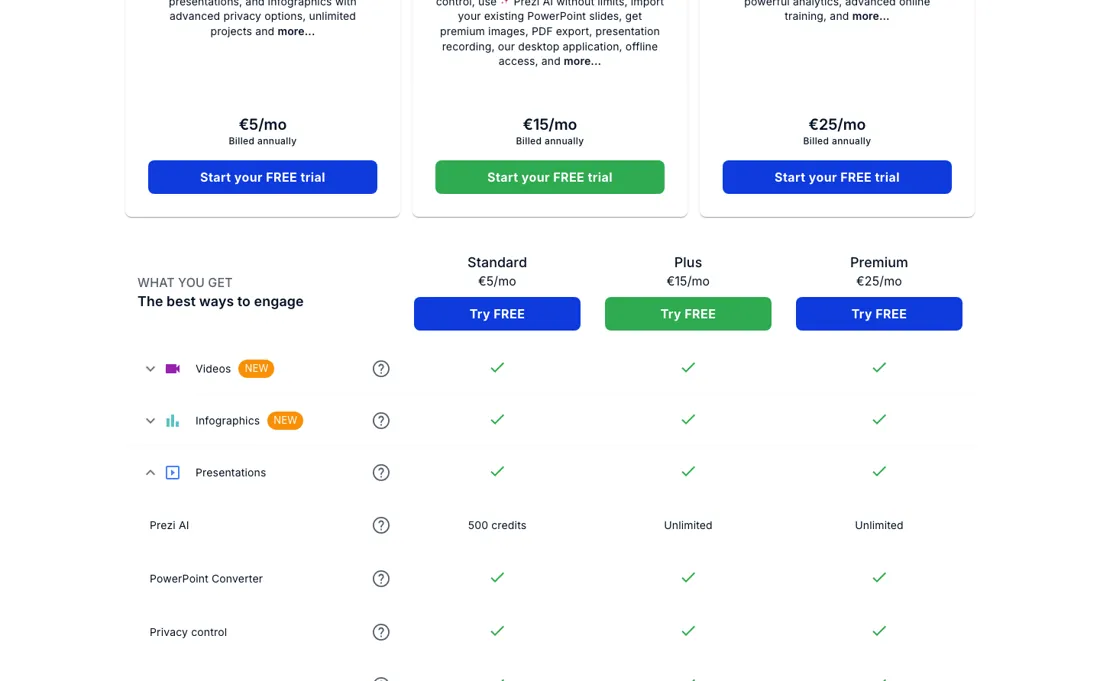
Prezi has a free plan, Basic, and three paid individual plans: Standard €5 a month, Plus €15 and Premium €25, all billed annually. Read on 28 September 2026 on prezi.com/pricing (which redirects to prezi.com/gts/pricing), in euros from a Netherlands exit, with every section of the comparison table opened; the three paid plans sit on the Individual tab, and Basic has a tab of its own, where it is shown next to Plus.
Every paid plan on the page requires annual billing: there is no monthly-billing switch and no monthly-billed price, and the page advertises a 14-day free trial. Basic lets you make up to 5 projects that anyone can see, with 500 Prezi AI credits, and has no PDF export or PowerPoint converter. The comparison table is where the gates actually are: Prezi AI is 500 credits on Standard, with no period given, and unlimited above it.
Its presentation exports, Export to PDF and portable presentations, start at Plus, as do video download and downloading as files in the Videos and Infographics sections; Standard is ticked on none of them, nor on presentation recording, smart branding, presenter view, voice-over or live remote presenting. On the Individual tab, presentation analytics and priority technical support are Premium only, as are five infographic rows: SQL connectors, iFrame import integrations, callouts, page linking and custom map import.
The table has no PowerPoint-export row, and Prezi's help-centre article on downloading a presentation as PowerPoint names no plan either; the PowerPoint converter the table ticks on all three paid tiers, including Standard, is an import tool, even though the Plus card advertises PowerPoint import as a Plus benefit. The Business tab lists Plus €15 a month, Premium €25 a month and Teams €39 a month per user, all billed annually, and a Students & Educators tab has its own EDU plans that need a valid school email address.
When we signed up the same day, Prezi's plan screen offered Plus €15, Premium €25 and Teams €39 a month (billed annually) with a trial, and an option to continue with Basic, but not Standard: the same lineup as the Business tab. Plans change — always verify the live price on their site.
Prezi’s pricing page, as we read it
What Prezi does
AI presentation maker for dynamic, non-linear decks that stand out from standard slides — turn ideas into polished, interactive presentations fast.
What buyers report about Prezi
Recurring themes from the buyer-review sites listed at the foot of this page, read in August 2026. We use Prezi ourselves, but a single account is a narrow sample, so here is what other buyers report. We summarise it here because the complaints are usually the part a vendor page leaves out.
- • The zooming canvas still does something no slide tool does, and 4.2 on G2 across 5,719 reviews shows active users like it.
- • For a presentation that needs to feel different from a deck, it remains the distinctive option.
- • An F rating at the BBB, and the negative reviews are overwhelmingly billing rather than product.
- • Auto-renewal after a free trial with no reminder email — reviewers describe finding out from the receipt.
- • Refunds are refused as a matter of policy, with reviewers reporting generic replies stating no exceptions are possible.
- • Monthly equivalents are advertised but most paid tiers bill annually. Check what you are actually signing up for.
Where the ratings disagree. 4.2 on G2 across 5,719 reviews against 2.9-3.2 on Trustpilot across roughly 600. G2 captures people using it; Trustpilot captures people trying to stop paying for it.
Pages read (August 2026): Trustpilot
The price is small; check the exit first
Read on 28 September 2026 on prezi.com/pricing from a Netherlands exit, the ladder is a free Basic plan, then Standard at €5 a month, Plus at €15 and Premium at €25, all billed annually -- €60, €180 or €300 a year. So the paid ladder spans five times end to end -- worth knowing before you assume the entry price is the price -- and it is still not the thing that should decide this purchase.
What decides it is the way out, and that is where the tiers split. On the comparison table the presentation exports, Export to PDF and portable presentations, start at Plus, as do video download and downloading as files in the Videos and Infographics sections; Standard is ticked on none of them, and the table has no PowerPoint-export row at all. Prezi's help centre does document a Download PPTX from the dashboard, added in February 2026, but describes the result as static slides, one per frame; the article names no plan for it, and Prezi's other pages disagree: the help centre's credits article lists 'Download and PDF export' as a Plus perk, while a June 2026 Prezi blog lists PPT export on Standard.
That route is still unchecked on every plan. In the newer AI editor, the Download tab on our free account listed PDF, SCORM and a PowerPoint option labelled editable ('Bewerkbare PPTX' in the Dutch interface we used), all three locked to Plus. The public room page showed PDF and PowerPoint download buttons, both to us on the free account and to logged-out viewers, who were asked to sign in first; we tried neither.
We downloaded no file, so whether any Prezi .pptx gives you text you can still change is unproven. So price this at Plus rather than Standard if your decks will need to leave Prezi as a PDF or an offline file, the only deck exports the pricing table lists, with one caveat we could not settle: the room page's PDF and PowerPoint buttons showed up even on our free account, and those buttons remain untested.
If a PowerPoint file would do, first check on a Standard trial whether the dashboard's Download PPTX works there. Note what moving up again does not change: Premium adds presentation analytics, priority support and five infographic features, and its export rows are the same as Plus. Before you build a library of eighty presentations here, export one on a Plus trial, if the trial unlocks the download, which we have not checked, and try to change four slides in PowerPoint; if they come back as pictures, the switching cost grows every month you keep paying.
The format is the other half of it. The zooming canvas genuinely holds a room when the content suits it, and genuinely makes people seasick when it does not. That is an audience question, not a feature question, and it is worth answering on one real presentation before you build a habit around it.
What we found running Prezi ourselves
The first findings are at the top of this page. The rest:
- On Basic, PDF, PowerPoint (labelled editable) and SCORM downloads in the AI editor were all locked to Plus, and the only sharing option is Public, which the Dutch interface describes as anyone being able to find and view the deck ('iedereen kan dit vinden en bekijken'), with the account holder's name on the page. To take our deck offline we had to move it to the bin.
What this test does not show: One run on one day on the Basic plan; Plus may behave differently. We did not judge design quality. We downloaded and opened no exported file, so we have not checked whether the PowerPoint labelled editable keeps its text editable. Also untested: the PDF and PowerPoint download buttons on the public room page, shown to us on Basic and to logged-out viewers behind a sign-in, and the dashboard's Download PPTX.
Most of our reviews are researched rather than run — how we review explains which is which, and why we do not pretend otherwise.
How to actually use Prezi
Test the format on one real audience before you build a habit around it. The zooming canvas genuinely holds a room when the content suits it and genuinely makes people seasick when it does not -- that is a question about your audience rather than about the software, and one presentation answers it definitively. Then plan for the exit before you build a library, because export is where the tiers split and not every route is documented.
On the comparison table the presentation exports, PDF and portable presentations, start at Plus, as do video download and downloading as files in the Videos and Infographics sections, and Standard has none of them; the table has no PowerPoint-export row. Prezi's help centre documents a Download PPTX from the dashboard and describes the result as static slides, one per frame, but the article names no plan for it, and Prezi's other pages disagree: the help centre's credits article lists 'Download and PDF export' as a Plus perk, while a June 2026 Prezi blog lists PPT export on Standard.
That download remains untested on every plan. In the newer AI editor, our free account's Download tab locked PDF, SCORM and a PowerPoint option labelled editable ('Bewerkbare PPTX' in the Dutch interface we used) to Plus. We have not opened an exported .pptx, so do that on a Plus trial, if the trial unlocks the download, which we have not checked: export one deck, open it in PowerPoint and try to change four slides before you commit a library to Prezi.
Keep the content somewhere you control. Write the actual words in a document of your own and use Prezi as the presentation layer, so that if you leave, the switching cost is redoing a design rather than rewriting the substance. That single discipline defuses most of the lock-in. And read the comparison table, not the cards, before you pick a tier. From a Netherlands exit on 28 September 2026 the individual ladder is Standard €5, Plus €15 and Premium €25 a month, all billed annually, and PDF export, portable presentations and presenter view only start at Plus -- so the tier you actually need is usually one above the one the entry price suggests.
Distilled from prezi.com/pricing read in a browser on 7 September 2026; it redirects to prezi.com/gts/pricing and renders client-side, so a plain HTTP request returns a 3.5 KB shell with no amounts and the page has to be read in a browser. From a Netherlands exit it prices in euros. Taken from it: the three individual cards (Standard €5, Plus €15, Premium €25, all billed annually, 14-day trial) and the full 'What you get' comparison table read row by row, which is where the tier gates are visible -- Prezi AI at 500 credits on Standard against unlimited above it, the eight rows that start at Plus (PDF export, presentation recording, offline access, portable presentations, presenter view, voice-over, smart branding, live remote presenting), the two that are Premium only (analytics, priority support), and the PowerPoint converter row that is ticked on all three. prezi.com/llms.txt was read as well and carries no amounts at all. Re-read 25 September 2026 in the browser pane (prezi.com/pricing redirects to prezi.com/gts/pricing; Dutch locale, euros): Standard €5, Plus €15, Premium €25 a month, billed annually, 14-day trial, unchanged. The comparison table now has seven rows that start at Plus (presentation recording, smart branding, portable presentations, presenter view, voice-over, PDF export, Live Prezi remote presenting) and no separate offline-access row; analytics and priority support are still Premium only, Prezi AI is still 500 credits against unlimited, and the PowerPoint converter is still ticked on all three. Re-read 28 September 2026 with a headless browser (Netherlands exit, cookie banner rejected; all four tabs read in both the Dutch and the English interface, every collapsed table section opened except Videos and Infographics on the English Business tab, which rendered empty on the first try and loaded normally on a retry): Standard €5, Plus €15, Premium €25 a month, billed annually, unchanged; a free Basic tab (up to 5 projects anyone can see, 500 Prezi AI credits, no PDF export, no PowerPoint converter); a Business tab with Plus €15 and Premium €25 a month and Teams €39 a month per user, and a Students & Educators tab with EDU Plus €4 and EDU Pro €8 a month and EDU Teams €19 a month per user, all billed annually; no monthly-billing switch. Opening the Videos and Infographics sections showed rows beyond analytics and priority support that are Premium-only on the Individual tab (SQL connectors, iFrame import integrations, callouts, page linking, custom map import). No tab has a PowerPoint-export row. Export and credits were read the same day in Prezi's help centre: 'How do I download my Prezi presentation as PowerPoint slides?' (Download PPTX from the dashboard or the classic editor, described as static slides, no plan named), 'What file types does Prezi Present support?' (export as a portable file, PDF or PPTX), the 'What's new' changelog (PPTX download added to Prezi Present in February 2026) and 'How do Prezi AI credits work?' (credits "stay in your account until used" and "don't expire"; it gives referrals and upgrading as the "two main ways" to get more and mentions no purchase; it covers free-licence users and does not name Standard; it lists "Download and PDF export" among the perks of upgrading to Plus or above). Prezi's blog 'Affordable AI Presentation Tool: Best Under $30 (2026)' (16 June 2026, updated 23 June) differs on two points: it lists PPT export on Standard, and it gives Basic and Standard 500 credits a month that reset monthly; its USD amounts were not checked against a checkout. Our own test on a free Basic account the same day supplied the rest: the AI editor's Download tab locked PDF, PowerPoint (labelled editable, 'Bewerkbare PPTX' in the Dutch interface) and SCORM to Plus; we downloaded no file; the public room page showed PDF and PowerPoint download buttons, both to our signed-in account and to logged-out viewers, who were asked to sign in, and we tested neither; and the plan screen at signup offered Plus €15, Premium €25 and Teams €39 a month (billed annually) and an option to continue with Basic, but not Standard, the same lineup as the Business tab.
Prezi vs Gamma, side by side
Both columns come from the same place: each vendor’s own published pricing, read on the date shown in the sources at the foot of this page. We do not average them into a score.
Both names above are affiliate links: we may earn a commission if you sign up, at no extra cost to you. Neither changes what this table says: both columns come straight from the vendors’ own pricing pages.
The natural comparison is PowerPoint, Canva or Gamma — linear-slide tools. Weigh it against PowerPoint on the job you actually need done.
Frequently asked questions
Can I pay for Prezi month to month?
Not as the pricing page shows it. Read on 28 September 2026 from a Netherlands exit, the page has no monthly-billing switch, and every paid card -- Standard €5, Plus €15 and Premium €25 a month on the Individual tab, and the Business and EDU plans too -- says billed annually, with no monthly-billed price anywhere on the page. So the real commitment is €60, €180 or €300 for a year. The page advertises a 14-day free trial, which is the closest you get to a month-to-month test: use it on one real presentation before you pay for a year. We have not checked whether the trial needs a card or renews automatically.
Do I need Plus to import my PowerPoint slides?
Probably not. The Plus card advertises importing existing PowerPoint slides, but the comparison table (read 28 September 2026) ticks the PowerPoint converter on Standard too; only the free Basic plan lacks that converter. Importing a PowerPoint through Prezi AI is a separate route, which Prezi's plan guide lists for Basic as well: the help centre says it spends AI credits, and the pricing table gives Basic and Standard 500 of them while Plus and above are unlimited. Beyond lifting that credit cap, Plus is where the presenting, branding and output features start: on the comparison table PDF export, portable presentations, presentation recording, presenter view, voice-over, smart branding and Live Prezi remote presenting are all ticked from Plus up, and on our free account the AI editor's PowerPoint download was locked to Plus as well. Try the import on the Standard trial; pay for Plus if you need one of those.
What does Premium add over Plus?
Read on 28 September 2026 with every section of the comparison table opened: presentation analytics and priority technical support, plus five infographic rows -- SQL connectors, iFrame import integrations, callouts, page linking and custom map import -- are marked Premium only on the Individual tab. The Premium card also mentions advanced online training. That is €10 a month more, €120 a year billed annually, and it does not change the export: the export rows on the table are the same on Plus and Premium. Pay for it if you need to see how viewers engage with a shared prezi or connect SQL data sources to infographics.
What should I weigh before buying Operations & Workflow software?
Usually it sits on top rather than replacing everything. Tools in this class tend to become the layer where work is tracked and handed off, while your existing systems stay the source of truth for their own data. Before you buy, map which tools it would replace outright and which it would merely sync with. If the answer is that it syncs with all of them, you are adding a layer rather than removing one.
Is this a hands-on review of Prezi?
Yes. We used Prezi ourselves on 2026-09-28; the section above reports what we measured in the product, and says where a figure comes from the vendor's own documentation instead. Most of our reviews are researched rather than run; we say which is which. We name what each tool is good and bad at, and we earn a commission only if you sign up, at no cost to you.
- Buyer reviews on G2, Trustpilot and the BBB, read August 2026.
- Prezi’s own published pricing page.
- A dated screenshot of that pricing page, kept on this site as the receipt.
- Our own hands-on session with Prezi (2026-09-28), written up in full further down this page.
Others in this category
Reviewed operations & workflow tools that share ground with Prezi — comparable in what they do, not drop-in swaps:
New reviews, price changes we recorded, and the cost conditions we found. No sponsored placements. Unsubscribe anytime.
This is our researched assessment — not a paid placement. The “Visit” links on this page are affiliate links: we may earn a commission if you sign up, at no extra cost to you, and it never changes our take. How we review →