FaceReady Review (2026)AI De-Aging Camera for Mac and Windows
 By Daan Haket · Researched and written with an AI assistant · who does what
There are no refunds, so a wrong purchase is a sunk cost after the 7-day trial.
people who join video calls from a Mac or Windows 11 PC and want an AI de-aging filter that runs on the computer itself.
you use an Intel Mac or Windows 10, you want a refund policy, or you need the camera on more than two computers.
Transparency: the “Visit” links on this page are affiliate links: we may earn a commission if you sign up, at no extra cost to you. No vendor can pay for a better review or verdict. How we make money →
Pricing (2026)
✓ Pricing re-verified 9 Nov 2026
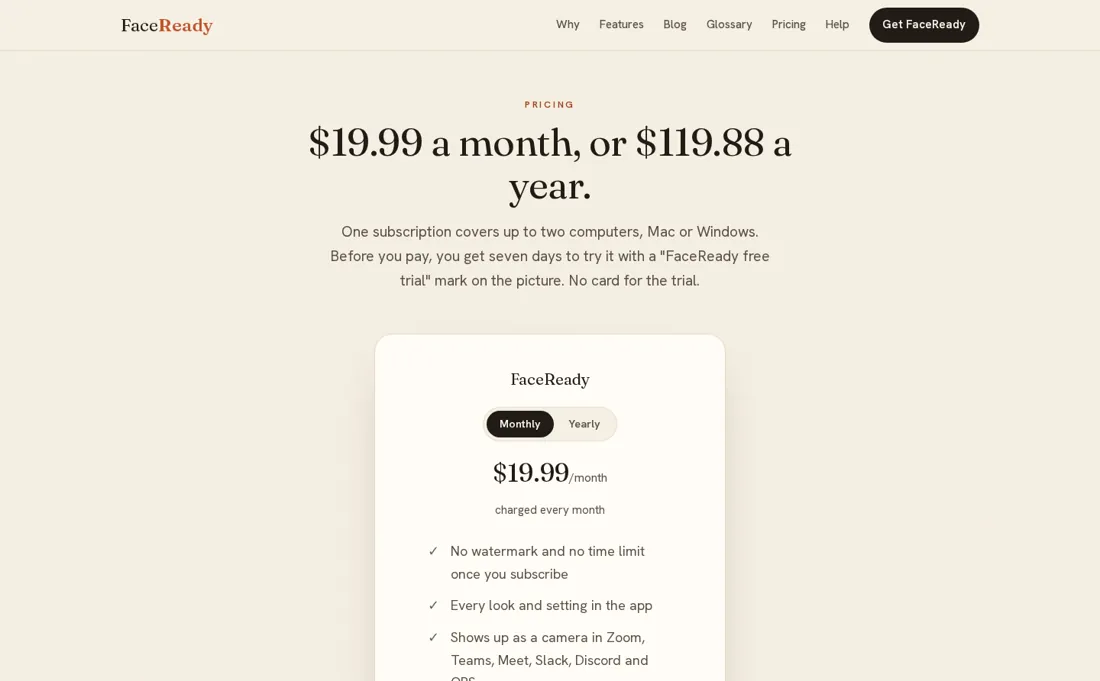
FaceReady costs $19.99 a month, or $119.88 a year, which the page says works out at $9.99 a month. One subscription covers up to two computers, Mac or Windows. The 7-day trial carries a "FaceReady free trial" mark on the picture and needs no card; paid plans have no watermark and no time limit. You can start monthly and move to yearly later.
The pricing page says the company does not give refunds. Prices are in US dollars; any tax is added at checkout and we did not open checkout, so the tax amount is not known. Plans change, so check the live price on their site before you buy.
What the pricing page doesn’t say
Intel Macs, Windows 10 and macOS versions older than 14 are not supported, and the free trial puts a watermark on your picture.
What FaceReady does
AI de-aging virtual camera for Mac and Windows that makes your face look younger in video calls, with processing on your own computer.

Yearly halves the monthly rate, if you will use it for a year
The yearly plan is $119.88 against $239.88 for twelve monthly payments, so it only pays off if you keep the camera in daily use for the full year. Since the page says there are no refunds, use the 7-day trial first and check the result on your own face and your own video app.
How to actually use FaceReady
Download the Mac or Windows app from faceready.ai and start the free trial. On a Mac, open FaceReady from Applications, allow camera access, switch the FaceReady camera extension on, then choose FaceReady as the camera in your video app. The Mac version needs macOS 14 Sonoma or later and an Apple silicon chip; Intel Macs and Windows 10 are not supported. We did not install it ourselves.
Distilled from FaceReady's own homepage, pricing page, system-requirements page and Mac install guide, read on 9 November 2026 with research prepared in October 2026. FaceReady is an affiliate partner of ours through Awin. We have not used the app ourselves.
The natural comparison is Snap Camera: Snap Camera is not in our directory as a reviewed tool, so we have no comparison. Test the free trial against the filter you use now.
Frequently asked questions
How much does FaceReady cost?
Per its pricing page, read on 9 November 2026, FaceReady is $19.99 a month or $119.88 a year. One subscription covers up to two computers.
Is there a free trial?
Yes, seven days, with a FaceReady free trial mark on the picture. The page says no card is needed for the trial.
Does the video go to the cloud?
The homepage says your camera never touches the cloud. That is the supplier statement; we did not check how the app processes video.
Can I get a refund?
The pricing page says the company does not give refunds, so use the trial before you pay.
What do I need to run it?
A Mac with Apple silicon on macOS 14 Sonoma or later, or Windows 11. Intel Macs and Windows 10 are not supported.
What do we not know?
The tax added at checkout, since we did not open checkout, and how cancellation works beyond what the pricing page says.
Is this a hands-on review of FaceReady?
This is a researched assessment, not a hands-on test. Where we've used a tool ourselves, we say so explicitly. We name what each tool is good and bad at, and we earn a commission only if you sign up, at no cost to you.
- Read 2026-11-09 on faceready.ai/pricing.
- A dated screenshot of that pricing page, kept on this site as the receipt.
Others in this category
Reviewed video & audio tools that share ground with FaceReady. They are comparable in what they do, not drop-in swaps:
New reviews, price changes we recorded, and the cost conditions we found. No sponsored placements. Unsubscribe anytime.
This is our researched assessment, not a paid placement. The “Visit” links on this page are affiliate links: we may earn a commission if you sign up, at no extra cost to you, and it never changes our take. How we review →