 Descript Review (2026)60 Free Minutes, Then $16/user
Transparency: the “Visit” links on this page are affiliate links — we may earn a commission if you sign up, at no extra cost to you. No vendor can pay for a better review or verdict. How we make money →
Descript is per-editor pricing with two meters running underneath: media hours AND monthly AI credits.
Two sessions on the free plan. On 7 September we ran it by hand: Daan logged in, and we read every counter against a test file of exactly five minutes that we built inside the page; Descript was not a partner of ours then and contributed nothing. On 30 September, by then a PartnerStack partner, we drove Descript from Claude through Descript's connector, for Descript's partner content challenge, which pays the first five entries $250: we uploaded one of our own five-minute review videos and asked for vertical clips in plain sentences, once directly and once from a claude.ai chat.
- The free plan's 100 AI credits are one-time, not monthly. Descript says so itself in two places: the plan card reads "100 AI credits at signup" for Free against "400 AI credits / month" for Hobbyist, and the usage screen inside the app puts "Lifetime AI credits used 0/100" next to "Monthly media minutes used 0/60". That pair of words -- lifetime against monthly -- is the whole answer.
- Media minutes come off at IMPORT, not at export, and per minute of media. Two five-minute files took the counter from 60m to 50m. Their own upload dialog says it too: "Each file added uses media minutes". Exporting costs no minutes and no credits, according to Descript itself.
- The AI assistant, Underlord, charges per instruction, and it does run on the free plan. Importing and transcribing cost 3 credits, Studio Sound over a ten-minute track 9 credits, and a question about the export settings 6 credits.
Visit Descript → Affiliate link — we may earn a commission if you sign up; it does not change what this page says.
Watch the 2-minute review
The video version of this review, from our YouTube channel.
⚡ Short on time? Watch the 30-second verdict Short.
Pricing (2026)
✓ Pricing re-verified 1 Oct 2026
Free plan with 60 minutes a month and watermarked 720p exports. Paid, per person per month, annual against monthly: Hobbyist $16 / $24, Creator $24 / $35, Business $50 / $65, with annual billing saving up to 35%. Media hours and AI credits are capped per tier: roughly 10, 30 and 40 hours a month, and 400 to 1,500 credits. So the meter that matters is footage rather than seats — a weekly podcast can outgrow Hobbyist on hours long before it needs the features above it. Plans change — always verify the live price on their site.
Category context: Operations & Workflow. Across the 51 tools in this category that we researched with a public US-dollar price, the median entry price is $25 a month (lowest paid plan as listed, per seat where the vendor prices per seat). Descript’s entry price of $16 a month sits below that median. Compare pricing conditions in the Software Cost Atlas →
What the price did
We capture Descript’s own pricing page every month and keep the figures, so this is our record of the page — not a forecast, and not someone else’s summary.
Descript's ladder held between our readings of 17 August and 1 October 2026: Hobbyist $16 / $24, Creator $24 / $35 and Business $50 / $65 per person a month, annual against monthly, with 10, 30 and 40 media hours and 400, 800 and 1,500 AI credits a month. The free plan's 60 minutes a month and 720p export were also unchanged on the later reading, which adds that its AI credits are 100, one-time rather than monthly.
What the pricing page doesn’t say
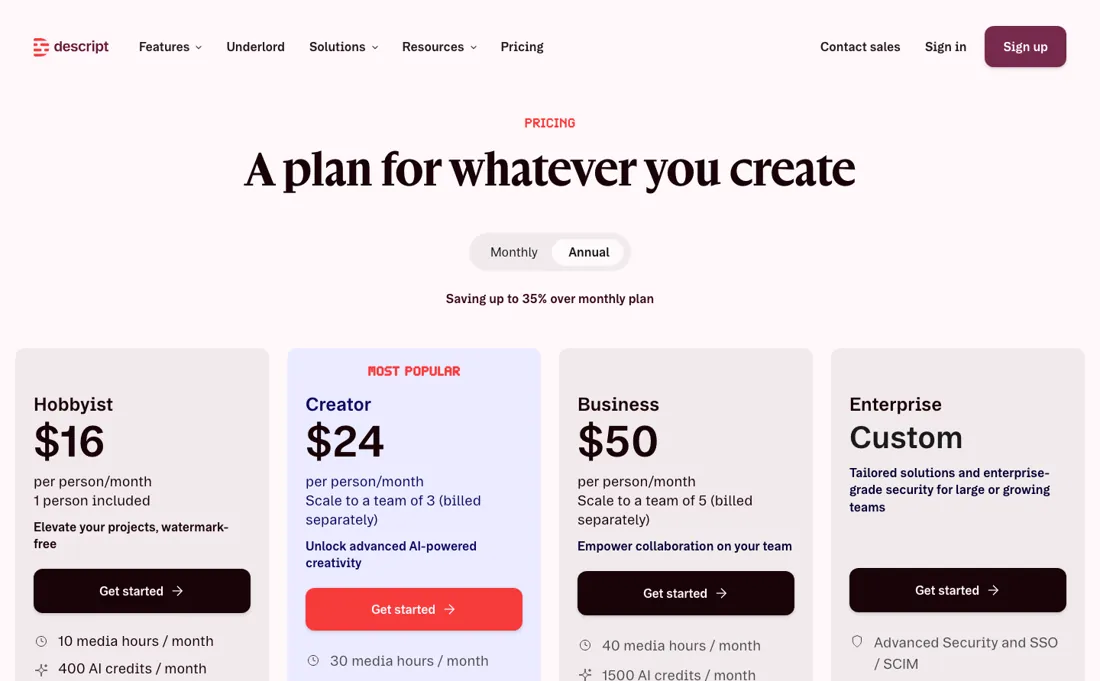
Heavy podcast or video volume burns through the caps fast, and the free tier watermarks 720p exports — model your real production hours before picking a tier. The API changes the arithmetic rather than escaping it. Their own API page states access is included for paying users at no additional cost, but the work it does draws from the same AI credits and media minutes — so automating a pipeline burns the caps faster, not slower.
It also stops just short of the finish — the same page says direct media file exports are not supported yet, so the export step stays a manual one in the app. (read on their own API page, 2026-08-14)
What Descript does
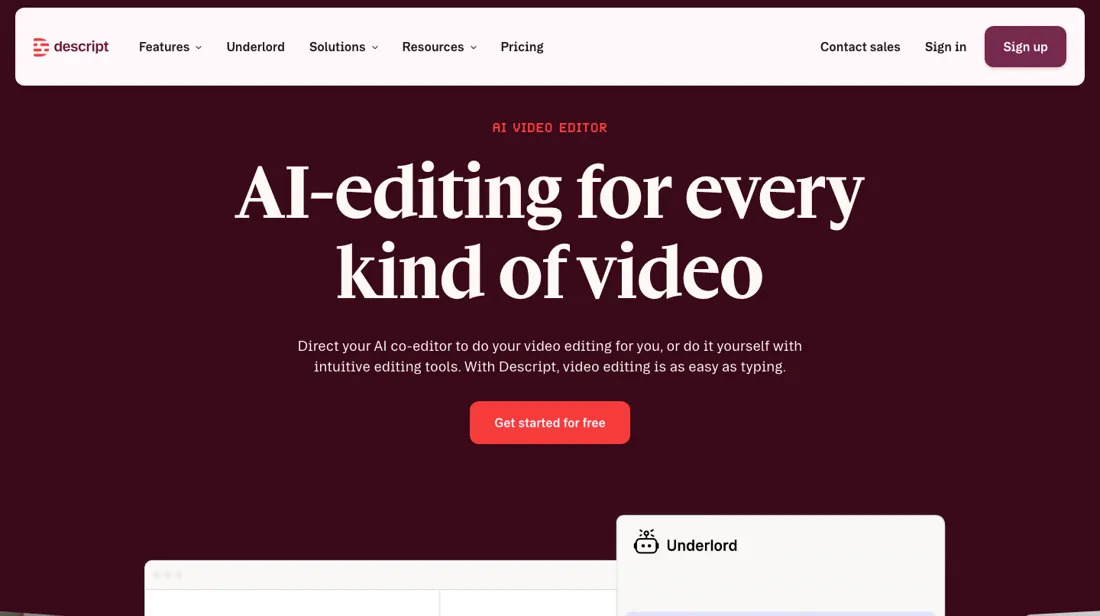
AI-powered video and podcast editor: edit media by editing the text transcript — cut, overdub and remove filler words like editing a doc — with screen recording, AI voice cloning and an AI assistant (Underlord) built in.
What buyers report about Descript
Recurring themes from the buyer-review sites listed at the foot of this page, read in August 2026. We use Descript ourselves, but a single account is a narrow sample, so here is what other buyers report. We summarise it here because the complaints are usually the part a vendor page leaves out.
- • Editing video by editing text is the thing, and it genuinely works for people who are not editors. 4.6 on G2 across 800+ reviews, 4.7 on Capterra.
- • The AI audio cleanup saves real time on a podcast workflow.
- • Bill shock is the most common G2 complaint. Reviewers describe going from $30 a month to hundreds once a busy production cycle pushed the team past its media-minute limit.
- • Every added user pays the full seat rate — no volume discount on the lower tiers — and unused subscription time is not credited when you upgrade mid-cycle.
- • One reviewer reports renders failing on videos over a minute with AI credits deducted anyway.
- • $16 Hobbyist, $24 Creator, $50 Business per user on annual billing; monthly runs 40-50% higher.
When the paid plan is worth it
Since 19 August 2026 there is also an API, and it is worth knowing it is a separate product rather than something your seat unlocks: descript.com/api sells programmatic editing, rough cuts and filler removal to teams producing video at volume. If that is why you are here, the per-seat plans below are the wrong page. Two meters run underneath the seat price and they settle the tier long before the feature list does: media hours a month, and AI credits.
Free gives one hour of media, 720p exports with a watermark and 100 AI credits once rather than monthly. Hobbyist is $16 per person a month billed annually ($24 monthly) for 10 hours and 400 credits with watermark-free 1080p; Creator is $24 ($35) for 30 hours and 800 credits at 4K; Business is $50 ($65) for 40 hours and 1,500 credits. Read the steps and the ladder shows where it stops being about volume.
Hobbyist to Creator triples the hours and doubles the credits for $8 more a month, the best-value step on the list. Creator to Business adds ten hours for roughly double the price, so if footage is the constraint, Business is not the answer to it. What upgrading does not do is remove the meter. Every paid tier is capped, Business included, so a heavy weekly show can exhaust the top self-serve plan and still be metered.
And because API work draws on the same credits and media minutes, automating a pipeline spends the allowance faster rather than escaping it.
What we found running Descript ourselves
The first findings are at the top of this page. The rest:
- An instruction that returns nothing still costs credits. "Remove all filler words" answered "No filler words were found -- the script shows 0 words, so there's nothing to remove" and deducted 2 credits anyway.
- Five instructions without a single real edit spent 20 of the 100 one-time credits. Anyone using the free plan as a trial is through it in an afternoon, and no more arrive.
- Studio Sound ran on Free, while the pricing table presents it as a Hobbyist benefit ("Studio Sound, Remove Filler Words, Create Clips, and more"). The line "Limited use of Underlord" on the free card is therefore more generous than the comparison table suggests.
- In onboarding, the consent "Our team analyzes your project information" is TICKED BY DEFAULT, in a step most people click straight through. You can turn it off, but you have to do it yourself.
- The watermark on the free plan sits in the bottom right of the frame; paid plans do not have it.
- Through Claude's Descript connector, a 5:15 review video of ours (94 MB) uploaded and transcribed in about 30 seconds. The import used 315 media seconds, consistent with minutes being charged at import.
- One sentence to Underlord through Claude (a vertical 9:16 clip of about 30 seconds on the price and the 90-day data limit, with captions, keeping the words and numbers as spoken) produced a new 24-second vertical composition in two and a half minutes for 48.3 AI credits. The original composition was left untouched, and the clip's transcript matched the source word for word, numbers included.
- From a claude.ai chat, Claude asked permission before each Descript action, read the transcript itself, chose the passage from 01:15 to 01:40 and had Underlord cut a 21-second vertical clip with burned-in captions in about three minutes. It also fixed the transcript's misspelling of the product name in the captions and said that it had.
- The vertical version is a centre crop. On our 16:9 video it cut off the text card at the side of the frame, and because our video already carries subtitles, Descript's captions landed on top of them. Ask for the full frame on a blurred background, and skip added captions when your source already has them.
- Our request to fix that was refused because the free plan had run out of AI credits: the one-time 100 were gone after our first session plus these two edits. Real editing work through Claude needs a paid plan.
- Publishing gave an unlisted share link and an MP4 download in about a minute and a half. We asked for 1080p and received 720x1280 with the watermark in the bottom right, so the 720p cap on the Free plan card is what applies, not the 4K that Descript's own assistant named in our first session.
Most of our reviews are researched rather than run — how we review explains which is which, and why we do not pretend otherwise.
How to actually use Descript
The vendor's own workflow has six steps and starts before the footage does: Record, Import or Generate. With no recording at all you can type a script, pick an AI Speaker voice and have the voiceover produced. Whatever comes in is transcribed automatically. Step two is the reason people arrive: delete a word or a sentence in the transcript and the media is cut with it, so rearranging audio or video is cut, copy and paste.
Structure comes next. You break the project into scenes, adding one wherever the visuals should change, and apply layouts such as split-screen or picture-in-picture. For pacing that text editing cannot reach, you drag directly in the wordbar rather than moving to a separate timeline. The polish pass is where the AI credits go: Underlord for generation, Studio Sound for audio, Eye Contact for gaze. Finish by sharing a hosted version, where viewers leave timestamped comments on the video itself, or by exporting locally to MP4, MP3, WAV or GIF.
Distilled from Descript help centre: "Get started with Descript", plus the getting-started, script-editing and export-and-share sections of help.descript.com and the Descript pricing page, read 21 August 2026. Pricing re-read 1 October 2026 on descript.com/pricing (plan cards on both billing tabs and the full comparison table with media minutes, AI credits and export resolution per tier); descript.com/pricing.md returns 404 and descript.com/llms.txt carries no amounts.
Descript vs Riverside, side by side
Each column shows the vendor’s own published entry price, read on the date shown. Entry prices can cover different services or units, so check what each one buys. We do not average them into a score.
Both names above are affiliate links: we may earn a commission if you sign up, at no extra cost to you. Neither changes what this table says.
The natural comparison is Riverside or CapCut — Riverside wins on recording-quality-first workflows, CapCut on quick social edits; Descript wins on the text-based editing workflow itself.
Frequently asked questions
What does Descript cost?
Per person per month: $16 on Hobbyist, $24 on Creator and $50 on Business when billed annually, or $24, $35 and $65 billed monthly. Annual saves up to 35%. There is a free plan with 60 minutes a month and watermarked exports. Read on 17 August 2026.
Which tier do I need for a weekly podcast?
Count hours, not features: the tiers cap transcription and editing at roughly 10, 30 and 40 media hours a month. A weekly hour-long show with raw multitrack footage will pass Hobbyist's allowance quickly even though the editing features would have been enough.
Is the free plan usable for real work?
For trying the text-based editing, yes. For publishing, no — exports are watermarked and capped at 720p, and 60 minutes a month is a single short episode. It is a genuine demo of the editing model rather than a working tier.
What should I weigh before buying Operations & Workflow software?
Usually it sits on top rather than replacing everything. Tools in this class tend to become the layer where work is tracked and handed off, while your existing systems stay the source of truth for their own data. Before you buy, map which tools it would replace outright and which it would merely sync with. If the answer is that it syncs with all of them, you are adding a layer rather than removing one.
Is this a hands-on review of Descript?
Yes. We used Descript ourselves on 2026-09-30; the section above reports what we measured in the product, and says where a figure comes from the vendor's own documentation instead. Most of our reviews are researched rather than run; we say which is which. We name what each tool is good and bad at, and we earn a commission only if you sign up, at no cost to you.
- Buyer reviews on G2 and Capterra, read August 2026.
- Re-verified 2026-08-17 and again 2026-10-01.
- A dated screenshot of that pricing page, kept on this site as the receipt.
- Our own hands-on session with Descript (2026-09-30), written up in full further down this page.
Others in this category
Reviewed operations & workflow tools that share ground with Descript — comparable in what they do, not drop-in swaps:
New reviews, price changes we recorded, and the cost conditions we found. No sponsored placements. Unsubscribe anytime.
This is our researched assessment — not a paid placement. The “Visit” links on this page are affiliate links: we may earn a commission if you sign up, at no extra cost to you, and it never changes our take. How we review →