 Campaign Monitor Review (2026)
You pay for contacts, not sends — so a large, quiet list costs the same as a large, active one, and dormant subscribers are literally a line item. Throughout this review we weigh it against Mailchimp.
Visit Campaign Monitor → Affiliate link — the rest of this page is the honest version, including who should skip it.
⚡ Short on time? Watch the 30-second verdict Short.
Pricing (2026)
✓ Pricing re-verified 16 Aug 2026
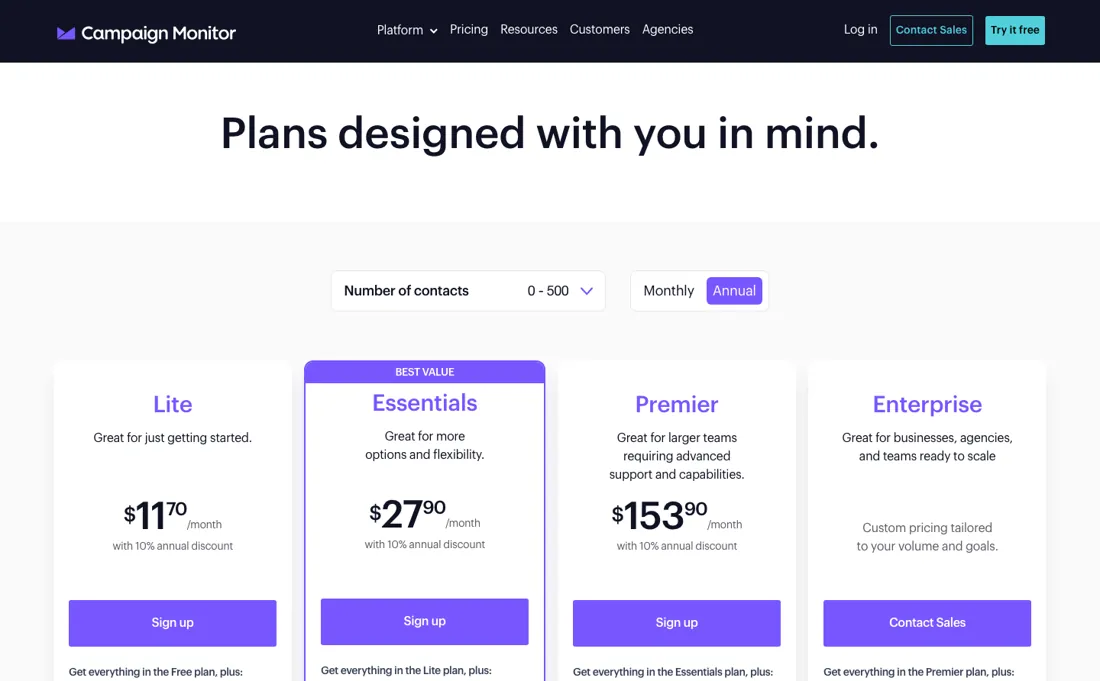
Contact-based, on three tiers — Lite (with a monthly send cap of about five times your contact count), Essentials (unlimited sends) and Premier (priority and phone support). We could not re-verify a plan amount on 2026-08-16. The page publishes no plan price until you pick a contact count in its slider. The only figure in the page itself is the Website Builder add-on, at €9 a month from an EU address — our July and August captures both read the same line as $10.
There is no free plan; the trial runs 30 days with 500 contacts. Older readings put Lite around $12-13 a month and Essentials around $29-31 at 500 contacts, climbing steeply with list size — treat those as indicative and take your own figure from the slider. Note also that the product is now listed as Campaign Monitor by Marigold. Plans change — always verify the live price on their site.
Correction after re-checking: Contact-based, read on the vendor pricing page in EUR with the monthly-billing toggle: at 0–500 contacts Lite €12/mo, Essentials €29/mo, Premier €158/mo; at 5,001–10,000 contacts Lite €109/mo, Essentials €168/mo, Premier €277/mo. Lite caps sends at 5x your contact count (2,500/month at the 0–500 tier); Essentials and Premier are uncapped. Annual billing takes 10% off, not ~25%, and the annual discount does not apply to agency or multi-team plans. (re-verified 2026-07-31)
What the price did
We capture Campaign Monitor’s own pricing page every month and keep the figures, so this is our record of the page — not a forecast, and not someone else’s summary.
This one is a record of what the page will not tell you. Our Price Watch captured campaignmonitor.com/pricing in July and in August 2026, and on 16 August 2026 we read it again: in all three the plan prices are absent from the page itself, because they only appear once you choose a contact count. The one amount the page does publish, the Website Builder add-on, read $10 a month in both monthly captures and €9 a month on 16 August from an EU address — a currency switch on the same line, not a discount.
What the pricing page doesn’t say
Clean your list before comparing prices anywhere. Campaign Monitor's strength is polished, agency-friendly email; its automation depth is lighter than dedicated marketing-automation platforms, so know which of the two jobs you're actually buying.
What Campaign Monitor does
Email campaigns with strong templates and client-friendly management for brands and agencies. Priced per contact rather than per send: Essentials at 10,000 contacts runs about $89/month, so dormant subscribers bill like active ones. Automation depth is lighter than dedicated platforms.
What buyers report about Campaign Monitor
Recurring themes from the buyer-review sites listed at the foot of this page, read in August 2026. We have not run Campaign Monitor ourselves, so this is other buyers' experience rather than ours. We summarise it here because the complaints are usually the part a vendor page leaves out.
- • The interface is clean and the templates make good-looking email easy — that is what reviewers consistently name.
- • Support gets good marks from most reviewers: quick, personal and staffed by humans.
- • TrustRadius is where the agency case is made: reviewers running 40 to 50 client sub-accounts pick it over Mailchimp for exactly that, and several mention being able to pay per campaign instead of monthly when a client sends rarely.
- • Price climbs sharply with list size and is the main reason teams leave. At 25,000 contacts, Essentials runs about $199/month against roughly $65 for ActiveCampaign or Brevo.
- • Automation depth is limited and there is no landing page builder.
- • There is no free plan — only a 5-subscriber sandbox.
- • A minority report slow support, no live support without paying extra, and difficulty reaching anyone. All three tiers are priced by contact count, so the figure you see quoted moves as your list grows.
- • The most useful billing detail we have found on any platform comes from a TrustRadius reviewer: contacts are counted per list, so one person on five lists counts as five subscribers. They would rather have one central list with tags — and if you segment by duplicating lists, you are paying for the overlap.
- • Automations and CRM integrations are named as the limit once you want more than a broadcast, including unsubscribes not syncing back to Salesforce.
- • There is no mobile app, and reviewers point out that lists and reports have no reason not to be usable on a phone even if the email builder is.
Where the ratings disagree. TrustRadius rates it higher than G2 or Capterra, and the reason is who writes there: agencies and resellers who bill clients for the ease of use, rather than in-house teams watching a list grow into a bigger invoice. Note also that the product is listed there as Campaign Monitor by Marigold — the same tool under its parent's name.
When the paid plan is worth it
The first real decision is send volume, not features. Lite caps monthly sends at 5x your contact count — 2,500 emails at the 0–500 tier — while Essentials removes the cap. At 0–500 contacts that step is €12 to €29 per month on monthly billing, so anyone mailing a small list more than five times a month has already justified it. Premier is a different calculation: €158 against €29 at 0–500 contacts, but €277 against €168 at 5,001–10,000, so its premium over Essentials narrows as the list grows.
It buys phone support, send time optimization, pre-built engagement segments, template management for teams and the included website builder, which is otherwise a €9 per month add-on; on Essentials only the engagement segments and the website builder are listed as purchasable extras. What no tier changes: the bill follows contact count, so a dormant list costs what an active one does, and no plan lets you keep a Gmail or Outlook From address — on every tier an unauthenticated address is rewritten to an account subdomain.
Our monthly capture read this vendor's pricing page in July 2026 and again in August 2026, and the amounts were the same both times. We keep watching — the registry records what moves.
How to actually use Campaign Monitor
Nothing goes out under your own domain until it is authenticated. Campaign Monitor's stated policy is that mail only goes out from authenticated domains: free webmail addresses cannot be authenticated, and an unverified From address is rewritten to an account subdomain such as abcxyz.createsend7.com, with replies routed back to the original address. Setup runs through Account settings, then Sending domains, and means adding up to three TXT records at your DNS host: DKIM, a DMARC record, and a recommended SPF include.
The default TTL is 300 seconds, though some hosts require higher values. A DNS host that rejects underscores cannot be used at all, but semicolons can be escaped. The documentation itself calls this step highly technical, and that is where non-technical teams stall. The list side is quicker: imports accept CSV, Excel, TXT and ZIP files up to 20 MB per upload, with file columns mapped to list fields. Two traps: a column whose first 1,000 rows are empty is dropped, and re-importing previously deleted addresses reactivates them. Importing without permission can end the account.
Distilled from Vendor help center, read in-session via the browser pane (WebFetch returns a JS loading stub for these pages): https://help.campaignmonitor.com/s/article/manage-your-own-authentication (DKIM/DMARC/SPF, up to three TXT records, TTL 300), https://help.campaignmonitor.com/s/article/from-domain-authenticated (authenticated-domain policy, rewrite to a createsend7.com subdomain), https://help.campaignmonitor.com/s/article/import-subscribers-from-a-file (accepted formats, 20 MB limit, empty-first-1000-rows rule, deleted-subscriber reactivation, permission warning). Plan gating and send caps from https://www.campaignmonitor.com/pricing/.
Campaign Monitor vs ActiveCampaign, side by side
Both columns come from the same place: each vendor’s own published pricing, read on the date shown in the sources at the foot of this page. We do not average them into a score.
Both names above are affiliate links: we may earn a commission if you sign up, at no extra cost to you. Neither changes what this table says: both columns come straight from the vendors’ own pricing pages.
The natural comparison is Mailchimp or ActiveCampaign — Mailchimp is the closest general peer, ActiveCampaign wins on automation depth — compare at YOUR list size, since contact pricing diverges fast. Weigh it against Mailchimp on the job you actually need done.
More on Campaign Monitor
Everything we publish about Campaign Monitor links back here — the review stays the honest hub:
The ex-banker filter — the same yardstick on every review (how we review): My ex-banker filter is simple: does Campaign Monitor remove a real cost — time, errors, missed revenue — bigger than what it charges? If the job above is genuinely yours, it's worth a look. We never publish fake or “exclusive” prices, so always confirm the current plan on their site.
Frequently asked questions
Why can I not see what Campaign Monitor costs?
Because the price is behind a slider. We captured the pricing page in July 2026, in August 2026 and again on 16 August 2026, and in none of those does the page itself carry a plan amount — you have to choose a contact count first. Budget for that: the number you get depends entirely on list size, and list size is the thing that grows.
Is there a free plan?
No. There is a 30-day free trial capped at 500 contacts, and after that every tier is paid. That is a real difference against the rivals reviewers compare it to, several of which keep a permanently free tier.
Why is my bill higher than my subscriber count suggests?
Because billing counts list memberships rather than people. An agency owner reviewing on TrustRadius put it plainly: one person on five lists counts as five subscribers, and they would rather have one central list with tags. If you segment by keeping parallel lists, you are paying for the overlap.
What should I weigh before buying Growth & Revenue software?
It depends on whether you have the bottleneck it solves. Small teams get the most out of this category when one clear problem is already costing real hours or revenue; buying ahead of that just adds cost and another login. Price it against the hours or lost deals it removes, not against its feature list, and start on the smallest plan that covers the job.
Is this a hands-on review of Campaign Monitor?
This is a researched assessment, not a hands-on test — where we've used a tool ourselves, we say so explicitly. We name what each tool is genuinely good and bad at, and we earn a commission only if you sign up, at no cost to you.
- Buyer reviews on G2, Capterra, GetApp, Gartner Peer Insights and TrustRadius, read August 2026.
- Campaign Monitor’s own published pricing page.
- A dated screenshot of that pricing page, kept on this site as the receipt.
We list our sources because most review sites do not. How we review →
Others in this category
The growth & revenue tools closest to Campaign Monitor that we have also reviewed. They overlap rather than match:
New dossiers, cost-traps we found, and tools that earned a keep — no hype, no sponsored-disguised-as-advice. Unsubscribe anytime.
This is our researched assessment — not a paid placement. The “Visit” links on this page are affiliate links: we may earn a commission if you sign up, at no extra cost to you, and it never changes our take. How we review →
Spotted an error? Tell us — we verify and fix fast, whether or not it flatters the product.