 InVideo Review (2026)
The honest catch is the credit model — each plan is a fixed monthly credit allowance that different models consume at different rates, and unused credits do not roll over, so a heavy month can exhaust an allowance long before it renews while a slow month simply wastes what you paid for.
Visit InVideo → Affiliate link — the rest of this page is the honest version, including who should skip it.
Watch the 2-minute review
Same honest take, in video form — from our YouTube channel.
⚡ Short on time? Watch the 30-second verdict Short.
Pricing (2026)
✓ Pricing re-verified 5 Sep 2026
Four paid tiers plus a free plan, read on invideo.io/pricing on 5 September 2026. On annual billing: Plus $17 a month (750 AI credits a year), Max $85 a month (3,900 credits), Generative $170 a month (8,000 credits) and Elite $900 a month (42,500 credits); month-to-month the same tiers are $20, $100, $200 and $1,000. Credits are the meter: every AI generation, avatar minute and export draws them down, and the annual pool is what you actually buy. Plans change — always verify the live price on their site.
What the pricing page doesn’t say
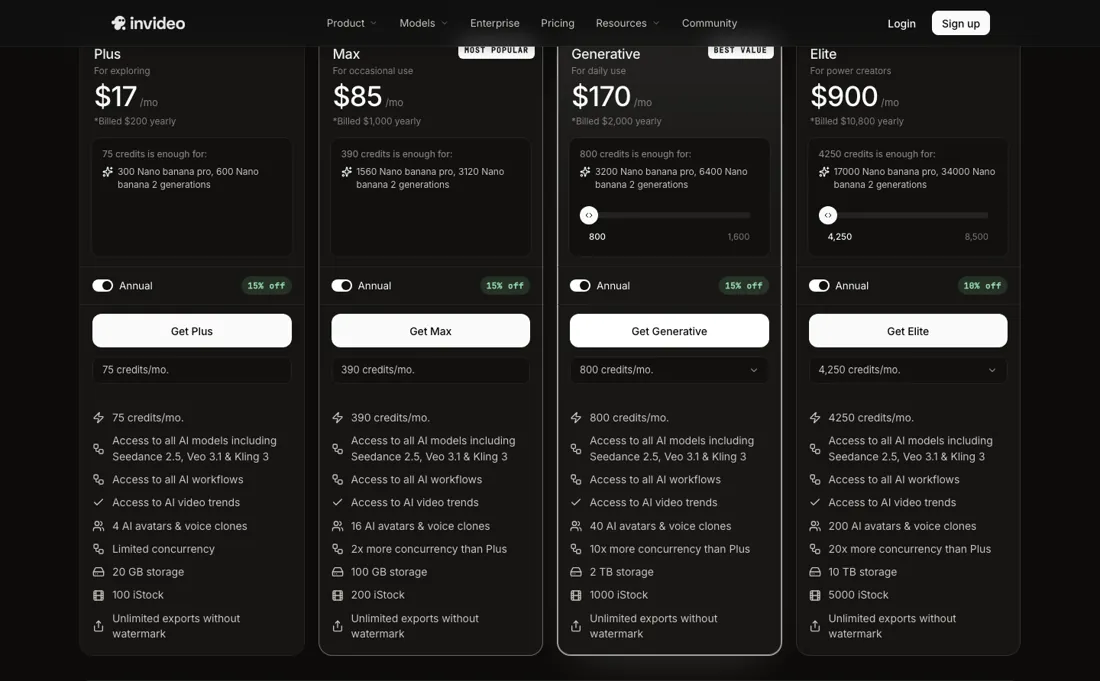
There is also no free way in any more: on 31 August 2026 the pricing page published no free tier at all, so the cheapest route to trying it is the Plus plan at $20 a month. AI video is fast but generic by default: templated output needs real editing and brand direction to not look like everyone else's. Treat it as a first-draft engine, not a finished-studio replacement.
What InVideo does
Turns a prompt or script into a first-draft video with AI voiceover, templates and stock footage. Plans are monthly credit allowances that do not roll over: Plus $20 a month, Max $100, Generative $200, Elite $1,000, roughly 15% cheaper paid yearly. The pricing page no longer lists a free tier, so Plus is the cheapest way in.

What buyers report about InVideo
Recurring themes from the buyer-review sites listed at the foot of this page, read in August 2026. We have not run InVideo ourselves, so this is other buyers' experience rather than ours. We summarise it here because the complaints are usually the part a vendor page leaves out.
- • Prompt to finished video with stock, voiceover and captions in one pass — for social content at volume that is genuinely fast.
- • Reviewers who work within the credit allowance report solid output.
- • The 7-day money-back guarantee is effectively unusable: refunds are refused once credits have been consumed, including after same-day testing. Read that before you buy.
- • Credits burn on bad output with no refund. About one in four editing commands needs a retry, and every retry costs.
- • "Create videos without limit" is not what the credit system does. One reviewer spent over $100 on extra credits during a single video and got no usable result.
- • The AI generation is credit-metered, so the monthly figure only tells you half of what you will spend. Reviewers report support quality declining compared with a couple of years ago.
When the paid plan is worth it
Since the watermarked free tier disappeared from the pricing page (checked 31 August 2026), the question is no longer whether to pay but which allowance to buy: every published plan exports without a watermark, so what separates the tiers is credits, storage and concurrency rather than the right to ship the video. Where the calculus breaks is the credit model. InVideo describes credits as internal currency that different AI models and settings consume at different rates, and its help center is explicit that unused credits and iStock allowance do not carry over — they reset only on your renewal date.
A slow month wastes what you paid for, and a heavy month (long scripts, an AI avatar, repeated regenerations) can burn an allowance well before it renews. Upgrading a tier does not fix a mismatched workflow. If one project spikes usage, InVideo sells separate one-time top-ups and plan "boosts" rather than folding extra capacity into the base price. So the real cost of a heavy edit season sits outside the sticker price advertised for the plan you're on.
How to actually use InVideo
You start from a single prompt box in the InVideo AI workspace, not the older Studio timeline. Sign in with Google, Apple, or email, then describe the video you want: topic, length, tone, and platform. The AI drafts a script, voiceover, stock footage, and subtitles together as a first cut you edit from there. No integrations or DNS work are required to begin; the only setup is the account itself.
That free-account route is no longer published: read on 31 August 2026, the pricing page listed no free tier at all, so the entry point is the cheapest paid plan rather than a watermarked free account.
Distilled from InVideo's own help center (help.invideo.io) support articles; the public pricing page renders its numbers via JavaScript and returned no figures through fetch tools
Common InVideo setup mistakes
Where InVideo setups actually go wrong, and what it costs you when they do. Same sources as the setup notes above — not from a walkthrough we ran ourselves.
Where people get stuck in practice is credit consumption.
- InVideo's own support articles field repeated questions about credits and iStock footage running out mid-project, because the platform charges per generation and per edit rather than per finished video.
- There's a dedicated Usage page users are pointed to specifically so they can see where an allowance went.
InVideo vs Synthesia, side by side
Both columns come from the same place: each vendor’s own published pricing, read on the date shown in the sources at the foot of this page. We do not average them into a score.
Both names above are affiliate links: we may earn a commission if you sign up, at no extra cost to you. Neither changes what this table says: both columns come straight from the vendors’ own pricing pages.
The natural comparison is Pictory or Synthesia — Pictory is a close text-to-video peer; Synthesia leans avatar/presenter video — pick by whether you need a talking head.
More on InVideo
Everything we publish about InVideo links back here — the review stays the honest hub:
The ex-banker filter — the same yardstick on every review (how we review): My ex-banker filter is simple: does InVideo remove a real cost — time, errors, missed revenue — bigger than what it charges?
Frequently asked questions
What should I weigh before buying Operations & Workflow software?
Usually it sits on top rather than replacing everything. Tools in this class tend to become the layer where work is tracked and handed off, while your existing systems stay the source of truth for their own data. Before you buy, map which tools it would replace outright and which it would merely sync with. If the answer is that it syncs with all of them, you are adding a layer rather than removing one.
Is this a hands-on review of InVideo?
This is a researched assessment, not a hands-on test — where we've used a tool ourselves, we say so explicitly. We name what each tool is genuinely good and bad at, and we earn a commission only if you sign up, at no cost to you.
- Buyer reviews on Capterra and practitioner reviews, read August 2026.
- InVideo’s own published pricing page.
- A dated screenshot of that pricing page, kept on this site as the receipt.
Others in this category
The operations & workflow tools closest to InVideo that we have also reviewed. They overlap rather than match:
New dossiers, cost-traps we found, and tools that earned a keep — no hype, no sponsored-disguised-as-advice. Unsubscribe anytime.
This is our researched assessment — not a paid placement. The “Visit” links on this page are affiliate links: we may earn a commission if you sign up, at no extra cost to you, and it never changes our take. How we review →