Databox Review (2026)
 By Daan Haket · Tested hands-on · written with an AI assistant · who does what
The pricing model bites, just not where it used to.
SMBs and agencies that want clean KPI dashboards from 130+ one-click integrations without building them by hand.
you need more than the three free sources but only a handful — the next step is Analyst at $71 a month for five — or you want deep custom data modelling, where a free tool like Looker Studio fits better.
Transparency: the “Visit” links on this page are affiliate links — we may earn a commission if you sign up, at no extra cost to you. No vendor can pay for a better review or verdict. How we make money →
We opened a new Databox account through the 'Get started' button under the Free plan on databox.com/pricing, connected Google Analytics 4 and Google Search Console for our own site, asked Genie two questions about that data, let Genie try to build a dashboard, and read the credit meter under Settings → Billing after every step. One account, one evening, our own traffic data — not a month of team use.
- The Free button does not give you Free. The account opened as a 14-day trial of Team Core at $249 a month, billed monthly. Free was listed in the app as a 'Downgrade'. Databox's own FAQ says that if no payment details are added by the end of the trial, syncing stops and reports pause, so anyone who wanted Free has to downgrade by hand before day 14.
- The downgrade was blocked until we deleted Databox's own sample data. The message: 'You have 1 connected Spreadsheets, but the Free plan is limited to 0.' That one spreadsheet was the Sample dataset Databox adds at sign-up. Free allows no spreadsheets at all: Excel and Google Sheets both open an 'Upgrade to Analyst' wall at $89 a month, something the pricing page does not say.
- Your one free dashboard is already taken. Databox's own Sample Dashboard stays after the downgrade and fills the plan's single dashboard slot. 'Create New Databoard' opened the $89 upgrade wall, and so did the button that would hang the sample dashboard on your own data.
Pricing (2026)
✓ Pricing re-verified 20 Oct 2026
Databox renamed and repriced its whole ladder since our August reading, so the Analyst/Pro/Growth tiers we described are gone. Free is $0 forever: 1 user, 3 data sources, 1 dashboard, 10 custom metrics, 50 AI credits a month, daily sync. Billed annually: Analyst $71/mo (1 user, 5 sources, unlimited dashboards and reports, 150 credits, hourly sync), Team Core $199/mo (3 users, 10 sources, 500 credits), Team Scale $319/mo (10 users, 30 sources, 1,000 credits, sub-accounts) and Agency from $79/mo (unlimited users, 4 clients, 20 sources, 300 credits), plus a quoted Custom tier.
Monthly, Analyst reads $89 and the others $249, $399 and from $99; annual billing is 20% off. Databox states it does not charge per seat. Extra data sources no longer carry a per-source fee: each plan includes a fixed number and more means moving up a tier, except on Agency, which adds client packs of 1 client, 5 sources and 50 credits for $20/mo annually ($25 monthly).
Add-ons are priced separately: branding and white-labeling $200/mo, advanced security management $80/mo, OKRs $160/mo, fiscal calendar $40/mo, 15-minute sync $14/mo per source, and flexible AI credit top-ups. Those add-on amounts are the annual-billing rates; on monthly billing the page shows $250 for branding, $100 for security management, $200 for OKRs, $50 for the fiscal calendar and $18 per source for 15-minute sync. Plans change — always verify the live price on their site.
Category context: Operations & Workflow. Across the 53 tools in this category that we researched with a public US-dollar price, the median entry price is $29 a month (lowest paid plan as listed, per seat where the vendor prices per seat). Databox’s entry price of $71 a month sits above that median. Compare pricing conditions in the Software Cost Atlas →
Correction after re-checking: (re-verified 2026-09-12) Databox restructured its pricing between our 13 August and 12 September 2026 readings and every plan name in our earlier text is gone. Analyst rose from $64 to $71 a month on annual billing. Pro at $159 and Growth at $399 were replaced by Team Core at $199 and Team Scale at $319 annually ($249 and $399 monthly), and a new Agency plan starts at $79 annually. Two mechanisms we described no longer exist. The $5.60 per additional data source is gone: extra sources now force a tier jump, and only Agency can self-serve capacity, through $20-a-month client packs. And 15-minute sync is no longer included at the top of the ladder but sold as a $14 per-source add-on, with hourly the fastest sync on every paid plan. Analyst's credit allowance is also lower than the 500 we recorded: 150 a month. We have dropped the '11 months of history' figure from our free-plan description because it no longer appears on the page. Re-read 2 October 2026: every plan amount, source count, credit allowance and add-on price above unchanged, and the trial FAQ still says syncing stops and scheduled reports pause if no payment details are added by the end of the 14 days. (re-verified 2026-10-02)
What the price did
We capture Databox’s own pricing page every month and keep the figures, so this is our record of the page — not a forecast, and not someone else’s summary.
We captured databox.com/pricing on 7 July and 2 August 2026 and read it by hand on 29 July, 13 August and again on 12 September 2026. Through mid-August nothing moved: Analyst $64, Pro $159 and Growth $399 a month on annual billing, and $5.60 per extra data source, identical five weeks apart. Between 13 August and 12 September the page was rebuilt. The ladder is now Free, Analyst $71, Team Core $199, Team Scale $319 and Agency from $79 a month on annual billing, the per-source fee has gone, and 15-minute sync has moved into a $14 per-source add-on. Only one figure is a like-for-like comparison: Analyst, up from $64 to $71, about 11%. The tier that replaced Pro costs $199 against $159, but includes 10 data sources where Pro included 3, so that one is a repackaging rather than a straight rise. Re-read on 2 October 2026, the new ladder had held for a second reading: Analyst $71, Team Core $199, Team Scale $319 and Agency from $79 a month on annual billing, client packs at $20, and the same add-on prices.
What the pricing page doesn’t say
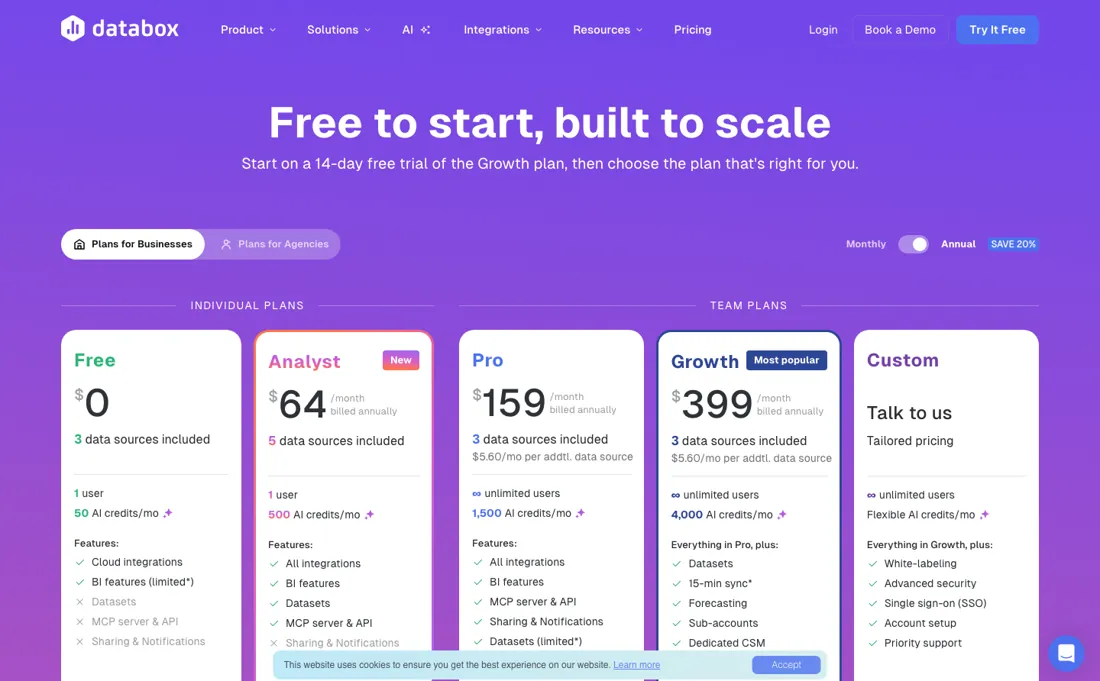
The per-source fee is gone, and for some buyers that is worse rather than better: each plan includes a fixed number of data sources and going over means moving up a whole tier, so one extra integration can mean the $199 Team Core to $319 Team Scale step rather than $5.60. Only the Agency plan sells capacity piecemeal, in $20 client packs. AI credits are a shared monthly pool for Genie and the MCP server, so heavy AI use moves you up a tier as fast as data does, and 15-minute sync — once part of the top plan — is now a $14 per-source add-on on top of the subscription.
Power users may also find the custom-metric and data-modelling depth limited next to a full BI tool.
Watch the video review
The video version of this review, from our YouTube channel.
⚡ Short on time? Watch the 30-second verdict Short.
What Databox does
Centralized KPI dashboards. Pull data from all your software tools into one clean interface to monitor your business health. A free Skills Marketplace adds guided analyses on top: the paid-ads skill standardizes every ad channel into one efficiency table with CPA gauges against your own targets, judged per funnel role. A native MCP server (mcp.databox.com) puts those metrics inside ChatGPT or Claude — ingest data and query it in plain language. It runs on every paid plan, not on Free, and its queries spend from the same monthly AI-credit pool as Genie.
What buyers report about Databox
Hands-on: tested 2026-09-25Reported by buyers: G2, Capterra, agency write-ups and Product Hunt, read August 2026 (Product Hunt read 13 August 2026)
Themes from the buyer-review sites listed at the foot of this page, read in August 2026 (Product Hunt read 13 August 2026). We tested Databox ourselves on 2026-09-25, but one test is a narrow sample, so here is what other buyers report. We summarise it here because the complaints are usually the part a vendor page leaves out.
- • Connecting several data sources is genuinely quick, and reviewers who compared visualisation tools call it the smoothest of them.
- • Priced competitively for small and midsize teams, with straightforward onboarding.
- • On Product Hunt (4.5 across 4 reviews — a small sample, so treat it as colour rather than weight) the comparison reviewers reach for is Looker Studio, and they call Databox the easier of the two to set up. One singles out the MCP server for letting an AI assistant pull live metrics instead of pasting screenshots.
- • Granular data modelling and advanced custom metrics are where it runs out. If you need those, check before you commit.
- • Reviewers report templates breaking and individual metrics quietly stopping.
- • Dashboards do not always refresh promptly.
- • Report customisation is repeatedly named as the thing that could be better.
- • Product Hunt reviewers report refresh latency on the entry-level tiers, and say part of it traces back to the upstream provider's rate limits rather than to Databox itself — which matches Databox's own troubleshooting documentation.
- • The MCP server is read-only: the same reviewers want to generate reports programmatically and cannot.
- • Feeding it unconventional JSON means reshaping the data before ingestion.
When the paid plan is worth it
Databox's free tier is unusually workable for one person: the pricing page lists 1 user, 3 data sources, 1 dashboard, 10 custom metrics, 50 AI credits a month and daily sync. That covers a freelancer who checks a handful of channels daily. Analyst, at $71 a month on annual billing, adds a fifth data source, 150 AI credits and hourly sync, but it is still a single seat, so it is a solo analyst's upgrade rather than a team's.
Team Core at $199 is where collaboration starts, with 3 users and 10 sources, and Team Scale at $319 buys 10 users, 30 sources and sub-accounts. Databox does not charge per seat, so the ladder is about sources and credits, not headcount. Upgrading pointedly does not fix data freshness that comes from the source side. Databox's own troubleshooting documentation states that data sources do not sync independently and only pull when metrics are actively in use, and that provider limits and account activity shape the real refresh rate.
No paid tier includes 15-minute sync either: hourly is the fastest, and faster costs $14 per source. A higher plan also does not retroactively manufacture history that was never collected.
Our monthly capture read this pricing page in September 2026 and again in October 2026. The price history below explains what changed.
What we found running Databox ourselves
The first findings are at the top of this page. The rest:
- What a Genie question costs: 3.7 credits for a simple one ('which pages got the most views in August'), 3.8 for a heavier week-by-week comparison. On Free's 50 a month that is about thirteen questions. The onboarding had already spent 1.9 credits by sending our four setup answers to Genie as a first question we never asked, and the app showed 'Buy more to keep Genie running' at 48 left.
- Genie spends credits on things the plan will not allow. It offered to build a dashboard, tried three times, reported that Databox 'rejected the request as invalid' without naming the one-dashboard limit, and charged 5.2 credits for nothing. After one hour we had used 14.6 of the month's 50 credits.
- Genie's diagnoses need checking. It called a half-finished Search Console connection 'broken' because 'the login expires' (the data manager said 'Unfinished connection'), and it flagged one of our real review URLs as a typo. The traffic figures themselves came back fast and were usefully broken down, including pages counted twice because of query strings.
- What held up: connecting a data source cost no credits, the unfinished connection still counted against the three-source limit, and the plan prices inside the app matched the public pricing page ($89 / $249 / $399 monthly; $71 / $199 / $319 billed annually).
What this test does not show: We did not add a fourth data source past the limit, did not build our own dashboard after deleting the sample one, and could not check how fresh each source's data is: the app shows sync frequency but no last-synced time.
Most of our reviews are researched rather than run — how we review explains which is which, and why we do not pretend otherwise.
How to actually use Databox
The shortest route to something useful is sign-up, then one connection, then a template. Databox's help center points new accounts to Data Manager > Available Integrations or Data Manager > Data Sources, where the integration is chosen and the user grants consent for Databox to access the data. From there, importing a pre-built Databoard and editing it in the Designer beats assembling Datablocks by hand. Two things reliably stall people.
The first is access: the person setting up Databox often lacks admin rights on the upstream tool, and the documented workaround is sending a colleague a connect request by email from the link at the bottom of the new connection dialog. The second is empty tiles after a successful connection, because metrics are scheduled only once they are first used in the app, so a brand-new metric can look blank before its first pull lands.
You can start free or trial any plan for 14 days without a card; if no payment details are added by the end of the trial, Databox says syncing stops and scheduled reports pause.
Where this section comes from: our research notes (162 words)
Databox pricing page and Databox Help Center onboarding and troubleshooting documentation, read 4 August 2026. Pricing page (databox.com/pricing) re-read 2 October 2026, served HTML and a headless browser on both billing toggles, including the plan comparison table and the FAQ; databox.com/pricing.md returns 403 and databox.com/llms.txt lists pages but no prices. Re-verified 6 October 2026: databox.com/pricing served HTML (every amount, source count, credit allowance and add-on price unchanged; Agency shows 4 clients) and these help-centre articles in a browser render: Cancel your subscription https://help.databox.com/cancel-your-subscription; Change your subscription plan https://help.databox.com/change-your-subscription-plan; Understanding AI credits https://help.databox.com/understanding-ai-credits; Add a data source https://help.databox.com/add-a-data-source; Export a dataset https://help.databox.com/export-a-dataset; Delete your account https://help.databox.com/delete-your-account.
Re-read 2026-10-20 on https://databox.com/pricing in a headless browser: Free $0, Analyst $71, Team Core $199, Team Scale $319 and Agency from $79 billed annually, account packs $20/month (1 account, 5 data sources, 50 AI credits), add-ons $200, $80, $40, $160 and $14 per source, and the FAQ monthly amounts ($249, $399, Agency $99, packs $25) all unchanged.
The natural comparison is Google Looker Studio — the free-but-manual dashboard alternative.
Frequently asked questions
Is the free plan usable, or is it really a trial?
Both exist, separately. Read on 12 September and again on 2 October 2026: Free is $0 forever with 1 user, 3 data sources, 1 dashboard, 10 custom metrics, 50 AI credits a month and daily sync — workable for one person watching a handful of channels. Separately you can trial any paid plan for 14 days without a card. Do not assume the trial lapses quietly into Free: Databox's own FAQ says that if no payment details are added by the end of the trial, your data stops syncing and scheduled reports and notifications are paused.
What will it cost with our actual tool stack?
Count sources, not seats — Databox states it does not charge per seat. Read on 12 September and again on 2 October 2026, on annual billing: Analyst $71 a month covers 1 user and 5 sources; Team Core $199 covers 3 users and 10 sources; Team Scale $319 covers 10 users and 30 sources. Going past your source count means moving up a tier rather than paying per source, because the $5.60-per-source line we recorded in August is gone. The exception is Agency, from $79 a month with unlimited users and 20 sources, where client packs add 1 client, 5 sources and 50 credits for $20 a month each.
Will a higher plan make the data fresher?
Barely, and less than it used to. Sync is daily on Free and hourly on every paid plan, so the 15-minute interval that came with the old Growth tier is no longer something a plan buys: it is a $14 per-source add-on. Databox's own troubleshooting documentation also says data sources do not sync independently and only pull when metrics are actively in use, and that upstream provider limits shape the real refresh rate. Upgrading cannot backfill history that was never collected. Read 12 September 2026.
What counts as one data source?
Each property, account or store, not each tool. Databox's help article Add a data source (read 6 October 2026) separates the integration from the data source: Google Analytics 4 is the integration and each GA4 property is a data source, and the same goes for each HubSpot account, each Shopify store and each GitHub repository. Two GA4 properties and one Shopify store therefore use three of the five sources on Analyst. The AI credits are one pool for the whole account: every user draws from it and unused credits do not roll over to the next billing cycle, according to Understanding AI credits. Databox publishes a typical-consumption table there, with a help question at around 1 credit and a deep analysis or a new Databoard at around 11 (medians), so check it against your own use before choosing a tier.
What happens if I downgrade or cancel?
A downgrade takes effect at once: features and limits outside the new plan are disabled immediately, and the unused part of what you prepaid is credited toward your next invoice rather than refunded (Change your subscription plan, read 6 October 2026). Cancelling keeps data syncing until the subscription ends; then syncing is put on hold, some plans lose the ability to add connections or data sources, and AI credits keep renewing monthly until the end of a quarterly or annual term. Synced data stays readable while the account exists; once the account is closed it is kept for 30 days and then deleted. A full export is not self-service: Databox handles it through support case by case, where technically feasible, and the per-dataset CSV export is limited to select plans. Databox also warns that pausing sync can leave permanent gaps in metrics with historical data limits.
Is this a hands-on review of Databox?
Yes. We tested Databox ourselves on 2026-09-25; the section above says what we tested, what we found and what we did not test, and where a figure comes from the vendor's own documentation instead. Most of our reviews are researched rather than run; we say which is which. We name what each tool is good and bad at, and we earn a commission only if you sign up, at no cost to you.
- Buyer reviews on G2, Capterra, agency write-ups and Product Hunt, read August 2026 (Product Hunt read 13 August 2026).
- Re-verified 2026-10-02, 2026-10-06 and 2026-10-20, read on their own pricing page.
- A dated screenshot of that pricing page, kept on this site as the receipt.
- Our own hands-on session with Databox (2026-09-25), written up in full further down this page.
Others in this category
Reviewed operations & workflow tools that share ground with Databox — comparable in what they do, not drop-in swaps:
New reviews, price changes we recorded, and the cost conditions we found. No sponsored placements. Unsubscribe anytime.
This is our researched assessment — not a paid placement. The “Visit” links on this page are affiliate links: we may earn a commission if you sign up, at no extra cost to you, and it never changes our take. How we review →