 Zendesk Review (2026)Copilot Needs the $115 Tier
Three separate multipliers sit on top of the number you first see.
Pricing (2026)
✓ Pricing re-verified 5 Sep 2026
Per agent per month on annual billing, US storefront: Support Team $19, Suite Team $55, Suite Professional $115. Suite Enterprise + Copilot is quote-only. The page geo-prices — read from Europe the same three tiers show €19, €55 and €115 — so check which storefront your quote came from. Annual billing carries a stated 20% discount and the monthly rate is never printed.
Paid add-ons on top of the seat price: Copilot $50 per agent/month (€50), Workforce Engagement bundle $50 (€50), Contact Center $83 (€82). Copilot can be attached to Professional and higher only. AI agents are included in Suite and Support plans but metered by 'automated resolutions' beyond the plan allowance, and App Builder, Action Builder and Voice are billed on consumption above their own allowances. Plans change — always verify the live price on their site.
What the pricing page doesn’t say
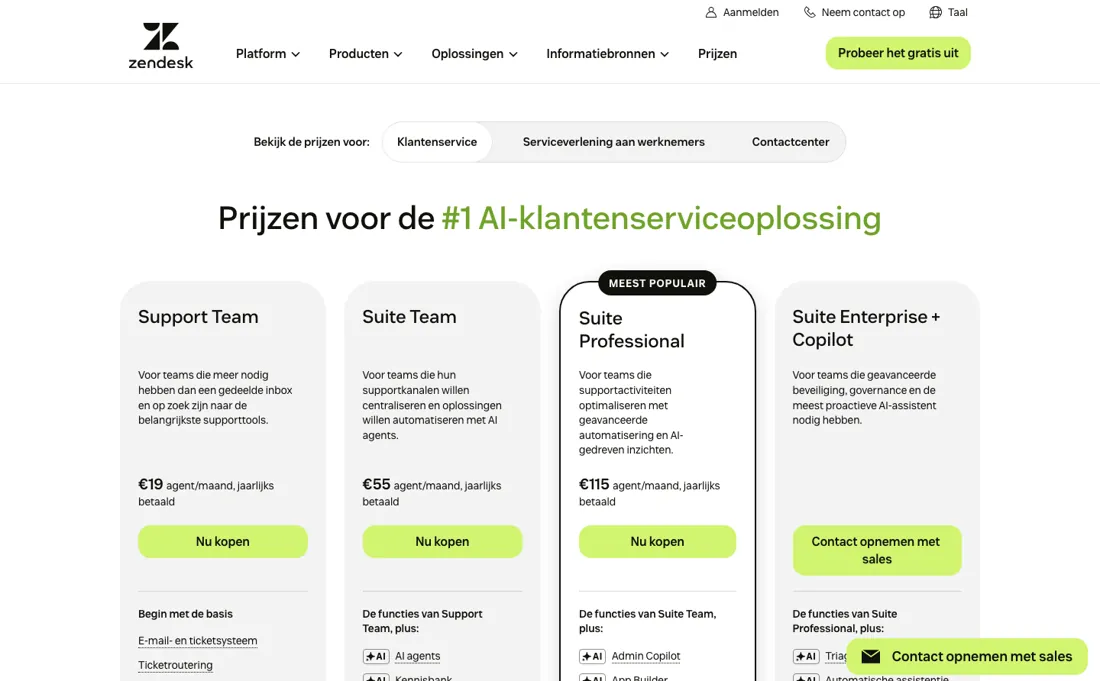
The prices shown are annual-billed — the page states a 20% annual discount and never prints the monthly rate, so budgeting month-to-month means adding roughly a quarter yourself. Copilot, the AI the product is currently sold on, is a $50 per-agent add-on that their own page restricts to Professional and higher: the $19 and $55 tiers cannot have it at any price, and on the $115 Professional seat it is a 43% uplift.
And the AI agents that are included are metered by automated resolutions: past the allowance you pay per resolution, so the bill moves with how well the AI works rather than with how many people you hire. App Builder, Action Builder and Voice are metered on consumption alongside it. Price the tier you need with the add-ons you actually want switched on, because the $19 entry and a working configuration are far apart.
What Zendesk does
Customer service suite: ticketing, messaging, voice, help centre and AI agents.
What buyers report about Zendesk
Recurring themes from the buyer-review sites listed at the foot of this page, read in August 2026 (SourceForge read 12 August 2026). We have not run Zendesk ourselves, so this is other buyers' experience rather than ours. We summarise it here because the complaints are usually the part a vendor page leaves out.
- • For a large or multi-department support operation the depth, ecosystem and enterprise controls are genuinely the safest bet in the category.
- • The integration marketplace is the largest in support software.
- • On SourceForge, an administrator credits the team with fast response times and actually solving the problem, and a startup customer notes that entry credit keeps the cost manageable in the early growth phase.
- • All Suite plans are annual contracts. There is no month-to-month at standard rates, and Zendesk's own FAQ confirms cancellations and downgrades get no refund.
- • The cost problem is not the starting plan, it is what happens after rollout. Copilot and Workforce Engagement together add roughly 87% to the seat price, and the AI resolution meter bills on top of that.
- • The native AI deflects more than it resolves — real-world resolution runs about 10-20%.
- • Setup takes longer and needs more technical skill than the demos suggest.
- • Non-enterprise customers report slow, automated and inconsistent support — from a company selling support software.
- • A CEO on SourceForge calls the pricing structure opaque — every additional capability turns out to be another paid add-on — and another reviewer there judges the suite expensive for what the entry level connects you to.
- • A SourceForge reviewer of eighteen months describes forwarded Gmail simply stopping, Zendesk declining to support their spam filter, and no resolution being offered; they moved to another vendor. It is one account, but it is the churn story in miniature.
Where the ratings disagree. SourceForge (read 12 August 2026) does not contradict the others — the price-opacity and add-on complaints match what G2 and Capterra reviewers raise. What it does not contain is anything about contract terms or AI-resolution billing, so the buying-stage friction has to be read off Zendesk's own pricing page rather than off reviews. TrustRadius and Gartner Peer Insights both refused our requests, so they are absent here rather than checked and dismissed.
The $19 tier cannot have the AI at any price
The ladder above is the number you first see. Three separate multipliers sit on top of it. The first is billing period. Those prices are annual-billed; the page states a 20% annual discount and never prints the monthly rate at all, so month-to-month means adding roughly a quarter yourself — about $144 on a Professional seat. The second is Copilot, and it is the important one. Copilot is a $50 per-agent-per-month add-on, and their own page restricts it to Professional and higher.
So the $19 and $55 tiers cannot have the AI this product is currently sold on, at any price — and on the $115 Professional seat it is a 43% uplift. A ten-agent team wanting the advertised product is on $165 a seat, or $19,800 a year. Workforce Engagement is another $50 and Contact Center $83. The third is metering. The AI agents that ARE included in Suite and Support plans are counted by 'automated resolutions' beyond the plan allowance.
That means the bill moves with how well the AI performs rather than with how many people you employ. It is an unusual shape, and one that rewards success with an invoice. App Builder, Action Builder and Voice are billed on consumption above their own allowances as well. So price the tier you need with the add-ons you would actually switch on, and compare that figure. The distance between the $19 entry and a working configuration is the whole story here, and no competitor comparison based on the entry price means anything.
How to actually use Zendesk
Decide whether you need Copilot before you look at tiers, because it settles the plan for you. Copilot is a $50 per-agent add-on and Zendesk's own page restricts it to Professional and higher — so if the AI is why you are here, the $19 and $55 tiers are not cheaper options, they are unavailable ones. A ten-agent team on Professional with Copilot is $165 a seat, or $19,800 a year.
Check which storefront you are quoting from. The page geo-prices, and the same three tiers read $19/$55/$115 in the US and €19/€55/€115 from Europe — which are not the same money. Make sure your quote and your comparison come from the same one. Budget the billing period properly: every published price is annual-billed and the monthly rate is never printed, so paying month-to-month adds roughly a quarter that you will have to work out yourself.
Then estimate automated resolutions, not just seats. The included AI agents are metered by resolution beyond your allowance, so your bill grows as the AI succeeds. Ask what the allowance is and what a resolution costs past it, and do the same for App Builder, Action Builder and Voice, which are all metered on consumption.
Distilled from Zendesk's own pricing page, read 10 September 2026. Note the page geo-prices: from a Netherlands exit zendesk.com/pricing redirects to zendesk.nl/pricing/#georedirect, which is where these figures come from — the Suite tiers at $19, $55 and $115 per agent per month and the Copilot add-on gating that puts AI on Professional and above. The $19,800 a year we quote for a ten-agent Professional team with Copilot is our own arithmetic (10 x $165 x 12), not a figure Zendesk prints.
The natural comparison is Freshdesk or Intercom — the usual head-to-heads — compare at the tier that includes the AI you actually want, since that is where the price gap opens.
The ex-banker filter — the same yardstick on every review (how we review): My ex-banker filter is simple: does Zendesk remove a real cost — time, errors, missed revenue — bigger than what it charges?
Frequently asked questions
What does Zendesk cost once the AI is switched on?
More than the tier you were quoted, and not at every tier. Read on 12 August 2026: Copilot is a $50 per agent per month add-on and their page restricts it to Professional and higher — so the $19 Support Team and $55 Suite Team seats cannot have it at any price. On the $115 Professional seat it is a 43% uplift, taking a working AI configuration to $165 per agent per month before the AI agents themselves are metered.
Why does the price I see differ from the price you quote?
Because the page geo-prices. Reading zendesk.com/pricing from two countries on 12 August 2026 gave $19, $55 and $115 per agent per month on the US storefront and €19, €55 and €115 on the European one — the same digits in a different currency, which is not the same money. The add-ons are not even numerically parallel: Contact Center reads $83 in dollars and €82 in euros. Check which storefront your quote came from.
What else gets billed beyond the seat price?
Two meters run on top of the per-agent figure. AI agents are included in Suite and Support plans but billed by 'automated resolutions' — Zendesk's own definition is that you pay per customer request the AI successfully resolved — so past your plan's allowance the bill rises with how well the AI performs, not with headcount. Separately, their page lists App Builder, Action Builder and Voice as consumption-billed above their allowances. Every figure shown is annual-billed too, with a stated 20% annual discount and no monthly rate printed.
What should I weigh before buying Customer Support software?
Judge it on evidence rather than adjectives. Look for a published security page, single sign-on and role controls on the plan you would actually buy (they are often gated to higher tiers), a status page with real incident history, and a clear answer on where your data is stored. If the tool will hold anything sensitive, those four answers matter more than any feature comparison.
Is this a hands-on review of Zendesk?
This is a researched assessment, not a hands-on test — where we've used a tool ourselves, we say so explicitly. We name what each tool is genuinely good and bad at, and we have no affiliate relationship with Zendesk — we earn nothing whether you sign up or not.
- Buyer reviews on G2, Capterra, SourceForge and practitioner reviews, read August 2026 (SourceForge read 12 August 2026).
- Re-verified 2026-08-12, read on their own pricing page from two countries.
- A dated screenshot of that pricing page, kept on this site as the receipt.
Others in this category
Reviewed customer support tools that share ground with Zendesk — comparable in what they do, not drop-in swaps:
Also in customer support, for browsing rather than as an alternative:
New dossiers, cost-traps we found, and tools that earned a keep — no hype, no sponsored-disguised-as-advice. Unsubscribe anytime.
This is our researched assessment — not a paid placement. How we review →