Warmup Inbox Review (2026)
 By Daan Haket · Researched and written with an AI assistant · who does what
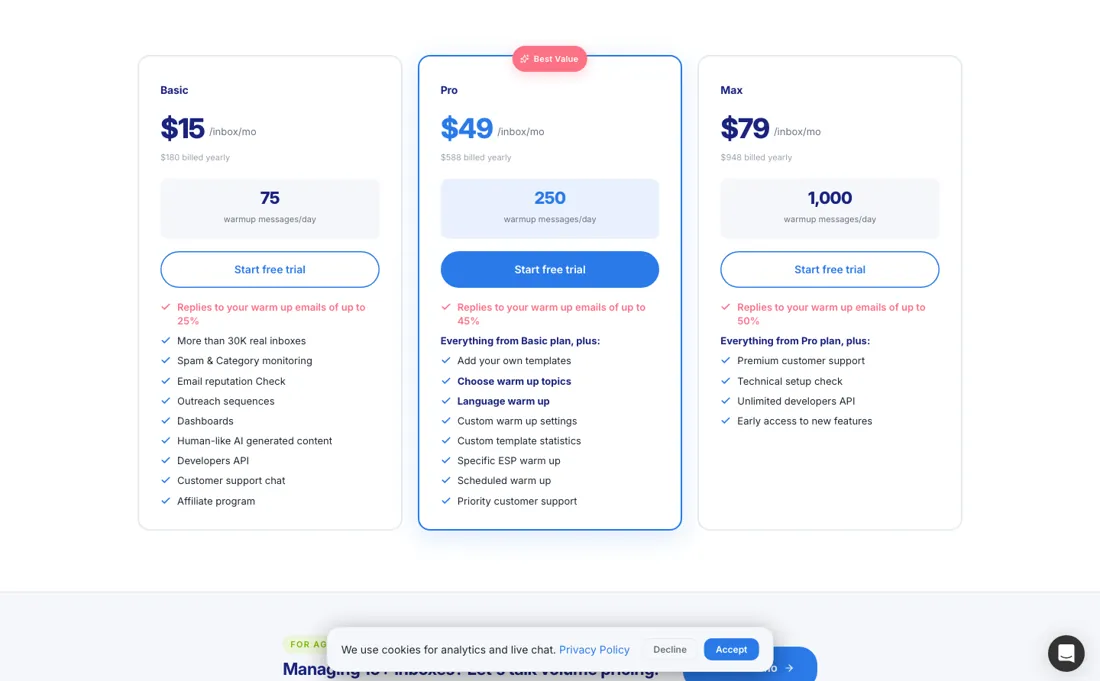
The pricing is published and readable — three tiers, per inbox, with both billing toggles printing a rate: $19, $59 and $99 monthly, or $15, $49 and $79 on the yearly plan.
outbound teams warming new sending domains and inboxes before campaigns, with integrations across Google, Outlook, Zoho and SendGrid.
you need more than fifty inboxes and want a published price — past fifty it is quote-only — or your sending volume is too low to need dedicated warm-up.
Transparency: the “Visit” links on this page are affiliate links — we may earn a commission if you sign up, at no extra cost to you. No vendor can pay for a better review or verdict. How we make money →
Pricing (2026)
✓ Pricing re-verified 25 Sep 2026
Three tiers, priced per inbox. At one inbox, billed monthly: Basic $19 a month for 75 warmup messages a day, Pro $59 for 250 a day, Max $99 for 1,000 a day. Billed yearly the same three read $15, $49 and $79 a month ($180, $588 and $948 a year), which is the 20% saving the page advertises. The page now publishes a volume ladder up to fifty inboxes: on yearly billing Basic falls to $14 an inbox from 5 inboxes, $12.50 from 10, $11 from 15, $9 from 25 and $7.50 at 50; Pro to $45, $40, $35, $29 and $23.50; Max to $73, $65, $56, $47 and $38 (monthly billing: Basic $18 to $9.50, Pro $54 to $28.50, Max $92 to $47.50).
Past fifty inboxes the price is quoted. The tiers also differ on the reply rate to your warmup mail — up to 25% on Basic, 45% on Pro and 50% on Max — and Pro adds your own templates, chosen warmup topics, language warmup and scheduled warmup. The trial is 7 days with no credit card, and the vendor states more than 30,000 real inboxes in the network. Plans change — always verify the live price on their site.
Category context: Marketing. Across the 23 tools in this category that we researched with a public US-dollar price, the median entry price is $29 a month (lowest paid plan as listed, per seat where the vendor prices per seat). Warmup Inbox’s entry price of $19 a month sits below that median. Compare pricing conditions in the Software Cost Atlas →
What the pricing page doesn’t say
The bigger caveat is structural: warmup is priced per inbox, so a team running twenty sending addresses pays for twenty, although the published volume ladder brings Pro down to $35 an inbox on yearly billing from fifteen inboxes. And warmup is a floor, not a ceiling — it builds sender reputation, but no amount of it rescues a bad list or a bad offer.
Watch the 2-minute review
The video version of this review, from our YouTube channel.
⚡ Short on time? Watch the 30-second verdict Short.
What Warmup Inbox does
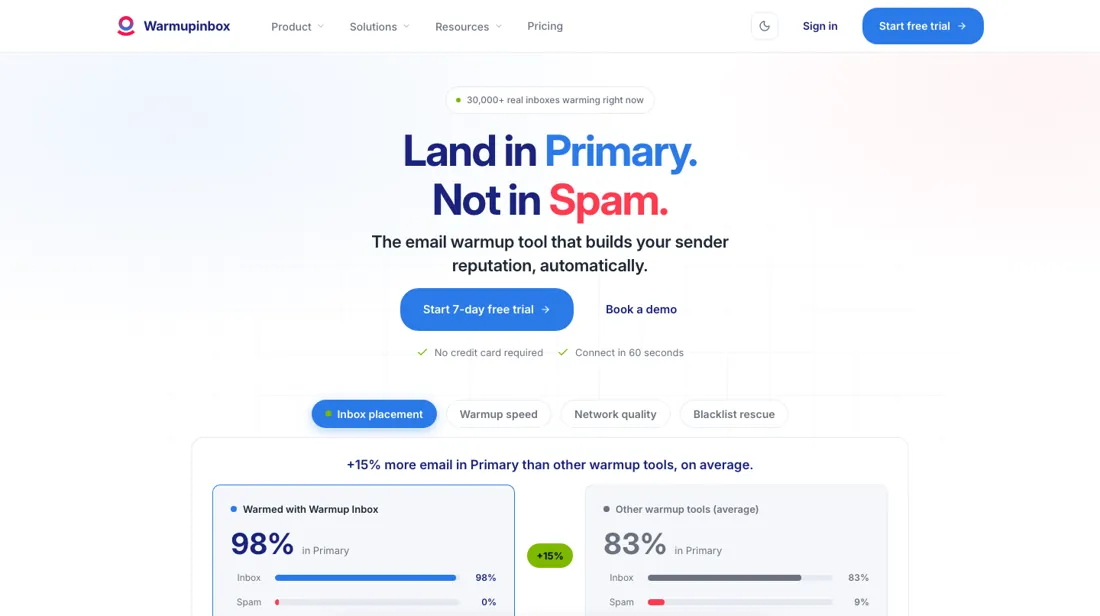
Standalone email warm-up service — automated inbox warming, deliverability monitoring and integrations for Google, Outlook, Zoho and SendGrid.
What buyers report about Warmup Inbox
Hands-on: not tested by usReported by buyers: G2, Capterra, Trustpilot and Software Advice, read August 2026
Themes from the buyer-review sites listed at the foot of this page, read in August 2026. We have not run Warmup Inbox ourselves, so this is other buyers' experience rather than ours. We summarise it here because the complaints are usually the part a vendor page leaves out.
- • Connect a Gmail account and warmup starts within ten minutes with no technical knowledge — that ease is what reviewers name first. 4.6 across G2, Trustpilot and Capterra.
- • A 30,000+ inbox network, and support is consistently called fast and responsive. $15/month annually for a single inbox is fair.
- • A handful of Trustpilot and G2 reviews flag Google Workspace accounts being suspended after connecting. That is the risk to weigh — your domain is worth more than the tool.
- • The network leans heavily on Gmail accounts, so Outlook and Microsoft 365 inboxes see slower and less consistent warmup volume.
- • When we read reviews in August 2026, reviewers said cost scales badly: at $49-$59 per Pro inbox, ten inboxes came to about $590 a month, which did not fit an agency. Warmup Inbox has since published a per-inbox volume discount; see the price section for the current ladder.
- • Billing complaints, and limited visibility into whether it is actually working.
Pages read (August 2026): Trustpilot
When the paid plan is worth it
Three tiers, priced per inbox: Basic $15 a month for 75 warmup messages a day, Pro $49 for 250, Max $79 for 1,000. The tiers also carry different reply rates to your warmup mail — up to 25%, 45% and 50%. Divide the price by the daily volume and the ladder turns out to have a hole in the middle. Basic works out at $0.200 per daily message, Pro at $0.196 and Max at $0.079.
In other words the step from Basic to Pro buys you essentially no volume discount at all — two per cent — while the step from Pro to Max cuts the unit rate by a factor of two and a half. If volume is what you are after, Pro is the worst value on the page and Max is by some distance the best. What Pro does buy is the reply rate, and that is the other way round.
Basic to Pro adds twenty points of reply rate (25% to 45%); Pro to Max adds five (45% to 50%). So the honest framing is that Pro is a reply-rate upgrade and Max is a volume upgrade, and which one you need depends on whether your problem is a cold domain or a large send. A brand new domain benefits more from replies than from raw volume; a team warming many inboxes ahead of a big campaign benefits from the reverse.
Price everything per inbox first. This is not an account fee: five sending addresses on Pro is $225 a month on yearly billing ($45 each once you reach five), not $49. Both toggles print a rate: $19, $59 and $99 monthly against $15, $49 and $79 yearly ($180, $588, $948), so the figures above are the annual ones. Multiplying the list price overstates a bigger team's bill, because the page (re-read 25 September 2026) publishes the volume ladder: on yearly billing Pro falls from $49 an inbox to $40 from ten inboxes, $35 from fifteen, $29 from twenty-five and $23.50 at fifty. Only past fifty is the price quoted.
How to actually use Warmup Inbox
The whole product is one connection step, and the vendor's own numbers put it at about sixty seconds — the FAQ says the process 'will probably take you less than a minute'. How you connect depends on where the inbox lives. Gmail and Google Workspace connect over OAuth, as do Outlook, Exchange and Microsoft 365, and the integrations page is explicit that this route needs no DNS work. Zoho Mail, Amazon SES, Mailgun, SendGrid and Brevo connect over SMTP or API, as does any other inbox with SMTP credentials.
After that the platform does the work. Your inbox is synced into a network the vendor puts at more than 30,000 continuously changing real inboxes, which open your mail, reply to it and mark it as important. You watch inbox, spam and bounce rates move in the dashboard. DNS, SPF, DKIM and blacklist checks are built in rather than bolted on, which matters because those are the things that will actually be wrong if warmup does not shift your placement.
Two practical notes. The trial is seven days and takes no credit card, which is short for a discipline whose whole point is slow reputation building — expect the trial to prove the connection works rather than to prove the outcome. And the help centre carries twenty-eight articles under Syncing Inboxes alone, one per provider type; if your setup is anything other than plain Gmail or Microsoft, read yours before you start rather than after a failed sync.
Where this section comes from: our research notes (128 words)
warmupinbox.com/pricing read in a live browser on 10 September 2026, both billing toggles — the three plan cards with their per-inbox rates, daily warmup volumes and reply-rate ceilings, the 'For agencies & teams' block (on 25 September 2026 replaced by a published ladder up to fifty inboxes and a quote beyond that), and the FAQ entries on the seven-day trial and on how annual billing works. The URL without a trailing slash 308-redirects to warmupinbox.com/pricing/.
Re-read there on 25 September 2026: the plan cards, the inbox slider (1, 5, 10, 15, 25, 50) and the schema.org UnitPriceSpecification list with a yearly and a monthly rate for every tier at each step, plus the FAQ on the 7-day trial, pro-rated mid-month inbox changes, upgrades and downgrades, and annual billing.
The natural comparison is lemwarm — lemwarm comes bundled with lemlist outreach seats; Warmup Inbox is the standalone warm-up specialist with broader inbox integrations; its public page prices every inbox count up to fifty.
Frequently asked questions
What do ten inboxes cost?
On yearly billing, $125 a month on Basic, $400 on Pro and $650 on Max; on monthly billing $160, $480 and $820. Those come from the per-inbox rate at the 10-inbox step of the ladder published on warmupinbox.com/pricing/ (read 25 September 2026): $12.50, $40 and $65 yearly, $16, $48 and $82 monthly. Multiplying the single-inbox price instead would put ten Pro inboxes at $490 on yearly billing, $90 more than the page charges.
Can I add inboxes or change plan in the middle of a billing period?
Yes, and the FAQ on the pricing page (read 25 September 2026) spells out how it is billed. Inboxes added mid-month are charged pro-rata from the day they are added, and removed inboxes become a credit on the next invoice. Upgrades apply at once, downgrades at the next billing cycle, with the difference pro-rated. Annual plans bill once at signup for twelve months, and you can move to monthly billing at the next renewal.
Where does the volume discount start?
At five inboxes, according to the page's own structured price list (read 25 September 2026): Pro on yearly billing is $49 an inbox from one to four, $45 from five, $40 from ten, $35 from fifteen, $29 from twenty-five and $23.50 at fifty. The FAQ on the same page says the per-inbox price comes down from your second inbox, which the published ladder does not show, so ask for a quote in writing if you run two to four. Past fifty inboxes there is no list price at all; the page asks you to book a call.
Is this a hands-on review of Warmup Inbox?
This is a researched assessment, not a hands-on test — where we've used a tool ourselves, we say so explicitly. We name what each tool is good and bad at, and we earn a commission only if you sign up, at no cost to you.
- Buyer reviews on G2, Capterra, Trustpilot and Software Advice, read August 2026.
- Re-read 25 September 2026 on warmupinbox.com/pricing/, plan cards plus the page's schema.org price list.
- A dated screenshot of that pricing page, kept on this site as the receipt.
Others in this category
Reviewed marketing tools that share ground with Warmup Inbox — comparable in what they do, not drop-in swaps:
New reviews, price changes we recorded, and the cost conditions we found. No sponsored placements. Unsubscribe anytime.
This is our researched assessment — not a paid placement. The “Visit” links on this page are affiliate links: we may earn a commission if you sign up, at no extra cost to you, and it never changes our take. How we review →