ServiceM8 Review (2026)Unlimited Users, Metered Jobs
 By Daan Haket · Tested hands-on · written with an AI assistant · who does what
Unlimited users on every paid tier is genuinely unusual in this category and worth saying first: put your whole crew in without the bill moving.
trades and service businesses with a crew, where per-user pricing elsewhere punishes you for having enough people — this is one of the few tools in the category that does not.
you are a sole trader doing a handful of jobs a month — the free tier covers that, and at low job volume the paid tiers are buying capacity rather than features.
Transparency: we earn nothing from ServiceM8; the links to it are plain links. How we make money →
Exit test (measured 2026-10-30)
- Export route
- History/Jobs, Clients and Reports offered no job or customer export in the inspected web UI
- Formats
- Not tested
- Attachments included
- Not tested
- Re-import tested
- With our own file, not the standard kit (see below)
- Lost on export
- Not tested
Formats describe this export route; offered formats may not have been inspected. Full exit test and scope ↓
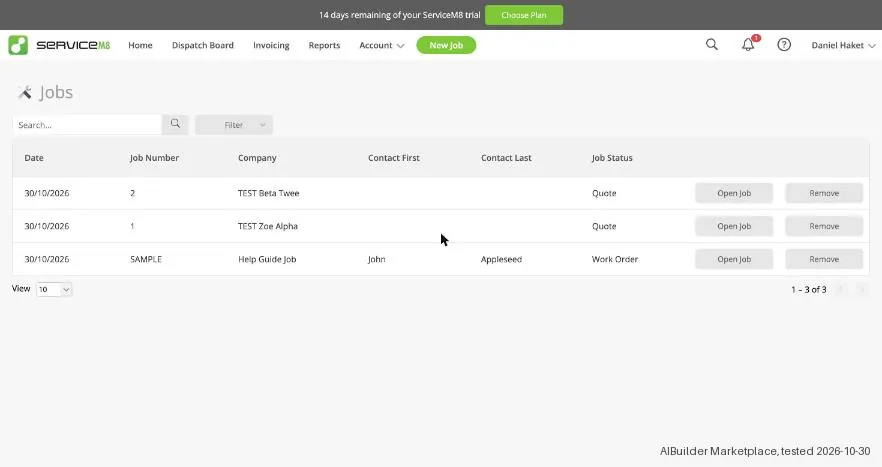
Tested by our team on 30 October 2026 on the free trial: Daan created the account and our AI assistant ran the test in Daan's browser. We went through the setup wizard, created two made-up quote jobs for two new clients and looked for an export.
How we tested
- Went through the setup wizard
- Created two made-up clients with a quote job each
- Looked through the jobs, clients, reports and account menus for an export
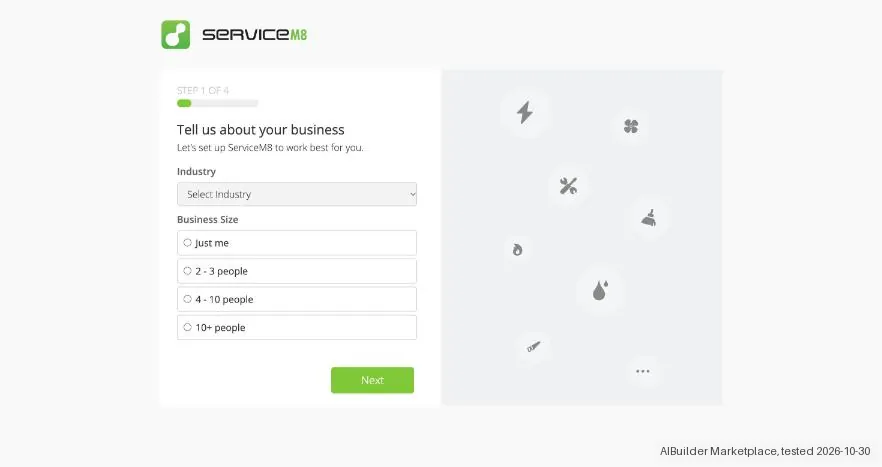
- The trial runs 14 days with no card. The four-step setup asks for your industry, accounting software and branding, and the last two steps can be skipped.
- New accounts include a sample job, and in our account its address was a real street near the location of the signup.
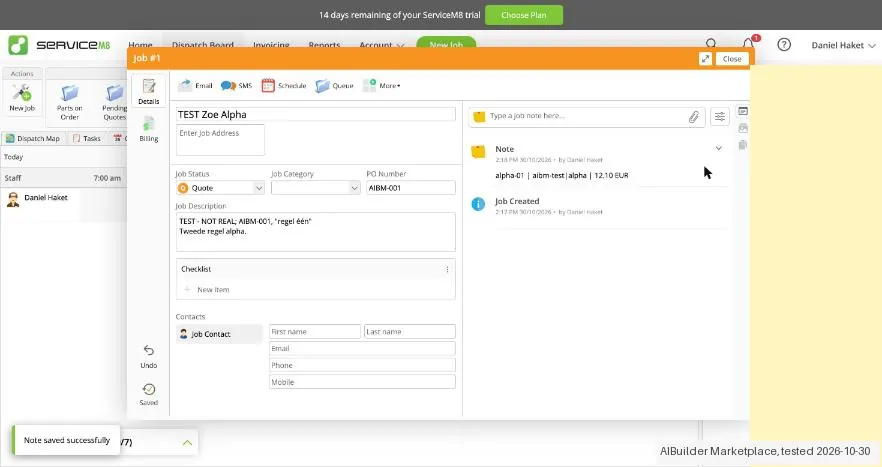
- Client names lost their accents: 'TEST Zoë Alpha' became 'TEST Zoe Alpha' as soon as we created the client. The job description kept accents and line breaks.
Pricing (2026)
✓ Pricing re-verified 19 Sep 2026
| Plan | Price | What you get |
|---|---|---|
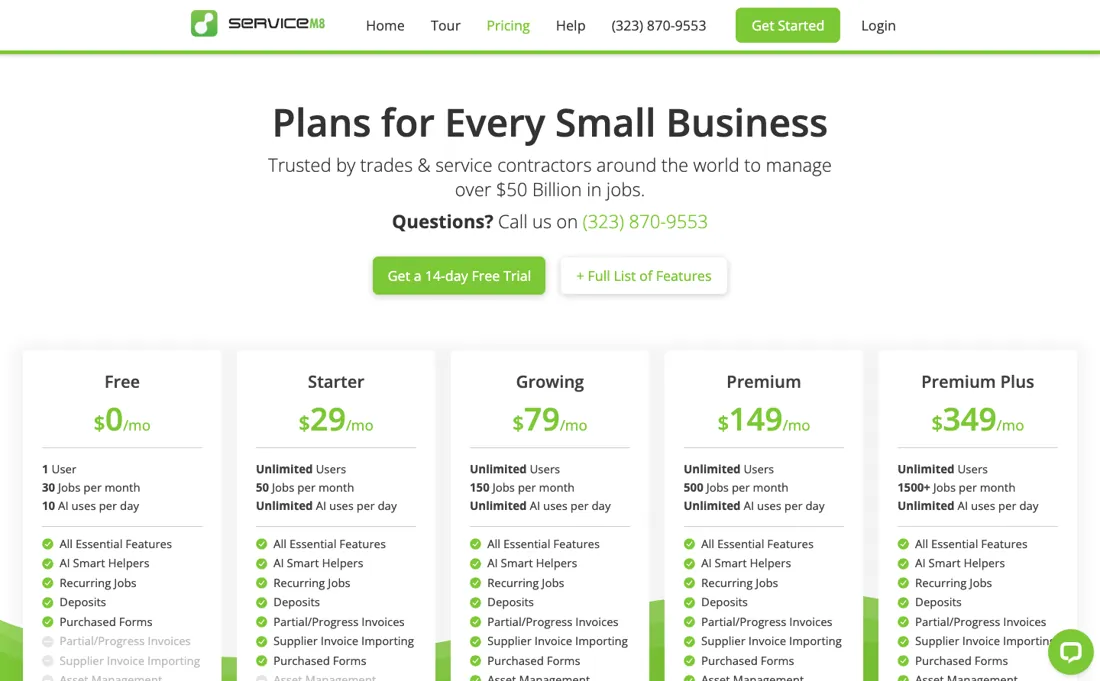
| Free | $0 | 1 user, 30 jobs a month, SMS at 10c each |
| Starter | $29 | unlimited users, 50 jobs |
| Growing | $79 | 150 jobs |
| Premium | $149 | 500 jobs |
| Premium Plus | $349 | 1,500+ jobs, additional jobs at 20c each |
Summarised from the pricing notes below; the notes carry the conditions.
Priced by jobs per month, with unlimited users on every paid tier. Free $0: 1 user, 30 jobs a month, SMS at 10c each. Starter $29: unlimited users, 50 jobs. Growing $79: 150 jobs. Premium $149: 500 jobs. Premium Plus $349: 1,500+ jobs, with additional jobs at 20c each — the only tier where the page prices an overage. Text messaging is listed as free on all four paid tiers, but the FAQ states there is an overage fee per SMS above each plan's monthly SMS cap, and neither the caps nor that fee are printed.
Going over the job ceiling is not a hard stop: the FAQ gives seven further days of normal use, after which you either reach your monthly reset or are prompted to upgrade. A 14-day free trial with full feature access is offered and needs no card; there are no lock-ins and changes are pro-rata. The AI Smart Helper is listed as available on All Plans and the page prints no daily usage cap for it (our August reading recorded ten uses a day on Free; that limit no longer appears on this page).
The full app is iOS; Android is served by the cut-down ServiceM8 Lite. Plans change — always verify the live price on their site.
Category context: Operations & Workflow. Across the 52 tools in this category that we researched with a public US-dollar price, the median entry price is $27 a month (lowest paid plan as listed, per seat where the vendor prices per seat). Compare pricing conditions in the Software Cost Atlas →
What the pricing page doesn’t say
The meter is jobs instead, and jobs are the thing you least control. Fifty a month on Starter is roughly two a working day, which a two-van operation passes in a busy month — and the next step is not a small one, it is $29 to $79. Count your jobs in your best month rather than your average, because that is the month that will bump you, and a seasonal trade will spend part of the year paying for a tier it does not need.
The free tier at 30 jobs and one user is a real trial, not a plan.
Watch the video review
The video version of this review, from our YouTube channel.
⚡ Short on time? Watch the 30-second verdict Short.
What ServiceM8 does
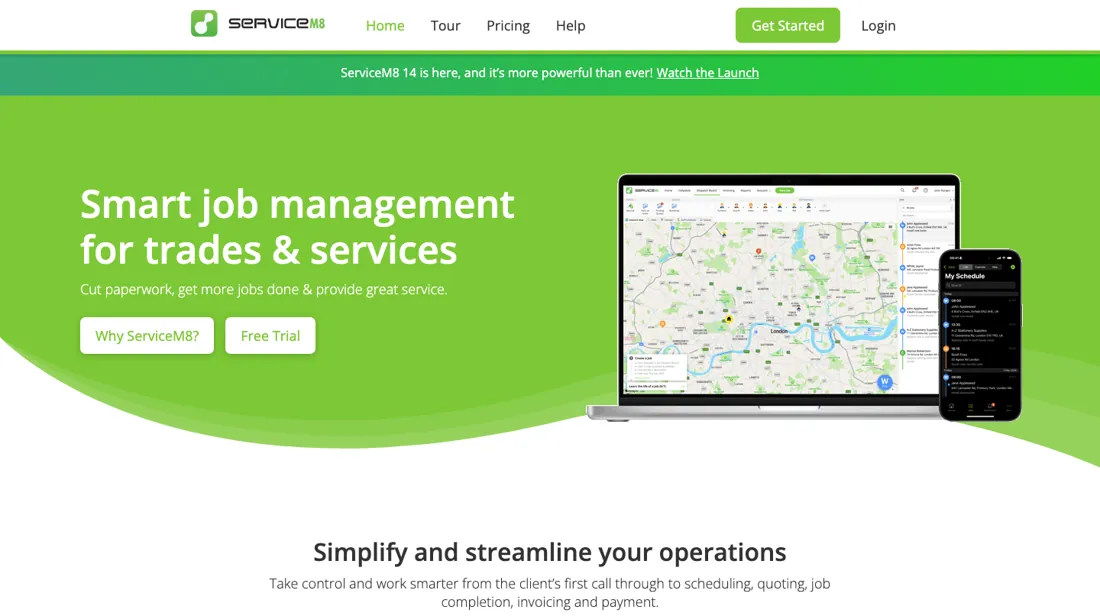
Job management for trades and service contractors: scheduling, quotes, job cards and invoicing.
What buyers report about ServiceM8
Hands-on: tested 2026-10-30Reported by buyers: G2, Capterra, GetApp and Software Advice, read August 2026
Themes from the buyer-review sites listed at the foot of this page, read in August 2026. We tested ServiceM8 ourselves on 2026-10-30, but one test is a narrow sample, so here is what other buyers report. We summarise it here because the complaints are usually the part a vendor page leaves out.
- • It does not charge per user. Every apprentice, subcontractor and admin can have access without the seat count driving the bill — unusual in this category and the main reason small trades pick it. 94% satisfaction across 288 reviews.
- • The Starter plan is free up to 10 jobs a month, so you can run it properly before paying.
- • Android support is limited — this is an iOS-first product, and if your crew is on Android that decides it before anything else does.
- • It needs a solid connection; field staff in poor coverage will feel that.
- • Reporting, batch invoicing and staff management all draw requests for improvement.
- • Support responsiveness is inconsistent, and paid plans start around $149/month once you pass the free tier.
Unlimited users, metered jobs
Say the good part first, because it is genuinely unusual: every paid tier carries unlimited users. Your whole crew goes in without the bill moving, which in field-service software is close to unheard of (2026-08-30, re-read on their own pricing page from a US exit, USD). The meter is jobs instead, and jobs are the thing you control least. Free is $0 for one user and 30 jobs a month.
Starter is $29 for 50, Growing $79 for 150, Premium $149 for 500 and Premium Plus $349 for 1,500 or more. A second, quieter meter sits on the free tier only: ten AI uses a day, where every paid tier is unlimited. Fifty jobs a month is about two and a half a working day, which a two-van operation passes in any decent month — and the next step is not gentle: $29 to $79.
Per job the ladder does improve, from $0.58 on Starter to $0.53 on Growing, $0.30 on Premium and $0.23 on Premium Plus, so volume is rewarded. But the marginal jobs are what matter when you are choosing: the hundred extra jobs Growing buys cost $0.50 each, while the 350 that Premium adds cost $0.20 each. The middle of this ladder is the expensive part. So count your jobs in your best month rather than your average one, because that is the month that trips the tier.
And if your trade is seasonal, accept that you will spend part of the year on a plan you do not need — or plan to move between tiers deliberately rather than being moved. The 14-day trial on the paid tiers is where you should be testing the thing that actually matters: whether your people will use it on a phone in a van.
Our monthly capture read this vendor's pricing page every month from August 2026 to October 2026, and the amounts were the same all 3 times. We keep watching — the registry records what moves.
What we found running ServiceM8 ourselves
The first findings are at the top of this page. The rest:
- A new job saves the moment you open it, with Quote as the default status.
- We found no export for jobs or clients in the web app. Clients can be bulk-imported, and the reports are dashboards with totals.
Claim vs. what we measured
We set a claim from ServiceM8's own pages next to what we saw in our test, on the plan named. The status says whether the two describe the same thing and match; it is not a verdict on the product. Confirmations are listed too.
| What the vendor says | What we measured | Status | What it means if you buy |
|---|---|---|---|
| 14-day free trialSource: support.servicem8.com, read 30 Oct 2026 | Measured 2026-10-30: The account banner shows fourteen days remaining of the ServiceM8 trial. No card was entered.Our test, 30 Oct 2026; 14-day trial; tier not inspected | ConfirmedThe fourteen-day claim is compared with the ServiceM8 remaining-trial banner, not a verified paid plan or mobile-app feature set. | Trial duration matches; paid plan and web export scope remain unverified. |
| 14-day free trialSource: support.servicem8.com, read 30 Oct 2026 | Measured 2026-10-30: No checkout opened. The plan overview or free editing route does not establish a tax-inclusive payable total.Our test, 30 Oct 2026; 14-day trial; tier not inspected | Not testableServiceM8 Choose Plan was left unopened; jobs created during trial establish no amount due, seat minimum or tax treatment. | Final currency, tax, term, seats, fees and payment total remain unverified. |
| you do not need a credit cardSource: support.servicem8.com, read 30 Oct 2026 | Measured 2026-10-30: No card was entered during the observed post-signup route. Daan handled signup; its individual screens were not counted.Our test, 30 Oct 2026; 14-day trial; tier not inspected | ConfirmedThe ServiceM8 setup wizard and Quote-job route required no card during the recorded session; later subscription activation is untested. | The observed route proceeded without card entry; billing later remains untested. |
Exit test: can you take your data out?
Created two Quote jobs with fictional customers, kit IDs in PO Number, multiline descriptions and separate notes. Test date: 30 Oct 2026. We describe the friction rather than score it; this is one run with synthetic records, not a verdict on ServiceM8.
| What we checked | What we saw |
|---|---|
| Fields offered by the export dialog | |
| Not offered in the field selector |
|
| The exported file | We did not inspect the file, so data retention and loss remain unverified. |
| Awkward but not lost | Job descriptions kept accents, quotation marks and line breaks in the UI. New Job creates the job immediately with Quote as the default status. Separate notes held the custom codes, tags and amount strings; structured equivalents were not tested. |
| Export route | History/Jobs, Clients and Reports offered no job or customer export in the inspected web UI. Clients offers Bulk Import. Settings was not searched, so broader export availability remains untested. |
| Export format | No job or customer export file obtained. |
| Re-importing the export | Customer Bulk Import was not tested. No job restoration or update round trip performed. |
| Cancelling | Cancellation, expiry and account deletion were not tested. The control date, where recorded, is planning only. |
What the exit test does not show:
- Full signup screen count and first-result setup speed.
- Actual cancellation, expiry and deletion.
- All kit fields that were not entered.
- Application reimport or restoration.
Kit check counts
Kit projecten-taken-feedback 1.0.0; run servicem8-2026-10-30; observed 2026-10-30.
- export / AIBM-001: Of 10 checks: 0 kept, 0 changed, 0 lost, 0 not offered, 10 not tested
- export / AIBM-002: Of 10 checks: 0 kept, 0 changed, 0 lost, 0 not offered, 10 not tested
- reimport / AIBM-001: Of 10 checks: 0 kept, 0 changed, 0 lost, 0 not offered, 10 not tested
- reimport / AIBM-002: Of 10 checks: 0 kept, 0 changed, 0 lost, 0 not offered, 10 not tested
Each record and phase uses this kit’s checks. Counts describe this run; they are not a score or a comparison between kits.
Mail in the first 14 days
Mail timeline: not measured.
Screenshots from our test (click to enlarge)

What this test does not show:
- Scheduling, invoicing and payments
- The mobile app
- Accounting software sync
- Support's answer (we emailed our three questions on 30 October)
Most of our reviews are researched rather than run — how we review explains which is which, and why we do not pretend otherwise.
How to actually use ServiceM8
Count your jobs in your busiest month, not your average one, because that is the month the tier is set by. Fifty jobs on Starter is about two and a half a working day — a two-van operation clears that easily — and the step from Starter to Growing is $29 to $79. Then put the whole crew in from day one, because you can. Unlimited users on every paid tier means there is no reason to ration logins, and the value of field software comes entirely from everyone actually using it rather than one person retyping job cards.
Use the 14-day trial on a real job, end to end: quote, schedule, dispatch, complete, invoice, take payment — from a phone, in a van, with poor signal. That is where this class of software fails, and never in the office. If your trade is seasonal, decide in advance how you will handle the quiet half of the year. The meter is jobs, so a winter on a summer tier is money for nothing — plan to step down deliberately rather than noticing in March.
Distilled from ServiceM8 pricing page (servicem8.com/pricing) plus the ServiceM8 Help Center getting-started track (support.servicem8.com) and the product tour (servicem8.com/tour), read 30 August 2026 from a US exit — the five tiers and their job ceilings, the unlimited-users rule on every paid tier, the AI-use cap on Free, and the set-up-to-first-job sequence the help centre lays out.
ServiceM8 vs Tradify, side by side
Each column shows the vendor’s own published entry price, read on the date shown. Entry prices can cover different services or units, so check what each one buys. We do not average them into a score.
The Tradify link above is an affiliate link — we may earn a commission if you sign up, at no extra cost to you — and the other column is a plain link. Neither changes what this table says.
The natural comparison is Tradify or Jobber — the direct job-management peers — compare on jobs included versus users included, because that is the axis these differ on.
Frequently asked questions
Can you export your data from ServiceM8?
Exit check 2026-10-30; route excerpt: History/Jobs, Clients and Reports offered no job or customer export in the inspected web UI …; came along (excerpts): not_tested; lost (excerpts): not_tested; re-import: not tested.
What happens when I run out of jobs mid-month?
You keep working. Their FAQ says you can create new jobs as normal for another seven days after you hit the ceiling; if your monthly reset falls inside that window your job credits refresh and nothing happens, and if it does not you are prompted to upgrade. So the meter is a prompt rather than a wall, and there is no overage fee on Starter, Growing or Premium — the comparison table prices additional jobs at 20c only on Premium Plus. That seven-day grace is worth knowing before you buy a tier above the one you need for the two busy months a year.
Will it work if my crew is on Android?
Partly, and this is the thing to settle before the price. The full-featured app is built for iOS; Android gets ServiceM8 Lite, which the FAQ describes as being for technicians, subcontractors and temporary workers who need core job management — view schedules and job details, complete checklists. ServiceM8 still recommends iPhones for your main field technicians, and runs both an Upgrade to iPhone offer and a Small Business Fund to help buy them. A $29 subscription that assumes your crew carries iPhones is not a $29 decision.
Is the free plan really capped at 30 jobs?
That is the printed number, and the page names two ways past it. The FAQ says free-plan users can earn unlimited bonus jobs simply by accepting card payments, and a separate Promotions answer says working through their Learning Roadmap unlocks higher job and SMS limits, plan upgrades and higher-tier add-ons. Neither route is quantified anywhere on the page, and both are theirs to change, so treat 30 as what you are entitled to and anything above it as a bonus you have not been promised in writing.
Text messaging is listed as free on paid plans — is it unlimited?
No. The comparison table shows 10c per SMS on Free and Free on all four paid tiers, but the FAQ says there is a standard overage fee per SMS sent over your plan's monthly SMS cap. The caps themselves are not printed on the pricing page, and the fee is not either. If your plan is to lean on on-the-way texts, booking reminders, quote follow-ups and two-way SMS — which is most of what this product automates — ask for the per-plan cap and the overage rate before you commit.
Is this a hands-on review of ServiceM8?
Yes. We tested ServiceM8 ourselves on 2026-10-30; the section above says what we tested, what we found and what we did not test, and where a figure comes from the vendor's own documentation instead. Most of our reviews are researched rather than run; we say which is which. We name what each tool is good and bad at, and we have no affiliate relationship with ServiceM8 — we earn nothing whether you sign up or not.
- Buyer reviews on G2, Capterra, GetApp and Software Advice, read August 2026.
- Re-verified 2026-09-19 on their own pricing page, USD.
- A dated screenshot of that pricing page, kept on this site as the receipt.
- Our own hands-on session with ServiceM8 (2026-10-30), written up in full further down this page.
Others in this category
Reviewed operations & workflow tools that share ground with ServiceM8 — comparable in what they do, not drop-in swaps:
New reviews, price changes we recorded, and the cost conditions we found. No sponsored placements. Unsubscribe anytime.
This is our researched assessment — not a paid placement. How we review →