SaneBox Review (2026)$4.54/mo Is the Two-Year Rate
 By Daan Haket · Researched and written with an AI assistant · who does what
SaneBox works with any email provider, which is a genuine advantage over the built-in tools in Gmail and Outlook.
heavy-email professionals drowning in a cluttered inbox who want AI triage that works across any mail client.
your inbox is manageable or your mail client's built-in filtering already handles it — you don't need to pay for this.
Transparency: the “Visit” links on this page are affiliate links — we may earn a commission if you sign up, at no extra cost to you. No vendor can pay for a better review or verdict. How we make money →
Pricing (2026)
✓ Pricing re-verified 24 Sep 2026
(amounts unchanged since 18 Aug 2026; re-verified 24 September 2026 against the plan data that sanebox.com/pricing embeds for its client-side price cards) Three plans, and the advertised price is the two-year rate. Snack $4.54/mo billed $109 every 2 years, $5.42/mo billed $65 annually, or $9.49 month to month: 1 email account and 2 of the Sane features. Lunch $7.46 ($179 every 2 years) / $9.08 ($109 a year) / $15.99: 2 accounts and 6 features.
Dinner $22.04 ($529 every 2 years) / $26.58 ($319 a year) / $42.99: 4 accounts and every feature, plus phone support. The free trial is 7 days with all features on up to 4 accounts. Education, non-profit and government get another 25% off on request during the trial. Plans change — always verify the live price on their site.
Category context: Operations & Workflow. Across the 51 tools in this category that we researched with a public US-dollar price, the median entry price is $25 a month (lowest paid plan as listed, per seat where the vendor prices per seat). Compare pricing conditions in the Software Cost Atlas →
What the pricing page doesn’t say
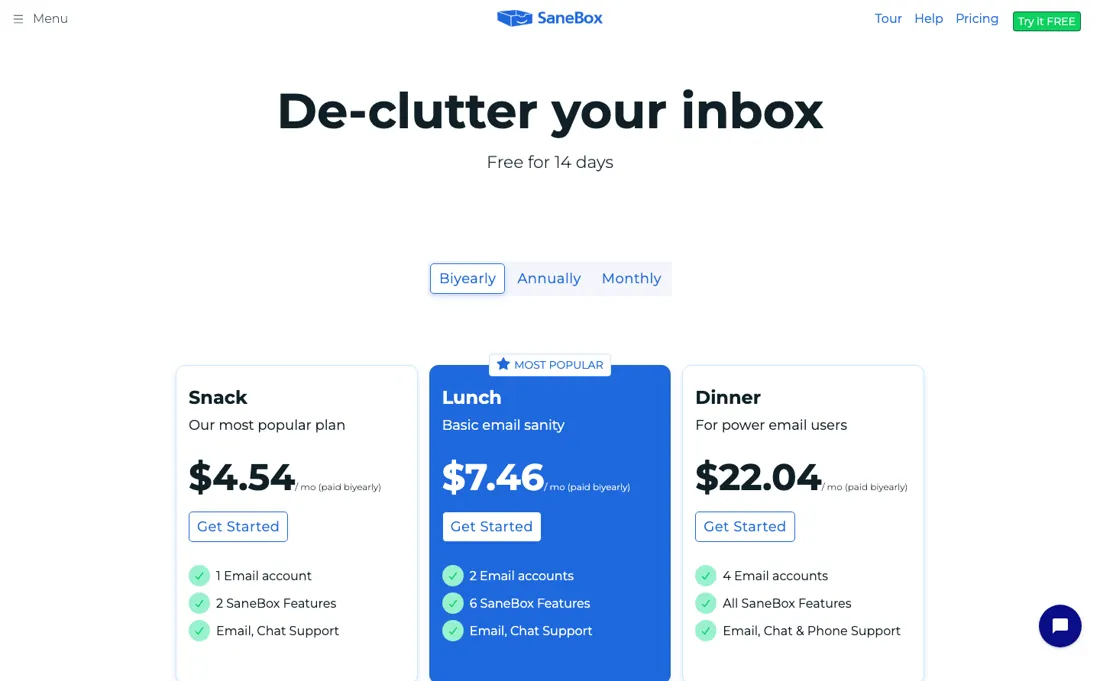
But you are paying monthly to filter mail that modern clients increasingly sort for free. The value is real only if your inbox is genuinely overwhelming and native filters are not cutting it. Price it on the plan you would actually keep: the headline rate is a two-year commitment, and month to month the same Snack plan is $9.49 rather than $4.54.
Watch the video review
The video version of this review, from our YouTube channel.
⚡ Short on time? Watch the 30-second verdict Short.
What SaneBox does
Email triage that moves low-priority mail out of the inbox and works with any provider. The honest catch: you are paying monthly to filter mail that modern email clients increasingly sort for free.
What buyers report about SaneBox
Hands-on: not tested by usReported by buyers: G2 and Trustpilot, read August 2026
Themes from the buyer-review sites listed at the foot of this page, read in August 2026. We have not run SaneBox ourselves, so this is other buyers' experience rather than ours. We summarise it here because the complaints are usually the part a vendor page leaves out.
- • It works with the mail client you already use rather than replacing it, which reviewers rate as the main advantage over switching to a new inbox app.
- • The privacy model is unusually clean — it reads headers and metadata, not message bodies — and privacy-conscious reviewers call this out specifically.
- • No free tier, and the trial is only 7 days — the whole judgement has to fit in a week.
- • The features people actually want — deep cleaning, attachment handling — sit on the top tier, not the entry one.
- • Cancellation friction comes up repeatedly. Check how you cancel before you start the trial.
Pages read (August 2026): Trustpilot
When the paid plan is worth it
SaneBox has no free tier — a 7-day trial and then a paid plan — and the tiers split on two axes that are easy to miss. Read in a live browser on their pricing page on 18 August 2026, because the figures are rendered client-side and a plain fetch of that page returns nothing: Snack covers 1 email account, Lunch 2 and Dinner 4. The second axis is the one that catches people.
Lunch does not give you every feature — it lets you pick 6 from a list of eleven: SaneLater, SaneNoReplies, SaneDoNotDisturb, SaneBlackHole, SaneNews, SaneCC, Reminders, Attachments, SaneSnooze, SaneNotSpam and the filtering extras. Snack gives you 2 of the eleven. Only Dinner includes all of them. So if SaneBlackHole and SaneReminders are the two you came for, on Snack that is your entire allowance. The allowance is per connected account, which is the one piece of good news in the arrangement.
The pricing itself has a sharper edge than most. The number on the pricing page is the every-two-years rate: Snack reads $4.54 a month, but that is $109 charged once for two years. The same plan is $5.42 a month billed annually and $9.49 month to month — so the advertised figure is less than half what a month-to-month buyer actually pays, and Dinner runs from $22.04 to $42.99 across the same three columns.
A 20-30% annual discount is normal in this market; a 109% gap between the headline and the flexible option is not. And it is worth knowing that the cheap number on the page asks for a two-year commitment to a tool you are meant to be trialling for seven days.
How to actually use SaneBox
SaneBox works by moving mail between folders on your existing account, so the first decision is which account to connect — and on Snack you only get one. Connect the inbox that actually hurts. Then leave it alone for a few days. The filtering learns from where you move things, so the useful signal is you dragging a message out of SaneLater back into the inbox, not you reading a settings page.
Judge it at the end of the trial, not on day two. Pick your feature set deliberately if you land on Lunch. Six of eleven is a real constraint, and the two most people end up wanting are SaneBlackHole, which permanently kills a sender, and SaneNoReplies, which tracks mail you sent that nobody answered. Both are on the list you choose from, not included by default.
Distilled from SaneBox's own help-centre articles on the Snack, Lunch and Dinner subscriptions, read 2 August 2026, and the pricing page at https://www.sanebox.com/pricing, read 24 September 2026 from the plan data embedded in the served page (three billing cycles per plan with their totals, accounts and feature counts per plan, the default feature selection shown to a new visitor, and the 7-day trial length).
The natural comparison is built-in email filters or Superhuman — native or premium email tools.
Frequently asked questions
Is the two-year SaneBox plan really the cheapest way to pay?
Yes, if you are sure you will keep it for two years. Read 24 September 2026 from the plan data on sanebox.com/pricing, Snack costs $109 once for two years, $65 a year on annual billing or $9.49 month to month. Over 24 months that is $109, $130 or $227.76. For Lunch the same comparison is $179, $218 or $383.76, and for Dinner $529, $638 or $1,031.76. The two-year price saves about a sixth against annual, but month to month costs roughly twice as much. The trial is 7 days, so the cheapest price asks for a two-year commitment after one week of use. Annual is the middle ground if you are unsure.
I have two email accounts. Which SaneBox plan do I need?
Lunch at the least. The plan data on the pricing page, read 24 September 2026, gives Snack 1 email account, Lunch 2 and Dinner 4, and 4 is the most any listed plan connects. Lunch is $15.99 month to month, $109 a year or $179 for two years, and comes with 6 features against Snack's 2. If both inboxes need every feature, including SaneSnooze and SaneCC, that is Dinner at $42.99 a month or $319 a year, which also covers two more accounts.
Which SaneBox features come with Snack and Lunch?
A short list, set by the plan's feature count. Read 24 September 2026, the plan data gives Snack 2 features and Lunch 6, and the selection the page shows a new visitor is SaneLater and SaneBlackHole on Snack, then SaneNews, SaneNoReplies, SaneNotSpam and DIY Folders added on Lunch, and SaneSnooze and SaneCC added on Dinner. So a Snack buyer gets the core filter (unimportant mail to SaneLater) and the one-click sender block, but no reply tracking, newsletter folder or snooze. If SaneNoReplies is why you are buying, Lunch is the entry point, not Snack.
Is this a hands-on review of SaneBox?
This is a researched assessment, not a hands-on test — where we've used a tool ourselves, we say so explicitly. We name what each tool is good and bad at, and we earn a commission only if you sign up, at no cost to you.
- Buyer reviews on G2 and Trustpilot, read August 2026.
- Amounts unchanged since 18 Aug 2026; re-verified 24 September 2026 against the plan data that sanebox.com/pricing embeds for its client-side price cards.
- A dated screenshot of that pricing page, kept on this site as the receipt.
Others in this category
Reviewed operations & workflow tools that share ground with SaneBox — comparable in what they do, not drop-in swaps:
New reviews, price changes we recorded, and the cost conditions we found. No sponsored placements. Unsubscribe anytime.
This is our researched assessment — not a paid placement. The “Visit” links on this page are affiliate links: we may earn a commission if you sign up, at no extra cost to you, and it never changes our take. How we review →