EngageBay Review (2026)Free Tier, Then $14.99 a User
 By Daan Haket · Researched and written with an AI assistant · who does what
The meter is contacts AND seats at once: prices are per user, and each tier caps contacts — Basic’s 500 contacts fills fast, and the Growth jump is steep ($15 → $65 per user).
small teams that want CRM, email marketing, helpdesk and live chat in one affordable suite — the free tier is a genuine trial-for-life, and it undercuts HubSpot hard at small scale.
your contact list is big (per-tier caps push you up fast) or you need best-of-breed depth in one area — all-in-one means good-at-everything, not best-at-anything.
Transparency: the “Visit” links on this page are affiliate links — we may earn a commission if you sign up, at no extra cost to you. No vendor can pay for a better review or verdict. How we make money →
Pricing (2026)
✓ Pricing re-verified 5 Oct 2026
| Plan | Price | What you get |
|---|---|---|
| Free | $0 | 250 contacts, 1,000 branded emails, free for teams up to 15 members |
| Basic | $14.99/user/mo | 500 contacts — $12.74 on biennial prepay |
| Growth | $64.99/user/mo | 5,000 contacts, marketing automation — $55.24 on biennial prepay |
| Pro | $119.99/user/mo | 10,000 contacts, SSO, uptime SLA, phone support — $101.99 on biennial prepay |
Genuinely free tier: $0 for 250 contacts with email marketing, CRM, helpdesk and live chat, and the plan card adds that it is free for teams of up to 15 members. All-in-One suite per user/month on monthly billing: Basic $14.99 (500 contacts), Growth $64.99 (5,000 contacts, marketing automation), Pro $119.99 (10,000 contacts). The three rates have not moved since our August reading, but the Pro contact allowance has: the plan card now says 10,000 contacts where we recorded 50,000.
A note beside it confirms that ceiling in the vendor's own words — “The Pro plan includes up to 10,000 contacts” — and directs anyone who needs more to schedule a call about expanding the limit. The published ceiling is a fifth of what it was, and everything above it is now a sales conversation rather than a price. Read the toggle before you read the number.
The page defaults to a biennial ‘15% off’ display (Basic $12.74, Growth $55.24, Pro $101.99) with a yearly ‘8% off’ step in between ($13.79, $59.79, $110.39), so the friendly figure in the headline assumes you prepay two years. Single bays (Marketing or CRM & Sales) start at $11.04/user/mo on that same biennial display. One oddity worth knowing before you quote a number back to anyone: the page’s own title tag still advertises “Free to $99/Month”, and $99 is not a rate in any of the three billing columns. Plans change — always verify the live price on their site.
Category context: Sales & CRM. Across the 12 tools in this category that we researched with a public US-dollar price, the median entry price is about $45 a month (lowest paid plan as listed, per seat where the vendor prices per seat). EngageBay’s entry price of $14.99 a month sits below that median. Compare pricing conditions in the Software Cost Atlas →
AIBUILDER20 — 20% off your first billing, created for AIBuilder Marketplace readers and confirmed in writing by EngageBay on 10 Aug 2026. Read the limits before you count on it: it works only on Growth or Pro, and only on yearly or biennial billing — the free tier, Basic and every monthly plan are excluded, and the code expires on 31 October 2026. Because those plans are prepaid, the first billing is the whole term, so this is 20% off your first year or first two years and then the standard rate at renewal. One detail we had to go back and ask about, now settled: EngageBay's pricing page defaults to a biennial ‘15% off’ display, so it was not clear which figure the 20% comes off. EngageBay confirmed in writing on 12 Aug 2026 that it is calculated from the list prices — $64.99 per user per month for Growth and $119.99 for Pro — and not from the already-discounted biennial figures. Compare your checkout total against those list prices.Vendor-confirmed: Confirmed in writing by EngageBay, 12 Aug 2026. Not tested by us at a checkout. Ends 31 Oct 2026 (the vendor gave no time or time zone). Claim the deal →
What the price did
We capture EngageBay’s own pricing page every month and keep the figures, so this is our record of the page — not a forecast, and not someone else’s summary.
Three readings of the monthly rates, no movement on price. In August, on 18 September and on 5 October 2026 the All-in-One suite read Basic $14.99, Growth $64.99 and Pro $119.99 per user per month on monthly billing. What moved was the Pro contact allowance: 50,000 in our August entry, 10,000 on 18 September, and still 10,000 with a schedule-a-call note on 5 October.
What the pricing page doesn’t say
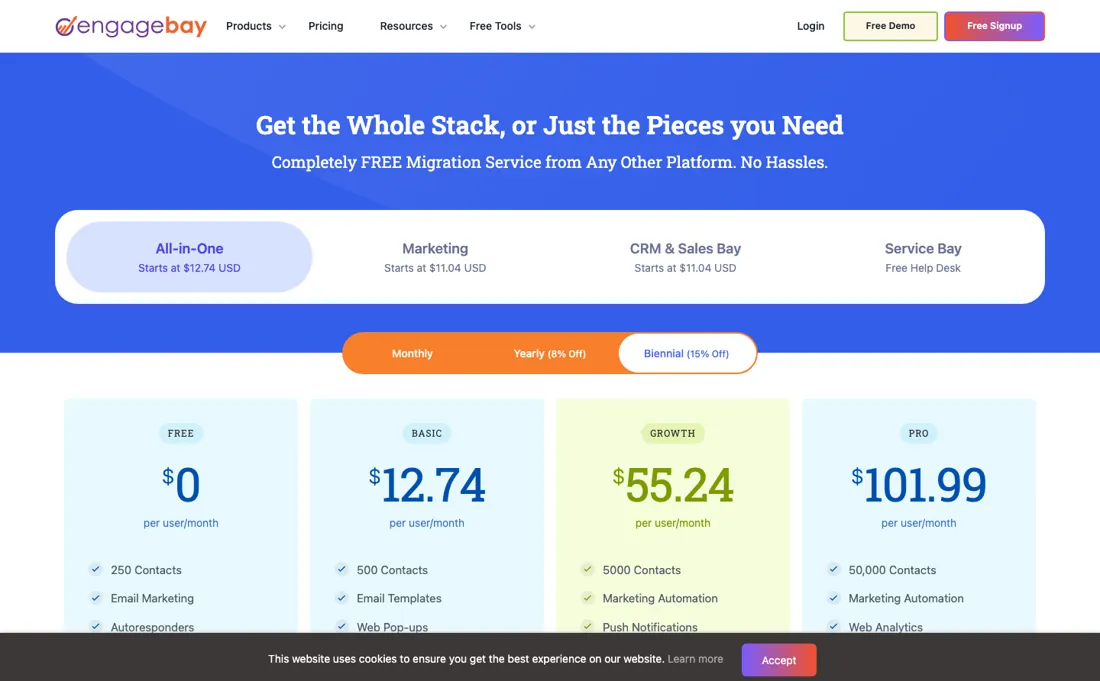
The advertised ‘starts at $12.74’ assumes biennial prepay — two years upfront for the friendly number. Real automation only starts at Growth.
Watch the video review
The video version of this review, from our YouTube channel.
⚡ Short on time? Watch the 30-second verdict Short.
What EngageBay does
All-in-one CRM, marketing, helpdesk and live chat for small teams — a genuine free tier (250 contacts) and per-user suites that undercut the big names.
What buyers report about EngageBay
Hands-on: not tested by usReported by buyers: G2, Capterra and Tekpon, read August 2026
Themes from the buyer-review sites listed at the foot of this page, read in August 2026. We have not run EngageBay ourselves, so this is other buyers' experience rather than ours. We summarise it here because the complaints are usually the part a vendor page leaves out.
- • Marketing, sales and support in one bill at a fraction of the enterprise suites — 4.7 across 617 G2 and 907 Capterra reviews, with affordability the single most-cited reason.
- • Support is repeatedly called responsive, which is not a given at this price.
- • Advanced automation has a real learning curve, and that is where new users stall.
- • Reporting and analytics are the recurring request — reviewers want more depth and better visuals.
- • Integration breadth and mobile polish both trail the larger platforms.
- • Contacts are tiered: 500 on Basic at about $14 per user, 5,000 on Growth at about $60, 50,000 on Pro at about $110. Price the tier your list needs.
When the paid plan is worth it
EngageBay's free plan covers a single early-stage user managing up to 250 contacts and sending up to 1,000 branded emails a month, with basic forms and one landing page - enough to validate a small pipeline before paying anything. The push to Basic ($14.99 per user per month) comes fast: free tops out at 250 contacts, and Basic only lifts that to 500, so a team running any real outreach volume outgrows it within weeks.
Growth ($64.99 per user per month) becomes worth it mainly for automation depth - 10 workflows with up to 15 nodes each - rather than for more contacts, since 5,000 contacts is a jump most small teams will not need right away. What upgrading does not fix is the per-user pricing itself. Every tier is priced per seat, so adding sales or marketing staff multiplies the bill directly — headcount growth compounds cost independently of contact volume or automation needs.
How to actually use EngageBay
Getting first value from EngageBay starts with setting up the account. Then either import an existing contact list by CSV, mapping fields during import, or switch on Google Contacts sync under Preferences to bring existing contacts in; two-way email sync with Gmail, Outlook or Office 365 is a separate feature of the All-in-one Pro plan. Before any marketing email will reliably land in inboxes, the sending domain needs DKIM and SPF verification.
EngageBay generates the records under Account Settings, but adding them as DNS TXT records happens at your DNS host, outside EngageBay, and confirmation depends on DNS propagation there. This is a common stalling point because it requires access to the domain's DNS rather than just an EngageBay login, and it cannot be rushed from within the product. A second practical snag is the free plan's size: 250 contacts and 1,000 branded emails, so a bulk import can outgrow it on day one.
Sending is also capped per day, and a broadcast to a list larger than your daily limit shows a daily-limit message instead of going out. Automations run on EngageBay's own events, such as a form submission, a tag or a link click, and need no integration, but they start on the Growth plan; Free and Basic have none.
Distilled from engagebay.com/pricing (plan cards and comparison table), help.engagebay.com/articles/account-settings (DKIM and SPF), /articles/preferences (Google Contacts sync), /articles/syncemails (two-way email sync, All-in-one Pro), /articles/email-broadcast-shows-i-have-reached-my-daily-limit.-why and engagebay.com/support/setup-automation (automation triggers), all read 29 Sep 2026. Pricing re-read 5 October 2026 (served HTML, /pricing now redirects to /pricing/all-in-one): monthly $14.99/$64.99/$119.99, yearly $13.79/$59.79/$110.39, biennial $12.74/$55.24/$101.99, contacts 250/500/5,000/10,000, Free for teams up to 15 members, bays from $11.04, title tag still "Free to $99/Month".
Try it on your own work first. The free Software Test Drive for a CRM or email tool gives you six tests with fictional data, a place to record what worked and a decision sheet you can print. There are no EngageBay-specific steps yet, so the general tests apply. Build a test plan →
EngageBay vs Keap, side by side
Each column shows the vendor’s own published entry price, read on the date shown. Entry prices can cover different services or units, so check what each one buys. We do not average them into a score.
Both names above are affiliate links: we may earn a commission if you sign up, at no extra cost to you. Neither changes what this table says.
The natural comparison is Keap — Keap is the automation-first veteran at a higher price point; EngageBay is the budget all-in-one with a real free tier — pick Keap for automation depth, EngageBay for breadth per dollar.
Frequently asked questions
What does EngageBay actually cost per user?
Three All-in-One tiers on monthly billing, read on engagebay.com/pricing on 18 September and again on 5 October 2026: Basic $14.99, Growth $64.99 and Pro $119.99 per user per month, on top of a free plan at $0. The page opens on a biennial ‘15% off’ view ($12.74, $55.24, $101.99) with a yearly step in between ($13.79, $59.79, $110.39), so the number you see first is the one that asks you to prepay two years. Buying a single bay instead of the suite starts at $11.04 per user per month on that same biennial display.
How many contacts do I get, and what happens when I fill the tier?
Contacts are the real meter and they are capped on every tier: 250 on Free, 500 on Basic, 5,000 on Growth and 10,000 on Pro. That top figure is worth checking against anything older you read, including us — our August entry recorded 50,000 on Pro, and on 18 September and 5 October 2026 the plan card reads 10,000. Past that there is no published price at all: the page says to schedule a call to discuss expanding your contact limit. So the highest number EngageBay publishes is now 10,000 contacts, at $119.99 per user per month.
Is the free plan a real plan or a trial?
A real plan, with a size limit rather than a clock. It is $0 for 250 contacts and carries email marketing, CRM, helpdesk and live chat, and the card states it is free for teams of up to 15 members (read 18 September and 5 October 2026). The catch is not time but capability: marketing automation first appears on Growth at $64.99 per user per month, four tiers up in price from Basic. If automation is the reason you are shopping, the free plan will show you the CRM but not the thing you came for.
Is this a hands-on review of EngageBay?
This is a researched assessment, not a hands-on test — where we've used a tool ourselves, we say so explicitly. We name what each tool is good and bad at, and we earn a commission only if you sign up, at no cost to you.
- Buyer reviews on G2, Capterra and Tekpon, read August 2026.
- Price re-verified 2026-09-18 and again on 2026-10-05 on engagebay.com/pricing, which now redirects to /pricing/all-in-one.
- A dated screenshot of that pricing page, kept on this site as the receipt.
Others in this category
Reviewed sales & crm tools that share ground with EngageBay — comparable in what they do, not drop-in swaps:
New reviews, price changes we recorded, and the cost conditions we found. No sponsored placements. Unsubscribe anytime.
This is our researched assessment — not a paid placement. The “Visit” links on this page are affiliate links: we may earn a commission if you sign up, at no extra cost to you, and it never changes our take. How we review →