Lindy.ai Review (2026)@mentions Take a $29.99/mo Seat
 By Daan Haket · Researched and written with an AI assistant · who does what
Cost tracks headcount rather than output: every colleague who so much as @mentions Lindy in Slack takes a paid seat, and a seat you remove runs to the end of the cycle with no mid-cycle proration. Throughout this review we weigh it against Zapier.
teams that live in Slack and want one shared teammate that sits in their meetings, runs scheduled routines and drafts replies inside the tools they already use.
you want flat, predictable automation costs across a large team — Lindy charges for every seat that touches it and the credits expire each cycle, so you pay for people whether or not they used their allowance.
Transparency: the “Visit” links on this page are affiliate links — we may earn a commission if you sign up, at no extra cost to you. No vendor can pay for a better review or verdict. How we make money →
Pricing (2026)
✓ Pricing re-verified 2 Oct 2026
| Plan | Price | What you get |
|---|---|---|
| Plus | $29.99 per user/mo | 3,000 credits per user a month |
| Pro | $99.99 per user/mo | 15,000 credits — five times Plus |
| Max | $199.99 per user/mo | 35,000 credits, about twelve times Plus |
| Enterprise | quoted | credits pool per workspace, refresh each cycle and do not roll over; anyone who uses Lindy takes a paid seat |
Now sold per user, and the credit allowance is published again. Plus is $29.99/mo per user (3k credits per user per month), Pro $99.99/mo per user (15k credits, 5x Plus) and Max $199.99/mo per user (35k credits, ~12x Plus). Enterprise is quote-only. Every seat's credits pool into one workspace balance, refresh each billing cycle and do not roll over; the page sizes work as 2-250 credits for an everyday ask, 250-1,000 for deep work and 1,000-2,500 for a big build.
Anyone who uses Lindy takes a paid seat, including colleagues who only @mention it in Slack — those who join that way get a 7-day free trial first, direct signups are billed straight away. All four tiers connect up to 5 inboxes, and computer use, model selection and MCP support are no longer tier-gated. Plans change — always verify the live price on their site.
Category context: Operations & Workflow. Across the 53 tools in this category that we researched with a public US-dollar price, the median entry price is $29 a month (lowest paid plan as listed, per seat where the vendor prices per seat). Lindy.ai’s entry price of $29.99 a month sits roughly at that median. Compare pricing conditions in the Software Cost Atlas →
What the price did
We capture Lindy.ai’s own pricing page every month and keep the figures, so this is our record of the page — not a forecast, and not someone else’s summary.
Our monthly capture of lindy.ai/pricing recorded three plan prices of $49, $99 and $199 on 7 July 2026, and the identical three on 2 August 2026. Reading the same page on 12 August 2026 it shows Plus $29.99, Pro $99.99 and Max $199.99 per user per month. Read in order, the entry price fell by about 39% somewhere in the ten days after our August capture while the two higher tiers each rose by 99 cents. One caveat we will not paper over: our July and August captures store the amounts without the plan labels, so the pairing of figure to tier is certain only for the 12 August reading. On 2 October 2026 the page still read Plus $29.99, Pro $99.99 and Max $199.99 per user per month with the same 3k, 15k and 35k credit allowances, so the August repricing has now held for seven weeks.
What the pricing page doesn’t say
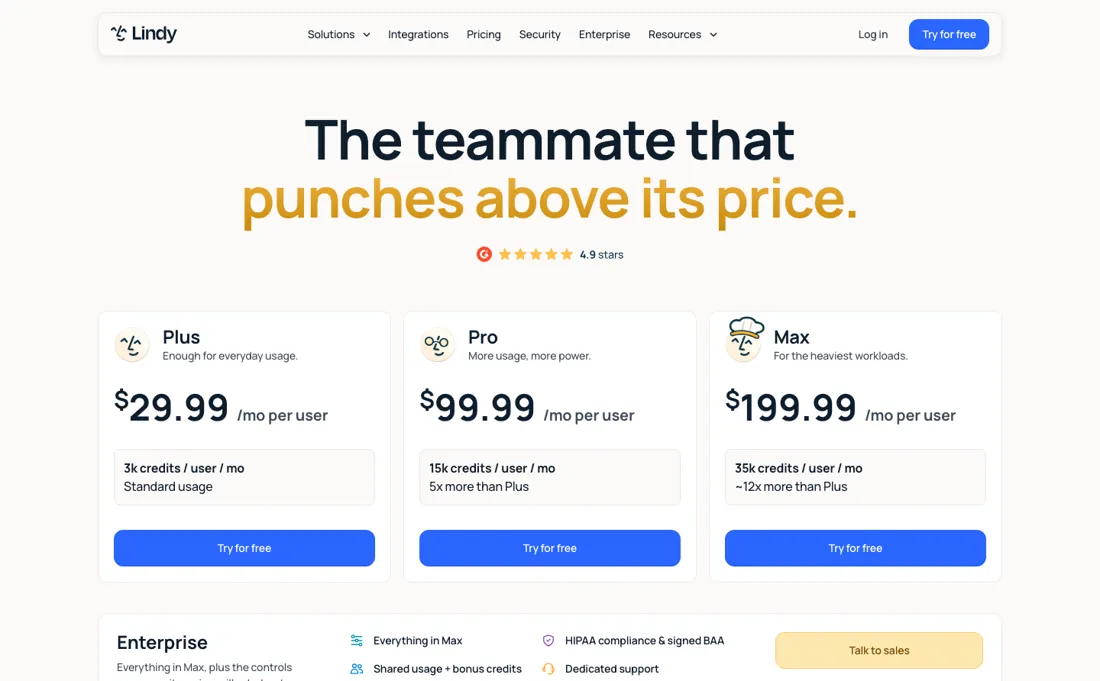
Credits are published now, but as ranges: an everyday ask is 2-250, a big build 1,000-2,500. So a month is still an estimate. And when the shared pool runs dry there is no top-up — Lindy pauses credit-using actions until the reset, unless an admin moves the workspace to a bigger plan.
Watch the video review
The video version of this review, from our YouTube channel.
⚡ Short on time? Watch the 30-second verdict Short.
What Lindy.ai does
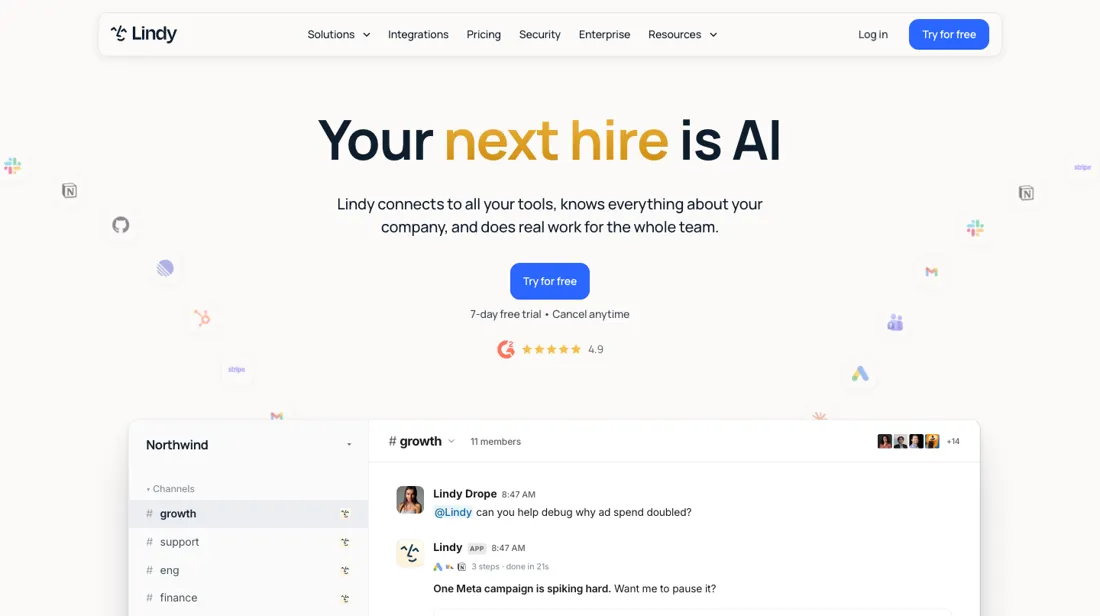
An AI teammate that lives in Slack: @mention it and it works across your other tools, sits in meetings for shared context and runs jobs on a schedule.
What buyers report about Lindy.ai
Hands-on: not tested by usReported by buyers: G2, Trustpilot, Reddit, Capterra and Product Hunt, read August 2026 (Capterra and Product Hunt read 12 August 2026)
Themes from the buyer-review sites listed at the foot of this page, read in August 2026 (Capterra and Product Hunt read 12 August 2026). We have not run Lindy.ai ourselves, so this is other buyers' experience rather than ours. We summarise it here because the complaints are usually the part a vendor page leaves out.
- • Setup is genuinely easy — that is the most common praise across 171 G2 reviews.
- • For supervised work — inbox triage, meeting notes, scheduling — reviewers say it does what it claims.
- • On Product Hunt, users single out that it carries tasks across their other tools rather than only producing text, with ready-made routines for calendars, appointment reminders and reworking existing content.
- • A Capterra reviewer praises how far the templates bend to a specific workflow — in their case reshaping a clinical note template to their own house format.
- • Cost is the single most-mentioned complaint (42 mentions), followed by subscription price (35). The cause reviewers named in August 2026 was the credit system: tasks then cost roughly $0.01 to $0.10+ each depending on model, so a predictable subscription became a variable bill. Lindy has since moved to per-user plans with a published monthly credit allowance per seat; see the price section for the current terms.
- • Several reviewers report charges above their expected cap. Complex agent chains burn credits faster than people expect.
- • Heavy users hit credit walls mid-cycle.
- • Unsupervised reliability is where the complaints concentrate — and support is hard to reach on individual plans.
- • A veterinary practice on Capterra reports that Lindy fails to follow clear, specific instructions more than half the time, that call recordings sometimes come back unusable, and that the AI both omits and invents points from a conversation. The same reviewer describes freezing, display problems, and support that answers by pointing at a tutorial video.
- • Product Hunt users warn that the built-in AI for editing a workflow gets it wrong often enough that you should duplicate the workflow before letting it change anything.
Where the ratings disagree. 4.9 on G2 across 170+ reviews against 2.4 on Trustpilot. The G2 reviews are about whether it works; the Trustpilot ones are about billing, and both are true. Capterra and Product Hunt, read in August 2026, do not open a new gap so much as sharpen the existing one: the praise is still about supervised, templated work and the complaints are still about unattended reliability and support — now with a specific clinical-transcription example behind them rather than a general impression.
Pages read (August 2026 (Capterra and Product Hunt read 12 August 2026)): Trustpilot
When the paid plan is worth it
Two meters run at once here and they multiply: seats and credits. Plus is $29.99 a user a month with 3,000 credits per user, Pro $99.99 with 15,000, and Max $199.99 with 35,000 — so climbing a tier buys five and then twelve times the credits for roughly three and then seven times the price. Per credit the ladder therefore improves sharply, and if credits are what you run out of, staying on Plus is the expensive choice.
But seats are the meter most teams underestimate, because of one rule: anyone who uses Lindy takes a paid seat, including a colleague who only @mentions it in Slack. In a channel where the tool is genuinely useful that spreads on its own. People who join that way get a 7-day trial first; direct signups are billed immediately. And a seat you remove runs to the end of the cycle with no mid-cycle proration, so a month of experimentation costs a full month per person who tried it.
The credits pool across the workspace, refresh each billing cycle and do NOT roll over — and there is no top-up. When the shared pool runs dry, Lindy pauses credit-using actions until the reset unless an admin moves the whole workspace to a bigger plan. That is the sharpest operational difference from most credit tools: you cannot buy your way out of a bad week mid-cycle, so size the plan for your busiest month rather than your average one.
Sizing is possible but rough. The page gives ranges: 2-250 credits for an everyday ask, 250-1,000 for deep work, 1,000-2,500 for a big build. At Plus's 3,000 per seat that is somewhere between twelve everyday asks and a single big build — a spread wide enough that the first month is a measurement rather than a plan. What no longer varies by tier: all four connect up to five inboxes, and computer use, model selection and MCP support are no longer gated.
Our monthly capture read this pricing page in August 2026 and again in September 2026. The price history below explains what changed.
How to actually use Lindy.ai
Decide who can @mention Lindy in Slack before you roll it out, because that is the cost driver rather than usage. Anyone who uses it takes a paid seat — including a colleague who only ever mentions it in a channel — and although people who join that way get a seven-day free trial first, direct signups are billed straight away. A seat you remove runs to the end of the cycle with no mid-cycle proration, so an accidental rollout is expensive to reverse.
Then size credits from the work, not the headcount. Every seat's credits pool into one workspace balance that refreshes each cycle and does not roll over. Lindy sizes an everyday ask at 2 to 250 credits, deep work at 250 to 1,000 and a big build at 1,000 to 2,500 — so two big builds can consume a whole Plus seat's 3,000 monthly credits on their own. Know what happens when the pool runs dry, because it is not an overage.
An underestimate therefore stops your automations mid-month rather than costing you money, which is worse for anything running in production. If you expect real volume, note the higher tiers are genuinely cheaper per credit — about one cent on Plus against 0.67 on Pro and 0.57 on Max — so an upgrade buys capacity at a discount rather than at a premium.
Where this section comes from: our research notes (164 words)
Lindy's own pricing page (lindy.ai/pricing), read 4 September 2026 — the three published per-user tiers and their credit allowances, the rule that anyone who uses Lindy takes a paid seat (including a colleague who only @mentions it in Slack), the seven-day trial for teammates who join through Slack against immediate billing for direct signups, the absence of mid-cycle proration when a seat is removed, the shared workspace pool that refreshes each cycle and does not roll over, the pause-until-reset behaviour when it runs dry, and the published credit bands for everyday asks (2-250), deep work (250-1,000) and big builds (1,000-2,500).
No annual rate and no top-up option is published on that page. Re-read 2 October 2026: amounts, credit bands and FAQ rules unchanged (credits refresh each cycle and do not roll over, credit-using actions pause when the pool runs out, no mid-cycle proration). The page also lists, on Enterprise, HIPAA compliance with a signed BAA and shared usage plus bonus credits; lindy.ai/llms.txt returns 404.
The natural comparison is Zapier or Make — trigger-based automation tools with flatter pricing. Weigh it against Zapier on the job you actually need done.
Frequently asked questions
Did Lindy just get cheaper?
The entry tier did, and recently. We capture their pricing page monthly: on 7 July and again on 2 August 2026 the three published prices were $49, $99 and $199. On 12 August 2026 the same page reads $29.99, $99.99 and $199.99 per user per month. So the cheapest way in dropped by roughly a third within days, and the two higher tiers barely moved. If you were quoted $49 recently, ask.
Who counts as a paid seat?
Anyone who uses Lindy, and the definition is wider than most teams expect. Their own pricing FAQ (read 12 August 2026) says a seat is taken whether someone signs up directly, joins your workspace, or only @mentions Lindy in Slack. Colleagues who arrive that way get a 7-day free trial first; direct signups are billed immediately. Removing a seat does not refund anything — it stays active to the end of the cycle you paid for, with no mid-cycle proration.
What happens when the credits run out?
Lindy pauses credit-using actions until the next cycle rather than billing you extra — their FAQ is explicit that there is no surprise bill and no top-up, and that an admin has to move the workspace to a bigger plan to keep going. Credits do not roll over. Note that the plan allowances are described in ranges (an everyday ask is 2-250 credits, a big build 1,000-2,500), so how far your pool goes is an estimate. Reviewers on Capterra and Product Hunt in August 2026 report burning through more than they planned on complex chains.
If someone leaves the team, can we re-use their free week?
No. Read on lindy.ai/pricing on 12 September and again on 2 October 2026: the free week is one-time per teammate, so anyone who leaves and comes back goes straight onto a billed seat with immediate access. Their FAQ also says Lindy will not re-add anyone an admin removed, and that a removed seat stays active to the end of the cycle with no mid-cycle proration. The one lever in the other direction is new on the same page: admins can set credit allocations per seat, so a shared pool no longer has to be first-come, first-served.
Is this a hands-on review of Lindy.ai?
This is a researched assessment, not a hands-on test — where we've used a tool ourselves, we say so explicitly. We name what each tool is good and bad at, and we earn a commission only if you sign up, at no cost to you.
- Buyer reviews on G2, Trustpilot, Reddit, Capterra and Product Hunt, read August 2026 (Capterra and Product Hunt read 12 August 2026).
- Re-verified 2026-10-02, read on their own pricing page; every amount, credit allowance and FAQ rule unchanged since 4 September.
- A dated screenshot of that pricing page, kept on this site as the receipt.
Others in this category
Reviewed operations & workflow tools that share ground with Lindy.ai — comparable in what they do, not drop-in swaps:
New reviews, price changes we recorded, and the cost conditions we found. No sponsored placements. Unsubscribe anytime.
This is our researched assessment — not a paid placement. The “Visit” links on this page are affiliate links: we may earn a commission if you sign up, at no extra cost to you, and it never changes our take. How we review →