Trainual Review (2026)Quote-Gated, $1,000 Setup Fee
 By Daan Haket · Researched and written with an AI assistant · who does what
You cannot find out what it costs without booking a demo.
growing teams (roughly 10+ staff) that need to document SOPs and onboard new hires consistently instead of training by osmosis.
you're a team of two or three — a well-organized Notion or Google Doc captures your processes without the seat-band pricing.
Transparency: the “Visit” links on this page are affiliate links — we may earn a commission if you sign up, at no extra cost to you. No vendor can pay for a better review or verdict. How we make money →
Pricing (2026)
✓ Pricing re-verified 5 Oct 2026
| Plan | Price | What you get |
|---|---|---|
| Core | no published price | — |
| Pro | no published price | — |
| Premium | no published price | MCP server for custom AI agents |
| Enterprise | no published price | API access with custom integration support, SOC 2 security documentation, extended implementation and migration |
Summarised from the pricing notes below; the notes carry the conditions.
No prices at all. The page lists four plans — Core, Pro, Premium and Enterprise, grouped under a Training, an Operations and a Performance suite — and every one of them carries a “Get a demo” button where a rate would be. The only figure the page publishes is a one-time implementation fee of $1,000, stated in its own FAQ alongside a 4–6 week engagement with an implementation specialist.
The FAQ also answers the sizing question directly: “Trainual is best suited for companies with 25 - 1000 employees”, and says pricing varies with team size and the features you need. Pricing is quote-only. An earlier version of this entry carried monthly figures attributed to unnamed third-party sources; those are not on the vendor's page and could not be traced to a named source, so they have been removed rather than repeated.
Full pricing notes (2 more paragraphs)
There is also no self-serve way to try it. The FAQ question “Can I try Trainual before committing to a subscription?” is answered with an invitation to book a demo, not with a trial, so a sales conversation is the only route in. Two things are quantified beyond the fee: the implementation team aims to have interviews completed and content in the account within 10 business days, and 500+ templates are included, with 400+ expert-built courses sold separately as a premium courses add-on whose price the page does not give.
Read on 5 October 2026, the Premium card lists an MCP server for custom AI agents, and Enterprise adds API access with custom integration support, access to SOC 2 security documentation and extended implementation and migration.
Plans change — always verify the live price on their site.
Category context: Operations & Workflow. Across the 53 tools in this category that we researched with a public US-dollar price, the median entry price is $29 a month (lowest paid plan as listed, per seat where the vendor prices per seat). Compare pricing conditions in the Software Cost Atlas →
What the price did
We capture Trainual’s own pricing page every month and keep the figures, so this is our record of the page — not a forecast, and not someone else’s summary.
No price to track, on either reading. On 18 September and 5 October 2026 trainual.com/pricing showed Core, Pro, Premium and Enterprise with a Get a demo button in place of a rate, and the only published figure, the one-time $1,000 implementation fee, read the same both times. Monthly figures an earlier version of this page carried came from unnamed third-party sources and were removed, not superseded by a vendor price.
What the pricing page doesn’t say
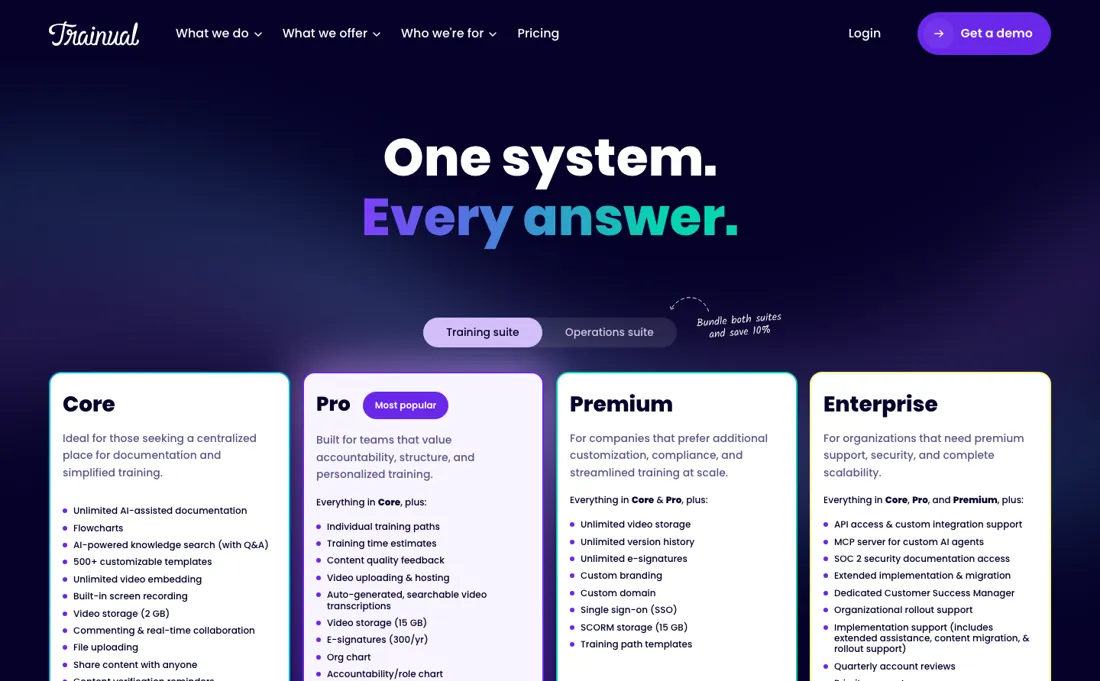
All four plans — Core, Pro, Premium and Enterprise — are quote-gated, and the single number the pricing page publishes is the one-time implementation fee of $1,000. The same page answers the sizing question plainly, best suited for companies with 25 to 1000 employees, so a small team is being told twice that it is not the buyer here: once by the fit range and once by a setup fee that arrives before the subscription does. Under a handful of staff, a shared doc may do.
⚡ Short on time? Watch the 30-second verdict Short.
What Trainual does
Documents SOPs and runs new-hire onboarding, with AI that drafts and updates training docs from your own account context.
What buyers report about Trainual
Hands-on: not tested by usReported by buyers: G2, Capterra and GetApp, read August 2026
Themes from the buyer-review sites listed at the foot of this page, read in August 2026. We have not run Trainual ourselves, so this is other buyers' experience rather than ours. We summarise it here because the complaints are usually the part a vendor page leaves out.
- • 4.7 on G2 across 984 reviews — onboarding and process documentation in one searchable place is what reviewers say it solves.
- • AI Assist for drafting and summarising content is named as genuinely useful rather than decorative.
- • Pricing is high for small businesses and has changed more than once, which reviewers mention alongside the praise.
- • Formatting fights back, design customisation is limited, and you cannot import PowerPoint directly.
- • Some teams report spending a long time on setup and hitting daily friction afterwards. It rewards a real documentation effort rather than replacing one.
When the paid plan is worth it
Trainual's pricing page lists no free tier and publishes no rates, routing buyers to a demo instead, so the real decision is which paid tier rather than free versus paid. Core is positioned for teams that mainly want documentation and search, and its caps are the ones to check first: video storage of 2 GB and version history of 30 days. Pro earns its place when training has to be personalised and provable, adding individual training paths, an org chart, video storage of 15 GB, version history of 90 days and e-signatures at 300/yr.
Premium is a compliance and brand purchase: unlimited video storage, unlimited version history, custom domain and SSO. What upgrading demonstrably does not fix is the content itself. No tier writes your processes for you, and the vendor charges a separate one-time implementation fee of $1,000 for the guided build. Higher tiers also buy more tracking, not more completion, so a team that ignores assignments on Core will keep ignoring them on Premium.
Our monthly capture read this vendor's pricing page in July 2026 and again in August 2026, and the amounts were the same both times. We keep watching — the registry records what moves.
How to actually use Trainual
The fastest route to something usable is one published subject, not a full playbook. From the left-hand menu open the Content page, click "Create subject" in the top right and fill out the prompts. The subject lands as a draft, which you build out with topics and steps. Then set the content status dropdown to "Published" and choose either "Publish as is" or "Finish all and publish". Starting from the library of 500+ customizable templates avoids the blank page.
Only after that add people, via Account, then "Manage users", then the "Add teammate" dropdown, entering full name, email address and permission level. That order matters because the vendor's own guidance is to add people when you are ready to create content and again when you are ready to assign it. The usual stall is inviting the whole company first: seats become usable immediately and are prorated, while seat reductions only apply at the start of the next billing cycle. Teams buying guided implementation should plan around a 4-6 week engagement.
Where this section comes from: our research notes (100 words)
Trainual's own pricing page, company FAQ and help center articles on plans, seats, upgrades and content setup, read 4 August 2026. trainual.com/pricing re-read 5 October 2026 (served HTML): four plans all on Get a demo, Core video storage 2 GB, Pro 15 GB with version history 90 days and e-signatures 300/yr, Premium unlimited plus SSO, custom domain and an MCP server; FAQ: 25 - 1000 employees, demo instead of a trial, $1,000 one-time implementation fee over the first 4-6 weeks, interviews and content within 10 business days, 500+ templates, 400+ premium courses as an add-on. llms.txt and pricing.md return 404.
The natural comparison is Notion or a wiki — cheaper documentation tools.
Frequently asked questions
What does Trainual cost?
Nobody outside a sales call knows, and that is the honest answer. All four plans — Core, Pro, Premium and Enterprise — sit behind a “Get a demo” button on trainual.com/pricing, read on 18 September and again on 5 October 2026, and the page publishes no seat rate, no floor and no range. The single figure it does publish is a one-time implementation fee of $1,000. The FAQ says pricing varies with team size and the features you need, which tells you the shape of the quote without telling you the number.
Can I trial it before committing?
No. Trainual's pricing FAQ asks “Can I try Trainual before committing to a subscription?” and answers it by inviting you to book a demo so the team can walk through your needs and decision timeline (read 18 September and 5 October 2026). There is no free tier and no self-serve trial on the page. For a tool whose value depends entirely on whether your team actually uses it, that means the first real test of adoption happens after you have signed and paid the $1,000 implementation fee.
Am I too small for it?
Possibly, and Trainual says so itself rather than making you guess. Its FAQ states the product is best suited for companies with 25 to 1000 employees, while noting some companies outside that band use it too (read 18 September and 5 October 2026). Put that next to the mandatory $1,000 implementation fee and the 4–6 week specialist engagement it buys, and a ten-person team is being told twice that it is not the intended buyer — once by the sizing note, once by the onboarding cost.
Is this a hands-on review of Trainual?
This is a researched assessment, not a hands-on test — where we've used a tool ourselves, we say so explicitly. We name what each tool is good and bad at, and we earn a commission only if you sign up, at no cost to you.
- Buyer reviews on G2, Capterra and GetApp, read August 2026.
- Re-read 2026-09-18 and again on 2026-10-05 on trainual.com/pricing.
- A dated screenshot of that pricing page, kept on this site as the receipt.
Others in this category
Reviewed operations & workflow tools that share ground with Trainual — comparable in what they do, not drop-in swaps:
New reviews, price changes we recorded, and the cost conditions we found. No sponsored placements. Unsubscribe anytime.
This is our researched assessment — not a paid placement. The “Visit” links on this page are affiliate links: we may earn a commission if you sign up, at no extra cost to you, and it never changes our take. How we review →