PreOrder Now Review (2026)
Check availability before anything else: on 26 September 2026 we could not find any way to install PreOrder Now.
stores that sell drops, restocks or made-to-order products and want pre-order badges, partial payments and back-in-stock emails without touching the theme — and that are on Shopify Basic or Standard, where the price is proportionate.
you need pre-orders running now, because as of 26 September 2026 there is no working install route for this app -- or you are on Shopify Plus and pre-orders are a small part of what you do, because you will pay $99.95 for the same feature set a Basic store gets for $19.95 — or you only ever need one pre-order product at a time, which the free tier already covers.
Transparency: we earn nothing from PreOrder Now; the links to it are plain links. How we make money →
Pricing (2026)
✓ Pricing re-verified 13 Sep 2026
| Plan | Price | What you get |
|---|---|---|
| Free | $0 | First pre-order product, mixed-cart warnings, email tech support |
| Shopify Basic | $19.95 a month | Unlimited pre-order products, collection page badges, preorder discount, product tag, Quickview support |
| Shopify Standard | $39.95 | Unlimited pre-order products, collection page badges, preorder discount, product tag, Quickview support |
| Shopify Advanced | $59.95 | Unlimited pre-order products, ALL FEATURES of Basic & Standard plans, dedicated success manager support |
| Shopify Plus | $99.95 | Unlimited pre-order products, ALL FEATURES of Basic & Standard plans, dedicated success manager support |
Summarised from the pricing notes below; the notes carry the conditions.
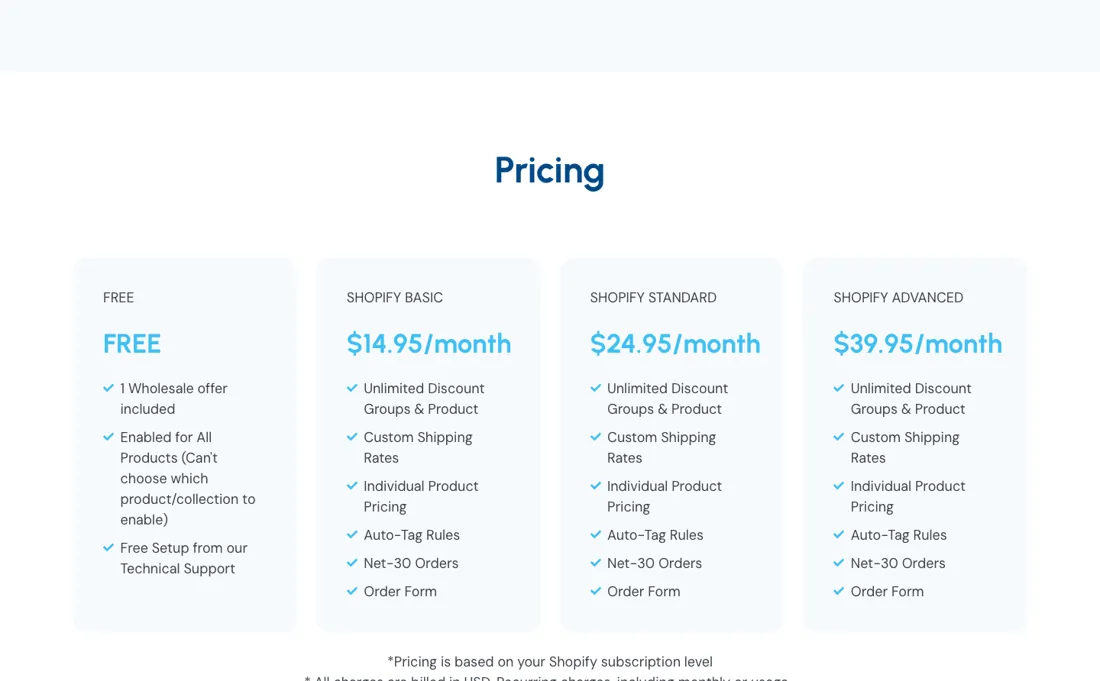
Five tiers, and they are named after your Shopify plan rather than after what the app does. Free is $0 and covers your first pre-order product, with mixed-cart warnings and email tech support. Then Shopify Basic is $19.95 a month, Shopify Standard $39.95, Shopify Advanced $59.95 and Shopify Plus $99.95 -- all with unlimited pre-order products. Read the feature lists side by side and the point becomes obvious: Basic and Standard list exactly the same five features (unlimited pre-order products, collection page badges, preorder discount, pre-order by product tag, Quickview support), and Advanced and Plus list exactly the same three (unlimited pre-order products, "ALL FEATURES of Basic Shopify & Shopify plans", dedicated success manager support).
So the ladder is not buying you capability; it is charging you according to the size of store Shopify says you run. A Plus merchant pays five times what a Basic merchant pays for the same badges, the same discounts and the same tagging. The one real step is Advanced, which adds a dedicated success manager. Note that partial payments, which the FAQ advertises as a feature, are named on none of the five plan cards, so the tier that carries them is unstated. All charges are in USD and recur every 30 days. There is no live price to check: the vendor's site no longer answers.
Category context: E-commerce. Across the 39 tools in this category that we researched with a public US-dollar price, the median entry price is $19 a month (lowest paid plan as listed, per seat where the vendor prices per seat). Compare pricing conditions in the Software Cost Atlas →
What the pricing page doesn’t say
Its Shopify App Store listing says the app is not currently available, it is missing from its publisher's list of apps on that store, Zenpire has moved its own product page to an "old app listing" address, and the Install button on that page leads straight back to the unavailable App Store listing. Read what follows as a record of what the app offered; if you need pre-orders now, pick an app you can actually install, such as Timesact Preorder, which we also review.
The free tier is more useful than it first looks: one pre-order product, unlimited time, with the mixed-cart warning included. For a store that runs one drop at a time that is not a trial, it is a plan. Before you upgrade, check which Shopify plan you are on, because that — not your feature needs — is what sets the price here. And if you are on Plus, price this against alternatives properly: at $99.95 a month you are paying a Plus surcharge for a feature set the app itself lists as identical to the $59.95 tier.
What PreOrder Now does
Shopify pre-orders with badges, partial payments, mixed-cart warnings and back-in-stock emails.
When the paid plan is worth it
Free to Basic at $19.95 is the only step that buys capability: it lifts the one-product limit and adds collection-page badges, pre-order discounts, tag targeting and Quickview support. Everything above that is priced by your Shopify plan, not by what you receive. Read the four paid cards side by side and the pattern is plain: Basic at $19.95 and Standard at $39.95 print the same five features, Advanced at $59.95 and Plus at $99.95 the same three.
The one genuine step up is the dedicated success manager at Advanced. What upgrading does not solve is the pre-order mechanics. Badges, discounts and tag targeting are all on the $19.95 card, and no higher tier adds a capability the cards distinguish: a Plus merchant pays five times a Basic merchant for a feature list the app prints as identical, plus that manager. Partial payments are worth asking about separately: the FAQ advertises them, but none of the five plan cards names them, so which tier carries them is unstated.
If you want help with the rollout, budget for Advanced; otherwise the honest comparison at $99.95 is against other pre-order apps, not lower tiers. Charges are in USD, recurring every 30 days.
How to actually use PreOrder Now
Start on free with one product and run a real pre-order through it end to end, including the mixed-cart case where a shopper puts an in-stock item and a pre-order item in the same basket -- that is where pre-order apps either save you support tickets or create them, and the mixed-cart warning is in the free plan. The vendor's own five steps are short: open the app and click "Pre-order products", enable pre-orders on the products you want, configure the settings including pricing and visibility, turn on Inventory Management so stock levels decide how pre-orders behave, then save.
Zenpire puts that at under ten minutes and says no coding or theme edits are needed, so treat a long setup as a sign something is wrong rather than normal. Two things to check before you pay. Which Shopify plan you are on, because that -- not your feature needs -- sets your rate here. And whether you actually want partial payments and confirmation emails switched on, since those shape what the shopper is promised at checkout.
Where this section comes from: our research notes (180 words)
The vendor's own app listing at zenpire.tech/app-listing/pre-order-now/, read 10 September 2026 and re-read 13 September 2026 -- the vendor's own page is the source because the Shopify App Store listing at apps.shopify.com/preorder-now states, checked 14 September 2026, that the app is currently not available there (it is carried as "PreOrder Now WOD" by Website on Demand Studio, LLC, and a store search for Zenpire returns no apps); Zenpire publishes the same five tiers on its own page: a free $0 plan for your first pre-order and paid tiers at $19.95, $39.95, $59.95 and $99.95 a month, named after and gated by the Shopify plan you are on ("ALL FEATURES of Basic Shopify & Shopify plans"), which is what makes the rate a function of your store size rather than your pre-order volume.
The setup sequence comes from the "5 Steps to Launch a PreOrder" section on that same page (open the app, enable per product, configure settings, turn on Inventory Management, save; "less than 10 minutes"), and the no-coding and mixed-cart-alert claims from its FAQ, both read 13 September 2026.
The natural comparison is a theme customisation or a general merchandising app — pre-orders can be built into a theme for free if you have the developer time — this app is worth it when badges, partial payments and mixed-cart handling all have to work together without you maintaining them.
Frequently asked questions
Can I still install PreOrder Now?
Not that we could find, checked 26 September 2026. apps.shopify.com/preorder-now states the app is not currently available on the Shopify App Store, and the app is absent from the list of apps its publisher, Staytuned, has on that store. Zenpire's own product page now sits at an "old app listing" address, and its Install button points back to the same unavailable listing. The prices below are what the app charged while it was listed. If it returns to the store we will re-check and update this page.
What does PreOrder Now cost?
Five tiers, re-read on zenpire.tech/app-listing/pre-order-now/ on 19 September 2026 with every amount unchanged since 13 September. There is a $0 tier good for a single pre-order product, and above it four paid rates -- $19.95, $39.95, $59.95 and $99.95 a month -- which all lift that limit entirely. The figures come from Zenpire’s own page rather than the Shopify App Store because the app is not installable there: apps.shopify.com/preorder-now, checked 14 September 2026, carries "PreOrder Now WOD" by a different developer and states the app is not currently available.
Why are the plans named after Shopify plans?
Because your Shopify plan, not your pre-order volume or your feature needs, is what sets the rate. The cards say so outright -- each grants "ALL FEATURES of Basic Shopify & Shopify plans" and so on up the ladder. The consequence is blunt: a Plus merchant pays $99.95 a month where a Basic merchant pays $19.95 for a feature list the app itself prints as all but identical. Check which Shopify plan you are on before you read the price list, because that is the number that decides your bill.
Which upgrade actually buys me something?
Only the first one. Free to $19.95 lifts the one-product limit and adds collection-page badges, pre-order discounts, tag targeting and Quickview support -- that step is real capability. Above it, read the four paid cards side by side: $19.95 and $39.95 print the same five features, and $59.95 and $99.95 the same three. The one genuine addition higher up is a dedicated success manager at $59.95. If you are on Shopify Plus and pre-orders are a sideline, price this against alternatives properly before paying five times the Basic rate.
Is the free plan usable for a real store?
For a store that runs one drop at a time, yes. It is one pre-order product with no time limit and the mixed-cart warning included, which makes it a plan rather than a trial. Run a real pre-order through it end to end before you consider paying, including the case where a shopper puts an in-stock item and a pre-order item in the same basket -- that is where pre-order apps either save you support tickets or create them, and it is the one thing you cannot judge from a feature list.
Does an e-commerce tool work with my store platform?
Check your platform and version specifically. Shopify support is close to universal in this category, while WooCommerce, BigCommerce, Magento and headless setups vary a lot, and 'supported' sometimes means a generic API rather than a maintained app. A listing in your own platform's app store, with recent reviews there, is a better signal than the vendor's logo wall.
Is this a hands-on review of PreOrder Now?
This is a researched assessment, not a hands-on test — where we've used a tool ourselves, we say so explicitly. We name what each tool is good and bad at, and we have no affiliate relationship with PreOrder Now — we earn nothing whether you sign up or not.
- Re-verified 13 September 2026 on zenpire.tech/app-listing/pre-order-now/, every amount unchanged since 10 September; the amounts come from Zenpire's own page because the app is not installable from the Shopify App Store: apps.shopify.com/preorder-now, checked 14 September 2026, carries it as "PreOrder Now WOD" by Website on Demand Studio, LLC and states the app is currently not available there, and a store search for Zenpire returns no apps.
- A dated screenshot of that pricing page, kept on this site as the receipt.
Others in this category
Nothing we have reviewed in e-commerce does the same job as PreOrder Now; these are neighbours by category only:
New reviews, price changes we recorded, and the cost conditions we found. No sponsored placements. Unsubscribe anytime.
This is our researched assessment — not a paid placement. How we review →