 Kumo Review (2026)
Five stars over nine reviews is not a track record, and the age makes that worse rather than better.
Visit Kumo → Affiliate link — the rest of this page is the honest version, including who should skip it.
Pricing (2026)
✓ Pricing re-verified 16 Sep 2026
| This tool | $15 | 10th cheapest of 25 |
| Cheapest | $4.99 | Scarcity.AI |
| Median | $29 | |
| Most expensive | $250 | Seller Snap |
Entry price per month, USD. Our own dated readings of 25 e-commerce tools — not a market survey, and cheapest is not best.
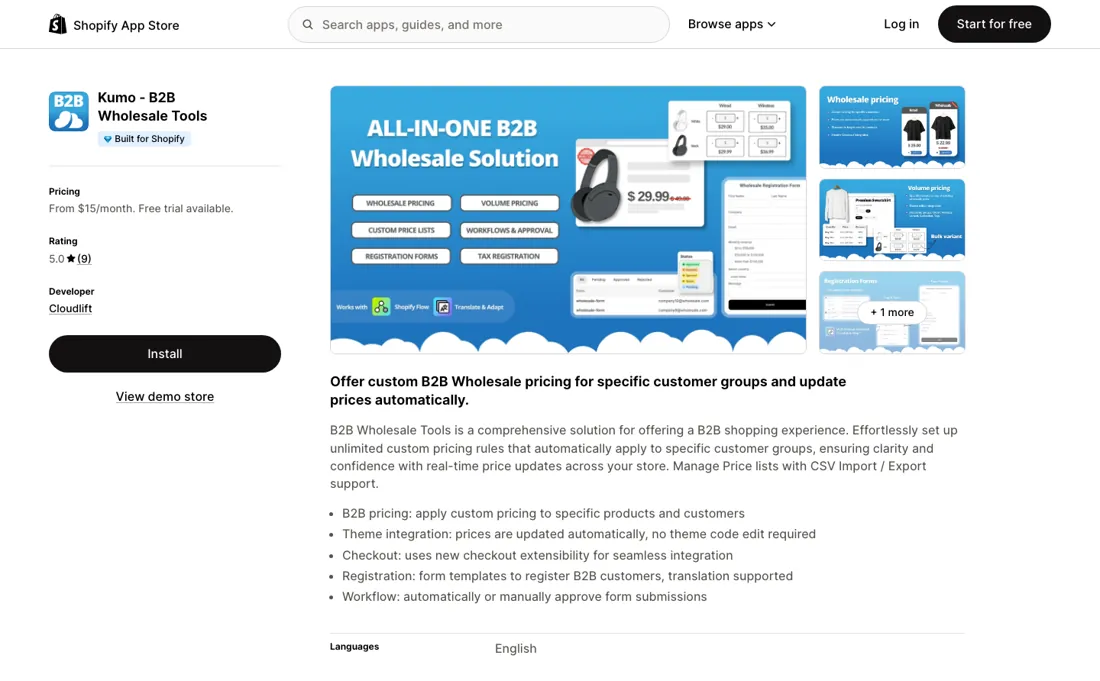
Two plans and no free tier: B2B at $15 a month and PLUS at $30, both with a 7-day free trial, billed in USD every 30 days. B2B carries the whole working app — wholesale pricing, volume pricing, customer registration forms and the approval workflow — and pricing rules are unlimited rather than metered, so the ladder is not a volume ladder.
PLUS adds exactly three things, and all three are Shopify Plus features: company registration, product catalog assignment and checkout integration. If you are not on Shopify Plus, the $30 tier has nothing to sell you. The app is Built for Shopify, launched on 21 November 2024, and shows 5.0 stars over 9 reviews. Plans change — always verify the live price on their site.
What the pricing page doesn’t say
The app launched on 21 November 2024, so it has had close to two years on the App Store to collect them. Nine reviews in that window is a small installed base, and a small installed base is what decides whether an app is still maintained in 2028 — the rating tells you the nine are happy, not that the app is safe to build a wholesale channel on. The second plan is a trap for anyone who reads the ladder as a feature ladder.
PLUS costs twice B2B and the three things it adds — company registration, catalog assignment, checkout integration — are all labelled Shopify Plus on the listing itself. On a standard Shopify plan the extra $15 a month buys nothing you can switch on.
What Kumo does
Shopify wholesale app from Cloudlift GmbH: unlimited custom pricing rules that apply automatically to named customer groups, CSV import and export of price lists, B2B registration forms with an approval workflow, and prices that update in the theme without code edits. Two plans and no free tier — B2B $15 a month, PLUS $30, both with a 7-day trial; everything PLUS adds requires Shopify Plus. Built for Shopify, launched November 2024, 5.0 stars over 9 reviews as of 16 Sep 2026.
What buyers report about Kumo
Recurring themes from the buyer-review sites listed at the foot of this page, read in September 2026. We have not run Kumo ourselves, so this is other buyers' experience rather than ours. We summarise it here because the complaints are usually the part a vendor page leaves out.
- • 5.0 over 9 reviews on the Shopify App Store, read 16 September 2026, with support the thing merchants name first: one reports booking a free call and being walked through every question on their list until the setup worked, another describes support as extremely fast.
- • Merchants describe the admin as lightweight and quick, and one specifically values that CSV uploads handle variants and that wholesale pricing and bulk discounts can be combined in the same setup.
- • One reviewer notes the app needed no separate theme integration on their theme, unlike other wholesale apps they had used, which they say can delay a launch by a day.
- • Nine reviews is the whole public record, and the app launched on 21 November 2024 — so that is nine in close to two years, not nine in a fast start. There is not enough there to judge reliability at scale.
- • The same reviewer who rates it five stars calls it a newer system that took more time to set up and mentions fixes being made while they used it, which reads as an app still maturing rather than a settled one.
Where the ratings disagree. Only one platform was read, and it is the vendor's own distribution channel. Every voice above comes from the Shopify App Store listing, where the merchant and the app already have a commercial relationship; no independent review platform was consulted for this entry.
When the paid plan is worth it
There is no free tier here, so the question is not whether to pay but whether to pay twice. The $15 B2B plan carries the working app, and the listing sells its pricing rules as unlimited rather than metered, so a catalogue with four wholesale rules and one with four hundred cost the same $15 a month. Volume tiers, the registration form builder and the approval workflow all sit on that entry plan, which is where most wholesale setups stop.
The $30 PLUS plan earns its money in exactly one case: you are already on Shopify Plus. All three things it adds — company registration, product catalog assignment and checkout integration — are labelled Shopify Plus on the listing itself, and they hook into platform features a standard Shopify plan does not have. Upgrading does not buy more pricing rules, more customers, faster support or a longer evaluation; both plans run the same 7-day trial.
Nor does it buy a bigger safety margin on the app: nine reviews in the two years since launch is the installed base on either tier, and $30 a month does not change that.
How to actually use Kumo
Cloudlift's own walkthrough puts the whole setup inside the app rather than in your theme. Install from the App Store, then open Kumo > Pricing > Add Pricing: a rule is a percentage or absolute discount plus two conditions — customers by tag, optionally restricted to logged-in shoppers, and products by tag, with exclusions available on both sides. Volume tiers live under Pricing > Volume Discounts, and the guide's own worked example is 10+ units for 10% off, 20+ for 15%, 50+ for 20%.
The gate is the form. Under Forms > Create New Form a drag-and-drop builder takes business name, tax ID or reseller certificate, contact details and custom fields, and you publish it on your own B2B signup page. Submissions land in a dashboard where you approve by hand or automatically, and approval assigns the wholesale tag that your pricing rules read. That makes the tag scheme the one decision worth getting right before you build anything else.
Distilled from apps.shopify.com/b2b-wholesale-tools, read 16 September 2026: the two plan cards ($15 B2B, $30 PLUS, both with a 7-day free trial, all charges billed in USD every 30 days), the feature list, the Built for Shopify badge, the 21 November 2024 launch date and the 5.0 rating over 9 reviews. The setup steps come from Cloudlift's own guide 'How to Set Up Wholesale Pricing on Shopify (Without Shopify Plus)' at cloudlift.app/blogs/shopify/how-to-set-up-wholesale-pricing-on-shopify-without-shopify-plus, published 14 March 2025 and read the same day: the menu paths (Pricing > Add Pricing, Pricing > Volume Discounts, Forms > Create New Form), the percentage-or-absolute discount choice, the customer-tag and product-tag conditions, the drag-and-drop form fields and the 10+/20+/50+ volume example are all that page's own. The vendor product page at cloudlift.app/pages/b2b-wholesale-tools, read the same day, confirms the developer is Cloudlift GmbH in Switzerland and lists the PLUS tier with two of the three Plus-only features that the App Store listing names.
Kumo vs Wholesale Gorilla, side by side
Both columns come from the same place: each vendor’s own published pricing, read on the date shown in the sources at the foot of this page. We do not average them into a score.
Both names above are affiliate links: we may earn a commission if you sign up, at no extra cost to you. Neither changes what this table says: both columns come straight from the vendors’ own pricing pages.
The natural comparison is Wholesale Gorilla — Same job, very different bill. Wholesale Gorilla runs $34.95, $69.95 and $149.95 a month against Kumo's $15 and $30, and buys you a nine-year history and 313 reviews at 4.7 stars against Kumo's nine. That is the whole trade: Gorilla is the safer bet on longevity and the deeper app, Kumo is less than half the entry price with unlimited pricing rules and a 7-day trial instead of Gorilla's 21-day one. On a standard Shopify plan with a handful of wholesale groups, Kumo does the job for the price of Gorilla's trial period..
More on Kumo
Everything we publish about Kumo links back here — the review stays the honest hub:
The ex-banker filter — the same yardstick on every review (how we review): My ex-banker filter is simple: does Kumo remove a real cost — time, errors, missed revenue — bigger than what it charges?
Frequently asked questions
What does Kumo cost?
Two plans and no free tier, read on the Shopify App Store listing on 16 September 2026: B2B at $15 a month and PLUS at $30, both with a 7-day free trial, all charges billed in USD every 30 days. The important detail is what does not scale: the listing sells pricing rules as unlimited rather than metered, so a catalogue with four wholesale rules and one with four hundred pay the same $15. Volume tiers, the registration form builder and the approval workflow are all on the entry plan. There is no per-customer, per-order or per-code charge published, so the monthly figure is the whole cost.
Is the $30 PLUS plan worth twice the money?
Only if you are already on Shopify Plus, and then it is barely a choice. PLUS adds exactly three things over the $15 plan — company registration, product catalog assignment and checkout integration — and the listing itself labels all three as Shopify Plus features. On a standard Shopify plan they hook into platform capabilities your store does not have, so the extra $15 a month buys nothing you can switch on. Upgrading does not buy more pricing rules, more customers, faster support or a longer evaluation either: both plans run the same 7-day trial. Read 16 September 2026.
Do I need Shopify Plus to run wholesale pricing?
No, and avoiding that is the whole point of the $15 plan. On a standard Shopify plan this gives you percentage or absolute discounts scoped by customer tag and product tag, volume tiers, a drag-and-drop registration form you publish on your own B2B signup page, and an approval step that assigns the wholesale tag your pricing rules read. The sequence matters: approval sets the tag, and the tag is what the price rule looks for, so the tag scheme is the one decision worth getting right before you build anything else. The catch is on the other side — if you are already on Plus, company accounts and price lists come with the platform, and this app is solving a problem you no longer have.
What should I weigh before buying E-commerce software?
Check your platform and version specifically. Shopify support is close to universal in this category, while WooCommerce, BigCommerce, Magento and headless setups vary a lot, and 'supported' sometimes means a generic API rather than a maintained app. A listing in your own platform's app store, with recent reviews there, is a better signal than the vendor's logo wall.
Is this a hands-on review of Kumo?
This is a researched assessment, not a hands-on test — where we've used a tool ourselves, we say so explicitly. We name what each tool is genuinely good and bad at, and we earn a commission only if you sign up, at no cost to you.
- Buyer reviews on the Shopify App Store listing (apps.shopify.com/b2b-wholesale-tools), read September 2026.
- Read 2026-09-16 on apps.shopify.com/b2b-wholesale-tools.
- A dated screenshot of that pricing page, kept on this site as the receipt.
Others in this category
Reviewed e-commerce tools that share ground with Kumo — comparable in what they do, not drop-in swaps:
New dossiers, cost-traps we found, and tools that earned a keep — no hype, no sponsored-disguised-as-advice. Unsubscribe anytime.
This is our researched assessment — not a paid placement. The “Visit” links on this page are affiliate links: we may earn a commission if you sign up, at no extra cost to you, and it never changes our take. How we review →