 Seller Snap Review (2026)Capacity Caps Set the Price
Read the caps before you read the prices, because the caps are what you are actually buying.
Visit Seller Snap → Affiliate link — the rest of this page is the honest version, including who should skip it.
Pricing (2026)
✓ Pricing re-verified 26 Aug 2026
- Starter — $100/month, annual billing only1 marketplace, 1 user, 1,000 SKUs, $15,000 revenue a month
- Accelerator — $250/month, or $175 paid annually ($900 saving)1 seller ID, 3 users, 1,000 SKUs, $30,000 revenue a month
- Standard — $500/month, or $425 paid annually ($900 saving)1 seller ID, 3 users, 15,000 SKUs, unlimited revenue
- Custom — quote — speak with salesseller IDs, users, SKUs and revenue set beyond the standard plan limits
| This tool | $250 | 19th cheapest of 19 |
| Cheapest | $4.99 | Scarcity.AI |
| Median | $29 | |
| Most expensive | $250 | this one |
Entry price per month, USD. Our own dated readings of 19 e-commerce tools — not a market survey, and cheapest is not best.
There are four tiers, and the axis that sets your price is capacity, not features. All four list the same six feature groups: Amazon & Walmart, AI repricing technology, min & max calculation, analytics, connectivity and integrations. The four tiers are set out above; what the page does not tell you is what each step actually buys. Accelerator doubles your revenue ceiling and leaves the SKU count alone, and Standard does the reverse — fifteen times the catalogue with the ceiling removed — while the seller ID and user counts never move at all.
So the middle tier is for turnover and the top tier is for range, and a shop that needs neither is paying for the other one. The revenue ceilings themselves are printed without any period attached; Seller Snap told us in writing on 24 Jul 2026 that both are calculated per month, so read them as $15,000 and $30,000 a month. Annual billing saves a flat $900 a year on both Accelerator and Standard — the same money, but 30 percent off the smaller plan against 15 percent off the larger one.
Every tier carries a 15-day trial with no credit card, and in the monthly view each price is labelled 'Starting at'. Seller Snap confirmed to us in writing on 24 Jul 2026 that readers coming through our link get 10% off for their first three months; it runs through the link, there is no code to enter. Update: asked directly, Seller Snap confirmed by email on 24 July 2026 that the Starter and Accelerator revenue caps are calculated per month.
Their pricing page still does not say so — we are passing on the vendor's answer, not something you can verify on the page yourself. One thing on the page has changed and it is not a price: a banner above the plans offers 'your first month for only $1 when you subscribe before 2026', a deadline that had already passed when we read it on 26 Aug 2026, so treat it as decoration rather than an offer until support confirms it. Plans change — always verify the live price on their site.
What the pricing page doesn’t say
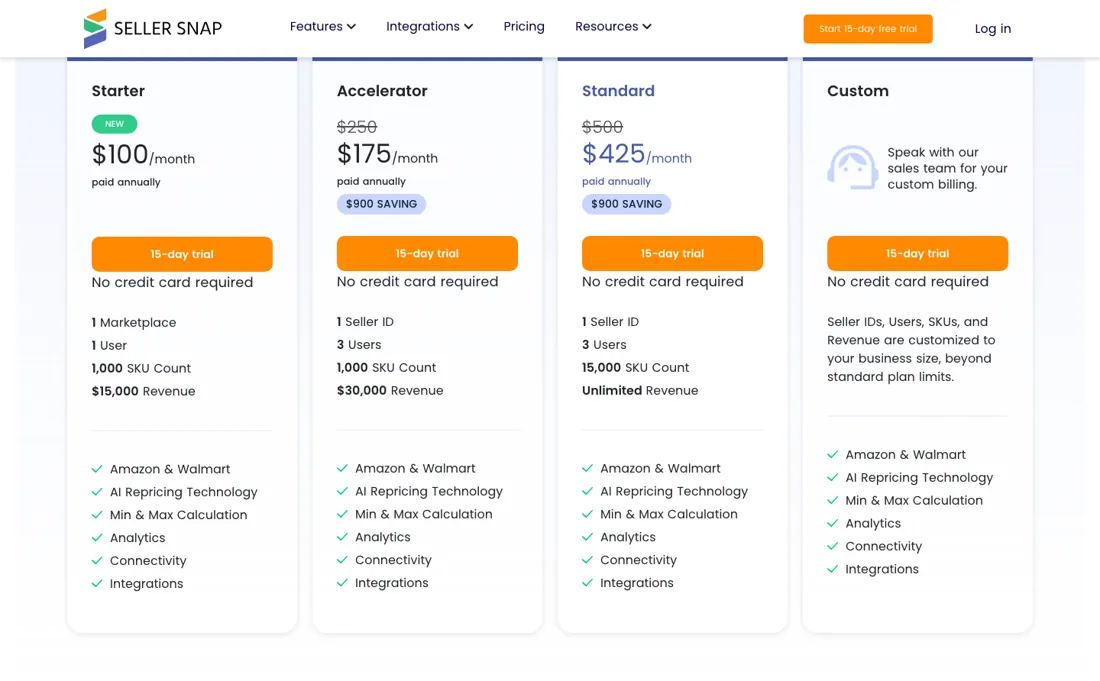
Two of them deserve scrutiny. First, the revenue limits — $15,000 on Starter, $30,000 on Accelerator — are printed with no period attached on the pricing page. We asked, and Seller Snap confirmed to us in writing on 24 Jul 2026 that both caps are calculated per month. That is the reading that costs you money. $15,000 a month is roughly $500 a day, so a seller who already clears that sits above Starter before signing up — and $30,000 a month puts the ceiling of Accelerator within reach of a shop doing $1,000 a day.
Measure your own monthly revenue against the tier first, because the page will not do it for you. Second, the SKU limit sits at 1,000 on both of the lower tiers, so catalog growth alone — not revenue, not users — can push you up a step. And the steps are steep: leaving Accelerator for Standard means $425/month annually or $500 monthly, roughly 2.4 times what you were paying, for capacity rather than for any feature you did not already have.
The cheapest door is also not quite $100: Starter is annual-billing only, so the lowest month-to-month entry into the product is $250/month. Finally, 'Starting at' appears above every monthly price on the vendor's own page — treat all of these as floors and confirm your own quote. Worth checking first, though: Amazon already includes a rule-based repricer. Automate Pricing comes with the Professional selling plan and supports rules such as Competitive Featured Offer and Competitive Lowest Price with a seller-set price floor, so if your problem is simply matching the competitive price without going below cost, test that before paying for anything.
And note what sets your tier: their FAQ says pricing follows the total number of SKUs in your Seller Central account, not the active ones, so a dormant catalogue costs you money. One more thing to time correctly. In September 2026 Seller Snap began telling affiliates that its most advanced repricing engine yet had just launched, built on the premise that Amazon no longer awards one Buy Box but thousands of local ones, buyer by buyer and city by city.
Their own repricing-engine page, read on 3 Sep 2026, is more careful than that: it says a redesigned app today, a new repricing engine coming soon, and it offers a waitlist and an early-access form rather than the engine itself. What has actually shipped is the redesigned app — a live Buy Box filter at SKU level, one preset across every store, repricing from a phone, and historical inventory value tracked over time.
The local Buy Box logic sits behind that, still ahead of the product rather than in it. So judge the subscription on what the app does today; if the local pricing engine is the reason you are signing up, ask support for a ship date in writing before you pay for a year of it.
What Seller Snap does
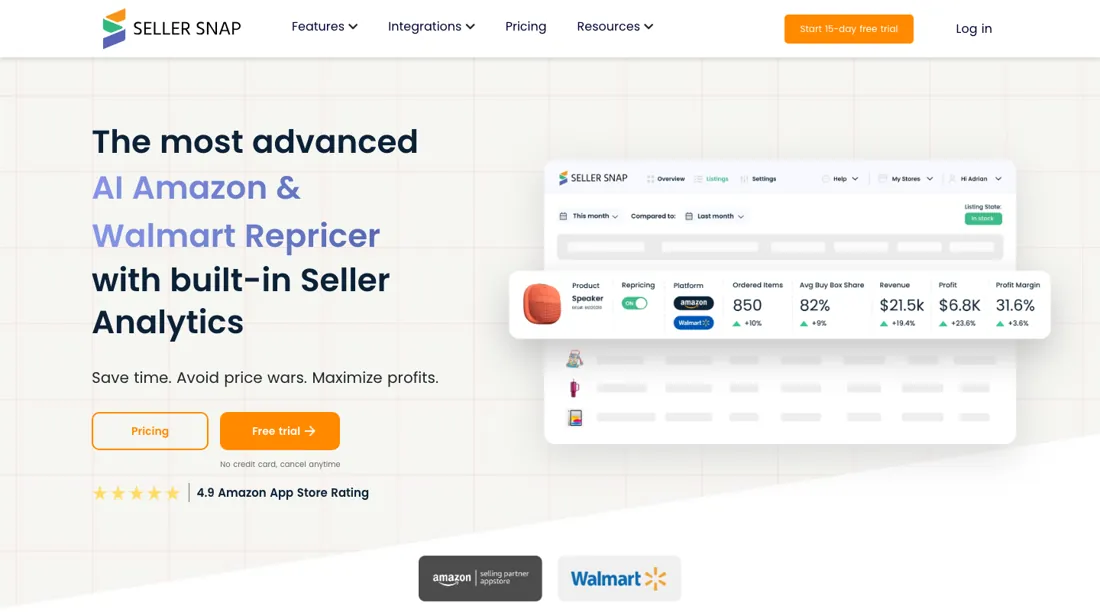
AI repricer and seller-analytics platform for Amazon and Walmart — what the vendor calls game-theory repricing, aimed at Buy Box share rather than racing to the bottom, plus min/max profit calculation, 80+ analytics data points and imports from tools like InventoryLab and SkuVault. Starter is $100/month billed annually (annual only); month-to-month starts at $250. 15-day free trial, no credit card. A July 2026 interface release adds live Buy Box insight with SKU-level filters, multi-store management from one screen including bulk cost updates, repricing from mobile, historical inventory-value tracking, saved views, customizable columns and a dark mode.
What buyers report about Seller Snap
Recurring themes from the buyer-review sites listed at the foot of this page, read in August 2026. We have not run Seller Snap ourselves, so this is other buyers' experience rather than ours. We summarise it here because the complaints are usually the part a vendor page leaves out.
- • The AI repricer competes rather than penny-undercutting, and reviewers credit it with real sales jumps — one reports going from £1k to £10k in two weeks.
- • Support and onboarding are named as genuinely helpful, and praise across the review set is close to universal.
- • From $250 a month, scaled by seller IDs and SKUs. Cost is essentially the only complaint — but it is a real one.
- • Multiple reviewers admit holding off because of the price before switching, so budget for the gap between deciding and seeing return.
- • Reviewers say plainly that a seller with 20 SKUs and $2,000 monthly revenue should use a budget repricer instead. This is a tool for established volume.
When the paid plan is worth it
Work out which cap binds you before you look at the prices, because the tiers move different levers. Starter at $100/month buys one marketplace, one user and 1,000 SKUs — and only on annual billing, so the cheapest month-to-month door into the product is Accelerator at $250. Accelerator adds two users and lifts the revenue cap from $15,000 to $30,000. Both figures are monthly, which Seller Snap confirmed to us in writing on 24 Jul 2026.
But it keeps the same 1,000-SKU ceiling, so it buys you nothing if catalogue size is what you keep hitting. For that, Standard is the tier that moves the wall, to 15,000 SKUs with no revenue cap. Above that, or with a second Seller ID, no price is published at all — that is Custom, and only sales knows the number. One thing no tier fixes: their FAQ states pricing follows the total number of SKUs in your Seller Central account rather than the active ones, so a large dormant catalogue is billed as if you were selling it.
How to actually use Seller Snap
Start on the 15-day trial — it needs no credit card — and stay on monthly billing until the tool has proven itself on your own listings, because Seller Snap states that annual plans cannot be cancelled during the 12-month period. Before you sign up, count two things in Seller Central: your total SKUs, all of them rather than the active ones, and your Seller IDs. Those two numbers decide your tier, so an estimate built from the headline price will be wrong if your catalogue is bigger than it feels.
Set your minimum prices before you let any repricer touch a listing; that floor is the safety rail the whole category depends on. Two limits the vendor states plainly: no eBay support, and no repricing of used items. Billing runs in advance and renews automatically, and cancelling takes effect at the end of the paid period with no refund for the unused part, so put the renewal date in your own calendar.
Distilled from Seller Snap's own pricing page, pricing FAQ and terms of use, plus Amazon's Seller Central documentation on Automate Pricing
Seller Snap vs Feedvisor, side by side
Both columns come from the same place: each vendor’s own published pricing, read on the date shown in the sources at the foot of this page. We do not average them into a score.
Both names above are affiliate links: we may earn a commission if you sign up, at no extra cost to you. Neither changes what this table says: both columns come straight from the vendors’ own pricing pages.
The natural comparison is Feedvisor — the other AI-first Amazon repricer we cover: Feedvisor's real platform (Feedvisor360, with ad optimization and dedicated analysts) starts around $1,500/mo, while Seller Snap sits in the $175-$425/mo band on published, self-serve pricing with a no-card trial. If you need multi-channel price monitoring rather than marketplace repricing, compare Pricefy instead — and verify every current price list yourself before you sign..
More on Seller Snap
Everything we publish about Seller Snap links back here — the review stays the honest hub:
The ex-banker filter — the same yardstick on every review (how we review): My ex-banker filter is simple: does Seller Snap remove a real cost — time, errors, missed revenue — bigger than what it charges?
Frequently asked questions
What should I weigh before buying E-commerce software?
Check your platform and version specifically. Shopify support is close to universal in this category, while WooCommerce, BigCommerce, Magento and headless setups vary a lot, and 'supported' sometimes means a generic API rather than a maintained app. A listing in your own platform's app store, with recent reviews there, is a better signal than the vendor's logo wall.
Is this a hands-on review of Seller Snap?
This is a researched assessment, not a hands-on test — where we've used a tool ourselves, we say so explicitly. We name what each tool is genuinely good and bad at, and we earn a commission only if you sign up, at no cost to you.
- Buyer reviews on Capterra, Research.com and Amazon-seller reviews, read August 2026.
- Re-verified 2026-08-26 on their own pricing page, both the monthly and the annual column; every figure below was read again on that date and none of them had moved since 24 Jul 2026.
- A dated screenshot of that pricing page, kept on this site as the receipt.
Others in this category
The e-commerce tools closest to Seller Snap that we have also reviewed. They overlap rather than match:
New dossiers, cost-traps we found, and tools that earned a keep — no hype, no sponsored-disguised-as-advice. Unsubscribe anytime.
This is our researched assessment — not a paid placement. The “Visit” links on this page are affiliate links: we may earn a commission if you sign up, at no extra cost to you, and it never changes our take. How we review →