Kiwi Sizing Review (2026)
 By Daan Haket · Researched and written with an AI assistant · who does what
The free plan is not limited by the chart count most people assume.
apparel and accessory stores where sizing drives returns, and that want charts plus an AI fit recommender without building either — 4.7 stars from 1,216 reviews on 19 September 2026 is a genuinely strong base, though the recent ones read differently from the aggregate.
you sell one-size or non-wearable products, where a size chart answers a question nobody asks, or you need more than ten charts and would land on a tier whose order-volume charges are not published.
Transparency: the “Visit” links on this page are affiliate links — we may earn a commission if you sign up, at no extra cost to you. No vendor can pay for a better review or verdict. How we make money →
Pricing (2026)
✓ Pricing re-verified 19 Sep 2026
| Plan | Price | What you get |
|---|---|---|
| Free | no published price | Up to three size charts, 22 templates, unlimited CSV import, Kiwi watermark |
| Premium | $7.99 a month | Up to ten charts, removes watermark, Google Analytics, auto-translation English/Spanish; no additional monthly charges |
| Plus | $14.99 | Up to twenty charts, ten size recommenders, six languages; additional charges apply based on order volume |
| Ultimate | $26.99 | Unlimited charts and recommenders, 22 languages; additional charges apply based on order volume |
Summarised from the pricing notes below; the notes carry the conditions.
Four tiers, and the interesting line is not the price but the sentence under it. Free publishes up to three size charts with 22 templates and unlimited CSV import, and puts a Kiwi watermark on your storefront. Premium is $7.99 a month for up to ten charts, removes the watermark, adds Google Analytics and auto-translation into English and Spanish, and states plainly: no additional monthly charges.
Plus, the tier the store marks Popular, is $14.99 for up to twenty charts, ten size recommenders and six languages. Ultimate is $26.99 for unlimited charts and recommenders and 22 languages. Both Plus and Ultimate carry the same caveat that Premium does not: additional charges apply based on order volume, and the listing does not say what those charges are. Import credits are an optional add-on on every paid tier, and all three come with a 14-day free trial.
The listing adds that all charges are billed in USD and that recurring and usage-based charges are billed every 30 days. So the cheapest paid plan is the only one whose bill you can predict, and the one the store pushes is not. Plans change — always verify the live price on their site.
Category context: E-commerce. Across the 39 tools in this category that we researched with a public US-dollar price, the median entry price is $19 a month (lowest paid plan as listed, per seat where the vendor prices per seat). Kiwi Sizing’s entry price of $7.99 a month sits below that median. Compare pricing conditions in the Software Cost Atlas →
What the pricing page doesn’t say
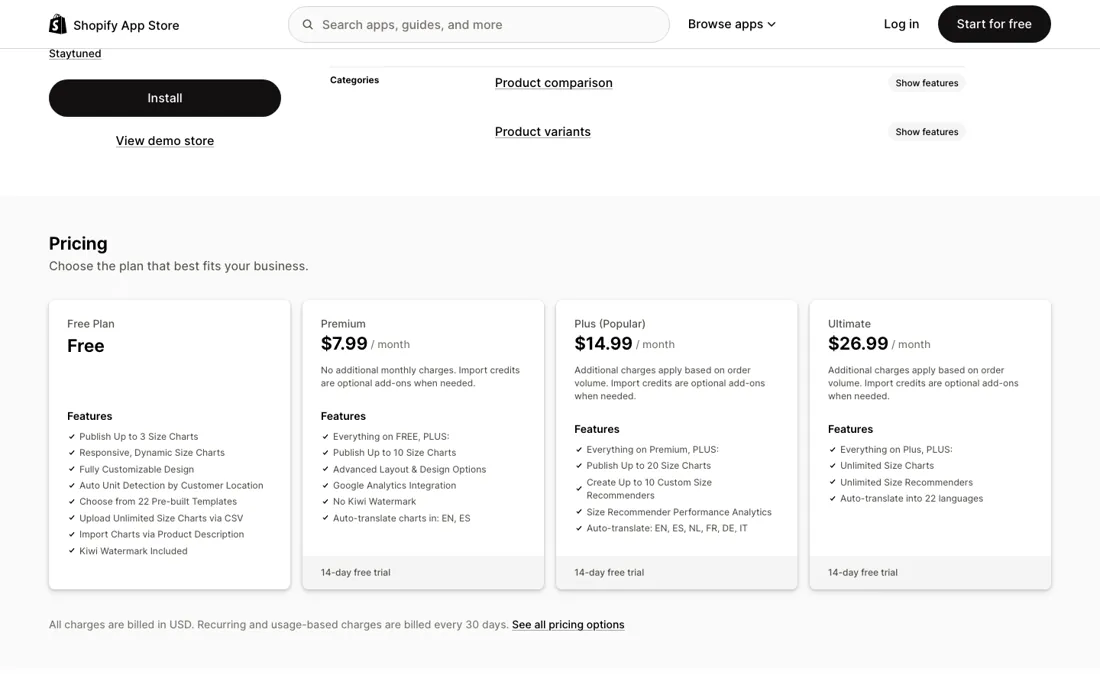
Three charts is generous for a small catalogue; the real limit is the Kiwi watermark sitting on your storefront, and removing it is what the $7.99 buys. Judge the free tier on whether you can live with that watermark in front of customers, not on how many charts you get. And read the small print above Plus and Ultimate before you upgrade: both add order-volume charges that the App Store listing never quantifies, while Premium says in writing that it has none.
Watch the video review
The video version of this review, from our YouTube channel.
What Kiwi Sizing does
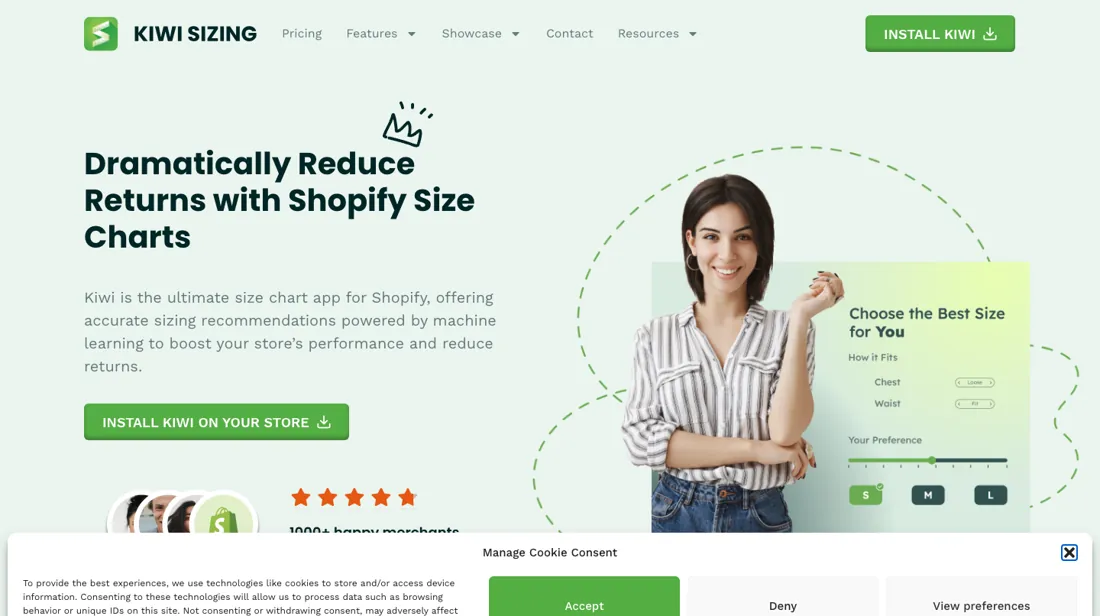
Shopify size charts and AI fit recommendations, built to cut returns. From Staytuned.
What buyers report about Kiwi Sizing
Hands-on: not tested by usReported by buyers: the Shopify App Store listing and its review pages, read September 2026
Themes from the buyer-review sites listed at the foot of this page, read in September 2026. We have not run Kiwi Sizing ourselves, so this is other buyers' experience rather than ours. We summarise it here because the complaints are usually the part a vendor page leaves out.
- • Support is the single most repeated compliment, and reviewers name what it did rather than praising it in general: live chat answering setup questions, and in one case the team writing custom code so a tech-pack size chart translated into accurate recommendations.
- • Merchants report the recommender doing the job it is sold for — fewer sizing questions reaching support, and shoppers completing orders they would otherwise abandon over fit.
- • The chart builder itself is described as fully customisable and quick to set up, including by merchants only a few months in.
- • A 2026 repricing dominates the recent reviews. Long-standing merchants describe an entry plan that used to cost about $6.99 and allow around 100 published charts becoming $7.99 for ten — a higher price for a much smaller allowance — and several say the change reached them without clear warning.
- • The order-volume charge on the upper tiers is where the bills land. One merchant of about four years reports moving from roughly $5 to $7 a month to around $150 a month after an upgrade, because the new model prices on orders rather than on charts.
- • The translation add-on is reported to do less than its name suggests: one reviewer found it translated buttons and headers but not the content inside the size guide, and that Shopify's own Translate & Adapt could not reach that content either.
- • Localisation is thin outside the major languages, and design changes beyond the presets are reported to need CSS.
- • Implementation documentation is called out as weaker than the support that compensates for it.
Where the ratings disagree. The overall score and the recent reviews point in different directions, and the reason is dated rather than mixed. The long tail of five-star reviews is about the product and the support; almost every recent one-star review is about the 2026 plan change, written by merchants who had been on the app for two to four years. Read the newest page first: it tells you what you would be signing up to now, which is not what the aggregate was earned on.
Pages read (September 2026): Shopify App Store
When the paid plan is worth it
The step that matters is Free to Premium at $7.99, and it buys two things: your storefront stops carrying someone else's watermark, and the bill stays flat no matter how much you sell. Everything above that trades predictability for capacity. Plus at $14.99 doubles the charts and adds size recommenders with their own performance analytics, which is the actual product for a fashion store — but it also switches you onto order-volume charges that are not published anywhere on the listing.
How large those get is visible only in the reviews. A store of four years wrote on 4 August 2026 that an accidental upgrade moved it permanently onto the order-based model, taking its bill from about $5–7 a month to about $150; the developer replied the same day, saying a member of the team had reached out directly. If your catalogue fits in ten charts, staying on Premium is worth real money at scale, because it is the only tier where growth in orders does not move the invoice.
How to actually use Kiwi Sizing
Install on free and publish one chart on your worst-returning product, not your best-selling one — that is where a size chart pays for itself and where you can measure it. Look at your own storefront on mobile and decide whether the watermark is acceptable; that decision, not the chart count, is what moves you to Premium. Only look at Plus once you actually want the size recommenders, and when you do, ask support in writing what the order-volume charge is before you switch.
It is not on the listing, and the review from 4 August 2026 describing a jump from about $5–7 to about $150 a month is the reason to ask rather than assume. Keep an eye on how many charts you build, too. The same reviewer's second point was that a library of a hundred charts is what makes leaving expensive, whatever the monthly figure says.
Distilled from The Kiwi Sizing listing in the Shopify App Store (apps.shopify.com/kiwi-sizing), read 5 September 2026 — the four plan cards with their chart, recommender and language limits, the order-volume caveat printed under Plus and Ultimate, the USD and 30-day billing note, and the review stream, where the 4 August 2026 review and the developer's reply beneath it put a figure on what that unquantified order-volume charge did to one store.
Kiwi Sizing vs Fast Bundle, side by side
Each column shows the vendor’s own published entry price, read on the date shown. Entry prices can cover different services or units, so check what each one buys. We do not average them into a score.
Both names above are affiliate links: we may earn a commission if you sign up, at no extra cost to you. Neither changes what this table says.
The natural comparison is Fast Bundle or the native Shopify size guide — the alternatives are a general merchandising app or building the chart into your theme — Kiwi earns its place when the recommender, not the chart, is what you are after.
Frequently asked questions
Which Kiwi plan do I need?
The line that matters is between Premium and Plus, and it is not about chart counts. Read on 19 September 2026: Free publishes up to three charts and puts a Kiwi watermark on your storefront. Premium at $7.99 a month lifts that to ten, removes the watermark, adds Google Analytics and English and Spanish auto-translation, and says in writing that there are no additional monthly charges. Plus at $14.99 and Ultimate at $26.99 add charts, recommenders and languages — and both carry a line Premium does not: additional charges apply based on order volume, which the listing never quantifies. So Premium is the only paid tier whose invoice you can predict, and it is not the one marked Popular. If your catalogue fits inside ten charts and you do not need a fit recommender, stopping at Premium is the whole decision. Every paid tier has a 14-day free trial and import credits are a separate optional add-on on all of them.
What happens if I cancel during the 14-day trial?
Watch the upcoming-bill line in your Shopify admin rather than trusting the cancellation, because the listing carries a recent case where those two disagreed. In a review dated 8 September 2026, an Australian merchant wrote that they tried the Plus plan on the two-week trial, quit before the trial ended and set the store back to free, then noticed two days beforehand that they were going to be billed for the month anyway. Their support messages went unanswered through the weekend, the charge went through, and they were still chasing a refund when they posted. The vendor replied the same day, acknowledged that the messages arrived while the team was out of the office, and said the charge had been resolved through app credits that morning. Read it as a process warning rather than a verdict: cancel with a few days of margin, check that the upcoming charge in Shopify actually disappears, and do not start a trial on a Friday.
Do I need the size recommender, or just the charts?
Charts are the cheap half and recommenders are what you actually pay for. As read on 19 September 2026 every tier including Free publishes charts — three on Free, ten on Premium at $7.99, twenty on Plus at $14.99, unlimited on Ultimate at $26.99 — with 22 pre-built templates, unlimited CSV import, auto unit detection by customer location and import straight from product descriptions available at the bottom. Size recommenders do not appear until Plus, which gives you ten of them plus recommender performance analytics, and Ultimate makes them unlimited. That is the same step that switches you onto order-volume charges, so the recommender, not the chart count, is what takes you off the predictable bill. The order to try it in is therefore: publish charts on Free or Premium, measure whether sizing is still driving your returns, and only then spend the 14-day Plus trial finding out whether a recommender moves that number.
Is this a hands-on review of Kiwi Sizing?
This is a researched assessment, not a hands-on test — where we've used a tool ourselves, we say so explicitly. We name what each tool is good and bad at, and we earn a commission only if you sign up, at no cost to you.
- Buyer reviews on the Shopify App Store listing and its review pages, read September 2026.
- Read 5 September 2026 and re-read 19 September 2026 on apps.shopify.com/kiwi-sizing, no amount changed.
- A dated screenshot of that pricing page, kept on this site as the receipt.
Others in this category
Reviewed e-commerce tools that share ground with Kiwi Sizing — comparable in what they do, not drop-in swaps:
New reviews, price changes we recorded, and the cost conditions we found. No sponsored placements. Unsubscribe anytime.
This is our researched assessment — not a paid placement. The “Visit” links on this page are affiliate links: we may earn a commission if you sign up, at no extra cost to you, and it never changes our take. How we review →