 Evey Events Review (2026)
Nobody gets caught by the monthly fee here; they get caught by the per-ticket one.
Visit Evey Events → Affiliate link — the rest of this page is the honest version, including who should skip it.
Pricing (2026)
✓ Pricing re-verified 1 Sep 2026
Four tiers, and every one of them charges twice: a monthly fee and a fee per ticket processed. Lite is free to install and takes $1.00 per ticket. Growth is $19 a month and $0.75. Standard, the tier the store marks Popular, is $49 and $0.50. Professional is $189 and $0.25. The paid tiers carry a 7-day free trial. Read that structure the right way round: the monthly fee is not what you are buying, it is what you pay to lower the per-ticket rate, so the correct plan follows from your ticket volume and nothing else.
The crossings are exact. Lite and Growth cost the same at 76 tickets a month; below that Lite wins. Growth and Standard cross at 120. Standard and Professional cross at 560. So a store selling 300 tickets a month pays $199 on Standard against $244 on Growth and $264 on Professional -- the middle tier, and the store's own Popular label happens to be right for that range.
Feature differences barely enter into it until Professional, which is where reserved seating, Klaviyo and Mailchimp integrations and the multi-vendor dashboard live. Plans change — always verify the live price on their site.
What the pricing page doesn’t say
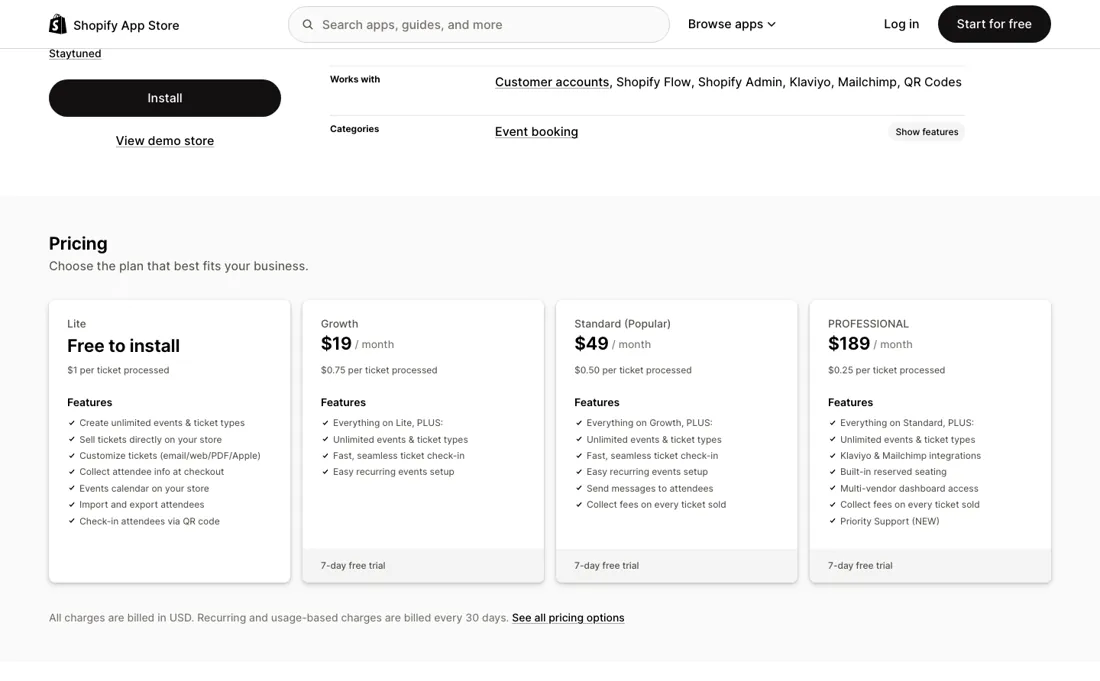
On Lite the app is free to install and then takes a dollar off every ticket you sell, which is invisible until you sell volume and then is the largest line on the invoice. Work out your monthly ticket count before you install anything, because that single number picks your plan: under 76 stay on Lite, 76 to 120 move to Growth, 120 to 560 move to Standard, above that Professional.
Getting this wrong is not a small error -- at 300 tickets a month the gap between the best and worst choice is about $65 every month.
What Evey Events does
Sell event tickets straight from your Shopify store: unlimited events and ticket types, QR check-in, attendee data at checkout. Free to install at $1 per ticket; the monthly plans buy a lower per-ticket rate.
When the paid plan is worth it
Upgrading is arithmetic, not judgement, and the app is unusually honest about it: every tier lists both numbers. The one place features do decide is Professional at $189, which adds built-in reserved seating, Klaviyo and Mailchimp integrations and multi-vendor dashboard access. If you need assigned seating you are on that tier whatever your volume says, and the $0.25 rate then softens the blow. Below that, ignore the feature lists and run the numbers: the tiers differ mostly in what they charge, not in what they do.
How to actually use Evey Events
Count last month's tickets before you install; that number chooses your plan and nothing else does. Start on Lite even if the count says otherwise, run one real event through it, and check that the ticket email and the QR check-in behave the way you want in front of actual attendees -- that is the part you cannot judge from a feature list. Then move to the tier your volume dictates.
Re-check the count every few months: this pricing punishes a store that grew and never revisited its plan.
The natural comparison is a dedicated ticketing platform — the real comparison is not another Shopify app but Eventbrite or similar -- Evey wins when keeping attendees inside your store data matters more than box-office depth.
More on Evey Events
Everything we publish about Evey Events links back here — the review stays the honest hub:
The ex-banker filter — the same yardstick on every review (how we review): My ex-banker filter is simple: does Evey Events remove a real cost — time, errors, missed revenue — bigger than what it charges? If the job above is genuinely yours, it's worth a look. We never publish fake or “exclusive” prices, so always confirm the current plan on their site.
Frequently asked questions
What should I weigh before buying E-commerce software?
Check your platform and version specifically. Shopify support is close to universal in this category, while WooCommerce, BigCommerce, Magento and headless setups vary a lot, and 'supported' sometimes means a generic API rather than a maintained app. A listing in your own platform's app store, with recent reviews there, is a better signal than the vendor's logo wall.
Is this a hands-on review of Evey Events?
This is a researched assessment, not a hands-on test — where we've used a tool ourselves, we say so explicitly. We name what each tool is genuinely good and bad at, and we earn a commission only if you sign up, at no cost to you.
- Read 1 September 2026 on apps.shopify.com/event-tickets.
- A dated screenshot of that pricing page, kept on this site as the receipt.
We list our sources because most review sites do not. How we review →
Others in this category
The e-commerce tools closest to Evey Events that we have also reviewed. They overlap rather than match:
New dossiers, cost-traps we found, and tools that earned a keep — no hype, no sponsored-disguised-as-advice. Unsubscribe anytime.
This is our researched assessment — not a paid placement. The “Visit” links on this page are affiliate links: we may earn a commission if you sign up, at no extra cost to you, and it never changes our take. How we review →
Spotted an error? Tell us — we verify and fix fast, whether or not it flatters the product.