Way Review (2026)
The pricing page reads like a feature ladder and behaves like a counter.
retailers and brands with physical stockists who want a Google Maps locator on their Shopify storefront without setting up a Maps API key or paying Google directly — the app handles the key on every tier, including the free one, which removes the developer step.
you have one shop and do not mind the app's branding under your map, because the free tier already covers you; or you need routing, appointment booking or stock-by-location, since this maps and directs and does not do any of that.
Transparency: the “Visit” links on this page are affiliate links — we may earn a commission if you sign up, at no extra cost to you. No vendor can pay for a better review or verdict. How we make money →
Pricing (2026)
✓ Pricing re-verified 19 Sep 2026
| This tool | $6.99 | 7th cheapest of 51 |
| Cheapest | $2.99 | MX AI |
| Median | $14.99 | |
| Most expensive | $450 | Attribuly |
Lowest paid entry price per account a month, billed monthly, in USD, among the 51 e-commerce growth apps we have researched (read between 2026-08-19 and 2026-10-06). Only tools priced in the same unit and on the same billing are compared — not a market survey, and cheapest is not best.
Four tiers, and above the first one the ladder is a location counter rather than a feature list. Free carries one store location, the floating Google Maps locator, appearance customisation and online support, with the app's own branding shown on your storefront. Basic is $6.99 a month or $67.10 a year and removes that branding, raising the limit to 50 locations and adding the map widget as an app block, a pop-up modal for multiple locations, full customisation with custom CSS, and bulk import and export.
Advanced at $14.99 a month or $143.90 a year and Pro at $29.99 or $287.90 list exactly the same eight features as Basic; what they add is headroom, 500 locations and 2,000. Annual billing saves a stated 20% on every paid tier and each carries a 7-day free trial. No Google Maps API key is required on any plan. Charges are in USD and recur every 30 days.
One line in the feature bullets sits against all of that: it advertises unlimited store locations, which no plan card offers. Developer Effective Apps, Ashdod, Israel; the app launched 24 April 2020, carries Shopify's Built for Shopify badge, names eleven interface languages and works with Google Maps, Apple Maps, Mapbox and Shopify's B2B solution. The review record read 134 at 4.7 on 19 September 2026, up one from 16 September: 118 five-star, 11 four-star, none at three, 3 at two and 2 at one. Plans change — always verify the live price on their site.
Category context: E-commerce. Across the 38 tools in this category that we researched with a public US-dollar price, the median entry price is $19 a month (lowest paid plan as listed, per seat where the vendor prices per seat). Compare pricing conditions in the Software Cost Atlas →
What the price did
We capture Way’s own pricing page every month and keep the figures, so this is our record of the page — not a forecast, and not someone else’s summary.
Every paid tier came down between our two readings, and by roughly the same three-tenths. On 25 August 2026 the listing priced Basic at $9.99 a month, Advanced at $19.99 and Pro at $39.99, with annual rates of $95.90, $191.90 and $383.90. On 16 September 2026 the same four cards read $6.99, $14.99 and $29.99, annually $67.10, $143.90 and $287.90. Nothing else moved: the same eight features on all three paid tiers, the same 1, 50, 500 and 2,000 location limits, the same 20% annual discount and the same 7-day trial. This is a price cut rather than a repackaging, so an older quote for this app is now too high by about a third.
What the pricing page doesn’t say
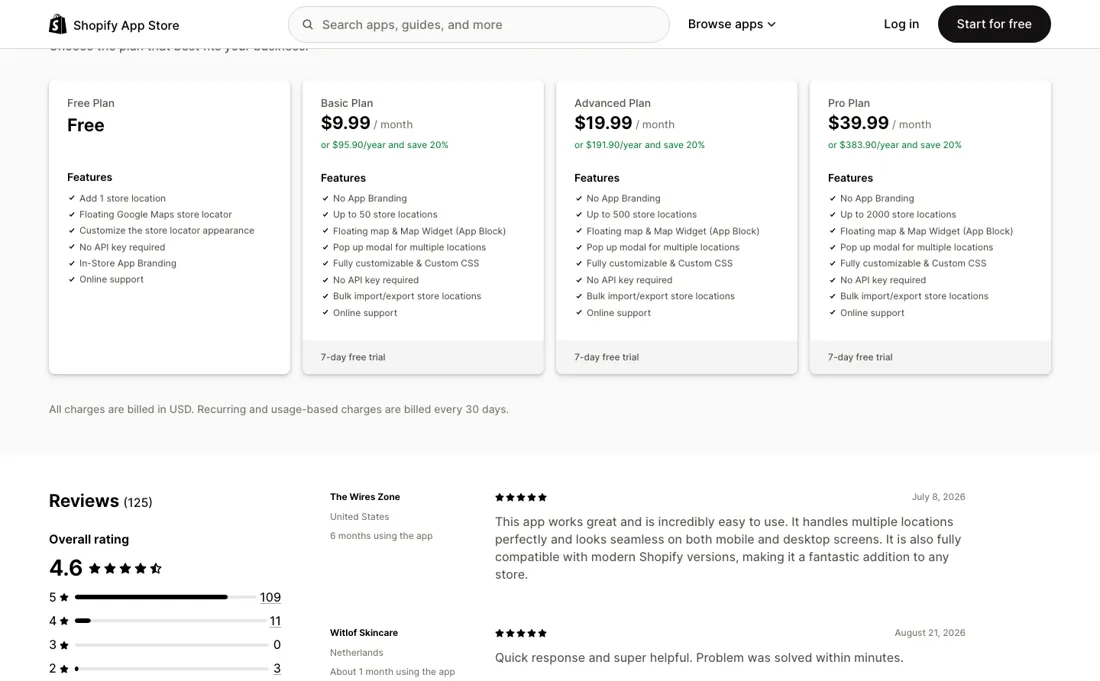
Basic, Advanced and Pro list the same eight capabilities, so the $8 and $23 steps above Basic buy nothing but a higher location limit, and the jump from 50 to 500 leaves no tier in between. A chain with 60 or 80 shops pays the 500-location price and uses a tenth of it. The free plan is genuinely usable on a live store, which is worth saying plainly — the same developer's Blocky and TiXel listings advertise free plans that turn out to be development stores only, and this one is not that.
What it does carry is the app's branding on your storefront and a hard limit of one location, so it is a real free tier for a single shop rather than a trial in disguise.
Watch the 2-minute review
The video version of this review, from our YouTube channel.
What Way does
Shopify store locator on Google Maps with no API key needed, priced by location count rather than by feature: the paid tiers add locations and nothing else, and it also works with Apple Maps and Mapbox.
What buyers report about Way
Recurring themes from the buyer-review sites listed at the foot of this page, read in August 2026. We have not run Way ourselves, so this is other buyers' experience rather than ours. We summarise it here because the complaints are usually the part a vendor page leaves out.
- • 110 of the 126 reviews are five stars and 11 are four, with nothing at three. The tenures are real rather than first-impression: KIWIKINGS (New Zealand, over two years, 12 June 2026), The Wires Zone (United States, six months, 8 July 2026), JOIIA (Canada, five months, 11 August 2026), felt-bikes (Spain, three months, 26 June 2026), Comor - Go Play Outside (Canada, about a month, 22 June 2026) and Witlof Skincare (Netherlands, about a month, 21 August 2026).
- • The Wires Zone is the only review that describes the paid case: multiple locations handled cleanly and the widget looking the same on mobile and desktop. Everything else praises the support desk — quick replies, problems solved in minutes — rather than the map itself.
- • The sharpest review disputes the free tier head-on. Sugar & Mila (New Zealand, about an hour, 31 July 2026): “On the Free Plan, it clearly says 1 Store Locator. What it does not say is, you need to Upgrade to show the 1 Store. Nothing is Free on the Free Plan.” Effective Apps replied publicly on 3 August 2026 that the free plan does include a working floating Google Maps locator for a single location at no cost, and that they had emailed the merchant. Neither side posted anything further, so the question is open in public.
- • Flabelus (Spain, nine minutes, 20 May 2026) says the app would not load on the Lorenza theme and that they could not disable the store icon. The developer answered the same day that the merchant had only asked how to remove it, so the theme conflict had never been reported to support, and offered to set it up for them.
- • Literie Universens (France, about five hours, 8 December 2025) writes in French that it is not a map for positioning shops and holds no interest — which reads as the free tier's floating navigate-to-store button being mistaken for the multi-location map that only appears on the paid plans.
- • Two of the five low-star reviews carry no text at all: Callas Confiture (Belgium, 29 days) and ABSO Kauppa (Finland, six minutes).
Where the ratings disagree. Two things worth setting against the pricing page. First, this listing's free plan is meant to be the honest one — the same developer's Blocky and TiXel listings advertise free plans that turn out to be development stores only, and this one is a genuine free tier on a live store. One merchant publicly says otherwise and the developer publicly says it works; nothing readable settles it, so treat it as the first thing to check in your own storefront rather than as established. Second, and more telling: not one review read mentions running out of store locations. The $19.99 and $39.99 tiers add nothing but a higher cap, and the jump from 50 straight to 500 is the reason a 60-shop chain pays the 500-location price — yet the reviews are entirely about installation and support. The pricing structure that costs the most is the part no buyer has written about.
Pages read (August 2026): Shopify App Store
When the paid plan is worth it
The three paid tiers carry word-for-word identical feature lists, so the only thing you are ever buying above $6.99 is room. That makes the arithmetic unusually simple and unusually easy to get wrong. Per location, Basic works out at fourteen cents a month, Advanced at three cents and Pro at one and a half — but only if you fill the tier. So count your locations before you read the plans.
At 60 shops you are paying $14.99 for a ceiling of 500, which is $14.99 for the ten locations that spilled over Basic. The steps are wide enough that most retailers sit a long way below their own ceiling, and there is no tier between 50 and 500 to land on. The first step is the one that is not about volume at all. Free is capped at one location, but what most single-shop merchants actually pay $6.99 for is the removal of the app's branding from their storefront.
Judge that step on whether you want another company's name under your map, not on the location count.
How to actually use Way
Count your locations first, because that number is the only thing the paid tiers differ on. Fifty is the Basic ceiling and the next stop is 500, so a chain in the sixties should know it is buying a ceiling it will not approach rather than a feature it needs. Then decide about branding separately. The free plan works on a live storefront with one location, which makes it a real place to start rather than a demo — but it puts the app's name under your map.
If that is the thing you want gone, $6.99 is the price of removing it, and the location limit is incidental to your decision. When you do load locations, use the bulk import rather than the form. It arrives at Basic along with custom CSS, and a spreadsheet of addresses is both faster and easier to correct later than fifty entries typed one at a time. Place the map as an app block rather than the floating widget if you want it on a specific page; both are on the same tier.
Distilled from apps.shopify.com/sticky-navigate-to-store, read 22 August 2026; pricing re-read there 25 August, 16 September and 19 September 2026 — the four plan cards, the feature bullets, the Languages and Works with fields, the Built for Shopify badge, the developer details and the review distribution.
Frequently asked questions
The listing says unlimited locations — so why do the plans stop at 2,000?
Because the bullet and the plan cards are two different kinds of writing, and only one of them is the deal. Read on 19 September 2026, the feature list at the top of the listing promises you can add unlimited store locations. The pricing block underneath caps Free at one, Basic at 50, Advanced at 500 and Pro at 2,000, and those ceilings are the only thing separating the three paid tiers — their eight features are word for word identical. Treat the ceiling on the card you pay for as the number that counts and the bullet as marketing copy that has outrun the plans. If you genuinely have more than 2,000 stockists, do not install on the strength of that sentence: ask the developer in writing what happens past the Pro limit before you build a locator around it.
Do I need a Google Maps API key, and will Google bill me separately?
No key, and no second bill — this is the app's most quietly useful feature. Every tier, the free one included, states that no API key is required, which means you are not opening a Google Cloud project, not attaching a credit card to it, and not watching a map-loads meter that bills you when a campaign sends a rush of traffic at your store locator. That is the step that stops most merchants building this themselves, and it is also the difference between a fixed monthly cost and a usage bill you do not control. The app also lists Apple Maps, Mapbox and Shopify's B2B solution among the things it works with, so the Google dependency is not the whole story — but the key question, the one that decides whether a developer has to be involved at all, is settled on the free plan.
What happens when I pass my plan's location limit?
The listing does not say, and we looked. Each card names a ceiling — 1, 50, 500, 2,000 — and nothing on the page describes what the app does at that ceiling: no overage rate, no per-location charge, no note about the map refusing new entries. The only nearby wording is Shopify's standard line that recurring and usage-based charges are billed every 30 days, which is printed on every listing and says nothing specific here. It matters more on this app than on most, because bulk import from a spreadsheet arrives at Basic: it is genuinely easy to upload 60 addresses into a 50-location plan and find out afterwards which ten the app decided to drop. Ask support before the import, or upload in batches small enough to see the boundary as you cross it.
What should I weigh before buying E-commerce software?
Check your platform and version specifically. Shopify support is close to universal in this category, while WooCommerce, BigCommerce, Magento and headless setups vary a lot, and 'supported' sometimes means a generic API rather than a maintained app. A listing in your own platform's app store, with recent reviews there, is a better signal than the vendor's logo wall.
Is this a hands-on review of Way?
This is a researched assessment, not a hands-on test — where we've used a tool ourselves, we say so explicitly. We name what each tool is good and bad at, and we earn a commission only if you sign up, at no cost to you.
- Buyer reviews on Shopify App Store (listing slug sticky-navigate-to-store; 126 reviews at a 4.7 average, the first page of the unfiltered list plus the one-, two- and three-star filter read separately), read August 2026.
- Re-verified 2026-09-19.
- A dated screenshot of that pricing page, kept on this site as the receipt.
Others in this category
Reviewed e-commerce tools that share ground with Way — comparable in what they do, not drop-in swaps:
New reviews, price changes we recorded, and the cost conditions we found. No sponsored placements. Unsubscribe anytime.
This is our researched assessment — not a paid placement. The “Visit” links on this page are affiliate links: we may earn a commission if you sign up, at no extra cost to you, and it never changes our take. How we review →