 Consentmo Review (2026)
Read the ladder before you budget $10 for this.
Visit Consentmo → Affiliate link — the rest of this page is the honest version, including who should skip it.
Pricing (2026)
✓ Pricing re-verified 8 Sep 2026
- Free — $0 a monththe cookie banner and preferences, one banner language and one cookie scan a month, with Consentmo branding on the banner
- Standard — $10 a month, or $100 a yearunlimited cookie scans, multi-region compliance, Google Consent Mode v2 and the Meta, Microsoft and TikTok signals, script blocking, no branding
- Plus — $37 a month, or $370 a yearweb accessibility, smart geotargeting, automated monitoring, scheduled scans and the EU withdrawal page
- Enterprise — $64 a month, or $640 a yearIAB TCF 2.3, cross-domain consent sharing, a checkout banner for Shopify Plus, and Hydrogen and headless support
| This tool | $10 | 7th cheapest of 21 |
| Cheapest | $4.99 | Scarcity.AI |
| Median | $29 | |
| Most expensive | $250 | Seller Snap |
Entry price per month, USD. Our own dated readings of 21 e-commerce tools — not a market survey, and cheapest is not best.
Billed in USD every 30 days, with a 7-day free trial on each paid tier. Banner impressions are unlimited on every tier, the free one included, so the ladder gates features rather than traffic. Free costs nothing and covers the cookie banner and preferences, the data-request and Do-Not-Sell pages, one banner language and one cookie scan a month, with minimal Consentmo branding on the banner.
Standard is $10 a month or $100 a year (17% off) and adds unlimited cookie scans, multi-region compliance (GDPR, CCPA, PIPEDA and others), Google Consent Mode v2 and Meta, Microsoft and TikTok integrations, US opt-out signals, script blocking, multilingual banners with automatic detection, automatic Google Drive backups and removal of the branding. Plus is $37 or $370 a year and is where the accessibility side starts: web accessibility (ADA/WCAG), smart geotargeting, the EU withdrawal page for Directive 2023/2673, automated monitoring, scheduled scans, AI cookie categorisation, advanced analytics and full CSS customisation.
Enterprise is $64 or $640 a year for IAB TCF 2.3, cross-domain consent sharing, a checkout banner for Shopify Plus, Hydrogen and headless support, A/B testing, an alt-text manager, bot and crawler protection and priority support. Plans change — always verify the live price on their site.
What the pricing page doesn’t say
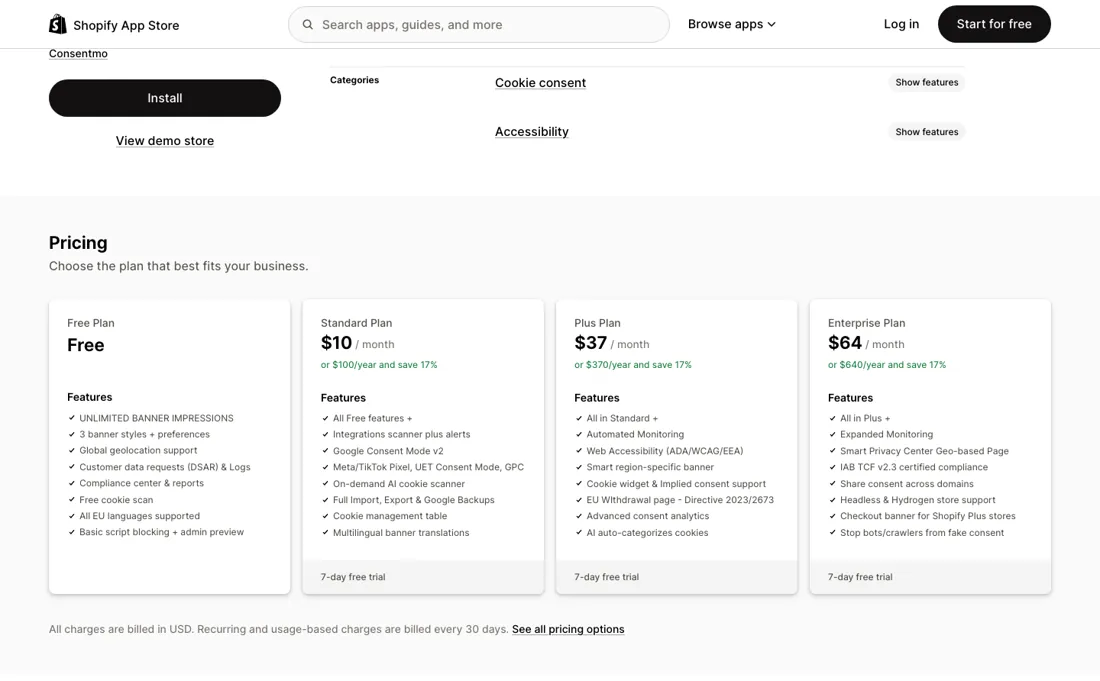
The two things the listing leads with — web accessibility and a smart, region-specific banner — are not on Standard; they start at Plus, $37 a month, which is 3.7 times the entry price. A Shopify Plus store that wants a banner on the checkout needs Enterprise at $64, and so does anything headless or on Hydrogen. The accessibility side is a widget and a scanner: it overlays controls and flags issues, but it does not change the theme markup underneath, which is where an accessibility audit actually looks — treat it as a first layer, not as a remediation.
And the free tier puts Consentmo's own branding on the banner your visitors see first.
What Consentmo does
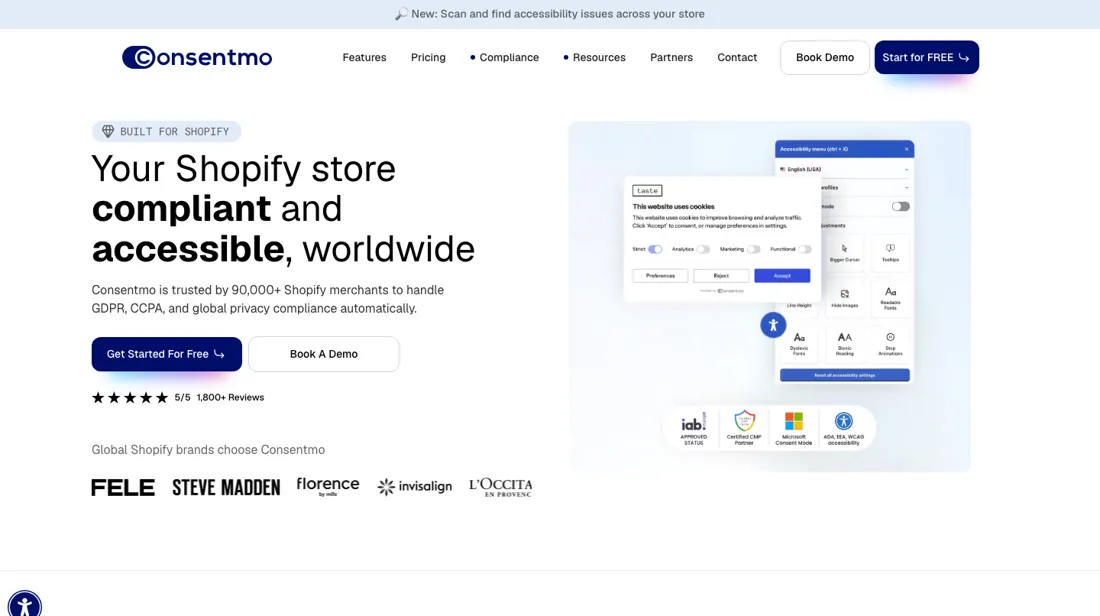
Shopify consent app that geolocates the visitor and shows the right GDPR, CCPA, PIPEDA or LGPD banner, with Google Consent Mode v2 and Meta, Microsoft and TikTok signals, cookie scanning and data-request pages — plus an accessibility widget and scanner from the Plus tier. Banner impressions are unlimited on every tier. Free plan; Standard $10 a month or $100 a year, Plus $37 or $370, Enterprise $64 or $640. Read 8 Sep 2026.
What buyers report about Consentmo
Recurring themes from the buyer-review sites listed at the foot of this page, read in September 2026. We have not run Consentmo ourselves, so this is other buyers' experience rather than ours. We summarise it here because the complaints are usually the part a vendor page leaves out.
- • An operator of more than 30 stores wrote in July 2026 that they had tried OneTrust elsewhere and came back to Consentmo for all of them, citing the breadth of compliance features in one place.
- • Reviewers repeatedly credit named support staff with solving configuration problems in live chat within minutes, including logging into the store to finish the setup.
- • It keeps pace with new regulation — a merchant of nearly five years says each new law has been handled without them having to chase it.
- • It stretches to unusual legal requirements: a Canadian store configured a strict basic-consent mode for Quebec's Law 25 against a custom Google Tag Manager setup with support's help.
- • The most common complaint is not a bug: merchants report analytics dashboards skewing and Meta retargeting audiences shrinking after install, and read that as the app misfiring rather than as consent being enforced. One spent weeks investigating before finding the cause.
- • Leftover code after uninstall is reported: a merchant who removed the app in January 2026 says pixel tracking stayed broken afterwards. The vendor disputes the account in its public reply.
- • A reviewer using it for ten months says the default setup has limitations, and that matching a legal team's stricter requirements needed support to make modifications.
- • Older complaints (2021–2024) are about a page-view quota that throttled the banner mid-month. That meter no longer exists — impressions are unlimited on every tier — so those reviews describe a product that has since changed.
Where the ratings disagree. The App Store listing's own feature summary is more generous about the free tier than the vendor's pricing table is: the listing credits Free with all EU languages, while consentmo.com puts multilingual support with automatic detection on Standard and gives Free one default banner language. Where the two disagree, the comparison table on consentmo.com is the more specific document.
What the ladder gates, and what no tier gives back
Read the ladder before you budget $10. Banner impressions are unlimited on every tier including Free, so the page-view quota merchants complained about for years is genuinely gone — but the two things the listing leads with are not on Standard. Web accessibility and the smart, region-specific banner start at Plus at $37, 3.7 times the entry price. Check the free tier against the vendor's own table rather than the App Store summary, because the two do not say the same thing.
The listing credits Free with all EU languages; consentmo.com's comparison table gives Free one default banner language and puts multilingual support with automatic detection on Standard. What no upgrade fixes is the thing merchants most often mistake for a fault. Reviewers going back years report analytics dashboards skewing and retargeting audiences shrinking after they install. That is consent working as designed: blocked trackers collect nothing until a visitor agrees. No tier buys that data back.
How to actually use Consentmo
The vendor's own compliance checklist, last updated in March 2026, runs in a fixed order, and one step in it is easy to miss. Set your regions first, under the Cookie banner tab in the Geolocation section — but the app's Shopify Customer Privacy API integration applies only to stores that installed after 12 December 2024. An older install sets its regions under Settings, Customer Privacy in Shopify instead. Then set the initial state: Consent banner, Behavior, Default mode of checkboxes, every cookie group unchecked before consent.
Then link your privacy policy under Consent banner, Content. The step that catches people out is the tracking scripts you pasted into theme files yourself. Those fire before consent and are not blocked for you; the setup guide has a section for adding that blocking by hand. Free includes one cookie scan a month, which is enough to see what is actually loading, and Support, Diagnose site tells you whether the banner is live.
Distilled from the Consentmo help centre at support.consentmo.com, in particular the setup-guide article 'How to set my compliance?' (last updated 24 March 2026), plus the full plan comparison table on consentmo.com/pricing and the tier list and merchant reviews on apps.shopify.com/gdpr-backpack, all read on 8 September 2026
Consentmo vs accessiBe, side by side
Both columns come from the same place: each vendor’s own published pricing, read on the date shown in the sources at the foot of this page. We do not average them into a score.
Both names above are affiliate links: we may earn a commission if you sign up, at no extra cost to you. Neither changes what this table says: both columns come straight from the vendors’ own pricing pages.
The natural comparison is accessiBe — these two only look alike on the accessibility line. accessiBe sells accessibility as its whole product, on any site, and goes deeper than a widget; Consentmo sells consent as its whole product and adds accessibility from the $37 tier up. So if accessibility is the reason you are shopping, Consentmo's Plus tier is a starting layer rather than a replacement. If consent is the reason, the two are not in the same market at all: the cookie banner, the geotargeting and the Consent Mode integrations are what Consentmo is for, and they are not what accessiBe sells.
More on Consentmo
Everything we publish about Consentmo links back here — the review stays the honest hub:
The ex-banker filter — the same yardstick on every review (how we review): My ex-banker filter is simple: does Consentmo remove a real cost — time, errors, missed revenue — bigger than what it charges?
Frequently asked questions
What should I weigh before buying E-commerce software?
Check your platform and version specifically. Shopify support is close to universal in this category, while WooCommerce, BigCommerce, Magento and headless setups vary a lot, and 'supported' sometimes means a generic API rather than a maintained app. A listing in your own platform's app store, with recent reviews there, is a better signal than the vendor's logo wall.
Is this a hands-on review of Consentmo?
This is a researched assessment, not a hands-on test — where we've used a tool ourselves, we say so explicitly. We name what each tool is genuinely good and bad at, and we earn a commission only if you sign up, at no cost to you.
- Buyer reviews on the Shopify App Store listing (apps.shopify.com/gdpr-backpack), including the one- to three-star filter, read September 2026.
- Read 2026-09-08 on apps.shopify.com/gdpr-backpack and on the vendor's own consentmo.com/pricing, which list the same four tiers.
- A dated screenshot of that pricing page, kept on this site as the receipt.
Others in this category
The e-commerce tools closest to Consentmo that we have also reviewed. They overlap rather than match:
New dossiers, cost-traps we found, and tools that earned a keep — no hype, no sponsored-disguised-as-advice. Unsubscribe anytime.
This is our researched assessment — not a paid placement. The “Visit” links on this page are affiliate links: we may earn a commission if you sign up, at no extra cost to you, and it never changes our take. How we review →