Boulevard Review (2026)From $143 Per Location, Add-Ons Too
 By Daan Haket · Researched and written with an AI assistant · who does what
Boulevard is per location, so the arithmetic for a second salon is not a volume discount, it is double — and the add-ons are per location too, which compounds it.
salons, spas and clinics with staff to schedule and a front desk to run — the per-location pricing works out fine for one busy site.
you are a solo practitioner with a calendar and a card reader, because the entry tier at $143 a month is priced for a team, and multi-location owners should price the add-ons per site before comparing.
Transparency: we earn nothing from Boulevard; the links to it are plain links. How we make money →
Pricing (2026)
✓ Pricing re-verified 21 Oct 2026
(2026-09-17, read on their own pricing page; re-read 2026-10-04 and 2026-10-21, annual amounts unchanged; the monthly figures below are from 4 October) Priced per location per month, and the page opens on its Annually tab, so the headline figures are annual-billing rates: Essentials $143, Premier $234 and Prestige $328 per location. The toggle's own label says Save 10% on annual; switched to Monthly on 4 October 2026 the cards read $159, $260 (normally $325) and $364 (normally $455), about 11% above the annual figures.
Premier and Prestige still carry the sticker, relabelled from summer to fall pricing by 4 October 2026, — $234 against a 'normally' $293 and $328 against $410, footnoted limited-time and new customers only — but Essentials no longer does: it lost the struck-through $176, rose from $140 to $143 since we read the page on 18 August 2026, and had its allowances raised to 250 texts, 1,000 email blasts and 50 GB of storage.
Prestige lists 100 GB. Enterprise is a bespoke quote and a separate Medspa tab carries its own bundles. Paid add-ons sit on top, also per location: Forms from $65 per month per location, QuickBooks $45, ePrescribe $45 per prescriber, and email beyond the included allowance at $0.01 each. Every tier's button is 'Get a demo': there is no self-serve checkout at any price. Plans change — always verify the live price on their site.
What the price did
We capture Boulevard’s own pricing page every month and keep the figures, so this is our record of the page — not a forecast, and not someone else’s summary.
Three dated readings. On 18 August 2026 the annual-billing cards read Essentials $140 against a struck-through $176, Premier $234 against $293 and Prestige $328 against $410, under a summer offer for new customers. On 17 September Essentials had dropped the comparison and read $143, while the other two were unchanged. On 4 October 2026 all three annual figures matched September, the footnote now said fall pricing, and the Monthly tab read $159, $260 and $364.
What the pricing page doesn’t say
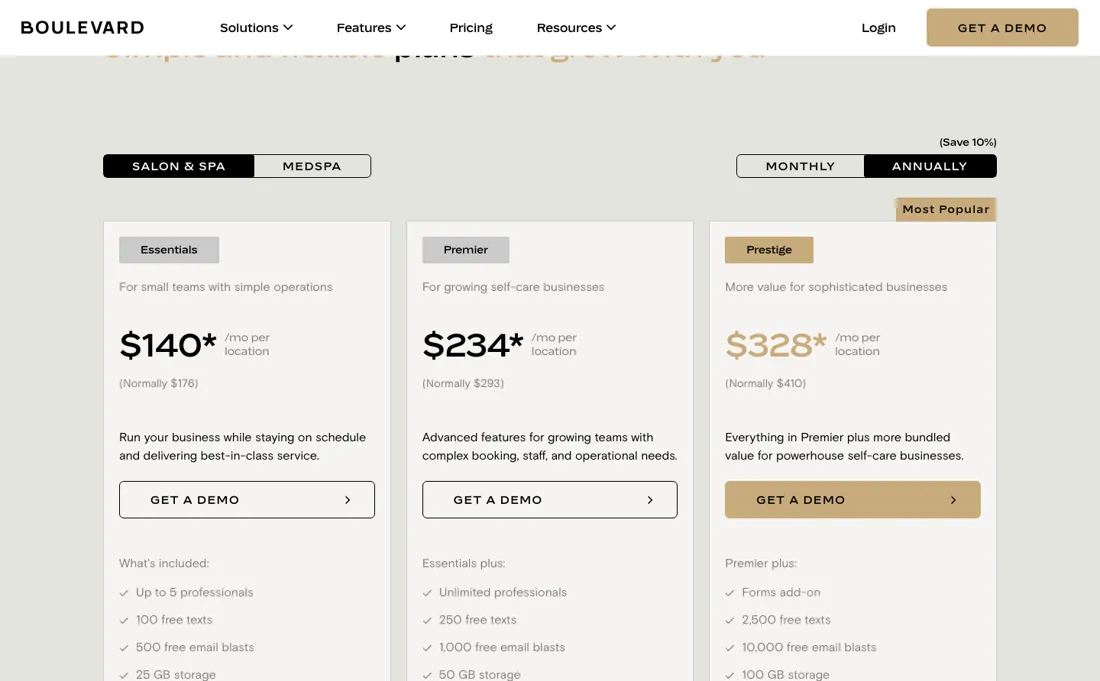
The prices you see are annual-billing rates: the page opens on its Annually tab and the toggle puts monthly billing about 11% higher ($159 against $143 on Essentials, read 4 October 2026), so the sticker is the cheapest version of the number. Two of the three tiers still show that sticker struck through against a higher 'normally' figure, footnoted on 17 September 2026 as a limited-time offer for new customers only, and relabelled 'fall pricing' by 4 October on the same terms; treat the higher number as the list price a renewal may return to.
Essentials shows what that looks like when the music stops: on 18 August it was $140 against a struck-through $176, and a month later the discount and the comparison are both gone and it reads $143. The third thing is not a price at all: you cannot buy this without booking a demo. That is a signal about how the deal is done, and it means the published numbers are a starting point rather than a checkout.
Watch the video review
The video version of this review, from our YouTube channel.
⚡ Short on time? Watch the 30-second verdict Short.
What Boulevard does
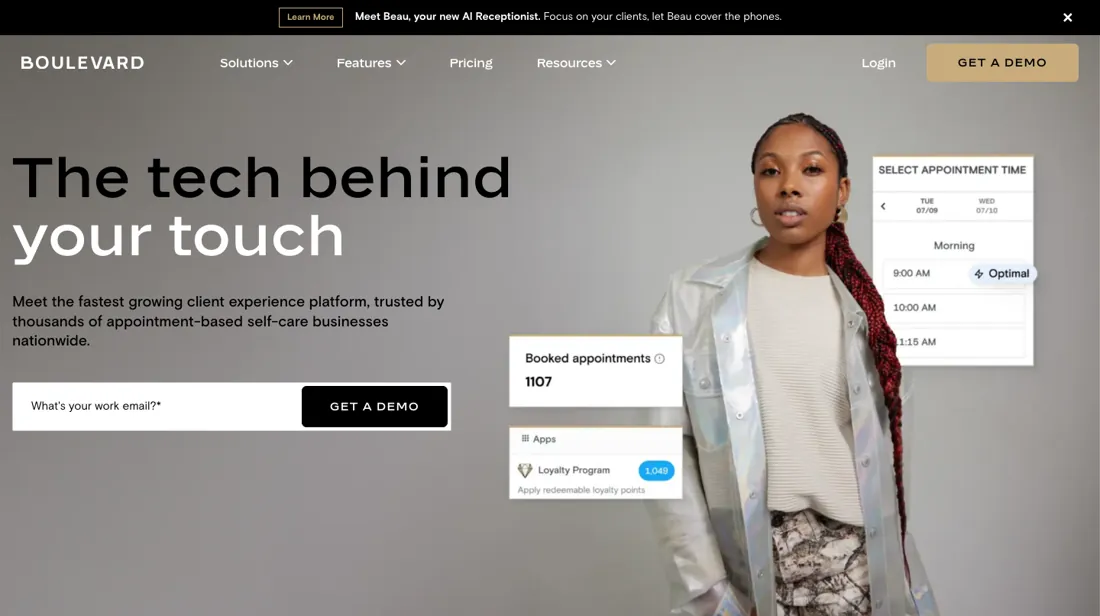
Booking, point of sale and client management for salons, spas and self-care businesses.
What buyers report about Boulevard
Hands-on: not tested by usReported by buyers: Capterra, GetApp, Software Advice and salon-industry reviews, read August 2026
Themes from the buyer-review sites listed at the foot of this page, read in August 2026. We have not run Boulevard ourselves, so this is other buyers' experience rather than ours. We summarise it here because the complaints are usually the part a vendor page leaves out.
- • Modern, genuinely pleasant to use, and onboarding gets salons live quickly — reviewers name the interface and the support.
- • Booking, client management and marketing in one place for established multi-provider businesses.
- • You sign a 12-month contract. There is no month-to-month, so this is a year's commitment from day one.
- • Each additional location pays full price, which makes scaling expensive rather than cheaper.
- • Reviewers call it expensive: it is priced per location, and the add-ons are charged per location on top of that.
- • Frequent updates are reported to affect performance, and reporting is limited relative to the price.
When the paid plan is worth it
The step from Essentials to Premier buys headcount, not a different product — and as of 17 September 2026 it buys less of anything else than it did. Essentials caps you at five bookable calendars; Premier makes professionals unlimited. The messaging allowances no longer separate them at all: both carry 250 texts, 1,000 email blasts and 50 GB, where Essentials had a quarter of that a month ago. Prestige bundles the Forms add-on and raises the allowances to 2,500 texts, 10,000 blasts and 100 GB.
Upgrade when you are hiring past five, then, not because a feature is missing. What no tier settles is the money side. Card processing is a separate negotiation: their FAQ offers volume discounts against your current merchant statement, or an Offset programme where clients pay a 3% fee and you pay 1%. The Duo point-of-sale has to be bought before you can start processing payments. And upgrading never changes the per-location arithmetic — a second site pays the full plan again, with QuickBooks at $45 and Forms from $65 per month per location on top.
How to actually use Boulevard
There is no self-serve checkout: the three published tiers all say Get a demo and Enterprise says Book a consultation. The FAQ says they are in touch within a day or two to set up a call covering your needs, a product demo and next steps. After signing, an Onboarding Specialist helps create the locations, service menu and staff accounts, and the on-demand training site Boulevard Academy takes the team through going live.
Start the data question early — the vendor's own answer is that what comes across depends on what your previous system releases, with client lists and inventory the types most platforms export. On hardware you probably have the computer or iPad already, but the Boulevard Duo point-of-sale must be purchased to process payments; a cash drawer, barcode scanner and receipt printer are optional. Payments batch into one business day and the deposit is initiated the next, usually reaching the bank after two business days.
Where this section comes from: our research notes (133 words)
Vendor pricing page including its own FAQ on setup, onboarding, data migration, equipment and payouts (joinblvd.com/pricing), read 18 August 2026. joinblvd.com/pricing re-read 4 October 2026 (served HTML and a live render of both toggles): annual $143/$234/$328 with $293 and $410 struck through, monthly $159/$260/$364 with $325 and $455 struck through, footnote "fall pricing, new customers only"; add-ons Forms from $65, QuickBooks $45, ePrescribe $45, email $0.01 unchanged. Boulevard help-centre articles Understanding Your Boulevard Bill (support.boulevard.io/en/articles/15521146) and Exporting & Backing Up Your Data from Boulevard (support.boulevard.io/en/articles/17176434) read 21 October 2026.
joinblvd.com/pricing re-read the same day in served HTML: annual $143, $234 and $328 per location with 'normally' $293 and $410, the fall-pricing footnote and the add-on prices unchanged; the monthly toggle was not re-read that day because its values load with the page script.
The natural comparison is Mindbody or Vagaro — the standing comparison in salon and spa software — compare per-location totals with your add-ons switched on, not the entry sticker.
Frequently asked questions
What does Boulevard cost per location?
$143, $234 or $328 per location a month for Essentials, Premier and Prestige, read on their pricing page on 17 September and again on 4 October 2026 — and read the tab before the number, because the page opens on Annually and its own toggle says Save 10% for annual: on Monthly the three cards read $159, $260 and $364. Enterprise is a bespoke quote, and there is a separate Medspa tab with its own bundles. The add-ons are per location as well: Forms from $65 a month, QuickBooks $45, ePrescribe $45 per prescriber, and email blasts beyond the included allowance at a cent each. Whatever you are quoted, the arithmetic for a second site is not a volume discount — it is the same bill over again, add-ons included.
Has the summer pricing ended?
On one tier, and the way it ended is the thing to see. On 18 August 2026 all three cards carried the struck-through sticker: $140 against $176, $234 against $293, $328 against $410. Read again on 17 September 2026, Premier and Prestige still carry theirs, footnoted limited-time and new customers only. Essentials has no asterisk and no “normally” figure any more — it simply reads $143. So the entry tier's introductory rate has quietly become its list price, $3 above the offer it replaced, while the discount on the two tiers above it is still running on terms that apply to new customers only. On 4 October 2026 the footnote had been renamed fall pricing, still limited-time and new customers only, over the same $234 and $328 against $293 and $410. If you are quoted a struck-through number on Premier or Prestige, ask what the renewal rate is and when the offer ends. That is the figure you will be paying in year two.
What does the entry tier include now?
More than it did a month ago, which is the genuinely good news on this page. Essentials was five professionals with 100 texts, 500 email blasts and 25 GB of storage on 18 August 2026; on 17 September it is up to five bookable calendars with 250 texts, 1,000 email blasts and 50 GB — the same messaging allowance Premier carries. For a salon with five or fewer people on the books, the case for Premier is now headcount and nothing else: it makes professionals unlimited and adds nothing else to the card. Forms is the notable omission, at $65 per location a month unless you are on Prestige, which bundles it. And payments sit outside the plan at every tier: the Boulevard Duo point-of-sale has to be bought before you can take card payments at all.
Are there one-time fees on top of the per-location price?
There can be, and the pricing page does not price them. Boulevard's help article Understanding Your Boulevard Bill, read 21 October 2026, says the first invoice may carry one-time fees for Guided Setup (an Onboarding Specialist configuring your locations, service menu and staff accounts) and for Import Plus or Data Migration from your previous software. No amount is published for either, so ask for both in writing during the demo. The same article confirms the location licence is billed separately for each location, add-ons monthly per location, and texts beyond the plan's allowance by usage tiers set in your subscription agreement rather than on the public page.
Can I get my data out of Boulevard if I leave?
Most of it, as reports, but not all of it in bulk. The help article Exporting & Backing Up Your Data from Boulevard, read 21 October 2026, lists CSV or Excel exports for the full client list with marketing consent, appointment history, product purchases, membership status, gift card, voucher and account-credit balances, staff records, service and product catalogs and inventory; Excel and CSV include every column, PDF and PNG only what is on screen. Client notes, appointment notes and forms, charts and photos are not in bulk exports and must be saved one client or appointment at a time, which matters most for medspas. Exporting needs the Export Reports permission plus the category permission, so confirm an owner role holds both before you give notice.
How many email blasts does Essentials include?
Boulevard's own sources disagree. The pricing page read 21 October 2026 lists 1,000 free email blasts on Essentials and Premier and 10,000 on Prestige; the help article Understanding Your Boulevard Bill, which states it is current as of 21 September 2026, says 500 on Essentials, 1,000 on Premier and 10,000 on Prestige. Both price emails beyond the allowance at $0.01 each, so the gap is at most $5 a month, but confirm which figure is in your subscription agreement, which the article says governs your pricing.
Is this a hands-on review of Boulevard?
This is a researched assessment, not a hands-on test — where we've used a tool ourselves, we say so explicitly. We name what each tool is good and bad at, and we have no affiliate relationship with Boulevard — we earn nothing whether you sign up or not.
- Buyer reviews on Capterra, GetApp, Software Advice and salon-industry reviews, read August 2026.
- 2026-09-17, read on their own pricing page; re-read 2026-10-04 and 2026-10-21, annual amounts unchanged; the monthly figures below are from 4 October.
- A dated screenshot of that pricing page, kept on this site as the receipt.
Others in this category
Reviewed business operations tools that share ground with Boulevard — comparable in what they do, not drop-in swaps:
Also in business operations, for browsing rather than as an alternative:
New reviews, price changes we recorded, and the cost conditions we found. No sponsored placements. Unsubscribe anytime.
This is our researched assessment — not a paid placement. How we review →