Xero Review (2026)$27 a Month After the Promo, Up From $25
 By Daan Haket · Researched and written with an AI assistant · who does what
Every plan on the US page is 80% off for three months, and the price after that is five times what the button says: $27, $59 and $97 a month.
small businesses whose bookkeeper or accountant already works in Xero — the ecosystem and the bank feeds are the real product, and the monthly price is small against what the reconciliation time costs.
you invoice a handful of clients and reconcile by hand: the entry tier at $27 a month after the promo buys automation you may not need yet, and simpler invoicing tools cost less.
Transparency: we earn nothing from Xero; the links to it are plain links. How we make money →
Pricing (2026)
✓ Pricing re-verified 9 Oct 2026
The 1 October price increase the page announced in September has happened. The standard monthly prices are now Early $27 (was $25), Growing $59 (was $55) and Established $97 (was $90). The headline offer has changed too: 'Get 80% off your plan for your first 3 months', so Early is $5.40 a month for three months and then $27, Growing $11.80 and then $59, Established $19.40 and then $97; a second button offers one month free instead.
Early still lists 20 invoices and 5 bills a month, with a footnote marker on the invoice limit; on our 19 September reading that footnote said the limit counts both approving and sending and that transactions initiated by app partners may count toward it. New on Early: auto-reconcile is an optional add-on at $5.00 a month (included on Growing and Established). Growing allows 3 budgets.
Multi-currency, project tracking, expense and mileage claims and international bill payments remain on Established only. Optional add-ons: Inventory Plus (no price shown, not on Early) and Xero Payroll powered by Gusto at $36 a month plus $6 per employee or contractor. Standard ACH bill payments are free; fees apply for other methods and for cross-border payments. Subscriptions auto-renew monthly until cancelled. The offer terms were not re-read on this date; on 19 September they limited the then-current 90% offer to new US customers buying their first organisation and to the base subscription only, prices excluded tax and a downgrade was only allowed one month after an upgrade. Xero prices differently by country. Plans change — always verify the live price on their site.
Category context: Financial Operations. Across the 10 tools in this category that we researched with a public US-dollar price, the median entry price is about $26 a month (lowest paid plan as listed, per seat where the vendor prices per seat). Xero’s entry price of $27 a month sits roughly at that median. Compare pricing conditions in the Software Cost Atlas →
What the pricing page doesn’t say
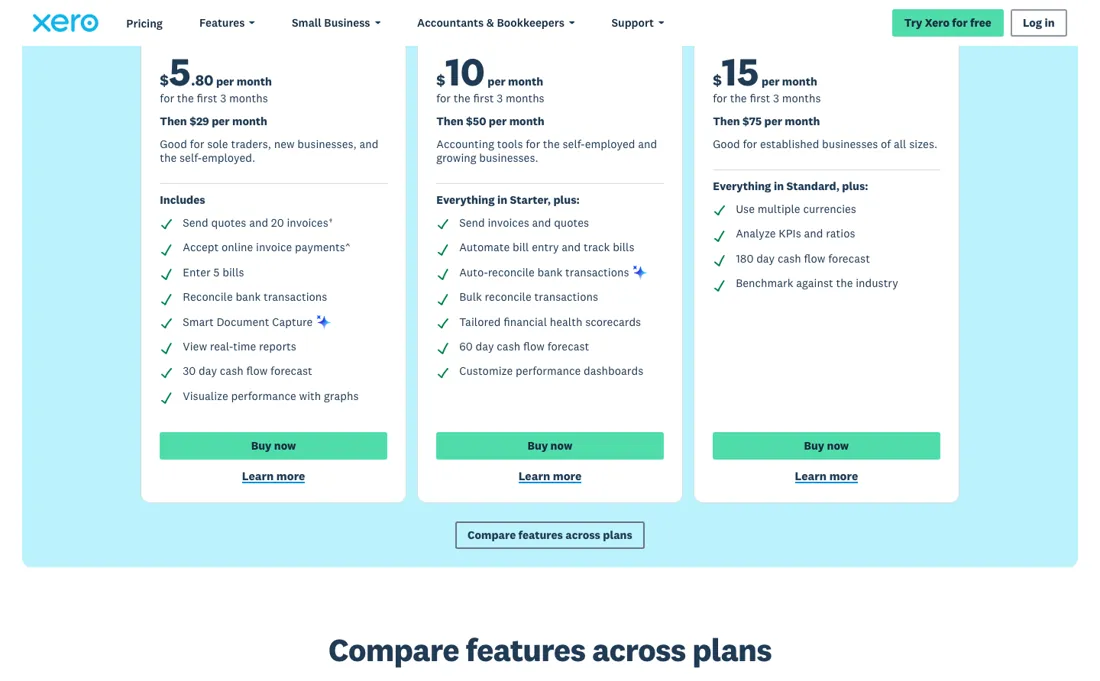
Those standard rates rose on 1 October 2026 from $25, $55 and $90. The second thing to check is the entry tier's ceiling: Early is 20 invoices and 5 bills a month, auto-reconcile costs $5 a month extra on it, and on our September reading the invoice limit counted approving as well as sending, with connected apps able to use it up. That makes Growing at $59 the realistic starting price for anyone billing through other software.
And check which country's page you are on, because Xero's tiers and prices differ by market.
Watch the video review
The video version of this review, from our YouTube channel.
⚡ Short on time? Watch the 30-second verdict Short.
What Xero does
Cloud accounting for small business: bank reconciliation, invoicing, bills and reporting.

What buyers report about Xero
Hands-on: not tested by usReported by buyers: G2, Capterra, GetApp and Trustpilot, read August 2026
Themes from the buyer-review sites listed at the foot of this page, read in August 2026. We have not run Xero ourselves, so this is other buyers' experience rather than ours. We summarise it here because the complaints are usually the part a vendor page leaves out.
- • Unlimited users on every tier, including the cheapest — a real advantage over per-seat competitors.
- • Non-accountants become productive in hours rather than days. Ease of use scores 9.0/10 on G2 against 8.2 for QuickBooks Online. 4.4 on both G2 and Capterra across 15,311 total reviews.
- • 46% of reviewers feel negatively about cost, and add-ons for advanced features push it out of reach for smaller teams. Established ran $90 a month when these reviews were read; since 1 October 2026 it is $97.
- • The forced switch from classic to new invoicing drew widespread complaints about lost functionality and a clunkier interface.
- • Manual payroll entry was removed in some regions — check yours before you migrate.
- • Support response times are a consistent complaint, alongside repeated price increases.
Where the ratings disagree. 4.4 on G2 and Capterra against 3.7 on Trustpilot. Narrower than most in this list, which itself says something: the complaints here are about price and product decisions, not about billing conduct.
Pages read (August 2026): Trustpilot
Read the second number
Every headline price on Xero's US page is a promotion: 80% off for the first three months. Early is $5.40 a month for three months and then $27. Growing is $11.80 and then $59. Established is $19.40 and then $97. Those standard rates are new: on 1 October 2026 Xero raised them from $25, $55 and $90, as the page had announced in September. Payroll powered by Gusto is an add-on at $36 a month plus $6 per employee or contractor.
So read the second number, not the first. It is printed right there, but smaller, and the plan people choose on the strength of $5.40 a month is the one that becomes $27, five times as much. Work out what the offer is worth across a year, because '80% off' sounds larger than it is. Three months at 80% off is 2.4 months of free service, a 20% discount on your first year and nothing after that.
In cash: Early costs $259.20 in year one against $324 at the standard rate, Growing $566.40 against $708, Established $931.20 against $1,164. Budget from the standard rate and treat the promotion as a one-off rebate. Two more things before you commit. Check which country's page you are looking at, because Xero prices and tiers differ by market. And be clear that the entry tier is a genuine floor rather than a taster: multi-currency and project tracking are on Established at $97, not on Early at $27.
The decision that matters with accounting software is not the monthly fee: your books end up inside it, which is what makes leaving expensive a year later. Pick on whether your accountant works in it and whether it connects to your bank properly, and let the $27-versus-$59 question follow from that.
How to actually use Xero
Check which country's page you are on before you read a single price. Xero's tiers and rates differ by market, so a comparison you found elsewhere may describe a different product at a different price, and the US figures are not the UK or Australian ones. Then budget the standard rate rather than the promotional one. Every headline is 80% off for three months: $5.40 becomes $27, $11.80 becomes $59, $19.40 becomes $97.
Across a full year the offer is worth about 20%, so plan from month four. The standard rates themselves rose on 1 October 2026. Pick the tier on the features that force it rather than on price. Multi-currency and project tracking sit on Established at $97, and auto-reconcile costs $5 a month extra on Early. Inventory Plus is a separate add-on again. Before any of that, ask your accountant or bookkeeper which package they work in, and connect your bank feed on day one.
Accounting software is chosen once and lived in for years, and the two things that decide whether it works are whether your bank feed is reliable and whether the person doing your year-end is fluent in it. The monthly fee is the smallest part of this decision.
Distilled from Xero US pricing plans, including the promotional banner and the cross-plan feature comparison, https://www.xero.com/us/pricing-plans/ (re-read in a headless browser 2026-10-09; offer terms and footnotes last read 2026-09-19); Xero multi-currency accounting, https://www.xero.com/us/accounting-software/use-multiple-currencies/ (read 2026-08-30).
Xero vs FreshBooks, side by side
Each column shows the vendor’s own published entry price, read on the date shown. Entry prices can cover different services or units, so check what each one buys. We do not average them into a score.
The natural comparison is QuickBooks or FreshBooks — the standing comparison in small-business accounting — compare the post-promotional price on all three, because all three lead with a discounted rate.
Frequently asked questions
Did Xero raise its prices in October 2026?
Yes. On 9 October 2026 the US page showed Early at $27 a month, Growing at $59 and Established at $97, up from $25, $55 and $90 on our September readings. The page had announced an increase from 1 October 2026.
What is the current Xero promotion worth?
Read on 9 October 2026: 80% off the first three months, so Early is $5.40, Growing $11.80 and Established $19.40 a month for three months. Across the first year that is a 20% discount: Early costs $259.20 instead of $324. After that the standard rate applies, and subscriptions auto-renew monthly.
Does the $27 Early plan let me invoice normally?
Only up to a limit. Early is capped at 20 invoices and 5 bills a month. On our 19 September reading the footnote said the invoice limit counts both approving and sending, and that transactions started by connected apps may count toward it. Growing at $59 has no such cap in the comparison table, which makes it the realistic entry price for anyone whose billing runs through connected apps.
What else lands on the bill besides the subscription?
Payroll powered by Gusto is $36 a month plus $6 per employee or contractor. Auto-reconcile is $5 a month extra on Early. Inventory Plus is optional on Growing and Established, not available on Early, and has no price on the page. Standard ACH bill payments are free; other methods and cross-border payments carry fees.
Is this a hands-on review of Xero?
This is a researched assessment, not a hands-on test — where we've used a tool ourselves, we say so explicitly. We name what each tool is good and bad at, and we have no affiliate relationship with Xero — we earn nothing whether you sign up or not.
- Buyer reviews on G2, Capterra, GetApp and Trustpilot, read August 2026.
- Re-verified 2026-10-09 in a browser render of their own US pricing page.
- A dated screenshot of that pricing page, kept on this site as the receipt.
Others in this category
Reviewed financial operations tools that share ground with Xero — comparable in what they do, not drop-in swaps:
New reviews, price changes we recorded, and the cost conditions we found. No sponsored placements. Unsubscribe anytime.
This is our researched assessment — not a paid placement. How we review →