 FreshBooks Review (2026)$2.30 Is a Three-Month Rate
Two things multiply the number you first see.
Pricing (2026)
✓ Pricing re-verified 7 Sep 2026
(2026-08-29, read on their own pricing page) Every amount is unchanged since 1 August 2026. The prices shown are 90% off for three months. Lite $2.30 a month promotional, $23 regular, 5 billable clients. Plus $4.30 promotional, $43 regular, 50 billable clients. Premium $7 promotional, $70 regular, unlimited clients. Select is quote-only. Team members are $11 a month each on every tier, with 2 included on Select.
Two add-ons sit in the fine print: Advanced Payments $20 a month and Payroll $40 a month plus $6 per user. The page prints the promotional saving beside each tier — $62.10 on Lite, $116.10 on Plus, $189.00 on Premium — which is exactly three months of the difference and confirms the discount runs three months and no longer. Separately, there is a 30-day free trial, and FreshBooks promises a full refund if you contact them within 30 days of purchase. Plans change — always verify the live price on their site.
What the pricing page doesn’t say
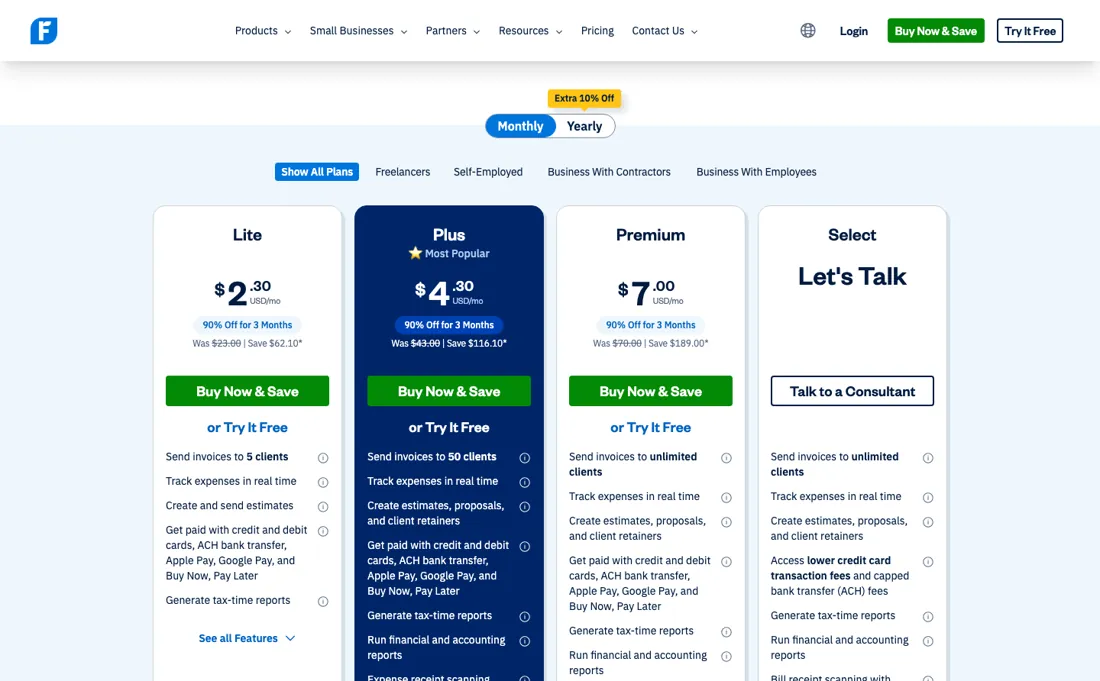
The promotional rate is 90% off for three months, so Lite is $23 rather than $2.30 from month four. And the meter is billable clients, not invoices or revenue: Lite stops at five, which a freelancer with a handful of retainers passes in their first good quarter, and the step to fifty clients is $43. Then people cost extra on top at $11 each, so a two-person studio on Plus is $54 a month rather than $43.
Payroll is a separate $40 plus $6 a head, which is the line most people miss when they compare this against a bookkeeping tool that includes it.
What FreshBooks does
Invoicing and accounting aimed at freelancers and service businesses, priced by billable clients.
What buyers report about FreshBooks
Recurring themes from the buyer-review sites listed at the foot of this page, read in August 2026. We use FreshBooks ourselves, but a single account is a narrow sample, so here is what other buyers report. We summarise it here because the complaints are usually the part a vendor page leaves out.
- • Support rates 9.2 out of 10 on G2, and reviewers describe reaching a helpful person within minutes. 4.5 on G2 across 975 reviews.
- • A 30-day trial and genuinely simple entry pricing.
- • Lite caps at 5 billable clients — and archived clients count toward it. That cap is the most-flagged complaint across every platform. Lite $23, Plus $43 (50 clients), Premium $70 (unlimited).
- • Every plan is single-user. Each extra team member is $11/month on top.
- • Payment links run over 3% of the transaction plus the fee, which reviewers call steep.
- • Duplicate entries and broken syncs are the most common complaint on Reddit.
Where the ratings disagree. 4.5 on G2 against 3.7 on Trustpilot across 1,017 reviews. That split tracks with whether someone is evaluating the features or living with the fees.
When the paid plan is worth it
Read the price on the page as a first-quarter rate, not a price. When we looked on 1 August 2026 every figure carried 90% off for three months: Lite showed $2.30 against a regular $23, Plus $4.30 against $43, Premium $7 against $70. Over a full year Lite therefore costs three months at $2.30 plus nine at $23, which is $213.90 -- an effective $17.83 a month, nearly eight times the number in large type.
Budget from the regular column and treat the discount as a welcome bonus rather than as the price. What separates the tiers is billable clients: 5 on Lite, 50 on Plus, unlimited on Premium. That is a hard operational ceiling rather than a feature, so count your active clients before anything else -- a freelancer with six regulars is already out of Lite. The line that catches teams is seats.
Team members are $11 a month each on every tier, including Lite. A three-person business on Lite pays $23 plus $22, which is $45 -- the seats cost as much as the plan. Only Select, the quote-only tier, includes any seats at all, and it includes two. Two add-ons sit in the fine print and both are large relative to the plan: Advanced Payments at $20 a month and Payroll at $40 plus $6 per user. Payroll alone is nearly twice the Lite plan.
What we found running FreshBooks ourselves
Daan started the 30-day trial; everything after that was measured inside the account. The first question the protocol asked was whether the trial takes a card, because their pricing page does not say. It does not — but the answer is on the signup page, not the pricing page, which is a small lesson in where vendors put the reassuring sentence.
- No card for the trial. The signup page states it plainly — “Try it free for 30 days. No credit card required. Cancel anytime.” — and the form asks only for an email address and a password. The pricing page, where you would actually look, says nothing about it.
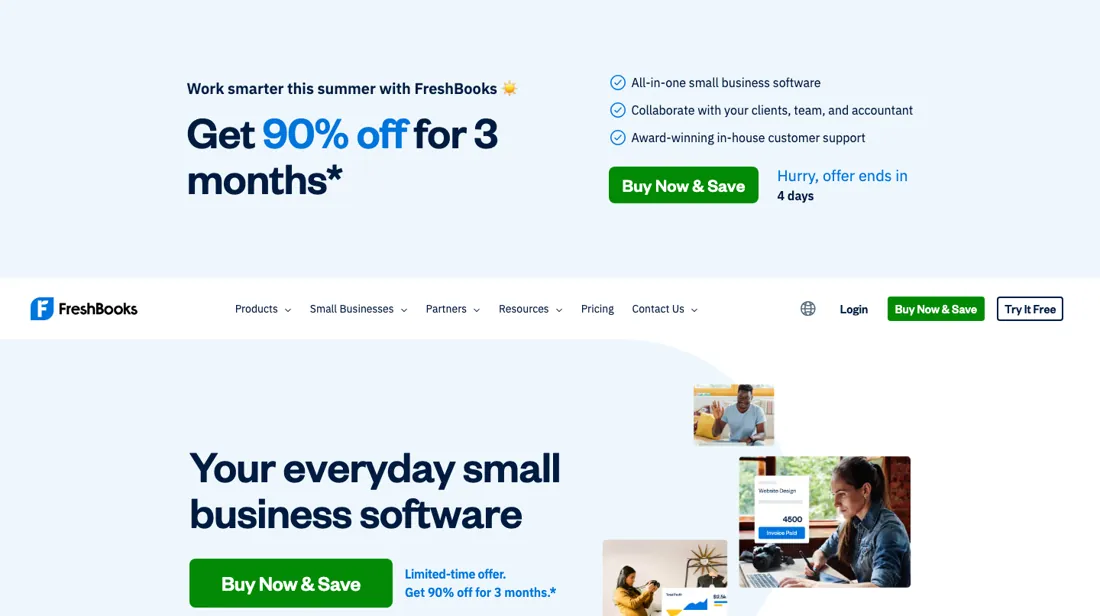
- The prices inside the account are not the prices on the pricing page. The public page leads with the promotional rate, currently a limited-time 90% off for three months. The in-app upgrade screen quotes the real thing: Lite $23, Plus $43, Premium $70 a month, with a Yearly toggle marked “Save 10%”. Sign up on the strength of $2.30 and the first screen you see afterwards is $23.
- Two add-ons ride along on every tier, and they are easy to miss: Team Members at $11 per user a month, and Advanced Payments at $20 a month. They are listed under Lite, Plus and Premium alike.
- Removing FreshBooks branding from the emails your client receives is not a paid feature — it is a quote-only one. It appears only on the top “Let's Talk” tier, alongside lower card fees and two included team members. On Lite, Plus and Premium your invoice mail carries their brand.
- The client ceiling that decides the tier is not testable during the trial. Lite stops at 5 clients, Plus at 50, Premium unlimited — but the trial runs with full features, as the upgrade screen says in as many words (“Upgrade to a paid plan to continue using all of FreshBooks' great features”). We fed the client importer a six-client CSV and it accepted the file and moved straight to field matching, with no limit warning at the point where a Lite account would have stopped. So the meter that will actually bite you is the one you cannot feel while you are evaluating.
- Prices are shown in USD on a Netherlands account, and the plan screen carries the note “Features vary by region.”
Most of our reviews are researched rather than run — how we review explains which is which, and why we do not pretend otherwise.
How to actually use FreshBooks
Budget month four, not month one. The prices on the page are 90% off for three months, so Lite is $2.30 now and $23 from month four, Plus is $4.30 becoming $43, and Premium $7 becoming $70. Everything else in this decision should be modelled on the regular rate. Then count billable CLIENTS, because that is the meter — not invoices, not revenue. Lite stops at five, which a freelancer with a handful of retainers passes in a single good quarter, and the step to fifty clients is $43 a month.
If your client list is growing, price Plus from the start. Add people separately. Team members are $11 a month each on every tier, so a two-person studio on Plus is $54 rather than $43 — and only Select, which is quote-only, includes any seats at all. And check the add-ons against what you assumed was included. Advanced Payments is $20 a month and Payroll is $40 plus $6 per user, which is the line most people miss when they set this beside a bookkeeping tool that bundles payroll. Work out your full basket — plan, seats, payroll — before you compare anything.
Distilled from FreshBooks' own pricing page, www.freshbooks.com/pricing, read 10 September 2026 from a Netherlands exit: the three published tiers with the promotional banner (90% off for three months) alongside the regular rates — Lite $23, Plus $43 and Premium $70 a month — the billable-client limits of 5 and 50, the team-member rate of $11 per person per month, and the add-on rates for Advanced Payments ($20 a month) and Payroll ($40 plus $6 per user). Select is quote-only. The promotional figures we quote ($2.30, $4.30 and $7) are the page's own discounted amounts, not our arithmetic.
FreshBooks vs Xero, side by side
Both columns come from the same place: each vendor’s own published pricing, read on the date shown in the sources at the foot of this page. We do not average them into a score.
The natural comparison is Xero or QuickBooks — the standing comparison — FreshBooks is friendlier for service billing, the other two are stronger accounting; compare on post-promotional price plus your team count.
The ex-banker filter — the same yardstick on every review (how we review): My ex-banker filter is simple: does FreshBooks remove a real cost — time, errors, missed revenue — bigger than what it charges?
Frequently asked questions
What should I weigh before buying Financial Operations software?
The bar here is higher than features. Check who actually holds the money and under what licence, whether client funds are segregated, what audit trail and permission controls you get, and how support behaves when something goes wrong mid-transaction. Anything touching payments should be able to answer those in writing; if it cannot, that is your answer.
Is this a hands-on review of FreshBooks?
Yes. We used FreshBooks ourselves on 2026-09-07; the section above reports what we measured in the product, and says where a figure comes from the vendor's own documentation instead. Most of our reviews are researched rather than run; we say which is which. We name what each tool is genuinely good and bad at, and we have no affiliate relationship with FreshBooks — we earn nothing whether you sign up or not.
- Buyer reviews on G2, Capterra, Trustpilot and Reddit, read August 2026.
- 2026-08-29, read on their own pricing page.
- A dated screenshot of that pricing page, kept on this site as the receipt.
- Our own hands-on session with FreshBooks (2026-09-07), written up in full further down this page.
Others in this category
Reviewed financial operations tools that share ground with FreshBooks — comparable in what they do, not drop-in swaps:
New dossiers, cost-traps we found, and tools that earned a keep — no hype, no sponsored-disguised-as-advice. Unsubscribe anytime.
This is our researched assessment — not a paid placement. How we review →