WebinarGeek Review (2026)No Basic Plan, Premium From €59/mo
 By Daan Haket · Researched and written with an AI assistant · who does what
The friendly €59 headline is the annual rate for 75 viewers, and the real cost lives in add-ons: localisation, the AI assistant, CRM integrations, RTMP and branding profiles are each €20-59 a month on top, and only a Premium subscription can buy them. A serious webinar stack quickly doubles the base plan.
marketing and sales teams running live and automated webinars in Europe who want a polished, GDPR-friendly platform with viewer-tier pricing.
you run occasional small webinars (your video-call tool may cover it), or you need the CRM and localization features that sit behind paid add-ons.
Transparency: the “Visit” links on this page are affiliate links — we may earn a commission if you sign up, at no extra cost to you. No vendor can pay for a better review or verdict. How we make money →
Pricing (2026)
✓ Pricing re-verified 3 Oct 2026
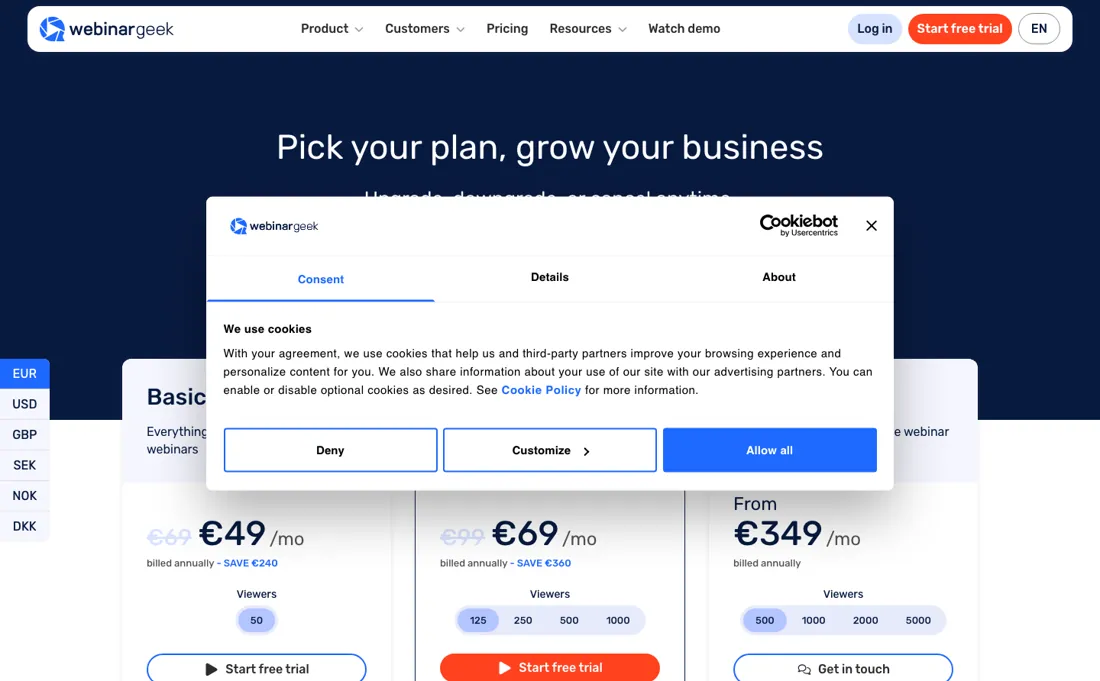
The plans are now Premium and Enterprise. The Basic plan we read on 14 September (€69 a month or €49 billed annually, 50 viewers) is no longer on the page, in English or in Dutch. Premium is bought per viewer tier, monthly against annual: €99/€59 at 75 viewers, €129/€79 at 125, €199/€119 at 250, €299/€179 at 500 and €399/€239 at 1,000. The page advertises "save up to 40%", and the annual discount is close to 40% on every tier.
Premium carries 100 presenters on stage, an 8-hour session limit, one account user, live captions, AI analysis and restreaming. Enterprise is annual-only and quoted from €349 at 500 viewers, €449 at 1,000, €649 at 2,000 and €849 at 5,000, with a 12-hour session limit, three account users, a custom domain, RTMP, workspaces, and localisation and the Salesforce and HubSpot integrations included. The figures render client-side and a plain fetch retrieves almost none of them.
Add-ons are priced per month on annual billing, with monthly in brackets: extra user €10 (€15), localisation €20 (€25), AI assistant €20 (€25), branding profiles €59 (€79, an extra workspace and e-mail domain included), HubSpot €49 (€69), Salesforce €49 (€69) and RTMP streaming €29.50 (€49.50), plus a one-off €495 for online onboarding. Plans change — always verify the live price on their site.
Category context: Marketing. Across the 23 tools in this category that we researched with a public US-dollar price, the median entry price is $29 a month (lowest paid plan as listed, per seat where the vendor prices per seat). Compare pricing conditions in the Software Cost Atlas →
Correction after re-checking: Corrected 3 October 2026. Until then this page priced WebinarGeek from a Basic plan at €49 a month billed annually (€69 monthly) for 50 viewers, read on 14 September 2026. That plan is no longer on the pricing page: the entry point is now Premium at €59 billed annually (€99 monthly) for 75 viewers, and the Premium tiers we had listed at 125 to 1,000 viewers have new prices (€79 to €239 annual, €129 to €399 monthly, against €69 to €199 and €99 to €399 before). The RTMP add-on moved from €34.50 to €29.50 a month on annual billing. Enterprise did not change.
What the price did
We capture WebinarGeek’s own pricing page every month and keep the figures, so this is our record of the page — not a forecast, and not someone else’s summary.
We have three dated readings of WebinarGeek's pricing page. On 4 August and 14 September 2026 it sold Basic at €49 a month billed annually (€69 monthly) for 50 viewers, and Premium from €69 (€99) at 125 viewers to €199 (€399) at 1,000. By 3 October 2026 Basic was gone and Premium started at 75 viewers: €59 (€99) at 75, €79 (€129) at 125, €119 (€199) at 250, €179 (€299) at 500 and €239 (€399) at 1,000. The monthly prices at 125 and 250 viewers rose by €30 and €40, the annual ones by €10 and €20, while the top tier's monthly price held at €399. Enterprise stayed at €349 to €849.
WebinarGeek’s pricing page, as we read it
Watch the 2-minute review
The video version of this review, from our YouTube channel.
⚡ Short on time? Watch the 30-second verdict Short.
What WebinarGeek does
European live and automated webinar platform — viewer-tier pricing, engagement tools, CRM integrations and GDPR-friendly hosting. The vendor states you can now generate a full webinar — including polls, quizzes and a registration page — from a plain-text description, with UTM tracking and post-webinar redirects on the registration page (vendor mail, August 2026).
What buyers report about WebinarGeek
Hands-on: not tested by usReported by buyers: Capterra, G2, GetApp and Software Advice, read August 2026
Themes from the buyer-review sites listed at the foot of this page, read in August 2026. We have not run WebinarGeek ourselves, so this is other buyers' experience rather than ours. We summarise it here because the complaints are usually the part a vendor page leaves out.
- • Support is the standout — reviewers describe it as fast, easy to reach and actually helpful, which is rare in this category.
- • Live, automated, hybrid and on-demand formats all in one tool, with viewer-level analytics and solid branding controls.
- • Basic caps at 50 viewers and shorter sessions, so the entry plan is not a smaller version of the product — check the cap against your list first.
- • Expensive for anyone running the occasional webinar rather than a programme.
- • The trial is short and reviewers find the pricing structure confusing.
- • Tutorials are thin and user roles are not clearly separated.
When the paid plan is worth it
WebinarGeek has no free plan, only a 14-day trial with every Premium feature, so the real question is which viewer tier you buy rather than whether to pay. Read on 3 October 2026, the pricing page no longer sells a Basic plan: Premium is the entry point, priced per viewer tier at €59 a month billed annually or €99 monthly for 75 viewers, then €79 against €129 at 125, €119 against €199 at 250, €179 against €299 at 500 and €239 against €399 at 1,000.
Annual billing now takes about 40% off at every tier, so the advertised "save up to 40%" holds across the ladder rather than only on the top rung. What upgrading does not solve is demand, because capacity is bought per tier rather than per attendee: an over-bought tier is money sitting idle and an under-bought one fails on the day. Nor does it fold in the depth. The add-ons are sold as extensions of a Premium subscription, so localisation and the AI assistant at €20 each, branding profiles at €59, HubSpot and Salesforce at €49 each and RTMP at €29.50 are all billed on top — including the AI assistant, which the vendor says now runs on on-demand webinars as well as live ones (vendor mail, 8 September 2026).
Enterprise, annual-only from €349 at 500 viewers to €849 at 5,000, includes localisation, RTMP, extra users and both CRM integrations, but still lists the AI assistant and branding profiles as add-ons.
How to actually use WebinarGeek
The quickest route to something real is not a blank webinar but the demo webinars WebinarGeek puts in every new account, "My first webinar" and "My first on demand webinar", which can be opened, edited and even used live. The vendor's own guide then runs 11 steps, and the ones that actually gate a launch are Publish and the dry run. The documentation is explicit that publishing is the moment a registration link becomes active: select the webinar, go to "Publish" in the left sidebar and click Publish before promoting anything.
The dry run sits behind the "Dry run" button, is not recorded, and stops automatically after 5 hours of broadcasting. The docs also set connectivity floors: about 2 Mbps upload for presenters and 0.5 Mbps download for viewers, and viewers cannot enter the room until 5 minutes before the scheduled start.
Distilled from Vendor pricing page, with every plan, viewer-tier and add-on figure re-read in EUR across both billing toggles (webinargeek.com/nl/prijzen, 14 September 2026), plus WebinarGeek help centre documentation (getting started guide, publishing, testing a webinar, system requirements, demo webinars), read 4 August 2026. Pricing page re-read 3 October 2026 at webinargeek.com/pricing and webinargeek.com/nl/prijzen in a headless browser, every Premium viewer tier and Enterprise tier on both billing toggles, plus the add-on list and FAQ; webinargeek.com/llms.txt returns 404.
WebinarGeek vs Livestorm, side by side
Each column shows the vendor’s own published entry price, read on the date shown. Entry prices can cover different services or units, so check what each one buys. We do not average them into a score.
Both names above are affiliate links: we may earn a commission if you sign up, at no extra cost to you. Neither changes what this table says.
The natural comparison is Livestorm — Livestorm is the browser-based all-rounder; WebinarGeek is the European specialist with strong automation — watch the per-add-on pricing as your needs grow.
Frequently asked questions
What does WebinarGeek cost?
There is no Basic plan any more; Premium is the entry point. Billed annually it is €59 a month at 75 viewers, €79 at 125, €119 at 250, €179 at 500 and €239 at 1,000; billed monthly €99, €129, €199, €299 and €399. Enterprise is annual-only, from €349 at 500 viewers up to €849 at 5,000. The page offers several currencies and prices by region, so confirm yours at checkout — the figures render client-side and do not appear in a plain fetch. Read on 3 October 2026.
What is not included in the plan price?
The add-ons, each billed on top of a Premium subscription, per month on annual billing: extra users €10, localisation €20, the AI assistant €20, branding profiles €59 (an extra workspace and e-mail domain included), HubSpot €49, Salesforce €49 and RTMP streaming €29.50, plus a one-off €495 for online onboarding. A team that wants CRM sync and a second brand profile is adding over €100 a month to the plan. Read on 3 October 2026.
Which tier do I need for my audience size?
Viewer count is the meter: Premium steps through 75, 125, 250, 500 and 1,000 concurrent viewers, and Enterprise runs 500 to 5,000. Mind the overlap — at 1,000 viewers Premium is €239 a month on annual billing and Enterprise €449, so that €210 gap buys the Enterprise feature set (custom domain, 12-hour sessions, RTMP, workspaces, three account users and the Salesforce, HubSpot and localisation add-ons included) rather than more capacity. Size on the largest webinar you realistically expect, because the cap is what fails on the day.
Is this a hands-on review of WebinarGeek?
This is a researched assessment, not a hands-on test — where we've used a tool ourselves, we say so explicitly. We name what each tool is good and bad at, and we earn a commission only if you sign up, at no cost to you.
- Buyer reviews on Capterra, G2, GetApp and Software Advice, read August 2026.
- Re-verified 2026-10-03 on the vendor's own pricing page, read in EUR in a browser on both billing toggles.
- A dated screenshot of that pricing page, kept on this site as the receipt.
Others in this category
Reviewed marketing tools that share ground with WebinarGeek — comparable in what they do, not drop-in swaps:
New reviews, price changes we recorded, and the cost conditions we found. No sponsored placements. Unsubscribe anytime.
This is our researched assessment — not a paid placement. The “Visit” links on this page are affiliate links: we may earn a commission if you sign up, at no extra cost to you, and it never changes our take. How we review →