TiXel Review (2026)It Works, or It Tracks Nothing
The rating is the most useful number on this listing, but not for the reason an average usually is.
Shopify merchants running Meta and TikTok ads who need more than the free channel apps give them — several pixels on one store, pixels scoped to individual products, or server-side Events API tracking alongside the browser pixel to recover events that ad-blockers and Safari strip.
you run one pixel for one brand, since Shopify's Meta and TikTok channels do that for nothing; or you cannot put real traffic through the store inside the seven-day trial, because the reported failure is a pixel that installs cleanly and then tracks nothing.
Transparency: the “Visit” links on this page are affiliate links — we may earn a commission if you sign up, at no extra cost to you. No vendor can pay for a better review or verdict. How we make money →
Pricing (2026)
✓ Pricing re-verified 18 Sep 2026
One paid plan and no ladder to climb, and the amounts are unchanged since 22 August 2026. Unlimited Plan is $19.99 a month, or $119.94 a year at a stated 50% saving, and carries unlimited pixels, server-side Events API pixels, regular pixels via pixel code, pixels scoped to specific products, automatic event triggers with no manual event configuration, accurate tracking and online support.
One term has changed and it matters: the free trial is now seven days, where the listing advertised three in August. The other tier, Development Stores, is still free but only for development and partner stores, with billing activated on upgrade — the same shape as this developer's Blocky listing. Charges are in USD and recur every 30 days. Developer Effective Apps, 13 Max Nordau, Ashdod, Israel; the app launched 19 October 2020.
The review record has moved a long way: 93 reviews at 4.6, up from 78 at 4.1 in August, distributed 84 five-star, 3 four-star, none at three or two, and 6 one-star — one fewer bottom-rated review than a month ago, against fifteen more reviews overall. Plans change — always verify the live price on their site.
Category context: Marketing. Across the 22 tools in this category that we researched with a public US-dollar price, the median entry price is $27 a month (lowest paid plan as listed, per seat where the vendor prices per seat). Compare pricing conditions in the Software Cost Atlas →
What the pricing page doesn’t say
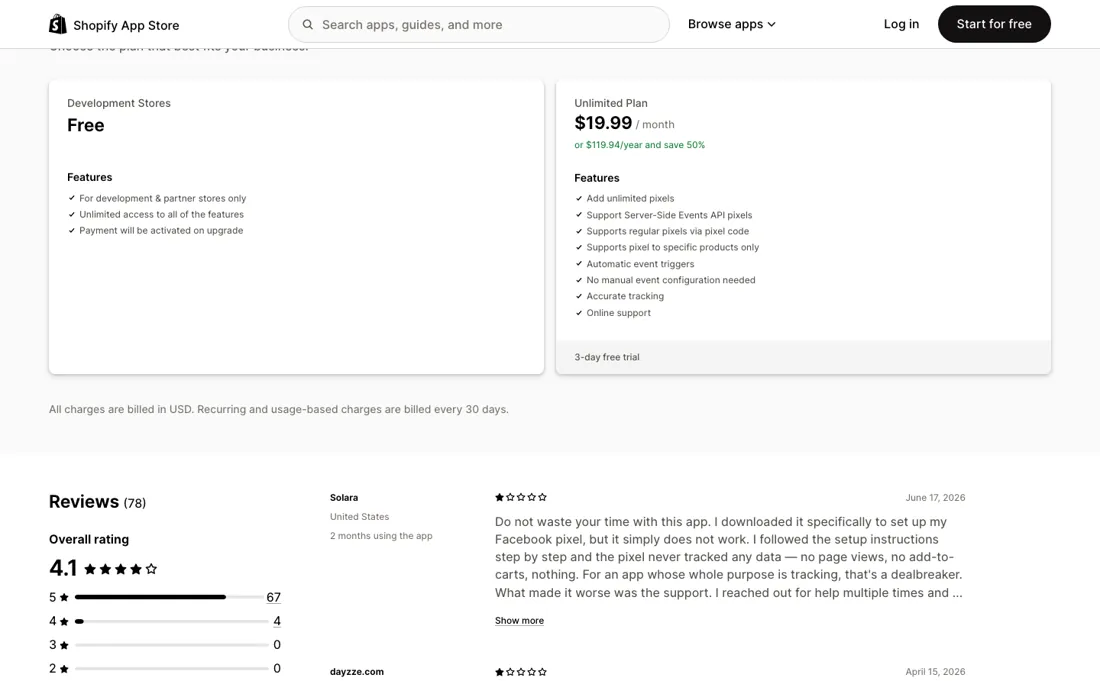
Read on 18 September 2026 it is 4.6 across 93 reviews, and the shape behind it is 84 five-star, 3 four-star, nothing at three or two, and 6 one-star. A month earlier it was 4.1 across 78, with 7 at the bottom. Nothing sits in the middle on either reading. That is not a mediocre product; it is a binary one — it works immediately, or it installs cleanly and then tracks nothing at all.
The one-star reviews describe the same failure in the same words: the pixel is set up by the instructions, no page views or add-to-carts ever arrive, and support does not reply. We cannot verify what happened in any individual account, but the consistency of the complaint is itself information. What is new since August is that the developer now answers them in public. A reply dated 2 September 2026 attributes the empty data to manual pixel configuration, where one mismatched ID or event setting is enough to stop events being recorded at all, and says that step is no longer needed: TiXel now integrates officially with Meta and TikTok and links the pixel to your ad account automatically.
That is the vendor's account of its own worst reviews, so treat it as a claim to test rather than a fix to trust. It is at least a specific and checkable one, and the trial has gone from three days to seven, which is enough room to check it.
Watch the 2-minute review
The video version of this review, from our YouTube channel.
What TiXel does
Shopify app for Meta and TikTok pixels, with unlimited pixels, product-level scoping and server-side Events API tracking on one flat plan.
What buyers report about TiXel
Recurring themes from the buyer-review sites listed at the foot of this page, read in August 2026. We have not run TiXel ourselves, so this is other buyers' experience rather than ours. We summarise it here because the complaints are usually the part a vendor page leaves out.
- • 68 of the 78 reviews are five stars and they are short, near-identical and almost all about setup speed and the support desk rather than about tracking: Reduceri Zilnice (United States, nine months, 9 March 2026) on accurate information and a support team on point, Fitnesa Kanāls (Latvia, over a year, 25 May 2026) on getting everything set up quickly, plus Renvero (United States, about two months), Vaiyra (United States, 23 days) and My Store (Netherlands, five days).
- • Filtering the listing to one, two and three stars returns exactly seven reviews and all seven are one-star — confirming there is no middle: 68 five, three four, none at three or two, seven at one.
- • Two of the most detailed describe the same failure in the same terms, and neither has a public reply from the developer under it. Solara (United States, two months, 17 June 2026): installed for a Facebook pixel, followed the setup instructions step by step, and got no page views and no add-to-carts at all, then no answer across several support attempts. dayzze.com (Egypt, three days, 15 April 2026) reports the same for a TikTok pixel, adding that the app kept trying to charge them and that support refused a refund.
- • Three more are about billing rather than tracking, and these the developer did answer publicly. fresh produced. (Belgium, three months, edited 8 February 2026) says a year was taken without their asking; Effective Apps replied on 3 February 2026 that Shopify requires manual approval for any charge, that their records show the subscription approved on 22 January 2026, and that a pixel was successfully installed afterwards. Akali Antwerp (Belgium, five days, 23 February 2026) says they were charged for a year and got no reply; the developer answered that the message had gone to a no-reply address of theirs. Pets Planet SA (South Africa, nine minutes, 16 December 2022) was stuck on the payment approval screen, which the developer attributed to Shopify's billing and later reported resolved. Two of the seven one-stars carry no text at all.
Where the ratings disagree. The distribution is the finding, because it is binary rather than mediocre: nothing sits at two or three stars. Either the pixel fires and the review is two lines of thanks, or nothing arrives at all and the review is a page long. Nobody has written the in-between review, which is what you would expect from a tool that either connects or does not. Set that against a three-day trial and the shape of the risk is clear — three days is enough to see the pixel installed but often not enough traffic to confirm events are landing, and the annual option at $119.94 sits right behind it. Two Belgian merchants say a year was taken they did not choose; the developer answers, with dates, that Shopify's own approval step makes that impossible. We cannot settle that from outside, and both accounts stay on the listing. What a buyer can do is treat the three days as a test with a deadline and verify events in the ad platform, not in the app, before the trial runs out.
Pages read (August 2026): Shopify App Store
When the paid plan is worth it
There is no upgrade decision here, so the only arithmetic is monthly against yearly. At $19.99 a month the year costs $239.88; at $119.94 paid up front it is half that. For a tool you either keep permanently or abandon in the first week, that saving is real — but the order matters. Prove the pixel fires before you buy a year of it. What the plan actually buys is worth reading against what you already have.
Shopify's own Meta and TikTok channels install pixels for free, and the case for paying $19.99 is the parts they do not cover: unlimited pixels on one store, server-side Events API alongside the browser pixel, and pixels scoped to individual products. If you run one pixel for one brand, the free channel apps may already be enough. The server-side piece is the strongest argument. Browser pixels lose events to ad-blockers and to Safari's tracking prevention, and the Events API is the standard answer.
If that is why you are here, it is the feature to verify first rather than the one to assume.
How to actually use TiXel
Install it on the first day of the trial, not the last. Seven days is the window as of September 2026, where it was three in August, and the failure this app is criticised for is not a crash but a silence — the pixel appears installed and no events arrive. You need traffic through the store to tell those apart. So verify rather than assume. Fire a test view, an add-to-cart and a checkout yourself, then open Meta Events Manager or TikTok Events and confirm all three arrived with the right event names.
Do it in the first two days, while uninstalling is still an option rather than an argument about a refund. Take the official route in while you are there: the developer says TiXel now connects straight to your Meta and TikTok ad accounts and links the pixel for you, which removes the manual step its worst reviews describe. And if server-side tracking is why you came, test it separately.
Distilled from apps.shopify.com/tixel — plan cards, the trial length, the review distribution and the developer's public reply of 2 September 2026. First read 22 August 2026, re-read 18 September 2026.
Frequently asked questions
How long is the free trial, and is it enough?
Seven days as of 18 September 2026, which is a real change — the listing said three in August and this review was written against that. Seven is enough if you spend it deliberately. The thing you are testing is not whether the app installs but whether events arrive, and that needs traffic: put a genuine view, add-to-cart and checkout through the store on day one, then check Meta Events Manager or TikTok Events for all three by name. If they are not there by day two you still have five days to uninstall, which is the difference the longer trial actually buys. Do not spend the week configuring and leave the verification to the end, because the reported failure mode is silent and looks exactly like a correct installation until you go and look at the other side.
Why pay $19.99 when Shopify's Meta and TikTok channels install a pixel free?
For most stores you should not, and that is the honest answer. The free channel apps handle the ordinary case: one pixel, one brand, standard events. What this charges for is the cases they do not cover — unlimited pixels on a single store, which matters if you run several brands or agencies through one shop, pixels scoped to specific products, and server-side Events API pixels alongside the browser one. That last is the strongest reason to pay: browser pixels lose events to ad-blockers and to Safari's tracking prevention, and the Events API is the standard answer to it. If none of those three describe you, the free channels are not a compromise. At $19.99 a month or $119.94 a year the decision is small either way, but prove the pixel fires before you buy twelve months of it.
How do I check the server-side tracking is really sending?
Check it as its own test, because a working browser pixel proves nothing about it. In Meta Events Manager the two arrive as different connection methods — browser and server — and an event can show up under one while the other sends nothing at all; a rising total event count is not evidence. Fire a purchase or a checkout yourself, then look at the event's source rather than its tally, and check the deduplication is working so one order is not counted twice. Do this inside the trial. The app's plan text promises server-side Events API pixels and automatic event triggers with no manual configuration, so if the server source is empty after real traffic, that is the feature you are paying for not working, and it is a support question while you still owe nothing.
What should I weigh before buying Marketing software?
Usually yes for the major platforms, but check yours specifically. Tools in this class typically ship native connectors for the big CMS, CRM and email platforms and fall back on Zapier, webhooks or an API for everything else. The practical question is whether your stack is on the native list or needs glue, because a missing native connector normally means either manual work or a paid middleware layer. Check the integrations page for your exact tools before you buy.
Is this a hands-on review of TiXel?
This is a researched assessment, not a hands-on test — where we've used a tool ourselves, we say so explicitly. We name what each tool is good and bad at, and we earn a commission only if you sign up, at no cost to you.
- Buyer reviews on Shopify App Store (listing slug tixel; 78 reviews, plus the one-, two- and three-star filter read separately), read August 2026.
- Re-read 2026-09-18 on apps.shopify.com/tixel.
- A dated screenshot of that pricing page, kept on this site as the receipt.
Others in this category
Reviewed marketing tools that share ground with TiXel — comparable in what they do, not drop-in swaps:
New reviews, price changes we recorded, and the cost conditions we found. No sponsored placements. Unsubscribe anytime.
This is our researched assessment — not a paid placement. The “Visit” links on this page are affiliate links: we may earn a commission if you sign up, at no extra cost to you, and it never changes our take. How we review →