Convert Review (2026)$299/mo for 100K Tested Users
 By Daan Haket · Researched and written with an AI assistant · who does what
The meter is tested users, and it keeps running: blow past your monthly allowance and overuse blocks land at $399-699 unless you hard-cap them — and every extra custom domain is $1,000 a year.
CRO teams running serious A/B and multivariate testing who want a privacy-first, GDPR-friendly alternative to the big experimentation suites.
your traffic is modest — statistical significance needs volume, and 100K tested users a month is more than most small sites can use — or your landing-page tool's built-in testing covers it.
Transparency: the “Visit” links on this page are affiliate links — we may earn a commission if you sign up, at no extra cost to you. No vendor can pay for a better review or verdict. How we make money →
Pricing (2026)
✓ Pricing re-verified 20 Sep 2026
| Plan | Price | What you get |
|---|---|---|
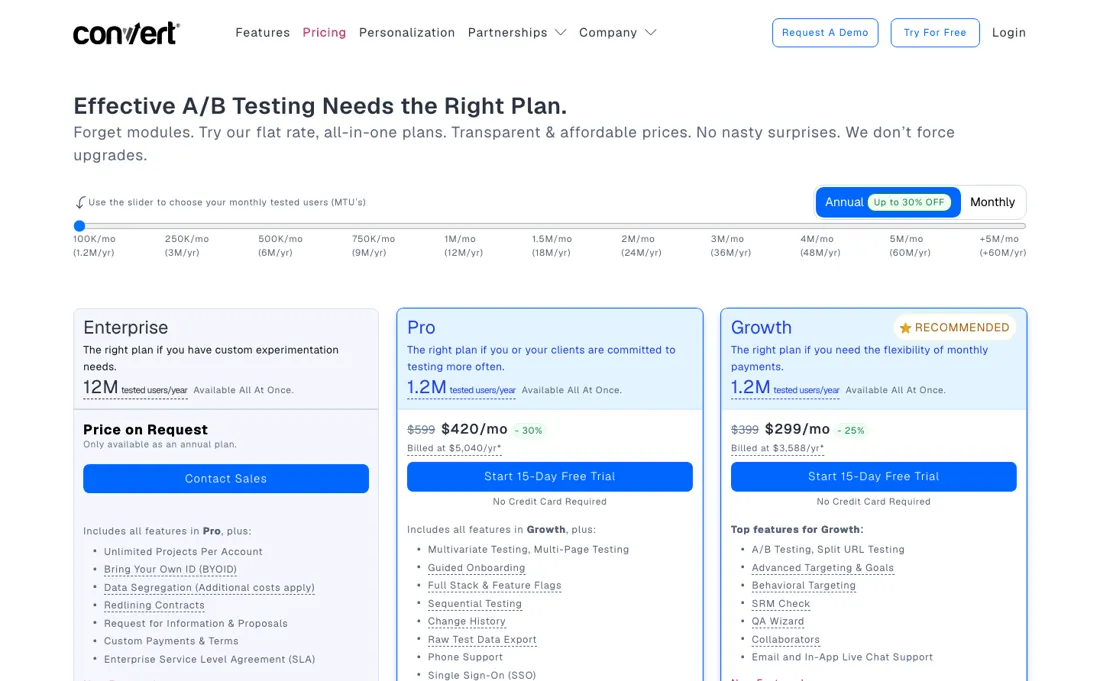
| Growth | $399/mo, or $299/mo paid annually ($3,588/yr) | 100K tested users/mo; 5 projects, 5 experiences, 10 domains; missing advanced features |
| Pro | $599/mo, or $420/mo paid annually ($5,040/yr) | 100K tested users/mo; 30 projects, unlimited experiences/domains, 100 goals |
| Enterprise | on request, annual only | Starts at 1M tested users/mo; unlimited projects, experiences, domains, 200 goals |
Summarised from the pricing notes below; the notes carry the conditions.
15-day standard free trial — through our link it's an exclusive 30-day full-access trial (verified 16 Jul 2026, no credit card). Growth $399/mo, or $299/mo paid annually ($3,588/yr, which the page calls a 25% saving); Pro $599/mo, or $420/mo paid annually ($5,040/yr, a 30% saving); Enterprise on request, annual only. Tested users are a slider rather than a plan feature: at the base position Growth AND Pro both include 100K tested users a month (1.2M a year), and Enterprise starts at 1M a month (12M a year).
The tiers differ on limits — active projects 5 / 30 / unlimited, active experiences per project 5 / unlimited / unlimited, active domains 10 / unlimited / unlimited, goals per project 30 / 100 / 200, custom segments 5 / 10 / 20, deploys 10 / 100 / 300 — and Growth is marked absent on multipage, multivariate and full-stack testing, multi-arm bandit allocation, geotargeting, weather targeting, custom pop-ups and the beta request-approval system.
Overuse is metered at $399 per extra 100K on Growth and $699 per 250K on Pro and Enterprise, and can be switched off; each additional custom domain (CNAME) costs $1,000/year. Prices exclude VAT and GST. Native heatmaps and frustration-sensing session recordings are included at every tier at no extra cost and do not consume tested users; 8% of the annual fee goes to tree planting with TIST. Plans change — always verify the live price on their site.
Category context: Marketing. Across the 24 tools in this category that we researched with a public US-dollar price, the median entry price is $29 a month (lowest paid plan as listed, per seat where the vendor prices per seat). Convert’s entry price of $399 a month sits above that median. Compare pricing conditions in the Software Cost Atlas →
What the pricing page doesn’t say
The friendly $299 headline assumes annual prepay; month-to-month is $399. One thing people misprice, and it is not the test itself: everyone expects an experiment to end when the subscription does. The trap is the winner. Convert describes itself as a client-side tool where “adding just one snippet of code on your site will then do all of the magic”. So a winning variant you leave running in the visual editor is not a change to your site — it is a rendering by their script.
Ship the winner into your own code, or you are paying rent on a result you already bought.
Watch the video review
The video version of this review, from our YouTube channel.
⚡ Short on time? Watch the 30-second verdict Short.
What Convert does
Privacy-first A/B testing platform — experiments, personalization and feature rollouts, priced by tested users. Via our link: an exclusive 30-day full-access trial (standard is 15 days).
What buyers report about Convert
Hands-on: not tested by usReported by buyers: G2, Capterra, TrustRadius and Gartner Peer Insights, read August 2026
Themes from the buyer-review sites listed at the foot of this page, read in August 2026. We have not run Convert ourselves, so this is other buyers' experience rather than ours. We summarise it here because the complaints are usually the part a vendor page leaves out.
- • It bills per unique tested visitor, not per page load — one person viewing five pages counts once. That is a materially better meter than the competition uses.
- • Reviewers get direct access to the people who build it, up to and including the CEO. For a testing tool that is unusual and it shows in the support ratings.
- • $299/month annually on Growth for 100,000 tested users, $420 on Pro. Overage is $399 per extra 100,000. Reviewers call it expensive and that is the main complaint.
- • The interface is simpler than Optimizely and VWO, which cuts both ways — less to learn, less to do.
- • The newer visual editor uses a layout unlike the rest of the category and reviewers stumble over it.
- • Onboarding below the Growth plan is thin.
When the paid plan is worth it
The step from Growth to Pro is $121 a month on the annual rate — $299 against $420 — and it does not buy traffic. Read on their pricing page on 20 September 2026, tested users are set by a slider, and at its first position Growth and Pro both include 100K tested users a month, 1.2M a year; only Enterprise starts at 1M a month. What the $121 buys is room to work: 30 active projects instead of 5, unlimited experiences per project instead of 5, unlimited active domains instead of 10, 100 goals per project instead of 30, 10 custom segments instead of 5, and 100 deploys instead of 10, plus multipage, multivariate and full-stack testing, multi-arm bandit allocation, geotargeting, weather targeting and custom pop-ups, all of which the comparison table marks absent on Growth.
The overage rate improves too, from $399 per extra 100K on Growth ($3.99 per thousand) to $699 per 250K on Pro ($2.80). What upgrading does not solve sits outside the plans. Overuse can be switched off, which turns a surprise bill into a hard stop, so decide which failure mode you prefer before launching a large test. Each additional custom domain is $1,000 a year at every tier, which for an agency or a multi-brand business can exceed the subscription itself.
The trial is 15 days as standard; through our link it is 30 days with full access and no credit card (verified 16 July 2026).
How to actually use Convert
Installation is one tracking script, but the work that decides whether a test is trustworthy is the QA pass. Convert documents it as four stages: draft in the Visual Editor using Preview Variation URLs, then check with Force Variation URLs, then QA the whole setup while viewing the experiment report, then launch. The two URL types are not interchangeable. Preview URLs ignore your Site Area and Audience conditions, while Force Variation URLs evaluate them and only work on active experiments, never on drafts.
Install the Chrome QA Widget first: it is the primary QA tool and it does not run on the legacy snippet, so a site still on the old script has to update before it can use the overlay. Run QA in an incognito window, because Convert's own guidance is that testers are commonly bucketed into the original and conclude the experiment is broken. If your site uses a consent platform, cookies may not be set until consent is granted, which breaks bucketing during QA.
Distilled from Convert's help centre, chiefly the QA Guide and 'Convert Experiences Basics' at support.convert.com, read 21 August 2026.
Convert vs VWO, side by side
Where a vendor publishes a price, its column shows the entry price we read and when; where it does not, the column says so rather than filling in a figure from elsewhere. We do not average them into a score.
Both names above are affiliate links: we may earn a commission if you sign up, at no extra cost to you. Neither changes what this table says.
The natural comparison is VWO — VWO is the broad experimentation suite where testing is one module; Convert focuses squarely on A/B testing with GDPR-first positioning — compare the add-on costs (API, domains) on both before deciding.
Frequently asked questions
Does Pro give me ten times the traffic allowance of Growth?
No, and this corrects an earlier reading of our own. On convert.com/pricing, read 20 September 2026, tested users are a slider rather than a plan feature: at its first position Growth and Pro both include 100K tested users a month, 1.2M a year, and it is Enterprise that starts at 1M a month, 12M a year. So the step from $299 to $420 on the annual rate buys limits and features at the same volume, not headroom. The comparison table, Growth against Pro: active projects per account 5 against 30, active experiences per project 5 against unlimited, active domains 10 against unlimited, goals per project 30 against 100, custom segments 5 against 10, deploys 10 against 100. Growth is also marked absent on multipage testing, multivariate testing, full stack, multi-arm bandit auto-allocate, geotargeting, weather targeting and custom pop-ups. The one place volume does show up is the overage rate: $399 per extra 100K on Growth is $3.99 per thousand, while $699 per 250K on Pro is $2.80.
How much does paying annually actually save?
Less on Growth than the banner suggests. The toggle says 'Up to 30% OFF' and the fine print splits it: Growth is $399 a month billed monthly and $3,588 a year, which the vendor describes as saving 25% on twelve payments of $399; Pro is $599 monthly and $5,040 a year, a 30% saving on twelve payments of $599. The effective monthly rates are the headline $299 and $420. Prices exclude VAT and GST, which are added at checkout by billing location, and 8% of the annual fee is spent on tree planting with TIST at no extra cost to you. The standard trial is 15 days with no credit card; through our link it is 30 days with full access. One cost sits outside the plans entirely and does not shrink with annual billing: each additional custom domain via CNAME is $1,000 a year on every tier. Read 20 September 2026.
How does it compare with VWO?
Convert answers that on its own pricing page, and it is worth knowing how. Its feature table annotates rows with what the same capability costs inside VWO's plans — custom JavaScript targeting, custom tag targeting, behaviour-based targeting, cookie-based targeting, time-of-day targeting, advanced post-segmentation and detailed report downloads are each marked as costing extra as an add-on in VWO Growth, or in VWO Growth and Pro — and it labels two of its own features with the VWO products they correspond to, Web Rollouts for deploys and Server Side testing for full stack. There is a legend translating Convert features into what they are called in the VWO app, the Enterprise tier includes a free VWO migration, and the homepage links a page called VWO Alternative. So this is Convert's own framing of the comparison, not a neutral one: the claim is that what VWO sells as add-ons is included here. Worth checking against VWO's own price page for the features you actually plan to use. Read 20 September 2026.
Is this a hands-on review of Convert?
This is a researched assessment, not a hands-on test — where we've used a tool ourselves, we say so explicitly. We name what each tool is good and bad at, and we earn a commission only if you sign up, at no cost to you.
- Buyer reviews on G2, Capterra, TrustRadius and Gartner Peer Insights, read August 2026.
- Re-verified 2026-09-20 on convert.com/pricing.
- A dated screenshot of that pricing page, kept on this site as the receipt.
Others in this category
Reviewed marketing tools that share ground with Convert — comparable in what they do, not drop-in swaps:
New reviews, price changes we recorded, and the cost conditions we found. No sponsored placements. Unsubscribe anytime.
This is our researched assessment — not a paid placement. The “Visit” links on this page are affiliate links: we may earn a commission if you sign up, at no extra cost to you, and it never changes our take. How we review →