 Tapita AI SEO Blog Builder Review (2026)
Transparency: the “Visit” links on this page are affiliate links — we may earn a commission if you sign up, at no extra cost to you. No vendor can pay for a better review or verdict. How we make money →
Publishing volume is the trap this tool makes cheap.
Visit Tapita AI SEO Blog Builder → Affiliate link — we may earn a commission if you sign up; it does not change what this page says.
Watch the 2-minute review
The video version of this review, from our YouTube channel.
Pricing (2026)
✓ Pricing re-verified 19 Sep 2026
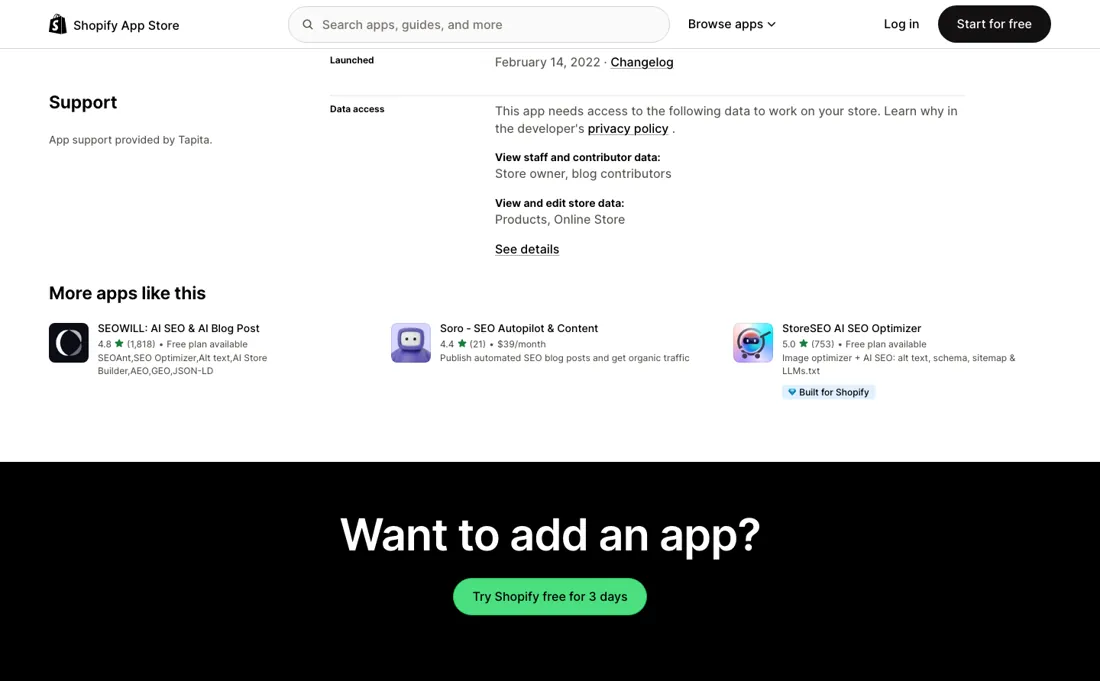
The paid tier has left the listing. Where the page carried a Pro plan in August, it now publishes no plan block at all: the Pricing field in the header reads simply “Free”, the word Pricing appears exactly once on the whole page, and the only dollar figure anywhere on it belongs to a different app in the “More apps like this” rail.
We checked that against the same developer's other listing in the same session — apps.shopify.com/google-seo-schema-meta-data renders its header as “Free plan available” and prints its full ladder — so this is the state of this listing rather than a page that failed to load. What that removes is everything a buyer could previously plan against: Pro at $9.99 a month on Shopify Basic rising to $14.99, $39.99 and $69.99 by Shopify plan, the $101.89 annual rate, the 250 monthly AI credits and the $0.06 charge for each credit beyond them.
The free tier's own allowance is gone from the page too — the 50 non-recurring credits are no longer stated — so as the listing stands there is no published number for what the app gives you or what exceeding it costs. Read on the same day: the listing is titled Tapita SEO AI Blog Builder, carries Shopify's “Built for Shopify” badge, works with Shopify Admin and the developer's own Tapita SEO Optimizer & Speed, is offered in English only, and stands at 4.9 from 485 reviews — up from 450 in August — distributed 466 five-star, 13 four-star, 2 three-star, 1 two-star and 3 one-star. Plans change — always verify the live price on their site.
What the pricing page doesn’t say
It generates posts quickly and schedules them daily or weekly in bulk, and a Shopify blog filled with unedited AI articles is precisely the pattern search engines have spent the last two years demoting: the app lowers the cost of production, not the bar for ranking. Used the other way round, as a drafting and structuring tool for posts you actually edit, it is sensible. The price is the second thing to watch, and on 19 September 2026 there is none to read.
The listing publishes no plan block and gives its pricing as Free. That is not the same as free being the whole story: the features it advertises — AI generation, bulk creation, translation, scheduling — were metered in credits until August, and no credit allowance or overage rate is stated anywhere on the page now. The same developer's other listing still prints a complete ladder, so this one is not simply a developer who does not publish prices.
Go in expecting to ask what the limits are, and do not plan a content calendar around an allowance nobody has told you the size of.
What Tapita AI SEO Blog Builder does
AI blog builder for Shopify: generates SEO-oriented posts with titles, images and keyword suggestions, embeds your products, and schedules bulk publishing from a drag-and-drop editor. The Shopify listing published no plan block and no credit allowance when we re-read it on 19 September 2026 — its pricing field reads Free.
What buyers report about Tapita AI SEO Blog Builder
Recurring themes from the buyer-review sites listed at the foot of this page, read in August 2026. We have not run Tapita AI SEO Blog Builder ourselves, so this is other buyers' experience rather than ours. We summarise it here because the complaints are usually the part a vendor page leaves out.
- • Support is the most-mentioned thing by a wide margin, in English and German alike: replies within hours, named agents, and staff who go into the store and fix the setup themselves. Several reviewers say they got that response speed while still on the free plan.
- • Non-writers get usable, product-linked drafts out quickly, and one store eight months in credits the app with a noticeable increase in traffic.
- • The most detailed recent review (August 2026, a store six weeks in and blogging weekly) describes a fortnightly cycle of breakage: posts fail after the credits for them have already been spent, support fixes it within several days, and the publishing routine stalls in between. The vendor replied publicly and acknowledged the lost credits.
- • Free-plan limits and slow, laggy editing show up in the one- and two-star reviews, but those date from 2022 and 2025 and describe Tapita's earlier page and SEO editor rather than the AI blog builder.
Where the ratings disagree. The listing shows 4.9 across 450 reviews, with 434 of them five stars and four below four. Read the dates and the 'time using the app' line before treating that as evidence of durability: a large share of the five-star reviews come from stores that had the app for a few hours or a single day and are thanking a support agent, not reporting on months of publishing. The one long review written by a store that had been blogging weekly for six weeks is a three.
Pages read (August 2026): Shopify App Store
When the paid plan is worth it
There is nothing to buy on this listing today, and that is the finding rather than a gap in our reading. Read on 19 September 2026, the Shopify App Store page publishes no plan block and states the pricing as Free. In August the same page sold a Pro tier whose real cost depended on which Shopify plan you were on — $9.99 on Basic, $14.99 on Grow, $39.99 on Advanced and $69.99 on Plus, the same app and the same 250 credits across a sevenfold spread — and that ladder was the most important thing a buyer could know about it.
It is gone from the page. So is the free tier's allowance. The listing used to state 50 one-off credits and $0.06 for each one after that; now it names neither, while still describing AI generation, bulk creation, translation and auto-scheduling as features. An app that meters AI work and publishes no meter is asking you to install first and find out after. Two readings fit what is on the page — the app has been made free, or its plans were pulled while something changes — and the listing does not distinguish them.
Until it does, treat any figure you remember from a comparison article as out of date, install it on a store you can uninstall from, and ask the developer in writing what the free plan includes and what happens when you reach the end of it.
How to actually use Tapita AI SEO Blog Builder
Start on one real post and take it all the way to publication, edits included, because what you are measuring is how much work the draft still needs — that number is the true cost of this tool, and right now it is the only cost you can measure. Read on 19 September 2026 the listing publishes no plan block at all, so before you build anything on it, ask support two questions in writing: what the free plan includes, and what happens when the AI generation runs out.
Until August the answers were 50 one-off credits and $0.06 for each one beyond; neither figure is on the page any more. Then use it the way it earns its keep. Link every post to the products it is meant to sell — the product-embedding blocks are the part a general AI writer cannot replicate — and put a human editing pass in the calendar next to the publishing slot rather than after it. Watch Search Console rather than the post count.
Distilled from apps.shopify.com/tapita-ai-seo-blog-builder — the listing header, the feature lists, the Works with and Languages fields and the review distribution, rendered rather than fetched because the page builds client-side. First read 19 August 2026, re-read 19 September 2026, alongside apps.shopify.com/google-seo-schema-meta-data as a control on the same day.
Visit Tapita AI SEO Blog Builder →
Frequently asked questions
What does this app cost?
Nothing that the listing will tell you. Read on 19 September 2026, the Shopify App Store page gives its pricing as the single word Free and carries no plan block: the word Pricing appears once on the entire page, in the header, and the only dollar figure anywhere on it belongs to a different app in the recommendations rail. That is a change rather than a habit. In August the same page sold a Pro tier at $9.99 a month on Shopify Basic, rising to $14.99 on Grow, $39.99 on Advanced and $69.99 on Plus — the same app and the same allowance across a sevenfold spread — with an annual rate of $101.89. None of those numbers is readable today. If you are comparing this against a paid tool, compare it as a free install and get the current terms from the developer before you depend on it.
How much AI writing do I get before it runs out?
The page no longer says, and it used to. Until August the listing stated 50 credits on the free plan that did not recur, $0.06 for each credit after that, and 250 credits a month on Pro. As read on 19 September 2026 none of those three figures is published anywhere on it, while AI generation, bulk creation, translation and auto-scheduling are all still listed as features. So the app meters work in credits and publishes no meter. It never did say how many credits a full-length post consumes, which was the number that decided whether an allowance was generous or tight; now the allowance is missing as well. Ask support what the free plan includes and what happens when you hit the end of it, and get the answer in writing before you schedule a month of posts against it.
Has it simply become free, or were the plans pulled?
From outside you cannot tell, and it is worth knowing which question you are asking. Shopify's own header field distinguishes these states — an app with a paid tier alongside a free one reads “Free plan available”, and this one reads “Free”. We checked the same developer's other listing on the same day as a control: apps.shopify.com/google-seo-schema-meta-data renders “Free plan available” and prints its whole ladder, so this is not a developer who keeps prices off the App Store, and it is not a page that failed to load for us. What the listing does not say is whether the paid tier was withdrawn, folded into the free one, or is being rebuilt. Install it if free suits you, keep the store you install it on one you can back out of, and re-read the listing before you commit a content programme to it.
What should I weigh before buying SEO & Marketing software?
Judge it on evidence rather than adjectives. Look for a published security page, single sign-on and role controls on the plan you would actually buy (they are often gated to higher tiers), a status page with real incident history, and a clear answer on where your data is stored. If the tool will hold anything sensitive, those four answers matter more than any feature comparison.
Is this a hands-on review of Tapita AI SEO Blog Builder?
This is a researched assessment, not a hands-on test — where we've used a tool ourselves, we say so explicitly. We name what each tool is good and bad at, and we earn a commission only if you sign up, at no cost to you.
- Buyer reviews on the Shopify App Store, read August 2026.
- Re-read 2026-09-19 on apps.shopify.com/tapita-ai-seo-blog-builder.
- A dated screenshot of that pricing page, kept on this site as the receipt.
Others in this category
Reviewed seo & marketing tools that share ground with Tapita AI SEO Blog Builder — comparable in what they do, not drop-in swaps:
New reviews, price changes we recorded, and the cost conditions we found. No sponsored placements. Unsubscribe anytime.
This is our researched assessment — not a paid placement. The “Visit” links on this page are affiliate links: we may earn a commission if you sign up, at no extra cost to you, and it never changes our take. How we review →