Survicate Review (2026)The Response Price Falls by Two Thirds
The plan is metered by response volume, not by surveys — a viral NPS month can push you a tier up, and the free plan's 30-day retention quietly deletes your history. Mind the billing asymmetry too: Starter is monthly-only while Growth and up expect an annual commitment.
product and CX teams running always-on feedback — NPS, CSAT and in-app surveys — piped into the CRM and analytics stack they already use.
you just need an occasional one-off questionnaire (a simpler form tool covers that) or your response volume is huge — response-metered pricing punishes scale.
Transparency: we earn nothing from Survicate; the links to it are plain links. How we make money →
Pricing (2026)
✓ Pricing re-verified 26 Sep 2026
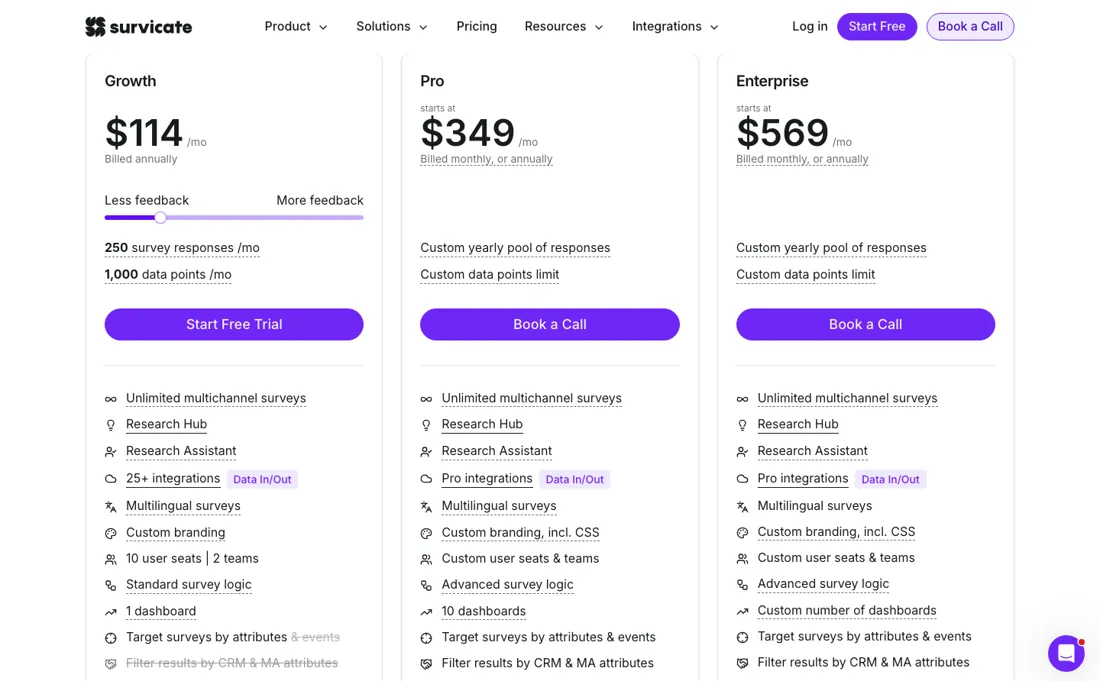
A 10-day trial of all features, no card. Growth is metered on feedback rather than seats and is a ladder, not a single price: $56 a month for 100 responses and 500 data points, $114 for 250 and 1,000, $169 for 500 and 1,500, $229 for 1,000 and 2,000, and $289 for 1,500 and 2,500 — billed annually, with 10 user seats across 2 teams and one dashboard at every rung.
Pro is $349 with a custom yearly response pool, advanced survey logic and 10 dashboards; Enterprise is $569. Starter is monthly-only and has its own ladder with an explicit overage rate: $89 for 100 responses at $0.89 for each one beyond, $179 for 250 at $0.59, $279 for 500 at $0.39. A response is counted per respondent, partial or complete; data points are new external feedback from integrations (calls, tickets, reviews) and exclude survey responses. Plans change — always verify the live price on their site.
Category context: Operations & Workflow. Across the 51 tools in this category that we researched with a public US-dollar price, the median entry price is $25 a month (lowest paid plan as listed, per seat where the vendor prices per seat). Survicate’s entry price of $56 a month sits above that median. Compare pricing conditions in the Software Cost Atlas →
Survicate’s pricing page, as we read it
Watch the 2-minute review
The video version of this review, from our YouTube channel.
What Survicate does
Customer feedback platform for continuous surveys: NPS, CSAT and in-product micro-surveys across web, in-app, email and link — with templates, audience targeting and native integrations (Segment and RudderStack among them) that pipe feedback straight into your CRM and analytics.
What buyers report about Survicate
Recurring themes from the buyer-review sites listed at the foot of this page, read in August 2026. We have not run Survicate ourselves, so this is other buyers' experience rather than ours. We summarise it here because the complaints are usually the part a vendor page leaves out.
- • Survey creation, onboarding and multichannel delivery are all described as easy, and support is responsive — 4.6 across 147 reviewers.
- • Once it is set up and integrated, reviewers report no ongoing friction.
- • You pay per response, and reviewers dislike that specifically. Growth is $114/month for 250 responses; Pro starts at $349 and Enterprise $569.
- • Price rises over time, and legacy plans get locked out of new features.
- • Advanced filtering and cross-analysis are limited, and the AI reporting is basic and occasionally wrong.
- • One reviewer reports audience targeting misfiring — surveys in the wrong language on the wrong pages, and responses drying up with no explanation.
The per-response price falls by two thirds
Pro is $349 with a custom yearly response pool, advanced survey logic and 10 dashboards, and Enterprise is $569 (read 2026-09-08 and re-read unchanged 2026-09-26 in the plan data the pricing page embeds; the page's own meta description says pricing starts from $56). Divide each rung by its allowance and the unit price falls hard: 56 cents a response at the bottom, 45.6 cents at $114, 33.8 at $169, 22.9 at $229 and 19.3 at $289.
The rung you land on therefore matters more than the plan name — 1,500 responses cost about a third per response of what 100 cost. It is still a lot for a unit of feedback; general-purpose survey tools charge single-digit cents for an extra response. What you are buying at that price is the in-product targeting and the integrations rather than the questionnaire, and that is a legitimate premium; it is just worth knowing which side of it you are paying for.
The single most useful difference between Growth and Pro is not on the feature list. Growth's 250 responses are a monthly cap; Pro's pool is annual. Feedback almost never arrives evenly — a launch, a price change or a support incident produces a spike, and a monthly cap turns exactly the month you most want data into the month you run out. If your feedback is campaign-shaped rather than steady, Pro's yearly pooling may be worth more than the ten dashboards it also brings.
One thing to unpick before you compare against anything older. We previously carried $89 as the entry price and then recorded a rise to $114, calling it a 28% increase. Neither figure was the floor and there was no increase: $89 is Starter's 100-response rung billed monthly, $114 is Growth's 250-response rung billed annually, and the actual Growth floor is $56. The billing asymmetry behind that confusion is real and worth knowing — Starter is monthly-only while Growth and above expect an annual commitment, so the plan that lets you leave cheaply is the one you probably do not want.
Do not plan to live on the free tier if NPS is why you are here. Survicate's own FAQ puts it at 25 responses a month, one active survey at a time, three collaborators, basic CRM integrations, a 300-response cap per survey and 1,000 per organisation, and 30 days of data retention before deletion. NPS is a trend measurement — a number with no previous quarter beside it cannot tell you anything — so the retention window alone rules it out.
The free plan can show you the product works; it structurally cannot do the job the product exists for. The 10-day trial of all features needs no card, which is the better way to look.
How to actually use Survicate
Estimate your monthly response volume before you look at plans, because that is the meter and the rung you land on sets the price. Survicate publishes the conversion it sees, which makes the sum doable: roughly 10% on web surveys, 16% in-product, 30% on mobile, and for email about a 20% open rate times a 20% click rate. On its own arithmetic, 250 responses means reaching 3,125 people on the web, 1,563 in-app, 833 on mobile, or sending 6,250 emails.
Work out your peak month rather than your average one, and note that a response counts per respondent — partial or complete, it is one. If your feedback is spiky, ask specifically about the response pool. Growth's allowance resets monthly; Pro's is an annual pool. A launch or an incident is precisely when you want the data and precisely when a monthly cap stops you, so for campaign-shaped feedback the pooling can matter more than any feature difference.
Use the 10-day trial rather than the free plan to evaluate. The free tier keeps only 30 days of history before deleting, which makes it useless for NPS or anything else measured as a trend — the trial gives you every feature and needs no card. And check which rung you are being quoted rather than which plan: Growth runs from $56 for 100 responses to $289 for 1,500, so a price named without its allowance tells you nothing.
Since 4 September 2026 there is a remote MCP server at https://mcp.survicate.com, which is worth setting up on day one if your team already works in an AI assistant. Connected, it will list your surveys and questions, pull survey and per-question results — response and completion counts, answer distributions, NPS and CSAT — over a date range you name, search the free-text responses, read and start AI research projects, and draft a survey that lands in your panel for review rather than going out.
Connection is one-click OAuth with no API keys, and every call runs as the connected user, so workspace role, folder access and Research Hub role apply exactly as they do in the panel — check that a shared assistant is connected under an account whose reach you are happy with. The plan question is now answered on the pricing page itself (read 26 September 2026): 'AI Agent and MCP', marked new, is listed on the Growth, Pro and Enterprise cards.
Where this section comes from: our research notes (305 words)
survicate.com/pricing, read on 8 September 2026. The plan ladder quoted here is not in the visible cards — those show only $114, $349 and $569 — but in the plan data the page embeds for its own price widget, which carries every rung with its response and data-point allowance, and the Starter rungs with their per-additional-response rates. The free-plan limits, the response-counting rule and the response-rate benchmarks come from the FAQPage JSON-LD block on the same page.
The page's own meta description independently states that pricing starts from $56, which agrees with the bottom rung of that data. survicate.com/pricing.md returns 404; survicate.com/llms.txt was read and carries no pricing. The remote MCP server was checked directly rather than taken from documentation: https://mcp.survicate.com answered on 8 September 2026 with a JSON-RPC 2.0 envelope, so the endpoint is live. Survicate's help centre index at help.survicate.com lists a Survicate AI section but no article we could open on the connector, so on 8 September the plan requirement was unconfirmed; the 26 September reading below settles it from the pricing page.
Re-read 26 September 2026: the embedded plan data by plain fetch (Growth $56/$114/$169/$229/$289, Starter $89/$179/$279 at $0.89/$0.59/$0.39 per additional response, Pro $349, Enterprise $569, all unchanged) and the rendered page in the browser pane from a Netherlands exit, where the cards read EUR 99 (Growth, 250 responses), EUR 299 and EUR 499 - regional prices, not a conversion. The Growth, Pro and Enterprise cards now list 'AI Agent and MCP' (marked new), which settles the plan question the earlier reading left open.
A 'ComparePlans' block embedded in the same page carries other figures ($63/$79, $239/$299, $479/$599) that do not render in the browser and are not used. The FAQPage answers on overage, cancellation and refunds, and the 25% education and non-profit discount are the source of the buyer questions.
Survicate vs SurveyMonkey, side by side
Each column shows the vendor’s own published entry price, read on the date shown. Entry prices can cover different services or units, so check what each one buys. We do not average them into a score.
The SurveyMonkey link above is an affiliate link — we may earn a commission if you sign up, at no extra cost to you — and the other column is a plain link. Neither changes what this table says.
The natural comparison is Typeform or SurveyMonkey — Typeform wins on beautiful long-form forms, SurveyMonkey on cheap general-purpose surveys; Survicate wins on continuous product feedback with deep integrations.
Frequently asked questions
What happens when I hit my Survicate response limit?
It depends on the plan. The pricing FAQ (read 26 September 2026) says Starter lets you switch on overages and keep collecting for an extra cost - $0.89, $0.59 or $0.39 per additional response depending on the rung. On Growth, Pro and Enterprise your surveys stop collecting once the limit is reached, and you have to upgrade or buy additional responses, at a price the page does not print. Size Growth on your peak month, not your average.
Can I get a refund if I cancel Survicate?
No. The FAQ (read 26 September 2026) says Survicate does not offer refunds: you can cancel at any time, the subscription runs to the end of the billing cycle, and the account then drops to the Free plan - 25 responses a month, and archived surveys can be reopened only up to 300 responses. Upgrades take effect immediately at the prorated difference. On an annual Growth commitment, use the 10-day trial, which needs no card, before paying.
Does Survicate have a discount for education or non-profits?
Yes: an extra 25% off any yearly plan for educational institutions and non-profits, arranged by emailing sales@survicate.com, according to the pricing FAQ (read 26 September 2026). It applies to yearly plans only, so it does not help on the monthly-only Starter plan. On Growth's 250-response rung at $114 a month billed annually, 25% off would bring it to $85.50.
What should I weigh before buying Operations & Workflow software?
Usually it sits on top rather than replacing everything. Tools in this class tend to become the layer where work is tracked and handed off, while your existing systems stay the source of truth for their own data. Before you buy, map which tools it would replace outright and which it would merely sync with. If the answer is that it syncs with all of them, you are adding a layer rather than removing one.
Is this a hands-on review of Survicate?
This is a researched assessment, not a hands-on test — where we've used a tool ourselves, we say so explicitly. We name what each tool is good and bad at, and we have no affiliate relationship with Survicate — we earn nothing whether you sign up or not.
- Buyer reviews on Capterra, Gartner Peer Insights and Software Advice, read August 2026.
- Read 2026-09-08 and re-read unchanged 2026-09-26 in the plan data embedded in survicate.com/pricing; from an EU exit the cards show EUR 99 for Growth at 250 responses, EUR 299 for Pro and EUR 499 for Enterprise.
- A dated screenshot of that pricing page, kept on this site as the receipt.
Others in this category
Reviewed operations & workflow tools that share ground with Survicate — comparable in what they do, not drop-in swaps:
New reviews, price changes we recorded, and the cost conditions we found. No sponsored placements. Unsubscribe anytime.
This is our researched assessment — not a paid placement. How we review →