 Securify Review (2026)
Transparency: the “Visit” links on this page are affiliate links — we may earn a commission if you sign up, at no extra cost to you. No vendor can pay for a better review or verdict. How we make money →
Blocking by country and IP is a blunt instrument and it cuts both ways: every rule that keeps out a fraudster also keeps out a customer travelling, using a corporate VPN, or living behind a carrier NAT.
Visit Securify → Affiliate link — we may earn a commission if you sign up; it does not change what this page says.
Watch the 2-minute review
The video version of this review, from our YouTube channel.
Pricing (2026)
✓ Pricing re-verified 20 Sep 2026
Free plan plus three paid tiers, unchanged since the readings of 18 August and 13 September 2026. Free: unlimited countries and IPs, last 1,000 visitor records, 500 blocked visitors a month. Pro $5.99 a month or $49.99 a year (30% less), Advanced $9.49 or $79.99 a year (30% less), Growth $49 or $490 a year (17% less). Trials are 3 days on Pro and Advanced and 7 days on Growth.
Rating 4.6 from 95 ratings (78 five-star, four four-star, two three-star, one two-star, ten one-star). Listed as 'Country Blocker Fraud Securify' from siimple.ai, with Shopify's Built for Shopify badge and Shopify Flow actions and triggers. Plans change — always verify the live price on their site.
Category context: E-commerce. Across the 33 tools in this category that we researched with a public US-dollar price, the median entry price is $19 a month (lowest paid plan as listed, per seat where the vendor prices per seat). Compare pricing conditions in the Software Cost Atlas →
What the pricing page doesn’t say
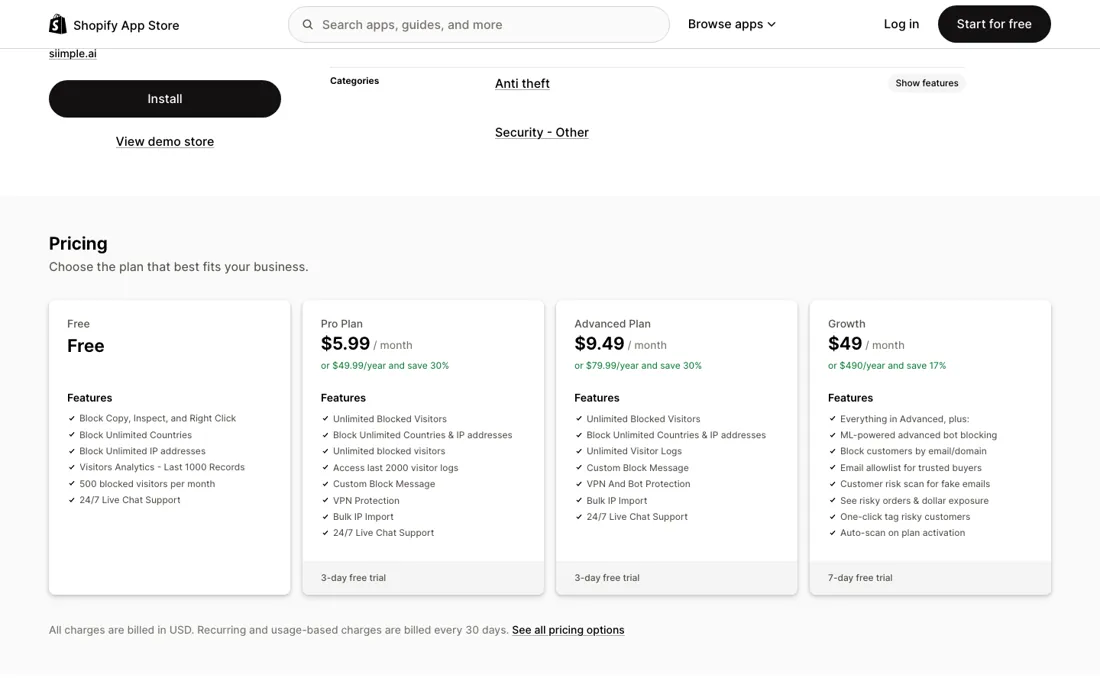
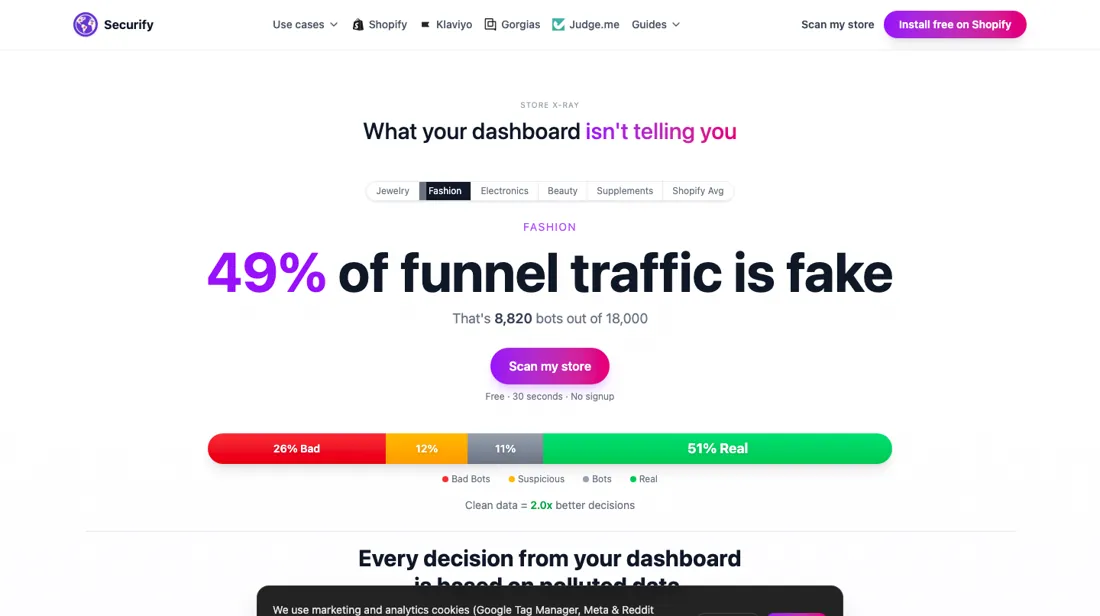
The app is honest enough to give you a live log of what it blocked, and that log is the part to actually read — a rule set nobody reviews quietly costs sales. Also worth separating in your head: blocking bots from your analytics is a reporting fix, while blocking fraud at checkout is a money fix, and the two need different rules.
What Securify does
Country blocker and fraud filter for Shopify: blocks countries, IP ranges, bots, VPNs and risky emails at checkout, and holds suspicious orders automatically.
What buyers report about Securify
Recurring themes from the buyer-review sites listed at the foot of this page, read in August 2026. We have not run Securify ourselves, so this is other buyers' experience rather than ours. We summarise it here because the complaints are usually the part a vendor page leaves out.
- • When it is set up, merchants say it does the job: blocking high-risk traffic, VPNs and bots, with one April 2026 reviewer naming the real-time visitor log as the part they actually use.
- • Support is fast and reaches beyond English — a Japanese merchant in May 2026 says staff responded and solved the trouble very quickly.
- • The most common one-star story is the same one, and it is a setup trap rather than a broken product: the app runs as a theme app extension, and if that is not switched on it blocks nothing while still billing. The vendor's own replies say so — to a merchant who says it charged for two years and did not work (November 2025), and to one whose country rule did nothing (June 2025). A Shopify theme update can switch it off again.
- • IPv6 is not supported. A January 2025 reviewer could not block even their own address; the vendor confirmed in reply that the app is IPv4-only.
- • Bot blocking is not configurable. A May 2026 reviewer says you cannot control which bots you allow, and the vendor answered that custom bot blocklists are still being built.
- • Rules that do not hold: abandoned checkouts from a blocked country continued for four days (December 2025), a Germany block did not take (June 2025), and a VPN test still reached the store (May 2026).
- • Blocking too widely cuts the other way. One merchant reports being locked out of their own site (August 2024) — the same risk the block log exists to catch.
- • Support response times are called too slow by several of the one-star reviewers (December 2025).
Where the ratings disagree. The rating splits rather than averages: 78% five stars and 14% one star, with almost nothing in between — a shape that usually means the product either works or was never running. Reading the one-stars, that is close to literal. Most of them trace to the theme app extension being off, which the vendor points out in its replies. So treat the 4.4 as conditional on a setup step, verify on day one that blocking actually fires, and check again after every theme change.
Pages read (August 2026): Shopify App Store
When the paid plan is worth it
Three steps, and only the last one is a real product change. Free blocks unlimited countries and IPs already, but stops at 500 blocked visitors a month and keeps 1,000 records -- for a small store under attack that cap is the thing that bites first. Pro at $5.99 lifts the cap, adds VPN detection, a custom block message and bulk IP import. Advanced at $9.49 adds bot protection and unlimited logs, which is $3.50 for the one thing most people install this app for.
Growth is the jump: $49 a month, five times Advanced, and it buys a different category of tool. That is machine-learning bot blocking, blocking by email address or domain, an allowlist for trusted buyers, a risk scan for fake email addresses, and one-click tagging of risky customers. That is fraud screening rather than access blocking, so treat Growth as a separate purchase decision instead of an upgrade. Annual billing saves 30% on Pro and Advanced but only 17% on Growth.
The trial is 3 days on Pro and Advanced and 7 on Growth, short for judging a blocking tool. Re-read 13 September 2026; rating 4.6 from 94 reviews.
How to actually use Securify
Run it in log-only mode first if the plan allows, or start with the narrowest rule you can defend, and watch the live log for a week before you widen anything. Check your log ceiling before you lean on that: read on the App Store listing on 13 September 2026, the free tier keeps the last 1,000 records and stops blocking after 500 visitors a month, Pro keeps 2,000, and only Advanced keeps them all.
The order in which to add rules matters: bot and scraper blocking is low-risk and cleans up your analytics, IP and VPN blocking is medium-risk, and country blocking is the one most likely to cost you real orders. Know one gap before you call the store sealed: a merchant reported in August 2026 that traffic through Shopify's own mobile app reached their store past the country block, and support answered that it is a platform path the app cannot intercept, offering checkout address validation as a second filter. Check the block log against your actual fraud cases monthly.
Distilled from apps.shopify.com/easy-block-customer-ip-country, read 18 August 2026 and re-read 13 September 2026 for the plan contents and the dated merchant reviews; siimple.ai, read 13 September 2026.
Frequently asked questions
The rating is 4.6 — what is in the one-star reviews?
Ten of the 95 ratings are one star, which is 11%, and read together they make a single complaint: it did not block. The vendor's public replies name the causes, and that is the useful part. Twice the theme app extension had never been switched on — one of those reviewers had the app installed for twelve minutes. In January 2025 a merchant could not block even their own IP address, and the vendor answered that the app is limited to IPv4 support while the advanced version handles IPv6. In November 2025 a Shopify theme update silently turned the app off inside a store that had been paying for eight months; the vendor acknowledged it and refunded from April. One reviewer had configured no rules at all. Two complaints do land on the product itself: in May 2026 a merchant reported an Unlimited VPN session getting through the VPN filter, and another asked for a custom bot blocklist, which the vendor said engineering was still building. Read on the listing's one-star filter, 20 September 2026.
How do I verify it is actually blocking?
Do not take the counter's word for it, because the commonest failure on this listing is an app that looks installed and is not. Three checks, in order. First confirm the theme app extension is enabled in your live theme — that single step sits behind several of the one-star reviews, and a Shopify theme update has switched it off at least once without telling anyone. Then test from outside your own network: a phone on mobile data has a different IP than your office, and be aware your own device may be handing over an IPv6 address, which a January 2025 vendor reply says the standard app does not act on. Finally read the live visitor log rather than the block count, and match it against orders you actually lost. One documented gap to test for: a merchant reported in August 2026 that traffic through Shopify's own mobile app reached their store past a country block, and support answered that it is a platform path the app cannot intercept. Read 20 September 2026.
Monthly or annual?
The discounts are real, but they sit behind a very short trial. Read on the listing on 20 September 2026: Pro is $5.99 a month or $49.99 a year against $71.88 for twelve monthly payments, and Advanced $9.49 or $79.99 against $113.88 — both the 30% the cards claim. Growth is $49 a month or $490 a year against $588, which is the 17% it claims. The trial is three days on Pro and Advanced and seven on Growth, and a blocking tool cannot be judged in three days: you need a week of live log before you know whether a country rule is catching fraud or customers. The cheap route is to run one month at the monthly rate, read the log, and only then commit to a year. On Pro that patience costs $5.99.
What should I weigh before buying E-commerce software?
Check your platform and version specifically. Shopify support is close to universal in this category, while WooCommerce, BigCommerce, Magento and headless setups vary a lot, and 'supported' sometimes means a generic API rather than a maintained app. A listing in your own platform's app store, with recent reviews there, is a better signal than the vendor's logo wall.
Is this a hands-on review of Securify?
This is a researched assessment, not a hands-on test — where we've used a tool ourselves, we say so explicitly. We name what each tool is good and bad at, and we earn a commission only if you sign up, at no cost to you.
- Buyer reviews on the Shopify App Store listing (73 reviews), read August 2026.
- Re-verified 2026-09-20 on apps.shopify.com/easy-block-customer-ip-country.
- A dated screenshot of that pricing page, kept on this site as the receipt.
Others in this category
Reviewed e-commerce tools that share ground with Securify — comparable in what they do, not drop-in swaps:
New reviews, price changes we recorded, and the cost conditions we found. No sponsored placements. Unsubscribe anytime.
This is our researched assessment — not a paid placement. The “Visit” links on this page are affiliate links: we may earn a commission if you sign up, at no extra cost to you, and it never changes our take. How we review →