Scrolly Review (2026)The Free Half and the $2.99 Half
The two features carry very different risk, the app presents them as one install, and since August the money has been split across them in a way the name does not warn you about.
Shopify merchants who want a free, one-click back-to-top button on long collection and product pages without touching theme code — and who can treat infinite scroll as a separate $2.99-a-month decision rather than part of the same install.
you run a large catalogue that depends on paginated collection URLs being crawled, your theme already ships its own load-more or filtering behaviour, or you need conversion work rather than navigation polish — this only changes how the page scrolls.
Transparency: the “Visit” links on this page are affiliate links — we may earn a commission if you sign up, at no extra cost to you. No vendor can pay for a better review or verdict. How we make money →
Pricing (2026)
✓ Pricing re-verified 19 Sep 2026
| Plan | Price | What you get |
|---|---|---|
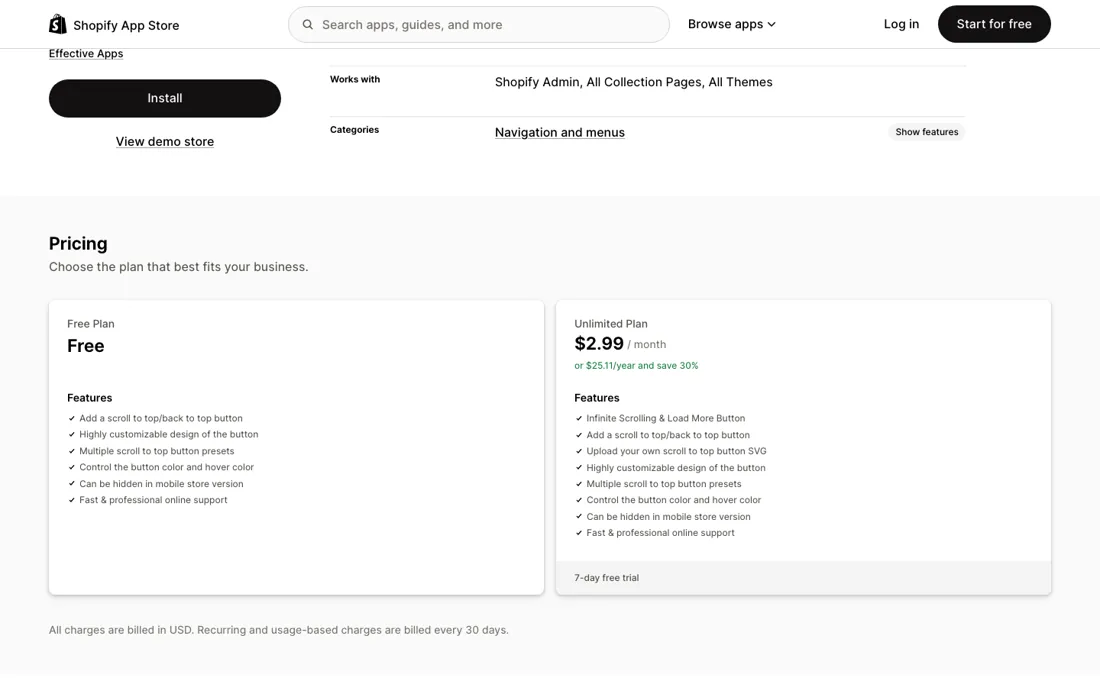
| Free Plan | no published price | Scroll-to-top button, multiple presets, button/hover colour, hide on mobile storefront |
| Unlimited Plan | $2.99 a month, or $25.11 a year (30% saving, 7-day free trial) | Infinite scrolling, load-more button, upload custom SVG icon for button |
Summarised from the pricing notes below; the notes carry the conditions.
| This tool | $2.99 | 1st cheapest of 51 |
| Cheapest | $2.99 | MX AI |
| Median | $14.99 | |
| Most expensive | $450 | Attribuly |
Lowest paid entry price per account a month, billed monthly, in USD, among the 51 e-commerce growth apps we have researched (read between 2026-08-19 and 2026-10-06). Only tools priced in the same unit and on the same billing are compared — not a market survey, and cheapest is not best.
Two plans now, where there was one. On 25 August 2026 the listing carried no paid tier, no usage meter and no surcharge — the pricing block most App Store listings use to sell an upgrade was simply absent. On 19 September 2026 it carries a Free Plan and an Unlimited Plan at $2.99 a month, or $25.11 a year with a 30% saving and a 7-day free trial.
The split does not fall where the app’s name suggests. Free keeps the scroll-to-top button and its styling: multiple presets, button colour and hover colour, and the option to hide it on the mobile storefront. Unlimited adds infinite scrolling and the load-more button, plus uploading your own SVG icon for the button. So the feature the app is named after, and the one the first three of the listing’s five selling points describe, is now the paid half.
All charges are billed in USD every 30 days. The app has been on the App Store since March 2020, carries Shopify’s Built for Shopify badge — the store’s own bar for performance, design and integration — and the listing names eleven interface languages. Plans change — always verify the live price on their site.
Category context: E-commerce. Across the 39 tools in this category that we researched with a public US-dollar price, the median entry price is $19 a month (lowest paid plan as listed, per seat where the vendor prices per seat). Compare pricing conditions in the Software Cost Atlas →
What the pricing page doesn’t say
Infinite scroll replaces the paginated collection URLs a crawler uses to walk a large catalogue, pushes your footer permanently out of reach, and on some themes collides with the load-more or filtering logic already in the theme — that is a merchandising decision, not a styling toggle. The app also edits Online Store script tags and the theme, so it adds a third-party script to every page and an uninstall can leave remnants.
What changed is which half you pay for. Read on 19 September 2026, the free plan keeps the scroll-to-top button and infinite scroll sits on the $2.99 Unlimited plan, where on 25 August the whole app was free. The amount is trivial; the shape is not. The half that can quietly alter how your collection pages are crawled is now the half with a billing relationship behind it, and the seven-day trial is the only window in which you will find out what it does to your store before the charge starts.
Anything written about this app before September — including a free-forever recommendation — describes an install that no longer exists.
Watch the 2-minute review
The video version of this review, from our YouTube channel.
What Scrolly does
Free Shopify app from Effectify that adds a customizable floating back-to-top button and, optionally, infinite scroll on collection pages, with no code and no paid tier. The button is a safe convenience; the infinite scroll replaces the paginated collection URLs crawlers use, so it is a merchandising decision rather than a styling one.
What buyers report about Scrolly
Hands-on: not tested by usReported by buyers: Shopify App Store, read August 2026
Themes from the buyer-review sites listed at the foot of this page, read in August 2026. We have not run Scrolly ourselves, so this is other buyers' experience rather than ours. We summarise it here because the complaints are usually the part a vendor page leaves out.
- • 4.9 across 212 reviews with 95% at five stars, on an app with no paid tier at all. Nearly every review says the same two things: it went in within minutes, and support answered fast. Lekkerhoning.nl (Netherlands, about two months, 17 May 2026) is one of the few reviewers with real tenure and leaves the most concrete note — support resolved a CSS z-index overlap quickly. Stylelista (Germany, 14 minutes, 8 June 2026) and Oblivo (Poland, five days, 23 May 2026) also single out the support desk rather than the feature.
- • Bourne from nature (United Kingdom, eight minutes, 30 April 2026) states the case the listing really trades on: they wonder aloud why a Shopify theme does not offer scroll-to-top by default, and call this a beautifully simple stand-in. UnBlock Tech TV Box (Hong Kong SAR, six months, 30 July 2026) is one of the few longer-running stores and reports it simply works.
- • There is very little criticism and none of it carries detail. The one clearly negative review, Chicago Pneumatic Monterrey (Mexico, 20 days, 23 August 2026), says only that it did not help at all and is very bad, without naming what failed. HeroByName (Latvia, four minutes, 9 April 2026) gives four stars and asks that the button be movable — which is a placement request, not a fault.
Where the ratings disagree. The tenures are the finding. Across the two pages of reviews read here the times shown beside them run three, four, four, five, six, six, eight, eight, nine, fourteen, twenty-three, twenty-six and thirty-five minutes. Those are installation reviews: they establish that the button appears and that the support desk replies, and nothing beyond that. It matters more here than on most listings, because the app ships two features and only one of them is a styling toggle. Not one review across the pages read mentions infinite scroll, endless scrolling, pagination, the footer, crawling or a theme conflict — the half of the app that changes how a collection page behaves is simply absent from the public record. The 4.9 is a rating of the scroll-to-top button.
Pages read (August 2026): Shopify App Store
There is something to buy now, and it is the half that carries the risk
Until late August 2026 there was nothing to buy here. Now there is: $2.99 a month, or $25.11 for a year at a 30% saving, with a seven-day free trial. That is not enough money to argue about, which is lucky, because the interesting question was never the price. Scrolly does two separate things, they carry very different risk, and the paywall now runs exactly between them. The back-to-top button is the low-risk half, and it stayed free.
It is a floating control with the styling you would expect to pay for — presets, colour and hover colour, and the option to hide it on mobile — and you can scope it to the whole store or to specific pages. On a long collection or a long product page it is a small, genuine convenience, and if you dislike it you turn it off and nothing about your store has changed.
Uploading your own SVG icon for that button is the one cosmetic thing that moved behind the paywall. Infinite scroll is the half that deserves a decision, and it is the half you now pay for. Loading more products as the shopper scrolls replaces the paginated collection URLs underneath, and those paginated URLs are how a crawler walks a large catalogue. It also puts your footer out of reach, because the page keeps growing beneath it, and on some themes it interferes with the load-more or filtering logic the theme already ships.
None of that makes it wrong — plenty of stores run it deliberately — but it is a merchandising and SEO choice dressed up as a display setting, and it should be made on purpose. The practical effect of the new plan is that the seven-day trial is your window to make it on purpose: switch it on, watch whether Search Console keeps crawling your paginated collection URLs, and decide before day seven rather than after.
One cost applies either way. The listing’s data-access panel says the app edits Online Store script tags and the theme, so switching it on adds a third-party script to your storefront and switching it off can leave remnants behind. The Built for Shopify badge means it cleared Shopify’s own performance review, which is a real counterweight, but it is still one more thing running on every page.
How to actually use Scrolly
The vendor's own walkthrough is three steps: open Scrolly's dashboard from the Shopify admin, pick the button style under Scroller Type, then set behaviour and appearance — colour, shape, size, hover effect, position, padding, animation — under Appearance Settings, and save. The button can run storewide or on selected pages only, which is the setting to reach for when it collides with a sticky menu or a chat bubble. Turn the button on and leave infinite scroll off for the first week.
The two features are independent and carry different risk: the button is a convenience, while infinite scroll changes how your collection pages are built and crawled. Ship both at once and you will not know which one caused whatever you see afterwards. One thing to know before you switch infinite scroll on: the help centre documents the back-to-top button and nothing else — there is no article on infinite scroll at all, even though it leads the listing, so plan on testing it rather than reading up on it.
Watch two numbers afterwards: whether Search Console keeps crawling the paginated collection URLs, and whether products viewed per session actually rises in your analytics. Infinite scroll is sold on the second number, and it is the one merchants almost never check.
Distilled from Effective Apps' help centre — the articles 'How to Set Up Scrolly' and 'About Scrolly: Scroll To Top Button' at www.effectify.help (both last updated 13 May 2026) — plus the Shopify App Store listing at apps.shopify.com/custom-scroll-to-top, read 10 September 2026: dashboard setup order, the Scroller Type and Appearance Settings tabs, the storewide-or-selected-pages display choice, and the infinite-scroll feature that the listing carries but the help centre does not document. Note that the bare domain effectify.help does not resolve; the help centre lives on www.effectify.help.
Frequently asked questions
Is Scrolly still free?
The button is; the thing the app is named after is not. Read on 19 September 2026, the Free Plan covers the scroll-to-top button with its presets, colour and hover colour and the option to hide it on mobile. The Unlimited Plan, $2.99 a month or $25.11 a year at a 30% saving with a seven-day free trial, adds infinite scrolling, the load-more button and the ability to upload your own SVG icon. When we read the same listing on 25 August 2026 there was no paid tier at all and no usage meter, so this split arrived somewhere in between. It matters more than $2.99 suggests, because the listing still leads with infinite scroll: the headline, the app’s own title and the first three selling points all describe the paid half. If you installed this app for the back-to-top button, nothing has changed for you. If you installed it to replace pagination, you are now on a trial clock.
Is $2.99 a month worth it for infinite scroll?
The price is not the question; whether you want infinite scroll at all is. Replacing pagination with endless scrolling takes away the paginated collection URLs a crawler uses to walk a large catalogue, pushes your footer permanently out of reach, and on some themes collides with load-more or filtering logic the theme already ships. Those are merchandising and SEO consequences, and $2.99 buys them just as efficiently as $299 would. Use the seven days deliberately rather than as a formality: turn it on, then watch two numbers — whether Search Console keeps crawling your paginated collection URLs, and whether products viewed per session actually rises in your analytics. The second is the number infinite scroll is sold on and the one merchants almost never check. One practical warning: the vendor’s help centre at www.effectify.help documents the back-to-top button and nothing else, with no article on infinite scroll at all, so plan on testing the paid feature rather than reading up on it.
What do the 236 reviews actually tell me?
Less than the 4.9 suggests, for two reasons. The shape first: on 19 September 2026 the listing shows 236 reviews averaging 4.9, with 225 at five stars, nine at four, one at three, one at two and none at one. A record with no bottom-rated reviews at all is unusual, and the ones on top read like install receipts rather than verdicts — among the most recent, one store had been using the app for 41 minutes when it wrote and another for about three hours. That tells you the install is painless, which is worth knowing, but not what infinite scroll did to the store three months later. The second reason is timing: the app has been on the App Store since March 2020 and carried no paid plan as recently as 25 August 2026, so effectively this entire record was written about a free app. It is not evidence about the $2.99 plan, and it is not evidence about how support treats a paying customer.
Does an e-commerce tool work with my store platform?
Check your platform and version specifically. Shopify support is close to universal in this category, while WooCommerce, BigCommerce, Magento and headless setups vary a lot, and 'supported' sometimes means a generic API rather than a maintained app. A listing in your own platform's app store, with recent reviews there, is a better signal than the vendor's logo wall.
Is this a hands-on review of Scrolly?
This is a researched assessment, not a hands-on test — where we've used a tool ourselves, we say so explicitly. We name what each tool is good and bad at, and we earn a commission only if you sign up, at no cost to you.
- Buyer reviews on Shopify App Store (listed as “Scrolly Infinite Scroll To Top”, listing slug custom-scroll-to-top), read August 2026.
- Read 2026-08-25 and re-read 2026-09-19 on apps.shopify.com/custom-scroll-to-top.
- A dated screenshot of that pricing page, kept on this site as the receipt.
Others in this category
Reviewed e-commerce tools that share ground with Scrolly — comparable in what they do, not drop-in swaps:
New reviews, price changes we recorded, and the cost conditions we found. No sponsored placements. Unsubscribe anytime.
This is our researched assessment — not a paid placement. The “Visit” links on this page are affiliate links: we may earn a commission if you sign up, at no extra cost to you, and it never changes our take. How we review →