 Riverside Review (2026)Hitting the Cap Stops Delivery
The meter is not recording time, it is separate-track download time — and separate tracks are the entire reason to use this rather than a video call. Throughout this review we weigh it against Zencastr.
Visit Riverside → Affiliate link — we may earn a commission if you sign up; it does not change what this page says.
Watch the 2-minute review
The video version of this review, from our YouTube channel.
⚡ Short on time? Watch the 30-second verdict Short.
Pricing (2026)
✓ Pricing re-verified 26 Sep 2026
- Pro — $24/mo billed yearlylisted at $35; 1 studio, 15 hrs of separate-track downloads
- Grow — $34/mo billed yearlylisted at $45; 2 studios, 20 hrs, live streaming and hosting for 2 shows
- Webinar — $79/mo billed yearlylisted at $99; 3 studios, 25 hrs, up to 100 registrants
- Business — contact salesunlimited studios and downloads, up to 10,000 registrants, async recording
Pro $35 a month or $24 on annual billing; Grow $45 or $34; Webinar $99 or $79; Business quote-only. What separates the tiers is studios and separate-track download hours — 1 studio and 15 hours on Pro, 2 and 20 on Grow, 3 and 25 on Webinar, unlimited on Business — while recording hours are unlimited on all four. Up to 4K desktop capture, 44.1/48 kHz audio and 10 people in a session are on every tier; the mobile apps cap at 1080p below Business, and frame rates are 24 FPS except on Business.
Webinar registration is 100 on the Webinar plan and up to 10,000 on Business. AI credits: Pro starts with 2,000 and Business with 12,000, and Magic Clips, Magic Audio and the AI Co-Creator do not consume them. The page contradicts itself: its FAQ says annual billing saves 'up to 20%' with Pro dropping from $29 to $24 and Grow from $39 to $34 — the pre-increase monthly rates — while against the $35/$45/$99 on the cards the annual saving is 31%, 24% and 20%. Plans change — always verify the live price on their site.
What the price did
We capture Riverside’s own pricing page every month and keep the figures, so this is our record of the page — not a forecast, and not someone else’s summary.
Our 26 August 2026 reading over a US connection found the monthly rates had risen from $29 to $35 on Pro and from $39 to $45 on Grow while the annual rates stayed at $24 and $34, so that increase fell entirely on people paying month to month. The 7 September 2026 re-read returns the same numerals. The FAQ on that same page still quotes the pre-increase $29 and $39 alongside its 'up to 20%' claim, which is the clearest confirmation that the rise is recent: the cards were updated and the copy underneath them was not.
What the pricing page doesn’t say
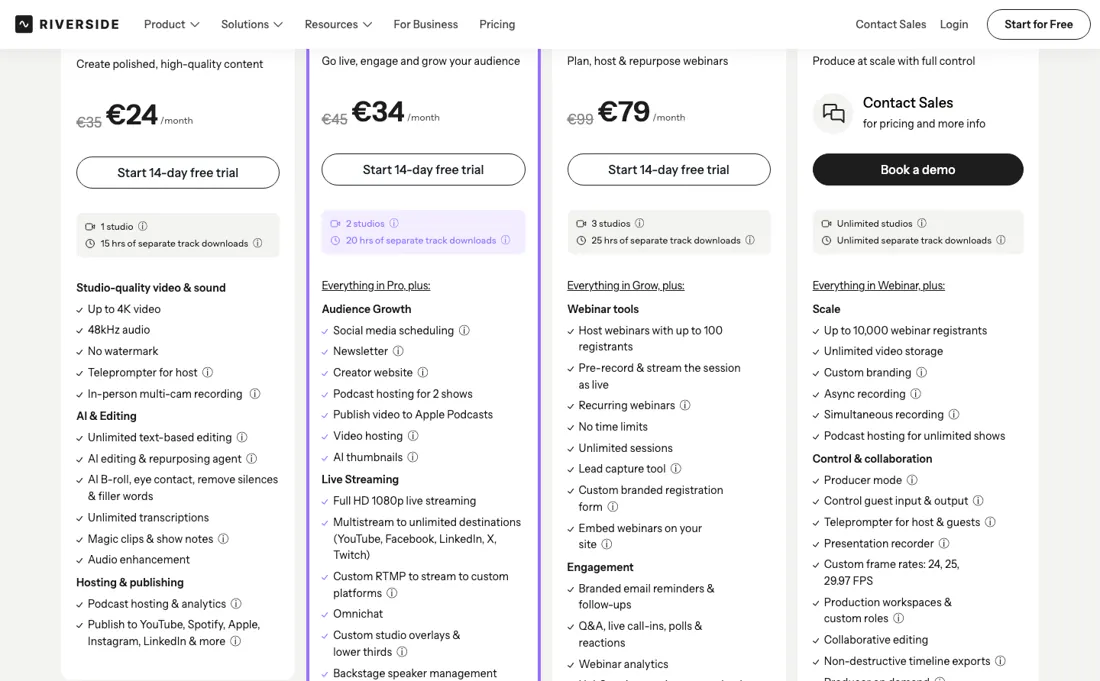
Recording itself is unlimited. Their own FAQ on hitting the cap: you can still access your content but cannot download new separate tracks until the next billing cycle or you upgrade. So a busy interview month does not cost you more money, it quietly stops you delivering, which is worse. Fifteen hours on Pro is about seven or eight hour-long interviews once you count retakes and the recording that runs while you set up. There is a 14-day trial rather than a published free plan.
What Riverside does
Records podcasts and video locally at each end, so guests on poor connections still come out broadcast-quality.

What buyers report about Riverside
Recurring themes from the buyer-review sites listed at the foot of this page, read in August 2026. We have not run Riverside ourselves, so this is other buyers' experience rather than ours. We summarise it here because the complaints are usually the part a vendor page leaves out.
- • Each participant records locally, so a guest's bad connection does not ruin the take. That is the core reason to use it, and it works. 4.8 on G2 across 1,657 reviews.
- • Guests join without friction, and the AI editing that strips filler words and pauses saves real time.
- • Sync problems, missing files and glitches are reported often enough to matter — always check your files are all there before you let a guest go.
- • Support is described as inconsistent and not transparent when something has gone wrong.
- • 4K recording sits on the higher tier, and both are quoted on annual billing; monthly costs up to 35% more.
- • Integrations with other platforms are thinner than reviewers want.
Grow moves the wall 33% for $10
The meter here is not recording time, it is separate-track download time — and separate tracks are the entire reason to use Riverside rather than a video call. Recording hours are unlimited on all four plans. Prices are per region: our US reading of 26 August 2026 gave dollars, and re-reading the page on 7 September 2026 from a Netherlands connection returns the identical numerals with a euro sign, because the amounts come from Riverside's own pricing API rather than the page.
In dollars, then: Pro is $35 a month or $24 on annual billing, for 15 hours of separate-track downloads and one studio. Grow is $45 or $34 for 20 hours and two studios. Webinar is $99 or $79 for 25 hours, three studios and registration for up to 100. Business is quote-only with unlimited studios and unlimited downloads. Per hour on the annual rate, Pro is the cheapest plan on the ladder at $1.60, Grow is $1.70 and Webinar is $3.16.
The volume discount runs backwards, and if hours were all you were buying nobody would ever leave Pro. The marginal figures say it louder: Grow's five extra hours cost $2 each, Webinar's five cost $9 each, the second studio costs $10 and the third costs $45. Which reframes the decision. What you buy when you leave Pro is not hours, it is distance from the wall — and hitting the wall does not cost money.
Their own FAQ: you can still access your content but cannot download new separate tracks until the next billing cycle or you upgrade. A busy interview month therefore does not produce a bigger invoice, it produces a stop — the recordings exist and you cannot deliver them. Fifteen hours is fewer sessions than it sounds once you count the recording that runs while you set levels, the retakes and the overrun.
What the upgrade does not buy is quality or capacity: up to 4K desktop capture, 44.1/48 kHz audio, 10 people in a session and unlimited transcription sit on Pro already, and every tier below Business charges for an extra editor seat as an add-on. AI credits run on their own meter — Pro starts with 2,000 and Business with 12,000, while Magic Clips, Magic Audio and the AI Co-Creator consume none — so neither the credits nor the resolution should decide your tier. Hours and studios are the only things the ladder sells.
Our monthly capture read this vendor's pricing page in July 2026 and again in August 2026, and the amounts were the same both times. We keep watching — the registry records what moves.
How to actually use Riverside
Record one real session inside the 14-day trial before you commit, and watch the upload rather than the recording. Riverside's value is that each participant is captured locally and uploaded separately, so the failure mode that matters is a guest on a poor connection or a browser that misbehaves — test that with a guest, not with yourself. Then measure your hours the way the meter does. It counts separate-track download time, not recording time, and the hours you download include the minutes that ran while you set levels, every retake and the overrun at the end.
Add those to your interview length and the honest monthly figure is usually half again what the schedule suggests. Pick the tier from that number and from your publishing calendar rather than from the price. Hitting the cap does not cost money — it stops you downloading new separate tracks until the cycle turns over — so what you are buying out of is a missed delivery date. If your estimate lands anywhere near Pro's 15 hours, Grow's five extra hours cost $10 and are worth it purely as headroom.
Check the amount in your own currency before you sign. The page prices per region, so a European visitor sees the same numerals with a euro sign, and the FAQ directly beneath the plan cards still quotes an older set of monthly rates than the cards above it.
Distilled from riverside.com/pricing read in a browser on 7 September 2026 from a Netherlands exit. Three things about reading this page. (1) riverside.fm/pricing is no longer the address — it redirects to riverside.com, which is where the page now lives. (2) The plan cards carry both amounts at once in the DOM: an element with class 'pricing__plan-price is--monthly' holding €35 and one with 'is--yearly' holding €24, with the monthly figure struck through while the yearly view is active. Operating the Monthly/Yearly control changes which one is emphasised, not the numbers, so a reading of one state is a reading of both. The container is labelled 'c-price-abtest-price-inner active-yearly' and the price block 'is__v2 version-b', i.e. the page is running a price A/B test and this is variant B — another visitor may be shown a different arrangement. (3) A hidden mobile comparison block ('compare-plans__wrapper-mobile', display:none at both 1280px and 375px) still contains a stale 'Free / Pro / Tab / Standard / Business' tab set with '$0/month' in three of the panes; it is dead markup from an older plan structure and no visitor sees it, so anything scraped from it is wrong. The plan limits (studios, separate-track download hours, resolution, audio, frame rates, session size, registrant caps) come from the Compare plans table read column by column, and the cap behaviour, the AI-credit allowances, the editor-seat add-on and the annual-saving claim come from the FAQ beneath it. riverside.fm/llms.txt returns 404. riverside.com/register, read the same day, still offers a free sign-up ('Sign up to join Riverside, it's free'), but the pricing page no longer lists a free plan or publishes its limits, so the 2-hour, 720p, single-track figures we carried are no longer sourceable. Re-read 26 September 2026 in the browser pane from a Netherlands exit: EUR 35/24, 45/34 and 99/79, 15/20/25 hours of separate-track downloads and 1/2/3 studios, unchanged; the FAQ still quotes $29 and $39 as the pre-annual monthly rates. The FAQ answers on webinars (registration, Q&A, polls, automated reminders, HubSpot and webinar analytics only from the Webinar plan; Business for more than 100 registrants) and on AI credits (Pro 2,000, Business 12,000, more purchasable once used; Magic Clips, Magic Audio and the AI Co-Creator need none) are the source of the buyer questions. A plain fetch of the same URL now returns a different variant - a Free plan with 2 hours of multi-track recording at 720p and 'Pro + Live Studio' at $29/$24 - next to a notice that the page is being viewed in a staging environment; the browser does not show that variant and it is not used here.
The natural comparison is Zencastr or SquadCast — the direct local-recording peers — compare the monthly hour allowance for separate tracks, not the headline price. Weigh it against Zencastr on the job you actually need done.
Frequently asked questions
Can I run webinars on the Grow plan?
Not properly. Riverside's pricing FAQ (read 26 September 2026) says you need at least the Webinar plan: Grow includes live streaming and multistreaming, but audience registration, Q&A, polls, automated email reminders, the HubSpot integration and webinar analytics are only on Webinar. That plan is $99 a month or $79 on annual billing and takes registration for up to 100 people; past 100 registrants the FAQ points you to the quote-only Business plan.
What happens when my AI credits run out?
You buy more, according to the FAQ (read 26 September 2026): Pro starts with 2,000 credits and Business with 12,000, and once they are used more can be purchased. The page prints no price for extra credits. Credits only power select features - AI Translation, AI B-Roll and Animated Clips are the examples given - while Magic Clips, Magic Audio and the AI Co-Creator do not use them, so a podcast workflow built on those three never touches the meter.
Is annual billing really 20% cheaper?
It is cheaper than that on the lower plans. The FAQ says annual billing saves up to 20% and quotes Pro dropping from $29 to $24, but the plan cards (read 26 September 2026) show Pro at 35 a month billed monthly against 24 on annual billing, Grow 45 against 34 and Webinar 99 against 79 - a saving of 31%, 24% and 20%. The cards are priced by region: from a Netherlands exit they show euros, with the same numerals our US reading showed in dollars.
What should I weigh before buying Growth & Revenue software?
It depends on whether you have the bottleneck it solves. Small teams get the most out of this category when one clear problem is already costing real hours or revenue; buying ahead of that just adds cost and another login. Price it against the hours or lost deals it removes, not against its feature list, and start on the smallest plan that covers the job.
Is this a hands-on review of Riverside?
This is a researched assessment, not a hands-on test — where we've used a tool ourselves, we say so explicitly. We name what each tool is good and bad at, and we earn a commission only if you sign up, at no cost to you.
- Buyer reviews on G2, SelectHub and creator reviews, read August 2026.
- Read 2026-09-26 on riverside.com/pricing; riverside.fm now redirects to riverside.com. Amounts are region-priced: the page returned euros from a Netherlands exit on this date, with the same numerals our 26 August 2026 US reading returned as dollars, so the dollar figures are given here.
- A dated screenshot of that pricing page, kept on this site as the receipt.
Others in this category
Reviewed growth & revenue tools that share ground with Riverside — comparable in what they do, not drop-in swaps:
New reviews, price changes we recorded, and the cost conditions we found. No sponsored placements. Unsubscribe anytime.
This is our researched assessment — not a paid placement. The “Visit” links on this page are affiliate links: we may earn a commission if you sign up, at no extra cost to you, and it never changes our take. How we review →