Restream Review (2026)Each Extra Seat Costs $25
The channel caps are the business model -- each tier buys a few more destinations.
creators, podcasters and marketing teams who broadcast one show to many platforms at once, without extra encoding hardware.
you stream to a single platform (its native studio is free) or you need broadcast-grade production control — an OBS-style tool fits better.
Transparency: the “Visit” links on this page are affiliate links — we may earn a commission if you sign up, at no extra cost to you. No vendor can pay for a better review or verdict. How we make money →
Pricing (2026)
✓ Pricing re-verified 26 Sep 2026
Re-read on restream.io/pricing on 26 September 2026, with both the Creator/Business tabs and the Monthly/Annually toggle operated. Free: 2 channels with Restream branding, 1 seat. Standard $19 a month, billed as $190 a year (3 channels, 1 seat). Professional $49 a month, billed as $470 a year (5 channels, Full HD 1080p in Studio, 2 seats). Business $239 a month, billed as $2,390 a year (8 channels, website player to 1,000 viewers, 2 seats).
Enterprise is quoted. Annual therefore saves 16.7% on Standard and Business and 20.1% on Professional, not the flat 'Save 20%' the toggle advertises. Add-ons are monthly on top: Clips +$19/+$29/+$59 and Webinars +$99/+$99/+$299 across the three tiers, extra team seats $25 a seat on Professional and Business only, and extra workspaces $49 (Professional) or $239 (Business). Plans change — always verify the live price on their site.
Category context: Growth & Revenue. Across the 82 tools in this category that we researched with a public US-dollar price, the median entry price is about $29 a month (lowest paid plan as listed, per seat where the vendor prices per seat). Restream’s entry price of $19 a month sits below that median. Compare pricing conditions in the Software Cost Atlas →
What the price did
We capture Restream’s own pricing page every month and keep the figures, so this is our record of the page — not a forecast, and not someone else’s summary.
Our 17 August 2026 reading recorded Standard at about $16 a month on annual billing, Professional at $39 and Business at about $199. On 7 September 2026 the page's own annual figures -- $190, $470 and $2,390 a year -- work out to $15.83, $39.17 and $199.17 a month: the same ladder, unchanged across three weeks. The $25 seat price is unchanged too. What our earlier reading did not record is the monthly-billing column, where Business is $239.
What the pricing page doesn’t say
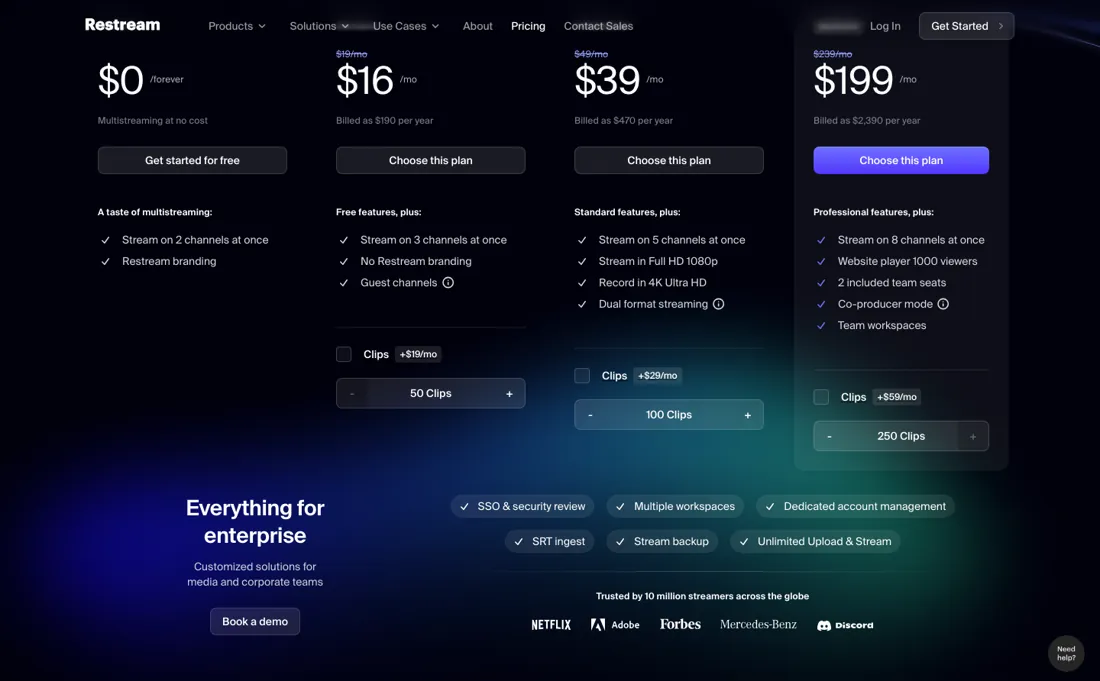
Seats are the second meter: Free and Standard include one and cannot buy another at all, while Professional and Business include two and sell extras at $25 a month. Price it at your real destination count and team size, not the sticker.
Watch the 2-minute review
The video version of this review, from our YouTube channel.
What Restream does
Multistreaming studio: broadcast one show to YouTube, LinkedIn, Facebook and Twitch at once from the browser, with guests and local recordings.
What buyers report about Restream
Recurring themes from the buyer-review sites listed at the foot of this page, read in August 2026. We have not run Restream ourselves, so this is other buyers' experience rather than ours. We summarise it here because the complaints are usually the part a vendor page leaves out.
- • Streaming to many destinations from one dashboard, with a genuinely usable free plan — that is the reason it exists and it works.
- • Standard on annual billing is cheap for multistreaming — reviewers reach for it as the step that removes the watermark without a real commitment.
- • Both the free plan and Standard cap at 720p. On a large screen that looks soft next to the 1080p everyone else is delivering.
- • The free plan's watermark is visible to your whole audience on every platform.
- • Facebook streaming and scheduling sit behind the paywall.
- • The step from Professional (~$49/month) to Business (~$239-299) is steep with nothing between. One reviewer reports being refused a partial refund after platform glitches, half a year in.
The per-channel price rises as you climb
Restream's ladder is sold on destination count, and destination count gets more expensive per unit the higher you go -- the reverse of how volume pricing usually works. Free covers 2 channels with Restream branding. Standard is $190 a year, $15.83 a month, for 3 channels, or $5.28 a channel. Professional is $470 a year, $39.17 a month, for 5 channels and Full HD, or $7.83 a channel. Business is $2,390 a year, $199.17 a month, for 8 channels: $24.90 a channel, 4.7 times Standard's rate (re-verified 26 September 2026 against restream.io/pricing).
Read it as marginal cost and the shape is clearer still. Going from Standard to Professional buys two more channels for $23.34, or $11.67 each. Going from Professional to Business buys three more for $160, or $53.33 each. Nobody pays $53 a channel for channels, which means Business is bought for something else -- the website player, the 1,000 concurrent viewers and stream disconnect protection are what its card actually adds.
Ask before you assume the jump is about destinations. Then the line that catches teams out, and it is worse than a price. Standard cannot add a seat at all: the comparison table prices extra seats at $25 a month each on Professional and Business, and leaves the Free and Standard cells empty. Free and Standard include one seat; Professional and Business include two. So your second person does not cost you $25 on Standard -- they cost you the move to Professional, $39.17 a month against $15.83, and the third person is the first one you pay $25 for.
If more than one person touches the stream, headcount picks your plan before channel count does. Annual billing saves 16.7% on Standard and Business and 20.1% on Professional, so the 'Save 20%' badge is a rounding of the best case. Price this at your real destination count and your real headcount, in that order, and the sticker will rarely be the answer.
How to actually use Restream
Count destinations and people separately, because both are metered and the seat is the one that catches teams out. Standard includes one seat and the comparison table offers no way to add another -- extra seats are priced at $25 a month on Professional and Business, and the Free and Standard cells are empty. So the price of your second person is not $25, it is the jump to Professional; settle that before you pick a tier on channel count.
Then test the thing that actually breaks, which is your upload. Multistreaming takes one feed and pushes it to several platforms, so your bandwidth and encoder settings decide the quality on all of them at once. Run a full-length test stream to your real destinations, at your real bitrate, from the venue you will broadcast from -- not a two-minute check from your desk. Use the free plan for that rehearsal, but know its limits: two channels and Restream branding on the output.
Fine for a test, wrong for a launch. And check where Full HD begins, because in Restream Studio it arrives at Professional. If you broadcast from Studio and your audience expects 1080p, Standard is a different output quality and no add-on fixes it; the pricing FAQ adds that from your own encoder software there is no such restriction, though some platforms may not accept Full HD.
Where this section comes from: our research notes (255 words)
restream.io/pricing read in a browser on 7 September 2026 with the page's own controls operated: the Creator and Business tabs, and the Monthly/Annually toggle, which does not change the headline per-month figure but adds the 'Billed as $190 / $470 / $2,390 per year' line that the annual arithmetic comes from -- read only one state and you get the ladder wrong. The Compare plans table underneath was read row by row across its five columns (Free, Standard, Professional, Business, Enterprise): included team seats 1/1/2/2, additional seats at $25 a month on Professional and Business with the Free and Standard cells empty, workspaces at $49 and $239, Studio video quality 720p up to Standard and 1080p from Professional, and channel counts 2/3/5/8.
The Clips and Webinars add-on prices come from the plan cards themselves. Re-read 26 September 2026 in the browser pane with the Annually toggle operated: $19/$49/$239 a month, billed as $190/$470/$2,390 a year, the Clips and Webinars add-ons, $25 seats and $49/$239 workspaces unchanged. The Compare plans table also gives cloud recordings from Standard up (the Free cell is empty) at 6 hours per stream and 15 days' storage on Standard, 10 hours and 15 days on Professional and 10 hours and 30 days on Business; Custom RTMP channels from Standard up; 6 on-screen participants on Free and 10 above.
The FAQ answer on Full HD (1080p in Restream Studio from Professional, no restriction from custom software) is the source of the getting-started correction. restream.io/llms.txt lists the same monthly plans; restream.io/pricing.md returns 404.
The natural comparison is StreamYard or OBS Studio — StreamYard wins on beginner-friendly guest shows, OBS on free pro-grade control; Restream wins on multistream breadth and scheduling.
Frequently asked questions
Can I stream in 1080p on the Standard plan?
Not from Restream Studio. The comparison table (read 26 September 2026) gives Free and Standard 720p HD and Professional, Business and Enterprise 1080p Full HD, and the FAQ says 1080p through Studio needs Professional. The same FAQ adds that if you stream from your own encoder software there is no such restriction, though some platforms may not support Full HD. So if you broadcast from OBS or similar, Standard at $19 a month does not cap your resolution; if you broadcast from Studio, it does.
Does Restream record my streams on the free plan?
No. In the comparison table (read 26 September 2026) the cloud-recordings row is ticked from Standard upward and the Free cell is empty. Standard records up to 6 hours per stream and keeps recordings for 15 days; Professional records 10 hours per stream for 15 days; Business 10 hours for 30 days. Download anything you want to keep before that window closes, because storage length is the one recording limit that does not grow until Business.
Can I stream to a platform that isn't on Restream's list?
Yes, from Standard up. The comparison table (read 26 September 2026) ticks Custom RTMP channels on Standard, Professional, Business and Enterprise and leaves Free empty, and the FAQ describes it as streaming to any platform that provides an RTMP URL and a stream key, naming Wowza and GoTo Webinar as examples. Each custom destination still counts against your channel limit: 3 on Standard, 5 on Professional, 8 on Business.
What should I weigh before buying Growth & Revenue software?
It depends on whether you have the bottleneck it solves. Small teams get the most out of this category when one clear problem is already costing real hours or revenue; buying ahead of that just adds cost and another login. Price it against the hours or lost deals it removes, not against its feature list, and start on the smallest plan that covers the job.
Is this a hands-on review of Restream?
This is a researched assessment, not a hands-on test — where we've used a tool ourselves, we say so explicitly. We name what each tool is good and bad at, and we earn a commission only if you sign up, at no cost to you.
- Buyer reviews on GetApp, Capterra and Software Advice, read August 2026.
- Restream’s own published pricing page.
- A dated screenshot of that pricing page, kept on this site as the receipt.
Others in this category
Reviewed growth & revenue tools that share ground with Restream — comparable in what they do, not drop-in swaps:
New reviews, price changes we recorded, and the cost conditions we found. No sponsored placements. Unsubscribe anytime.
This is our researched assessment — not a paid placement. The “Visit” links on this page are affiliate links: we may earn a commission if you sign up, at no extra cost to you, and it never changes our take. How we review →