monday.com Review (2026)
 By Daan Haket · Tested hands-on · written with an AI assistant · who does what
The seat price is not the product price.
teams who want one visual system for projects and work, and who will actually use the automations and views that justify the per-seat price at Standard or above.
you are two or three people who need a shared list. The free tier caps at 2 seats and 3 boards, and paying per seat for views you will not use is the most common way this gets expensive. Also skip it if you only want the CRM, since that is a separate subscription and worth pricing against dedicated CRMs.
Transparency: the “Visit” links on this page are affiliate links — we may earn a commission if you sign up, at no extra cost to you. No vendor can pay for a better review or verdict. How we make money →
Exit test (measured 2026-10-28)
- Export route
- Board menu > More actions > export board to Excel
- Formats
- XLSX
- Attachments included
- Not tested
- Re-import tested
- With our own file, not the standard kit (see below)
- Lost on export
- Start Date is stored as text rather than a date column.
Formats describe this export route; offered formats may not have been inspected. Full exit test and scope ↓
Tested by our team on 28 October 2026 on the free Pro trial: Daan created the account and our AI assistant ran the test in Daan's browser. We imported three made-up tasks, set up one automation, asked the AI assistant one question, exported the board, imported it again with one change and opened the Pro checkout without entering a card.
How we tested
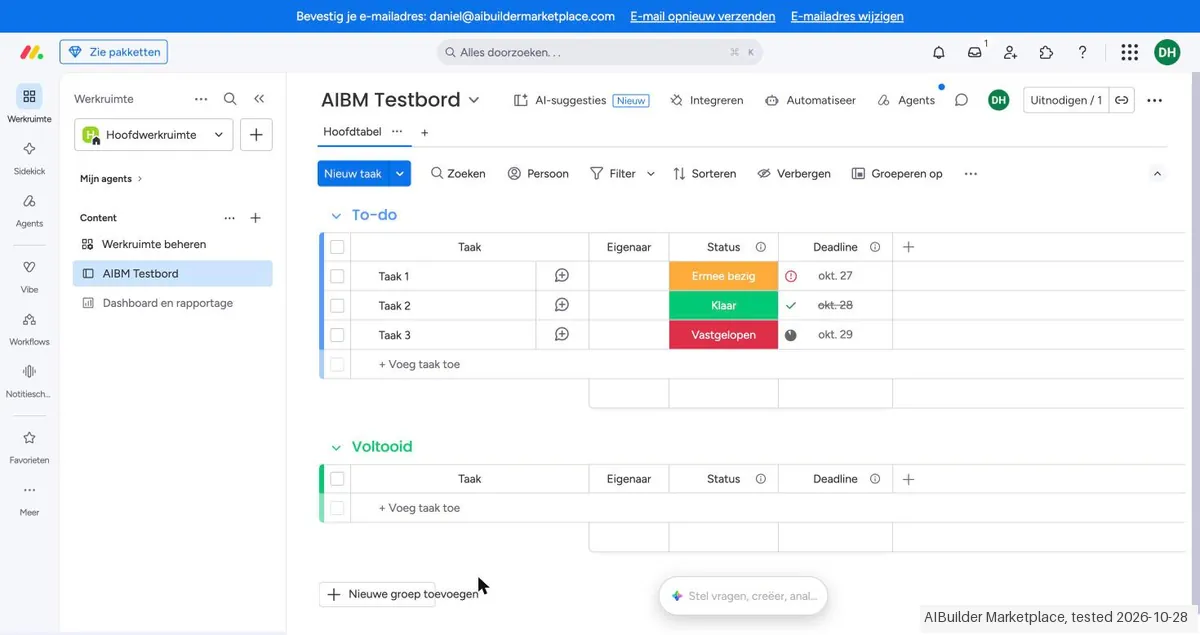
- Imported three made-up tasks from a CSV
- Set up one automation and asked the AI assistant one question
- Exported the board to Excel and imported it again with one change
- Opened the Pro checkout and stopped at the card form
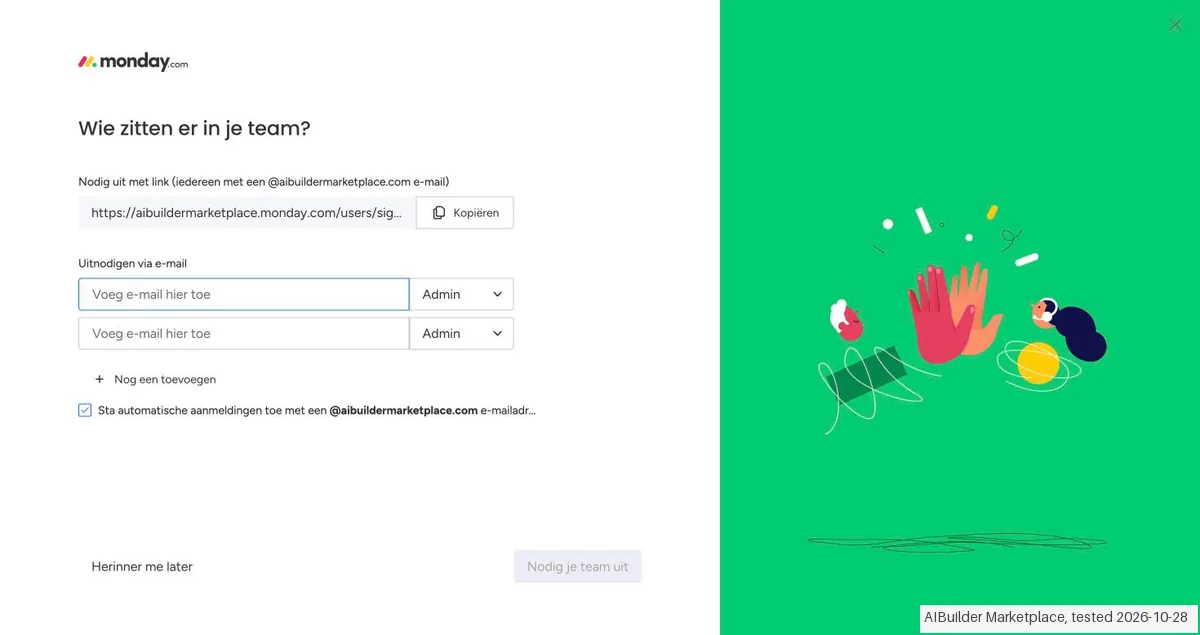
- The account opened on a 14-day Pro trial without a card, after six onboarding screens. The first screen had 'allow automatic sign-ups with an @aibuildermarketplace.com email address' switched on by default.
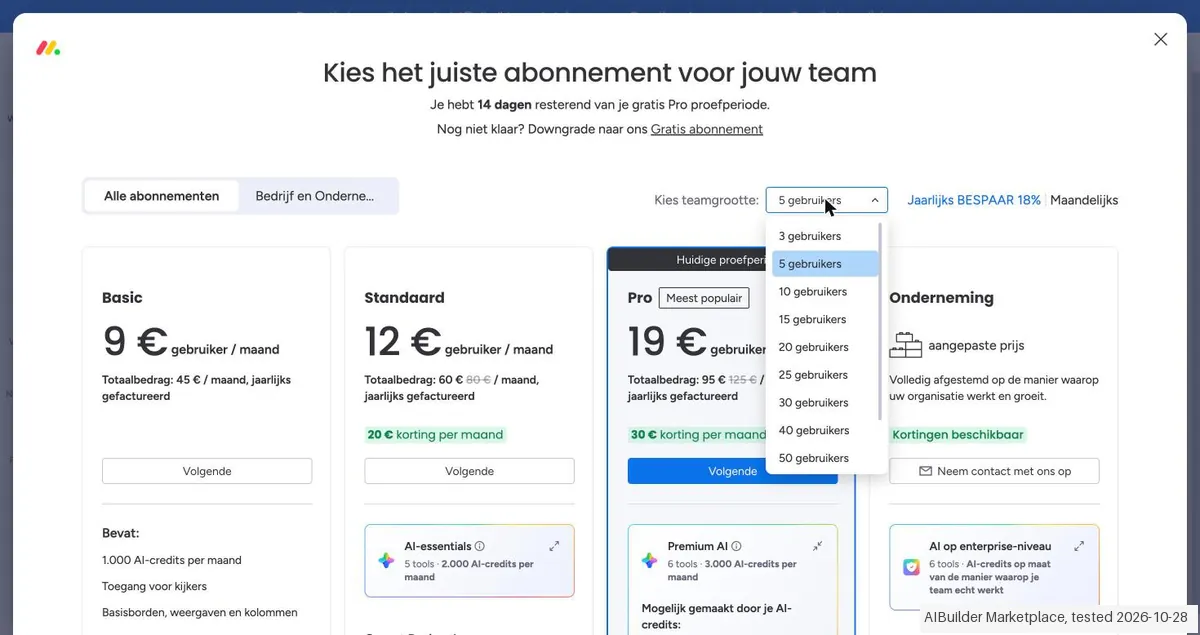
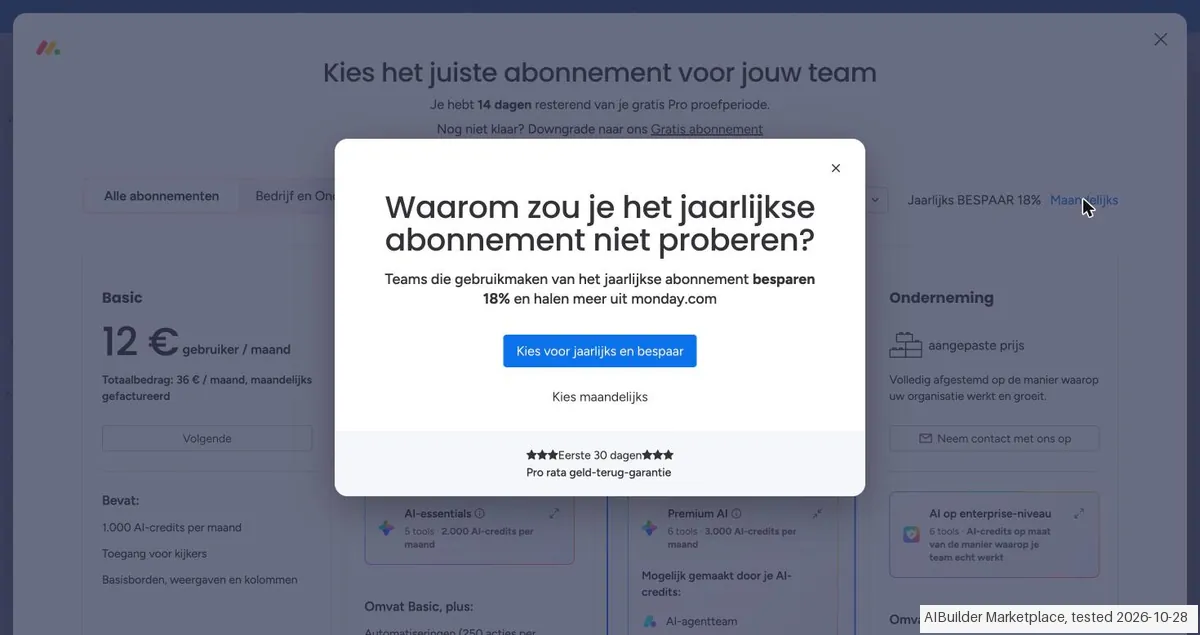
- The plans page started at 5 seats; the smallest choice was 3. For 3 seats Pro cost €19 per seat a month billed yearly or €24 monthly, and choosing monthly first opened a prompt to reconsider yearly billing.
- The Pro checkout for 3 seats monthly added an AI add-on of €30 (3,000 credits) by itself, offset by a €30 discount 'only in the first year', plus €15.12 tax (21%): €87.12 a month. After the first year that add-on would cost extra if you keep it.
Pricing (2026)
✓ Pricing re-verified 23 Oct 2026
Free covers two seats. Basic is $9 per seat a month, a total of $90; Standard $12, down from $14, for $120 instead of $140; Pro $19, down from $22, for $190 instead of $220. Enterprise is quoted. The seat count is the thing to watch: the per-seat figure moves with team size, so a price read at ten seats is not what three or fifty will cost.
Yearly billing is marked as 18% off, and each paid tier carries its own monthly AI-credit allowance rather than selling AI separately. Plans change — always verify the live price on their site.
What the pricing page doesn’t say
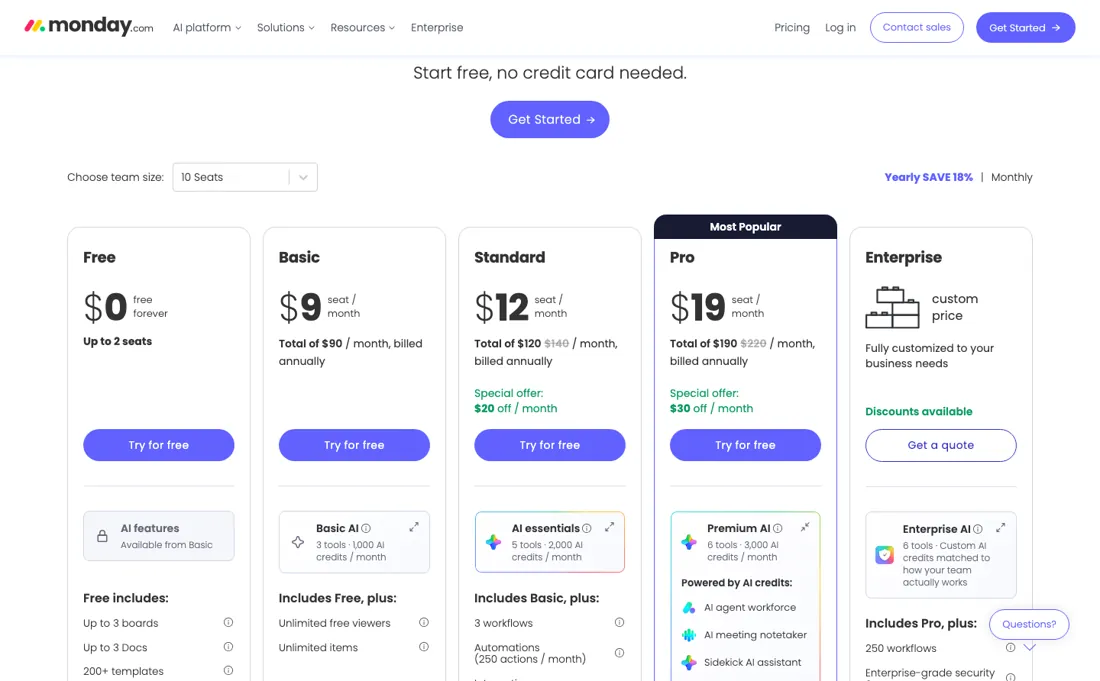
monday sells four products — Work Management, CRM, Dev and Service — each on its own subscription, and the $9 you see first is the cheapest tier of one of them. A sales team that wants the CRM is buying a second subscription on top of whatever Work Management costs, with a three-seat minimum of its own. The second number to find before you commit is the automation cap. Standard allows 250 automation actions a month across the whole account.
If you are buying monday because of the automations you saw demoed, 250 is roughly one workflow running a few times a day — and the next step up is Pro at $19 a seat against Standard's $12. Free is capped at two seats and three boards, which makes it a preview rather than a plan. On payment, the FAQ excludes debit cards (credit card or PayPal, depending on location) and accepts invoices only for Enterprise orders above a minimum fee it does not state, which can rule monday out for a small company that pays by bank transfer.
Watch the video review
The video version of this review, from our YouTube channel.
⚡ Short on time? Watch the 30-second verdict Short.
What monday.com does
Work management platform with boards, automations and views — plus separately-priced CRM, Dev and Service products.
What buyers report about monday.com
Hands-on: tested 2026-10-28Reported by buyers: Capterra, G2, pricing analyses and Product Hunt, read August 2026 (Product Hunt read 13 August 2026)
Themes from the buyer-review sites listed at the foot of this page, read in August 2026 (Product Hunt read 13 August 2026). We tested monday.com ourselves on 2026-10-28, but one test is a narrow sample, so here is what other buyers report. We summarise it here because the complaints are usually the part a vendor page leaves out.
- • Boards that non-technical teams actually adopt, and the visual layer is genuinely good — that is why it spreads inside companies.
- • The automation and integration library covers most of what a growing team needs without a developer.
- • On Product Hunt (4.8 across 41 reviews) the concrete praise is that switching between Kanban, timeline and table views does not lose data, and that automations take repetitive status updates and assignment routing off people.
- • Seats are sold in buckets, and it is the single most-criticised thing about the pricing. Minimum three seats, then multiples of five: a team of six pays for ten, a team of sixteen pays for twenty. A solo user pays for three.
- • The features most teams need are gated upward. Automations sit on Standard, time tracking and private boards on Pro — which makes the real entry price closer to $57/month (three Pro seats) than the $27 the headline suggests.
- • Monthly billing costs 18-30% more than annual.
- • Complex automations, newer board views and reporting are hard or impossible on mobile.
- • The free plan is 2 seats and 3 boards with no automations.
- • Product Hunt reviewers say they hit the Pro ceiling sooner than expected once automations and integrations get real — the same wall the automation cap describes, seen from use rather than from the price list.
- • Setup takes longer than expected, especially permissions and folder structure, and reviewers say the onboarding documentation does not front-load that.
- • Support is described there as thin and hard to reach.
When the paid plan is worth it
On Work Management the ladder is $9, $12 and $19 per seat a month billed annually, and what moves between them is automation volume rather than features you can name. Basic buys unlimited items and unlimited free viewers. Standard adds timeline and Gantt views, calendar, guest access and 3 workflows, but automations and integrations are capped at 250 actions a month. That ceiling is the reason most teams end up on Pro, where the same meters read 25,000 and workflows go to 20.
Pro also brings private boards, time tracking and 10,000 API calls a day against Standard's 1,000. The part the seat price does not cover is AI. Each tier now carries an AI credit allowance — 1,000, 2,000 and 3,000 a month — and the page prices credits as a separate line, 1,000 credits at $10 (2,000 at $20 and 3,000 at $30), each currently cancelled out by a “Special monthly discount” of exactly the same amount.
Read the totals arithmetic on the page before budgeting: when that offer lapses, AI credits become a real charge on top of seats.
Our monthly capture read this vendor's pricing page every month from August 2026 to October 2026, and the amounts were the same all 3 times. We keep watching — the registry records what moves.
What we found running monday.com ourselves
The first findings are at the top of this page. The rest:
- Our CSV import matched only the Status column automatically; task name and due date had to be mapped by hand. Start Date arrived as a text column. The status cells first showed colours without labels, but the labels appeared after reloading the board.
- A 'when status changes to Done, move item to group' automation ran within seconds and used 1 of the 25,000 monthly actions on Pro. The Sidekick assistant correctly named the two tasks due on 29 October.
- Re-importing with one changed description and 'Update' matched on task name: the description changed and no duplicates appeared, although the notice said '3 items imported'.
- Invitations offer Admin, Member and a Viewer role described as 'view only, no edits (free)'. The 'downgrade to Free' link only said you can choose a plan when the trial ends. API tokens and an MCP server are offered in the developer centre.
Claim vs. what we measured
We set a claim from monday.com's own pages next to what we saw in our test, on the plan named. The status says whether the two describe the same thing and match; it is not a verdict on the product. Confirmations are listed too.
| What the vendor says | What we measured | Status | What it means if you buy |
|---|---|---|---|
| 14-day free trialSource: monday.com, read 25 Oct 2026 | Measured 2026-10-28: The plans window states 14 days remaining in the free Pro trial.Our test, 28 Oct 2026; Pro, 3 seats, monthly, automatic AI add-on | ConfirmedSame session and tested trial; only the visible statements were compared. | The initial trial length is confirmed; behavior after expiry was not tested. |
| €24 per seat a month (Pro, monthly billing)Source: monday.com, read 28 Oct 2026The vendor's page no longer shows this wording (checked 2026-11-01) — original claim: “€24 per seat a month (Pro, monthly billing)” | Measured 2026-10-28: Pro, 3 seats, monthly: €72 plus an automatic AI add-on of €30, offset by a €30 discount only in the first year; tax €15.12 at 21.0%; total €87.12. The smallest paid team size offered is 3.Our test, 28 Oct 2026; Pro, 3 seats, monthly, automatic AI add-on | ContradictedSame Pro plan, 3 seats and monthly EUR term. Base plan matches the displayed price; contradiction concerns the automatic add-on after the first-year discount. No matching current cost rule; no computed renewal total. | The automatic AI add-on is discounted only in the first year, creating an additional charge afterward if retained. The final amount after that year was not observed. The paid plan requires at least 3 seats. |
Exit test: can you take your data out?
Exported the board to Excel and compared the three imported tasks with the custom CSV fixture. Test date: 28 Oct 2026. We describe the friction rather than score it; this is one run with synthetic records, not a verdict on monday.com.
| What we checked | What we saw |
|---|---|
| Came along in the export |
|
| Lost in the export |
|
| Awkward but not lost | Export is under More actions. Updates is off by default and Subitems is disabled in the dialog. |
| Export route | Board menu > More actions > export board to Excel. |
| Export format | XLSX opened and compared with the custom fixture; due dates are Excel dates and Start Date is text. |
| Re-importing the export | Update matched by task name, with the modified description recorded on AIBM-002 and no duplicates. The new import group was empty. Due Date was not mapped. No post-reimport export or update by Item ID was tested. |
| Cancelling | Following the Free downgrade link only shows a message to choose a plan at the end of the Pro trial. No downgrade was offered at that point and no change was confirmed. |
What the exit test does not show:
- Reimport/update by Item ID and post-reimport export.
- Preservation of all fields and IDs after reimport.
- Free-plan behavior after the trial.
- Update content preservation; there were no updates.
- All official category-kit checks; a copied ClickUp task fixture was used.
Mail in the first 14 days
Measurement running until 2026-11-10T23:00:00Z (last observed 2026-11-02T02:18:01.612935Z).
6 emails in the 14-day window so far; first email after signup: unknown (exact signup time not recorded); 0 with an explicit offer.
Retained inbox and junk only; removed or archived mail is outside this observation. Ambiguous supplier attribution is excluded. Day numbers use elapsed 24-hour periods since the recorded signup date at midnight Europe/Amsterdam; the signup hour is unknown. Offer flags quote literal subject/body text. Replies in our own correspondence (support tickets, our comment requests) are excluded; one-time codes, our own address, our account name and our name are replaced in brackets.
| Day | Time (UTC) | Sender | Literal subject | Folder | Offer evidence |
|---|---|---|---|---|---|
| Day 0 | 2026-10-28 07:59:26 UTC | monday.com team / use.mail.monday.com | Finish setting up your monday.com account | junk | |
| Day 0 | 2026-10-28 08:19:29 UTC | monday.com team / use.mail.monday.com | Your workspace is 1 minute away | junk | |
| Day 0 | 2026-10-28 08:20:21 UTC | monday.com team / euc1.monday.com | [Bevestig je e-mailadres] | junk | |
| Day 0 | 2026-10-28 08:24:33 UTC | monday.com team / learn.mail.monday.com | Welcome to a new way of working | junk | |
| Day 2 | 2026-10-30 09:00:04 UTC | monday.com team / learn.mail.monday.com | A quick peek at your agent | inbox | |
| Day 3 | 2026-10-31 09:00:10 UTC | monday.com team / learn.mail.monday.com | Most teams don't stop at one agent | inbox |
Screenshots from our test (click to enlarge)
What this test does not show:
- What the Free plan allows after the trial
- How many AI credits one Sidekick answer uses (we saw a balance of 7.6 afterwards, not before)
- Re-importing by item ID
- Contacting support
- Guests and seat costs with real colleagues
Most of our reviews are researched rather than run — how we review explains which is which, and why we do not pretend otherwise.
Questions we are still checking
Facts about monday.com that would change a buying decision, and where we stand on each. An unanswered question does not mean the feature is missing; it means we have not confirmed it yet.
- Does a guest user count against the paid seats on Standard and Pro? Still checking
Applies to: the pricing page lists guest access from Standard and free unlimited viewers from Basic, but says nothing about how guests are billed.
Why it matters: an agency inviting client contacts needs to know whether each guest adds a seat to the invoice.
Checked: monday.com pricing (2026-10-23) - What will the included AI credits cost once the special monthly discount ends, and is an end date set? Still checking
Applies to: the totals line prices 1,000 credits at €10 and cancels it with a special monthly discount of exactly -€10, without a date.
Why it matters: a team budgeting a year ahead needs to know whether the seat total rises by €10, €20 or €30 per account a month.
Checked: monday.com pricing (2026-10-23) - Who qualifies for the nonprofit program, and does the 70% seat discount extend to monday CRM? Still checking
Applies to: the nonprofit page lists 10 free seats, 70% off additional seats and 33% off AI, with eligibility on a separate tab.
Why it matters: a charity choosing between Work Management and the CRM for donor tracking needs the discounted price of the product it will use.
Checked: monday.com for nonprofits (2026-10-23)
Have a public source that answers one of these? How we review explains how we check and correct.
How to actually use monday.com
The free tier is where to start and it is deliberately small: up to 2 seats, up to 3 boards and 3 docs, 8 column types, and the 200+ template library. That is enough to model one real process end to end, which is the only honest test. Build the first board from a template rather than blank, because the templates carry the column types and views that make the rest make sense.
Add people as viewers before you add them as seats — viewers are free and unlimited from Basic upward and have read-only access, so stakeholders who only look at status never need a paid seat. Leave automations until the process is stable: from Standard they meter at 250 actions a month, which a chatty board can burn through quickly, and the jump to 25,000 is a whole tier. Mobile apps for iOS and Android are included from Free.
Use the trial on the tier you expect to buy. The FAQ (read 23 October 2026) offers a 14-day free trial of Pro for Work Management, CRM and Dev, which is the only way to see the 25,000-action automation meter and time tracking before paying; Free never shows them. Paid plans start from three seats, and above 40 users monday sends you to a quote. If AI credits will matter, two items in the What's New log are worth switching on early: an AI Admin Usage dashboard that shows AI spend per user and can be exported for chargeback, and separate permissions for who may build monday vibe apps, which the log describes as controlling builder access and AI credit usage by role.
The same log lists automations that can now be created, read and disabled from Sidekick or over MCP, and a human-approval step for AI Workflows; it prints month and day but no year beside each entry.
Sources for this review
- monday.com pricing (Work Management) · read 23 Oct 2026: seat prices, AI credit lines and discount, AI tool counts per tier, automation and integration caps, daily API-call allowances, Enterprise SLA
- monday CRM pricing · read 23 Oct 2026: CRM seat prices monthly and yearly, 33% yearly saving, contacts, columns, quotes, automations and workspaces per plan
- monday.com FAQs · read 23 Oct 2026: 18% yearly discount, 14-day Pro trial, three-seat minimum and 40-user quote threshold, payment methods, Enterprise invoicing, refund window, data deletion schedule
- monday.com for nonprofits · read 23 Oct 2026: 10 free seats, 70% off additional seats, 33% off AI capabilities
- monday.com What's New · read 23 Oct 2026: AI Admin Usage dashboard, vibe creation permissions, automations via Sidekick and MCP, human approval in AI Workflows
- monday.com llms.txt and agent signup skill · read 23 Oct 2026: MCP server and GraphQL API as agent routes, human-only account creation, no credit card for the Free plan
Full research notes and reading history (201 words)
Vendor pricing page for Work Management, including its per-tier feature lists and the seat-and-credit totals arithmetic (monday.com/pricing), read 26 August 2026. Re-read 29 September 2026 in a rendered (playwright) browser from a Dutch connection: the Work Management, CRM, Dev and Service tables, the totals tooltip (€9 x 10 seats = €90, 1,000 credits = €10, special monthly discount -€10), the Enterprise automations tooltip (up to 250,000 actions a month) and the pricing FAQ (18% off yearly, 14-day Pro trial).
Re-read on 21 October 2026 with a plain fetch from a Dutch connection: https://monday.com/pricing (Basic €9, Standard €12 and Pro €19 per seat at 10 seats on yearly billing, 18% off yearly, AI-credit lines unchanged) and its pricing FAQ on refunds, payment and plan changes. Re-read on 23 October 2026 with a plain fetch: the pricing page (the per-tier AI tool counts, the daily API-call allowances and the Enterprise 99.9% uptime SLA), the platform FAQs at monday.com/w/faqs (Pro trial, minimum seats, payment methods, data deletion after closure), the nonprofit page (monday.com/w/nonprofits), the CRM pricing page with its per-plan record limits (monday.com/crm/pricing), the What's New log (monday.com/whats-new), and the machine-readable files monday publishes for AI agents (monday.com/llms.txt and the signup skill under monday.com/.well-known/agent-skills/).
monday.com vs ClickUp, side by side
Each column shows the vendor’s own published entry price, read on the date shown. Entry prices can cover different services or units, so check what each one buys. We do not average them into a score.
Both names above are affiliate links: we may earn a commission if you sign up, at no extra cost to you. Neither changes what this table says.
The natural comparison is Asana or ClickUp — the standing comparison in work management — judge on the automation cap at the tier you would actually buy, not on the headline seat price.
Frequently asked questions
Can you export your data from monday.com?
Exit check 2026-10-28; route excerpt: Board menu > More actions > export board to Excel; came along (excerpts): Imported task names, descriptions, native Item IDs and due dates are present / Status values to do, in progress and complete are present in the export …; lost (excerpts): Start Date is stored as text rather than a date column; re-import: not tested.
Is $9 a seat the real entry price?
Only for the cheapest tier of one of four products, and only on annual billing. Read on 26 August 2026 from a US connection: Work Management is Basic $9, Standard $12 and Pro $19 per seat a month, with the Yearly toggle marked 18% off and Free capped at 2 seats and 3 boards. The other three products we read the same day from Europe, where monday prices them in euros: monday CRM is a separate subscription at €12, €17 and €28 a seat annually (€18, €25 and €41 monthly) with a three-seat minimum; monday Dev is €9, €12 and €20; monday Service starts at €31 and runs to €45. monday prices on the visitor's IP, so read the symbol as the one you will be charged in rather than as a conversion. A team that wants projects and a CRM is buying two subscriptions, not one.
Which tier do I need if I am buying it for the automations?
Standard allows 250 automation and integration actions a month across the whole account — roughly one workflow firing a few times a day. Pro lifts that to 25,000 and Enterprise to 250,000. If the demo that sold you was an automation, price Pro at $19 a seat rather than Standard at $12, because the tier below it will run out in the first month.
Is the free plan enough to start on?
It is a preview rather than a plan: 2 seats, 3 boards and 3 docs, with no automations. A third colleague forces a paid tier, and if what you actually want is the CRM, that product starts at a three-seat minimum before you compare anything else.
Who needs a paid seat?
Anyone who edits. Viewers are free and unlimited on the paid plans, with read-only access and no editing rights. Guests, external users who only see the boards you invite them to, come with Standard and up. Whether a guest counts against your seats is not stated on the pricing page, so it is not confirmed here. Paid plans start from 3 seats, and above 40 users monday quotes on request. Read on monday.com/pricing on 21 October 2026, Work Management.
Can I get money back if I change my mind?
Only on a yearly plan, and only within 30 days of paying: cancel the account from the Admin section and monday refunds the remaining balance automatically. Past that window there are no refunds for downgrades. Payment is one upfront instalment for the whole term, and credit cards exclude debit cards (PayPal is also accepted, depending on location). Read in the pricing FAQ on monday.com/pricing on 21 October 2026.
Which plan do I need to connect an AI agent, Zapier or my own script?
Standard at the least, and probably Pro. Read on monday.com/pricing on 23 October 2026, the plan table gives an API allowance only from Standard upward: 1,000 calls a day on Standard, 10,000 on Pro and 25,000 on Enterprise, each with the note that more can be bought, though no price for the extra calls is printed. Free and Basic list no daily allowance at all. monday's own file for AI agents (monday.com/llms.txt, read the same day) points to a hosted MCP server at mcp.monday.com with OAuth sign-in as the preferred route and the GraphQL API as the fallback, and its signup instructions are explicit that an agent cannot open the account: a person creates it in a browser, which monday puts at about two minutes with no credit card. If an integration polls a board every few minutes, do the arithmetic against the daily cap of the tier you are pricing before you pick it.
Is there a nonprofit price?
Yes, and it is the largest discount monday publishes. Its nonprofit page, read 23 October 2026, offers 10 free seats, 70% off additional seats and 33% off AI capabilities, with no credit card needed to start, and says more than 27,000 nonprofits use the program. The general FAQ points qualified nonprofit organisations to the same program. The page has an eligibility section we did not get past in a plain read, so whether a fiscally sponsored project or a non-registered community group qualifies is not confirmed here, and neither is whether the 70% applies to monday CRM seats as well as Work Management.
What happens to our boards if we close the account?
They are deleted on a fixed schedule. monday's FAQ, read 23 October 2026, says data is removed within 90 days of account closure: a 30-day rollback window, then 60 days to remove it from databases and sub-processors. Admins can choose to keep data after cancelling, but the same answer warns that it may still be deleted with or without notice, and that data can be exported at any time. So export before you cancel rather than counting on the rollback window.
How do monday CRM's plans differ, beyond the seat price?
By hard record and document caps, which matter more than the seat figure for a small sales team. Read on monday.com/crm/pricing on 23 October 2026 from a Dutch connection (euros, 10 seats): Basic is €12 a seat on yearly billing (€18 monthly) and allows 1,000 active contacts and deals, 5 columns per board, 20 quotes and invoices a month and one workspace. Standard is €17 (€25) with 10,000 contacts and deals, 15 columns, 50 quotes and invoices, 250 custom automations a month and three workspaces. Pro is €28 (€41) with 100,000 contacts and deals, 75 columns, 250 quotes and invoices and 15 workspaces. The CRM page marks yearly billing as a 33% saving, against 18% on Work Management, so the monthly CRM price carries the larger premium.
Is this a hands-on review of monday.com?
Yes. We tested monday.com ourselves on 2026-10-28; the section above says what we tested, what we found and what we did not test, and where a figure comes from the vendor's own documentation instead. Most of our reviews are researched rather than run; we say which is which. We name what each tool is good and bad at, and we earn a commission only if you sign up, at no cost to you.
- Buyer reviews on Capterra, G2, pricing analyses and Product Hunt, read August 2026 (Product Hunt read 13 August 2026).
- Read 2026-08-26 on monday.com/pricing over a US connection, at their default of 10 seats on yearly billing; re-read 2026-09-29 in a rendered browser from a Dutch connection, where the page serves euros with the same numerals on all three paid tiers and the AI-credit line with its equal 'special monthly discount' is unchanged; re-read 2026-10-21 from a Dutch connection, same euro numerals, the same 18% yearly saving and the same AI-credit lines; re-read 2026-10-23 with a plain fetch, again unchanged.
- A dated screenshot of that pricing page, kept on this site as the receipt.
- Our own hands-on session with monday.com (2026-10-28), written up in full further down this page.
New reviews, price changes we recorded, and the cost conditions we found. No sponsored placements. Unsubscribe anytime.
This is our researched assessment — not a paid placement. The “Visit” links on this page are affiliate links: we may earn a commission if you sign up, at no extra cost to you, and it never changes our take. How we review →