 Close Review (2026)
The built-in calling is the draw, but call and SMS credits stack on top of the seat price — a '$99' plan can effectively cost ~$160/user once a rep dials 50+ times a day. Great for call-heavy teams, pricey if you barely dial. Throughout this review we weigh it against Salesforce.
Visit Close → Affiliate link — the rest of this page is the honest version, including who should skip it.
Watch the 2-minute review
Same honest take, in video form — from our YouTube channel.
Pricing (2026)
✓ Pricing re-verified 14 Aug 2026
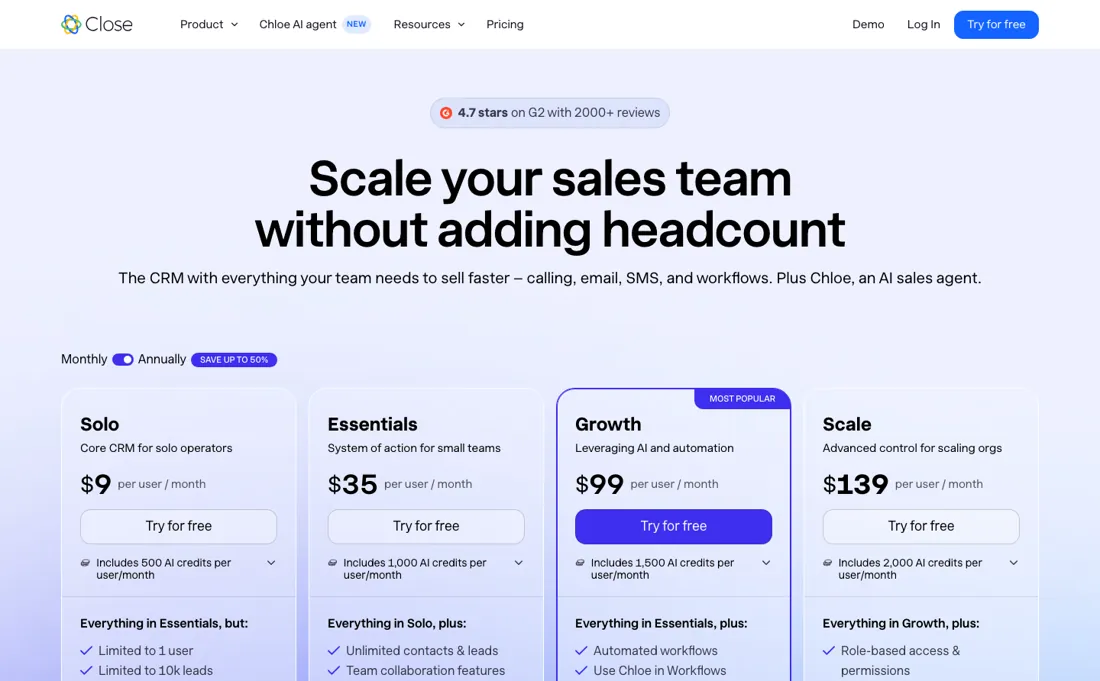
Per-seat: Solo $19, Essentials $49, Growth $109 and Scale $149 per user/mo, or $9, $35, $99 and $139 billed annually. No free plan; the trial runs 14 days and close.com states no credit card is required, with $5 of calling and enrichment credits included, and the page carries a 30-day money-back guarantee. AI credits are pooled per tier (500 a month on Solo, then 1,000, 1,500 and 2,000 per user up to 10,000, 15,000 and 20,000).
Call minutes, SMS and dialer credits are billed separately, and can meaningfully raise the real cost. Outbound calls run about $0.02 a minute, phone lines start at about $1 a month, and premium numbers are $19 a month per line. The Call Assistant add-on is $50 a month per organisation plus $0.02 a minute. Plans change — always verify the live price on their site.
Correction after re-checking: (first corrected 2026-07-23) Third-party pricing articles still name Close's tiers Base, Startup, Professional and Enterprise. Those names are gone: the plans above are what Close sells, and we have now read them unchanged on 23 July, 3 August, 11 August and 14 August 2026.
What the price did
We capture Close’s own pricing page every month and keep the figures, so this is our record of the page — not a forecast, and not someone else’s summary.
The July and August 2026 captures are different documents: 20,260 characters against 20,388, and a different text hash, so the page was edited between them. And yet not one amount moved: all twelve figures in the section above read the same in both captures, and so did the metered lines underneath them. Our own dated readings on 23 July, 3 August, 11 August and 14 August 2026 return the same twelve amounts. Close rewrites the page and leaves the prices alone.
Close’s pricing page, as we read it
What Close does
Sales CRM unifying calling, email and SMS in one inbox, for teams that live on the phone. Seats run about $9 (Solo) to $139 (Scale) per user/month billed annually, and call, SMS and Power Dialer credits bill separately on top — a $99 plan can land nearer $160 once a rep dials all day.
What buyers report about Close
Recurring themes from the buyer-review sites listed at the foot of this page, read in August 2026 (App Store reviews through 8 August 2026, SourceForge through September 2023). We have not run Close ourselves, so this is other buyers' experience rather than ours. We summarise it here because the complaints are usually the part a vendor page leaves out.
- • Ease of use is mentioned by 819 reviewers, close to half of everyone who wrote one. Helpful support at 482 mentions.
- • The built-in dialer is the reason most calling teams pick it — around 4.7 on G2 across 2,010 reviews, 85% of them five stars.
- • On SourceForge, calling, SMS and email being in the one tool without plug-ins is named repeatedly as the reason not to switch away, and support is described as answering within one to two hours and usually resolving the same working day.
- • App Store reviewers who sell B2B SaaS say it fits them better than HubSpot or Salesforce, and one credits checking deal status on the road with closing a deal.
- • Reporting is the consistent complaint. Pipeline reports are not fully customisable, and deals that skip or move back a stage do not report correctly.
- • Custom fields yes, custom objects no — the leads/contacts/opportunities model is fixed.
- • No native Apollo connector despite being the most common pairing; it goes through Zapier.
- • Budget $150–250 per rep per month once the dialer tier, Call Assistant and calling minutes are in. The seat price is not the bill.
- • The mobile app is the consistent complaint and it has not gone away: App Store reviews from May 2023 through 8 August 2026 call it glitchy, slow and crash-prone, with no real iPad layout (it runs as a blown-up iPhone view). Specific reports include audio dropping out on roughly one call in ten, a 30-minute delay before missed calls and messages sync, and texting from the app often failing to load so reps go back to the laptop.
- • SourceForge adds occasional call lag and audio quality problems, some missing niche integrations, a learning curve from the sheer number of features, and time zones that are awkwardly handled when dialling.
Where the ratings disagree. The sharpest split is not between platforms but between devices. The same App Store reviewers who call the mobile app unreliable praise the desktop version in the same breath, and that pattern holds across three years to this month. G2 and SourceForge are written by people sitting at a desk, so the mobile problem barely registers there. If your reps work from a phone, weigh the App Store reviews heavier than the aggregate score.
When the paid plan is worth it
Close has no free plan, just a 14-day trial that does not ask for a credit card. Solo, the cheapest tier at $19 per user monthly or $9 on annual billing, caps you at one user and 10,000 leads. Essentials ($49 monthly, $35 annual) lifts both caps but still has no workflows. That is the catch: the automation most teams buy Close for, meaning workflow sequences, the power dialer and bulk email, starts at Growth ($109 monthly, $99 annual).
On the official feature table, Growth is the real starting point if you run outbound at any volume; Essentials covers pipeline tracking with straightforward calling. Scale ($149 monthly, $139 annual) adds the predictive dialer, call coaching, custom roles with unique permissions, and unlimited call-recording retention, where Solo and Essentials keep recordings 30 days and Growth 90. Role-based access itself is on every plan, so do not upgrade for that alone.
No tier removes the metered costs: outbound calls run around $0.02 per minute and phone numbers start at about $1 per month, on top of every subscription.
Our monthly capture read this vendor's pricing page in July 2026 and again in August 2026, and the amounts were the same both times. We keep watching — the registry records what moves.
How to actually use Close
Close's own onboarding checklist puts process before data. Step 0 states that before you connect accounts or import data, it is critical to set the foundation: your sales process, meaning pipeline structure, lead statuses and opportunity stages. The docs frame this as the way to avoid rework later. Customizing lead records and custom fields is step 2, ahead of importing at step 3, so configure your fields first. Connecting email and calendar is step 1 and the docs put it at two minutes.
Distilled from Close's official onboarding checklist (help.close.com), the vendor pricing/feature table, and one independent third-party setup walkthrough (AddToCRM)
Common Close setup mistakes
Where Close setups actually go wrong, and what it costs you when they do. Same sources as the setup notes above — not from a walkthrough we ran ourselves.
The friction sits in communications setup.
- At step 5 the docs note you may be required by law to provide information before registering phone numbers.
- Step 6 requires A2P 10DLC registration before you can text US numbers, which is a carrier compliance process rather than a toggle in Close.
- Smart Views arrive at step 8, Workflows at step 9.
- One independent walkthrough adds two self-inflicted traps: too many pipelines cause confusion when deals overlap, and a workflow that is too aggressive burns leads who would have converted with a gentler approach.
Close vs Pipedrive, side by side
Both columns come from the same place: each vendor’s own published pricing, read on the date shown in the sources at the foot of this page. We do not average them into a score.
Both names above are affiliate links: we may earn a commission if you sign up, at no extra cost to you. Neither changes what this table says: both columns come straight from the vendors’ own pricing pages.
The natural comparison is Pipedrive or HubSpot — other sales CRMs. Weigh it against Salesforce on the job you actually need done.
More on Close
Everything we publish about Close links back here — the review stays the honest hub:
The ex-banker filter — the same yardstick on every review (how we review): My ex-banker filter is simple: does Close remove a real cost — time, errors, missed revenue — bigger than what it charges? If the job above is genuinely yours, it's worth a look. We never publish fake or “exclusive” prices, so always confirm the current plan on their site.
Frequently asked questions
What does Close actually cost per rep?
The seat is the smaller half of it. Read on their pricing page on 14 August 2026: Solo $19, Essentials $49, Growth $109 and Scale $149 per user per month, or $9, $35, $99 and $139 on annual billing. On top of every one of those sit metered costs the plan does not cover — outbound calls at about $0.02 a minute, phone lines from about $1 a month, premium numbers at $19 a month per line, and the Call Assistant add-on at $50 a month per organisation plus $0.02 a minute. If your team dials all day, budget the usage first and the seat second.
Has Close's price changed recently?
Not in the window we can prove. We hold monthly captures of close.com/pricing from July and August 2026 and read it again by hand on 14 August: the page was edited between the two captures — it is a different document, 20,260 characters against 20,388 — and every amount is the same in both. If you priced Close a month ago, that quote still stands.
Is there a free plan, and can I try it without a card?
There is no free plan. There is a 14-day trial and close.com states no credit card is required, with $5 of calling and enrichment credits included so you can test the dialer rather than only the pipeline. After you buy, the page carries a 30-day money-back guarantee. Read 14 August 2026.
What should I weigh before buying Growth & Revenue software?
It depends on whether you have the bottleneck it solves. Small teams get the most out of this category when one clear problem is already costing real hours or revenue; buying ahead of that just adds cost and another login. Price it against the hours or lost deals it removes, not against its feature list, and start on the smallest plan that covers the job.
Is this a hands-on review of Close?
This is a researched assessment, not a hands-on test — where we've used a tool ourselves, we say so explicitly. We name what each tool is genuinely good and bad at, and we earn a commission only if you sign up, at no cost to you.
- Buyer reviews on G2, SourceForge and the Apple App Store, read August 2026 (App Store reviews through 8 August 2026, SourceForge through September 2023).
- Re-verified 2026-08-14, read on their own pricing page.
- A dated screenshot of that pricing page, kept on this site as the receipt.
We list our sources because most review sites do not. How we review →
Others in this category
The growth & revenue tools closest to Close that we have also reviewed. They overlap rather than match:
New dossiers, cost-traps we found, and tools that earned a keep — no hype, no sponsored-disguised-as-advice. Unsubscribe anytime.
This is our researched assessment — not a paid placement. The “Visit” links on this page are affiliate links: we may earn a commission if you sign up, at no extra cost to you, and it never changes our take. How we review →
Spotted an error? Tell us — we verify and fix fast, whether or not it flatters the product.