Home › Research › Hands-on test
Hands-on test · run on 2026-11-12ClickUp’s MCP server, tested with Claude Code: tasks, comments and subtasks worked, and so did delete
On the morning of 12 November 2026 we connected Claude Code, Anthropic’s coding agent, to ClickUp’s hosted MCP server and had it run a small project from the command line: make a list, create a task with a due date and priority, comment on it, add a subtask, find it again, move it along and delete it. Everything worked on a workspace with no paid ClickUp plan. One result did not match the line we had published from ClickUp’s docs: delete is available.
Through ClickUp’s MCP server, Claude Code created a list, a task with due date and priority, a comment and a real subtask, changed the status and read it back, all on a workspace without a paid plan. Deleting the task also worked and took its subtask with it.AIBuilder Marketplace, hands-on test, 12 November 2026
How we tested
- Connection. We added the server URL
https://mcp.clickup.com/mcpto Claude Code as a remote (HTTP) server and signed in once through ClickUp’s own OAuth page in the browser. No API key to copy. - Our own test workspace. The workspace from our earlier ClickUp test, with one space and no paid plan: ClickUp shows an Upgrade button in the sidebar.
- Plain-language instructions. Claude Code (on Anthropic’s Sonnet model) got a numbered list of steps and had to pick the tools itself. We logged each tool call, its input and the answer.
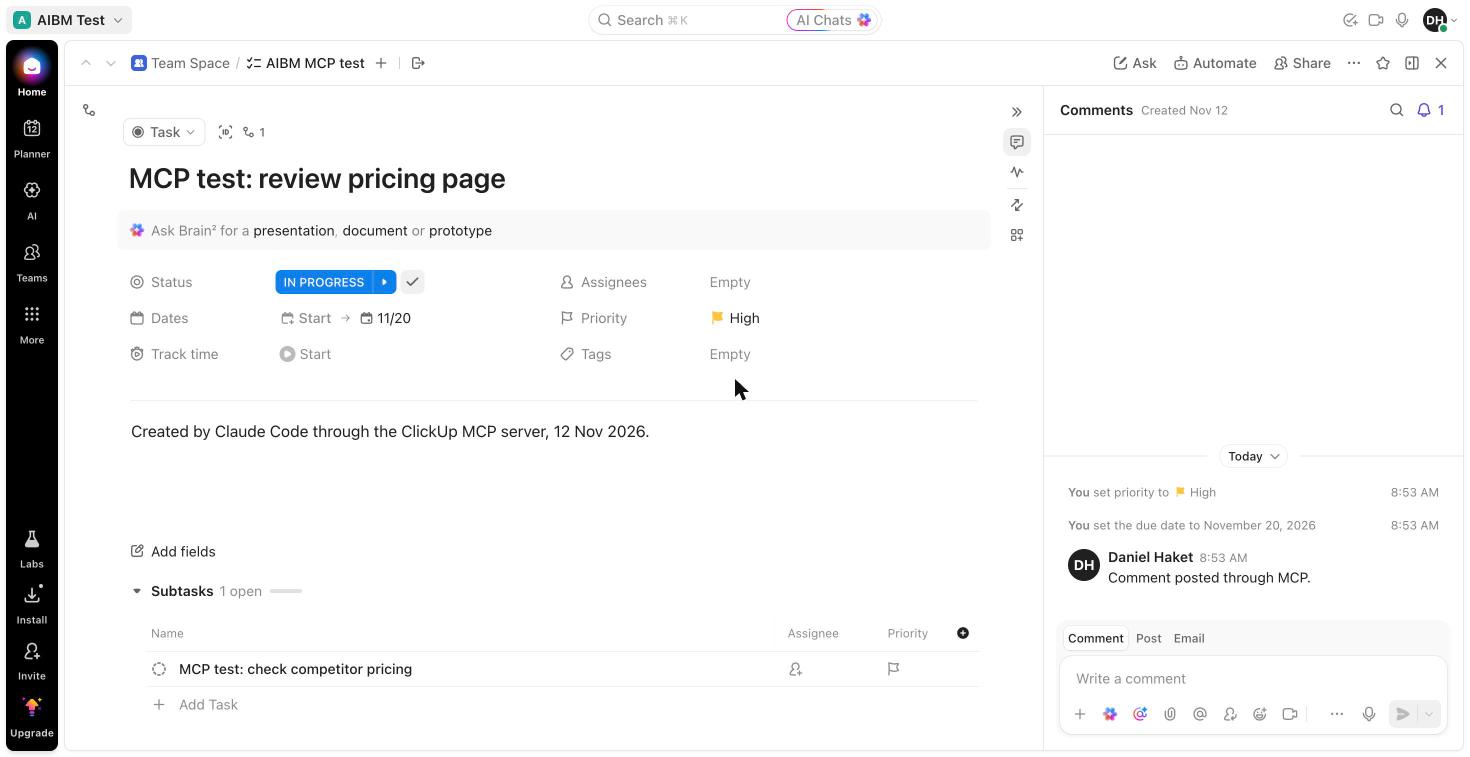
- Checked in ClickUp, not just in the answers. Afterwards we opened the task in ClickUp in the browser (screenshot below).
What happened, step by step
| Step | What we saw | Result |
|---|---|---|
| Who am I | clickup_get_user returned the account, its time zone (Europe/Amsterdam) and the current local time. clickup_get_workspace_hierarchy listed the one space and its four existing lists. | worked |
| New list | clickup_create_list made “AIBM MCP test”. We asked for it in the space root; ClickUp filed it in a folder called “hidden” by itself. | worked |
| Task | clickup_create_task with a description, due date 20 November and priority high returned the task id and its URL. The due date came back as a timestamp that matches midnight in Amsterdam, so time zones were handled. | worked |
| Comment and subtask | A comment through clickup_create_task_comment, and a subtask through clickup_create_task with a parent: a real subtask, listed under the task in ClickUp, not a checklist line. | worked |
| Search | In the first run, a search for “MCP test” seconds after creating them found the task but not its subtask, although both names contain the phrase. In the second run a search for “competitor pricing” found the subtask straight away. | inconsistent |
| Status | Claude Code first read the list’s statuses (to do, in progress, complete), set “in progress” and read the task back to confirm it. | worked |
| Delete | clickup_delete_task returned success, and reading the task and its subtask afterwards gave “Resource not found”: the delete took the subtask with it. We had published, from ClickUp’s docs, that delete operations are not supported; ClickUp’s setup page no longer says so, and the tool is there. | worked |
| Other areas | Time tracking (no entries, no error) and chat channels (three listed) were readable too. No call was refused and we saw no rate-limit message in 19 calls. | no limits hit |
What it means if you use ClickUp
The server does what a project tool’s API should: an agent can turn a request like “make a task for the pricing review, due next Friday, high priority, with a subtask for the competitor check” into the right objects, and you see them in ClickUp seconds later. Every action is recorded under your own name; the comment in our screenshot shows as written by the account owner, with nothing marking it as written by an agent.
Two things to set up before you let an agent loose. First, delete is available and cascades to subtasks, so if you only want an assistant that adds and updates, tell your MCP client to ask before every call or block the delete tool. Second, the free limit is per rolling 24 hours: ClickUp’s MCP page lists 100 calls on Free Forever, 300 on Unlimited, 1,000 on Business, 2,500 on Business Plus and 5,000 on Enterprise, or the normal API limits if you buy the Everything AI add-on. Our whole test used 19; a busy day of agent work would not fit in 100.
Want to try it yourself? The MCP server works on ClickUp’s free plan, so you can connect it without paying: start a free ClickUp workspace (our affiliate link).
Screens from the test
What this test does not show
- Docs, whiteboards and goals. We tested tasks, lists, comments, subtasks, search and status, not ClickUp Docs or the other areas the server covers.
- The daily limit in practice. We stayed far below 100 calls, so we have not seen what an agent gets when the limit runs out.
- Teams and permissions. One owner account; we did not test what a guest or a member with fewer rights can do through the server.
- Other clients. Only Claude Code. ClickUp says the server works with the major MCP clients.
Our ClickUp review: ClickUp. Our earlier MCP test: Claude Code on a Miro board through Miro MCP. How we separate researched reviews from hands-on ones: how we review.
AIBuilder Marketplace, “ClickUp’s MCP server, tested with Claude Code”, hands-on test run on 2026-11-12. Free to quote and reproduce with attribution (CC BY 4.0).