Home › Research › Hands-on test
Hands-on test · run on 2026-11-11Claude Code writes the Mermaid, Miro draws it: an edit on the board changed the code, and a line of code changed the board
On the evening of 11 November 2026 we had Claude Code, Anthropic’s coding agent, write three Mermaid diagrams of a real system: the pipeline that turns an approved partner into a published review on this site. We put them into Miro’s new Mermaid diagrams on the free plan, then edited them on the board and in the code, broke the code on purpose and read it back out. One board, one evening, three diagram types: a case study, not a verdict on every setup.
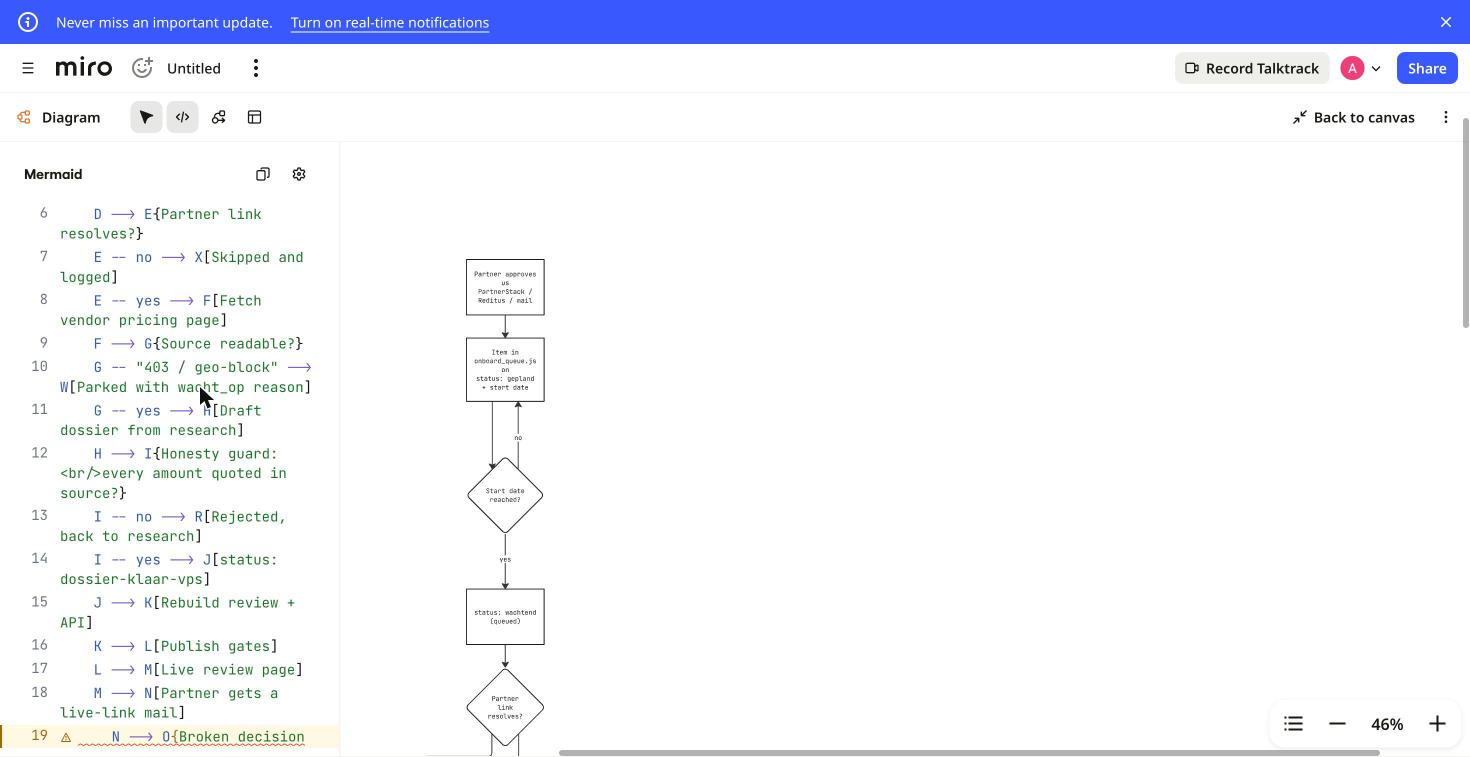
Miro rendered all three Mermaid diagrams that Claude Code wrote as native Miro shapes. Renaming a box on the board rewrote the matching line of Mermaid, and a line we added to the code appeared as a new box. Only the flowchart could be edited visually; the sequence and ER diagrams rendered but stayed code-only, as Miro’s own help page says.AIBuilder Marketplace, hands-on test, 2026-11-11. Free to quote with attribution.
How we tested
- A real system, not a toy. Claude Code wrote the Mermaid from what it had just read in our own pipeline: the onboarding queue, the research step, the honesty check that rejects any price not quoted in a source, and the publish gates. The flowchart has 16 boxes and 16 arrows, including one loop back and three dead ends.
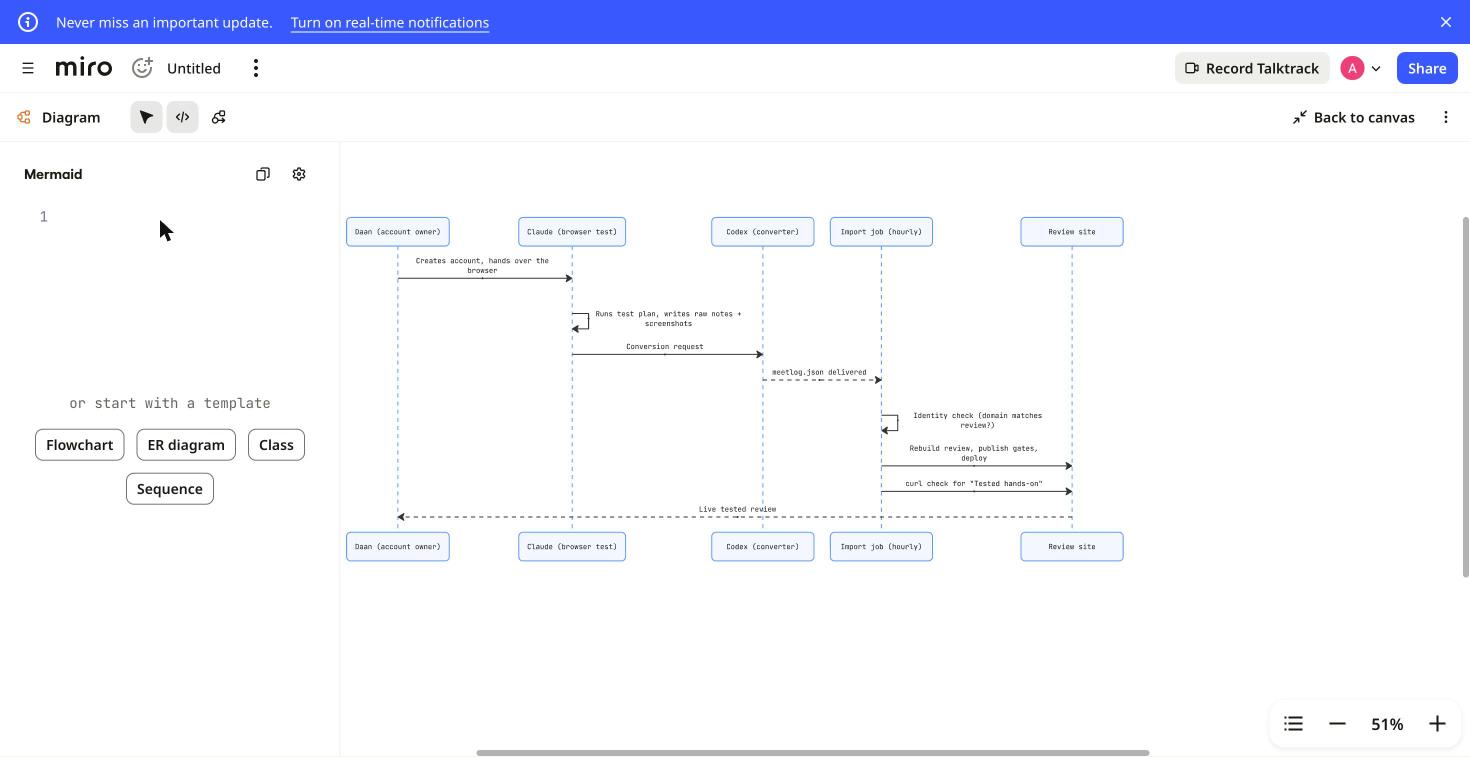
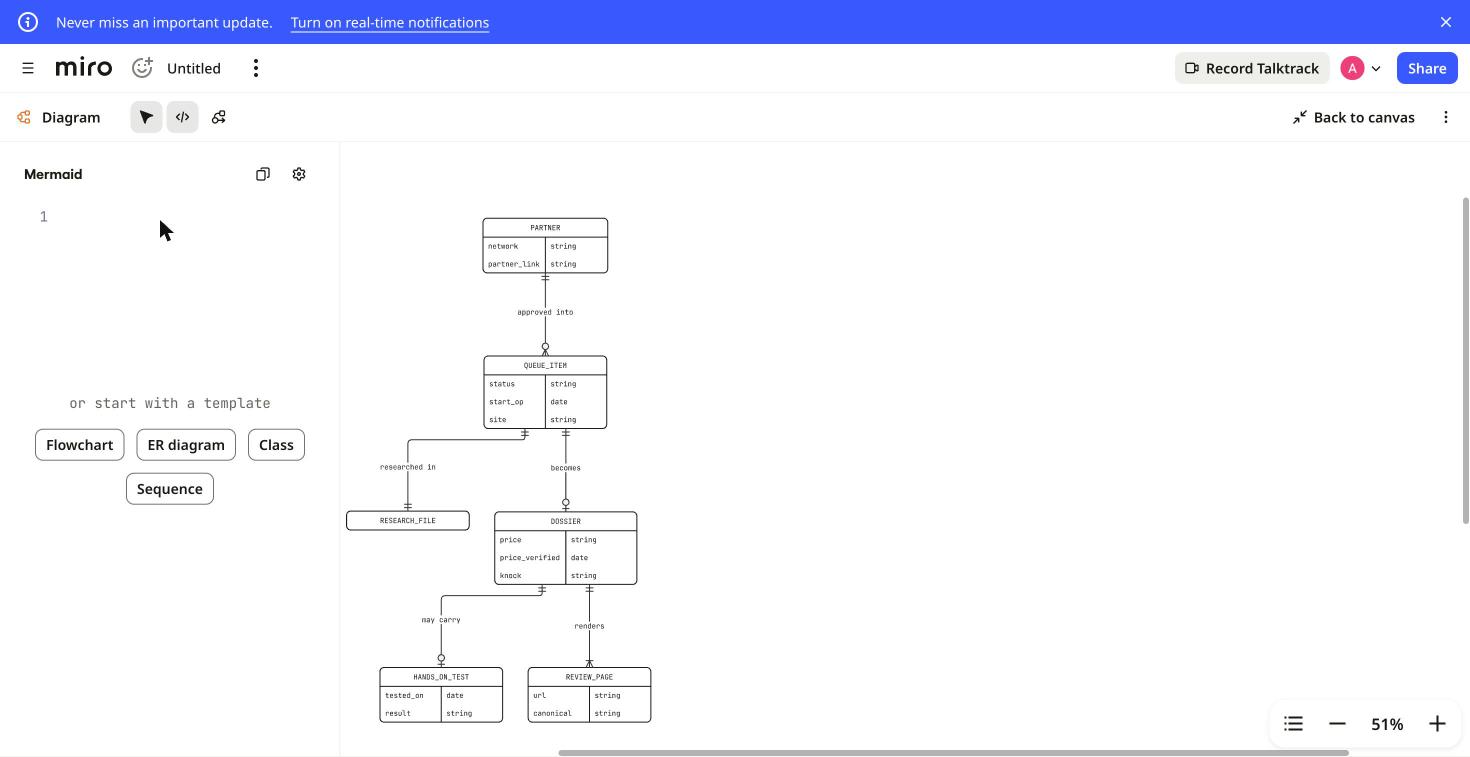
- Three diagram types. A flowchart (the onboarding pipeline), a sequence diagram (how a hands-on test travels from the browser to a live page, five participants and eight messages) and an ER diagram (partner, queue item, research file, dossier, test and review page: six entities, five relationships).
- Miro’s free plan. An existing free Miro account in Chrome. For each diagram we placed a Diagram on the board, chose Build with code and put the Mermaid into the code panel, as Miro’s help page describes. We pasted the code with a scripted paste into the code panel rather than with the keyboard.
- Checked in the code, not just on screen. After each change we read the Mermaid back out of Miro’s code panel and compared it with what Claude Code had written.
What happened, step by step
| Step | What we saw | Result |
|---|---|---|
| Flowchart in | The 16 boxes appeared as Miro shapes: rectangles for steps, diamonds for decisions, labelled arrows for yes, no and 403 / geo-block. Clicking a box selected it and opened a toolbar for shape type, font size, bold, text colour, border and fill. | worked |
| Board → code | We double-clicked the box “status: wachtend” and renamed it “status: wachtend (queued)”. Line 5 of the Mermaid changed to D["status: wachtend (queued)"]: Miro added the quotes itself, because Mermaid needs them around brackets in a label. | worked |
| Code → board | We typed a new line at the end of the code, M --> N[Partner gets a live-link mail]. A 17th box appeared at the bottom of the flowchart, connected to “Live review page”, and was still there after a reload. | worked |
| Sequence diagram | All five participants, their lifelines and the eight messages rendered, including the two self-calls and the dashed replies. Double-clicking a participant did nothing: no text editing. | rendered, code-only |
| ER diagram | Six tables with their fields and types, five relationships with the right one-to-many and zero-or-one markers and their labels. | rendered, code-only |
| Broken code | We added a line with an unclosed decision, N --> O{Broken decision. The line got a warning icon and a red underline in the code panel, and the diagram kept its last valid version instead of breaking. Closing the brace rendered the new diamond. | worked |
| Code back out | The Mermaid we read back from Miro matched what Claude Code wrote line for line, with the same indentation and the <br/> line breaks intact. The only differences were our own two edits. | worked |
| The snag | Each time we put code into a new diagram, the diagram rendered but the code panel next to it stayed empty until we reloaded the page; after the reload the code was there. It happened with all three diagrams. It may come from our scripted paste, so a paste from the keyboard may behave differently. | reload needed |
What the Claude Code half adds
The point of Mermaid in Miro is that the diagram stays text. Claude Code could describe our pipeline in a minute because it had just read the code, and because the result is Mermaid rather than a picture, the same text can go back into the repository next to the code it describes. What we did by hand on the board, rename a step and add one, is the kind of change an agent can make in the code instead. Miro’s help page says agents connected through Miro’s MCP server can also create, read and update these diagrams directly on a board; we did not test that route (see below).
Flowcharts only, for now
Miro is upfront that visual editing works for flowcharts only, with state, sequence, class and ER diagrams marked “Coming soon” on its help page. That matched what we saw: the sequence and ER diagrams looked right, but every change to them has to go through the code. The same page notes that Miro lays the diagram out itself, so you cannot drag a shape to a spot of your choosing unless you switch the diagram to free-form, which cuts it loose from the Mermaid code.
What it costs
Nothing extra. Miro’s help page lists Mermaid diagrams for all users on the Free, Starter, Business, Enterprise and Education plans, and we ran the whole test on a free account. If you want to try it, start from Miro’s Mermaid page: miro.com/mermaid (our affiliate link). The free plan’s limit of three editable boards applies, as covered in our Miro review.
Screens from the test
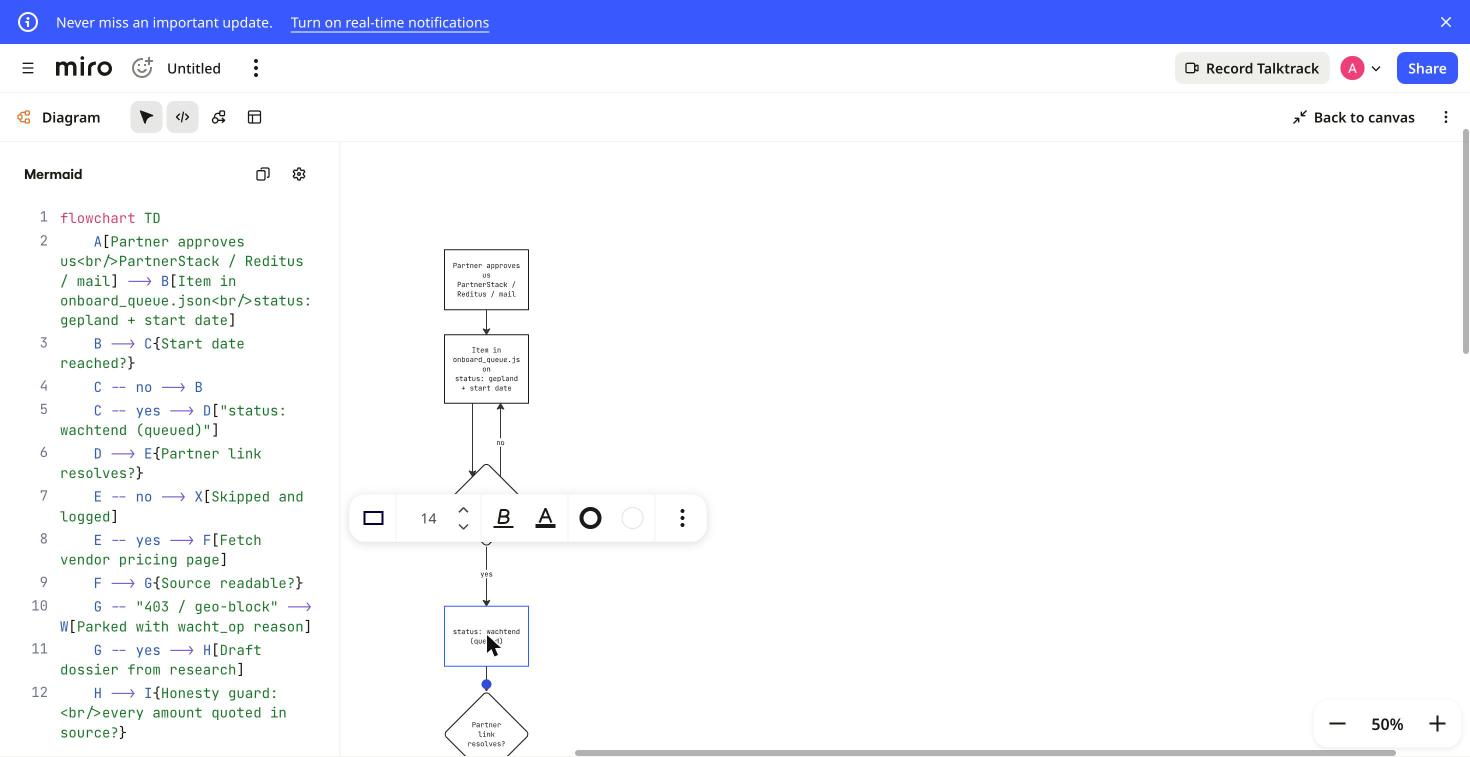
D["status: wachtend (queued)"].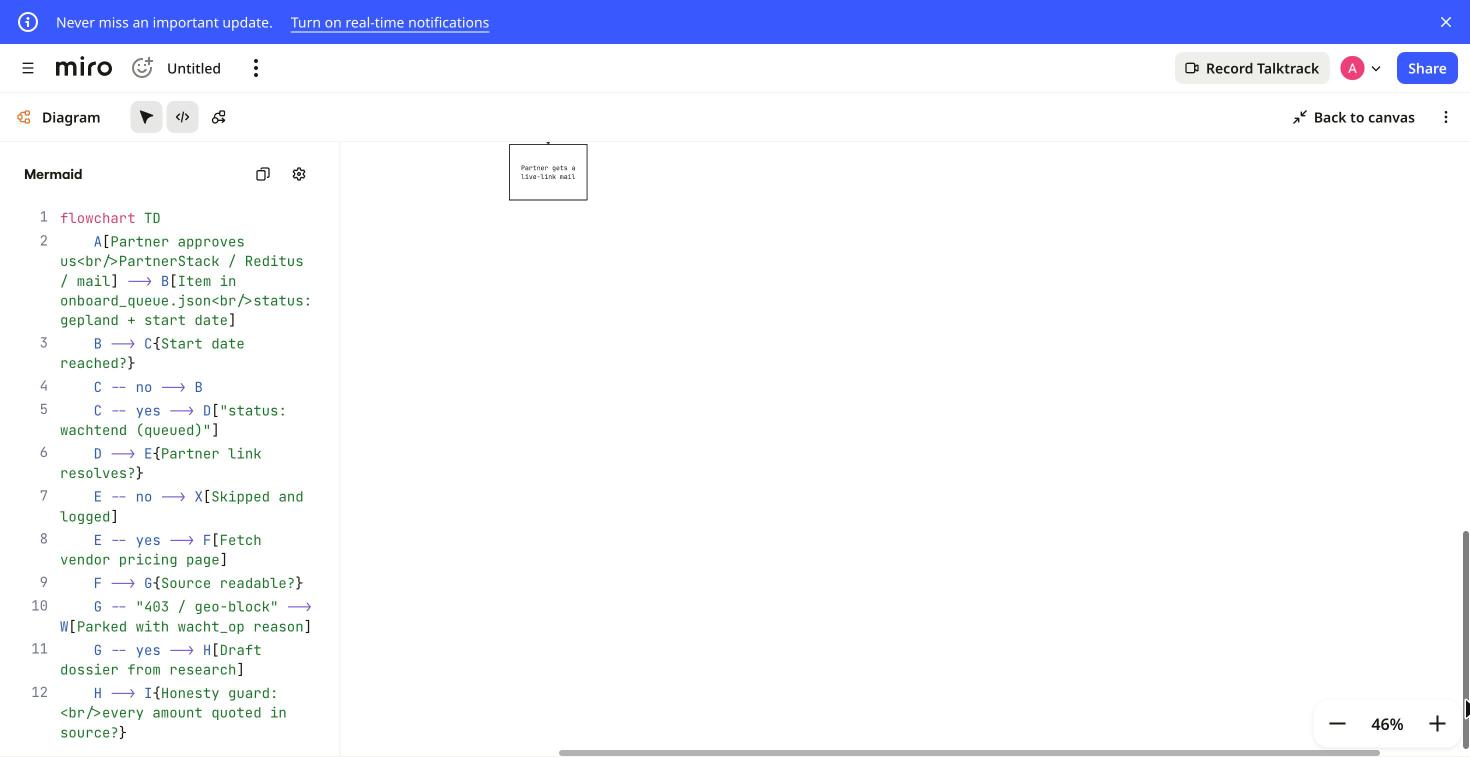
What this test does not show
- Miro’s MCP server. We did not connect Claude Code to Miro MCP, so we have not seen an agent create or edit a diagram on the board itself, or the change legend Miro says an agent can add. Claude Code wrote the Mermaid and we carried it into Miro.
- Teams. One account, one browser: no real-time co-editing, comments or sharing with a second person.
- Other diagram types and Miro AI. No class or state diagrams, no Sidekicks or Flows, no switch to free-form and no export.
- Large diagrams. Our biggest diagram had 17 boxes; we did not test how auto layout copes with hundreds.
Our full review: Miro. Our other hands-on tests: Clonable on WordPress · one booking app, three AI builders · one pitch deck, four AI presentation tools. How we separate researched reviews from hands-on ones: how we review.
AIBuilder Marketplace, “Claude Code writes the Mermaid, Miro draws it”, hands-on test run on 2026-11-11. Free to quote and reproduce with attribution (CC BY 4.0).