Success.co Review (2026)$12 a User, Less as You Grow
 By Daan Haket · Researched and written with an AI assistant · who does what
The ladder rewards size rather than commitment: each band's rate applies only to the seats inside it, so the 26th user costs a dollar less than the 25th, and the annual discount is worth about the same single dollar per user.
leadership teams that already run on goals and want one place to set objectives, track KPIs and scorecards, and keep strategy execution on cadence.
your team won't commit to a regular goal-review rhythm (the software alone won't create it), or a simple shared doc already keeps you aligned.
Transparency: the “Visit” links on this page are affiliate links — we may earn a commission if you sign up, at no extra cost to you. No vendor can pay for a better review or verdict. How we make money →
Pricing (2026)
✓ Pricing re-verified 26 Sep 2026
| Plan | Price | What you get |
|---|---|---|
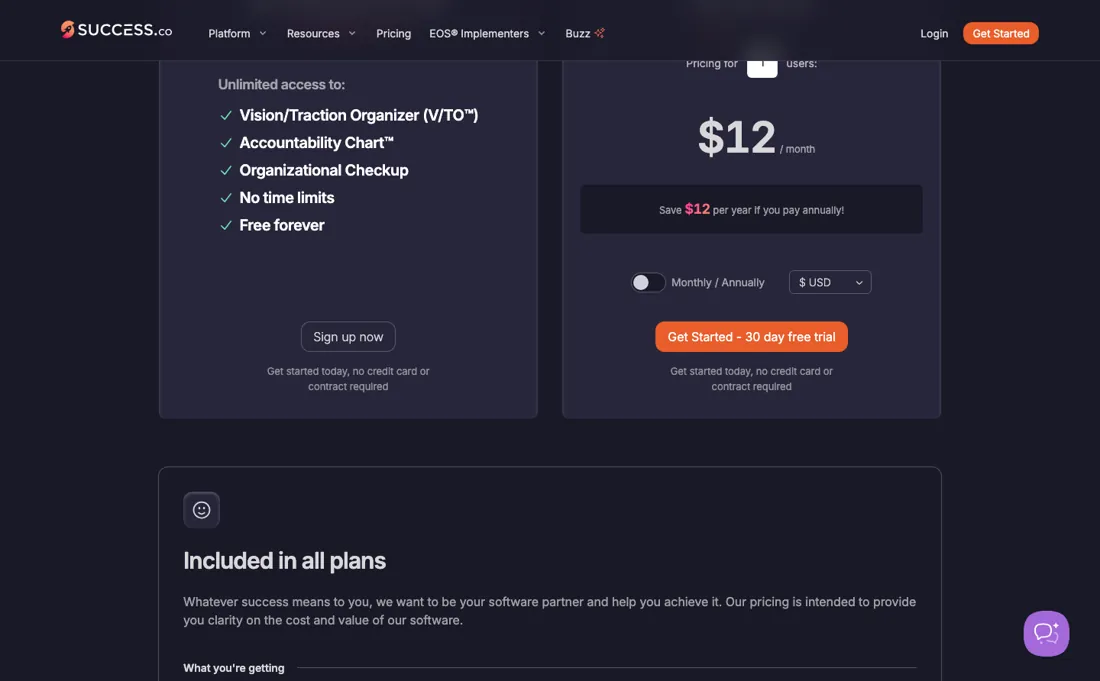
| Free Forever plan | $0 | V/TO, Accountability Chart, Organizational Checkup, no time limit, no card |
| All Inclusive Plan | Monthly: $12, $11, $9, $7, $6 per user a month; Annual: $11, $10, $8, $6, $5 per user a month | Per user graduated bands: First 1-25, Next 26-75, Next 76-125, Next 126-250, Next 251-1000 users |
| custom plan | no published price | More than 1,000 users |
Summarised from the pricing notes below; the notes carry the conditions.
There is a Free Forever plan at $0 with the V/TO, Accountability Chart and Organizational Checkup, no time limit and no card. The paid All Inclusive Plan is priced per user in graduated bands: the visible table labels them 'First 1-25 users', 'Next 26-75', 'Next 76-125', 'Next 126-250' and 'Next 251-1000', so each rate applies to the seats inside its band. Monthly billing: $12, $11, $9, $7 and $6 per user a month; annual billing: $11, $10, $8, $6 and $5.
More than 1,000 users is a custom plan. Two add-ons sit outside the plan at $250 a month each: Single Sign-On (Okta, Microsoft Entra ID, Google Workspace or any SAML/OIDC provider) and Directory Sync via SCIM. A 30-day free trial needs no credit card, data migration is done free of charge, and 501(c)(3) or similar nonprofits get 50% off. Plans change — always verify the live price on their site.
Category context: Growth & Revenue. Across the 81 tools in this category that we researched with a public US-dollar price, the median entry price is $29 a month (lowest paid plan as listed, per seat where the vendor prices per seat). Success.co’s entry price of $12 a month sits below that median. Compare pricing conditions in the Software Cost Atlas →
What the pricing page doesn’t say
So the number that decides your bill is headcount, not billing term — and at the small end, where most teams start, $12 a user is the least favourable rate on the whole page. The two capabilities a security team will ask for first, SSO and SCIM, are not in any plan: they are $250 a month each, which on a 20-person account doubles the bill.
Watch the video review
The video version of this review, from our YouTube channel.
⚡ Short on time? Watch the 30-second verdict Short.
What Success.co does
Strategy execution and OKR platform. Turn goals into action: set objectives, track KPIs and scorecards, run meetings and align teams so strategy actually gets executed rather than just planned.
What the vendor's material says about Success.co
Hands-on: not tested by usReported by buyers: none found
We found no independent buyer reports of Success.co. The points below come from vendor testimonials and category comparisons, read in August 2026. They describe what is offered, not what buyers experienced, so weigh them as documentation, not as reviews.
- • A 30-day free trial with no commitment, and users report the centralised progress tracking and reminders removing the confusion that kills most OKR rollouts.
- • Support is described as responsive, knowledgeable and proactive in getting teams started — which in OKR software matters more than features, because adoption is the whole battle.
- • We found no independent reviews on G2, Capterra or Trustpilot. What exists is testimonials on the vendor's own site — use the trial rather than the quotes.
- • OKR platforms fail on adoption, not capability. Whatever you buy, the question is whether your team will update it weekly; nothing in the software answers that.
When the paid plan is worth it
There is a Free Forever plan at $0 with the V/TO, the Accountability Chart and the Organizational Checkup and no time limit, so the first question is not whether to pay but when. The paid All Inclusive Plan is priced per user in five bands, and the visible price table (read 26 September 2026) labels them 'First 1-25 users', 'Next 26-75', 'Next 76-125', 'Next 126-250' and 'Next 251-1000': each rate applies to the seats inside its band, not to the whole team.
On monthly billing that is $12, $11, $9, $7 and $6 a seat. A correction to what we wrote before. We read the bands as whole-team rates and concluded that a 26th, 76th or 126th user would shrink the bill. On the page's own labels it does not: 25 users cost $300 a month and 26 cost $311. Every seat adds cost; it just adds less further up. At 125 users the bill is $1,300, an average of $10.40 a seat, well above the $9 printed for that band.
Annual billing takes a dollar off every band ($11, $10, $8, $6, $5). For 25 users that is $275 against $300 a month, about 8%; for 250 users $1,925 against $2,175, about 11.5%, because a dollar is a bigger share of the cheaper upper bands. What no band includes is identity management. Single Sign-On and Directory Sync via SCIM are $250 a month each; on a twenty-person account paying $240 a month, SSO alone more than doubles the bill and both together triple it.
Upgrading headcount never brings them in. There is a 30-day free trial with no credit card, data migration at no charge, and 501(c)(3) or similar nonprofits get 50% off on request after sign-up.
Our monthly capture read this vendor's pricing page every month from August 2026 to October 2026, and the amounts were the same all 3 times, including $250 from the pricing above. We keep watching — the registry records what moves.
How to actually use Success.co
Signing up runs through a social login — Google, Microsoft, or Success.co's own SimpleLogin — and on first sign-in the platform asks for your company name and a Success.co company URL. That URL matters more than it looks: afterwards you can log in either at success.co/login, which sends you to the company you belong to, or directly at success.co/your-company-name. SimpleLogin is the documented route when your email is not hosted by Google or Microsoft, or when you want to sign in with a different address than your Google or Microsoft one.
First value is a Level 10 meeting rather than a filled-in dashboard, because L10s are the weekly rhythm the whole EOS framework hangs on. The documented path is Start a Meeting, pick the team (Leadership Team, for instance), then choose the meeting type: Weekly L10, Annual Planning Day 1 or Day 2, Focus Day, Quarterly Pulsing or Vision Building. The Schedule tab does the same thing for a future date, with description, date, time and a repeat rule.
A facilitator and a scribe are assigned per meeting, and joining is prompted by a top banner alert and an indicator on the Meetings page. What to set up before that first meeting is your team and your EOS artefacts: the guides cover Join your team, the customisable Dashboard, Agendas (EOS templates or your own), and the core tools — V/TO, Rocks, Scorecard, Accountability Chart, Issues, Headlines and People Analyzer.
Integrations exist for Asana, ClickUp, Monday, Teamwork, Slack, Zapier and both Google and Microsoft Calendar, there is an AI Connector, and there are desktop and mobile apps. EOS implementers get their own section for adding clients and tracking progress, plus an Integrator Hub for team health.
Where this section comes from: our research notes (312 words)
success.co/pricing and success.co/docs, both read on 8 September 2026. Every amount here comes from the JSON-LD SoftwareApplication block on the pricing page, which publishes the per-user bands as UnitPriceSpecification entries — monthly $12, $11, $9, $7 and $6 and annual $11, $10, $8, $6 and $5 across the 1-25, 26-75, 76-125, 126-250 and 251-1,000 user bands — with the 30-day trial and the 50% nonprofit discount stated in the same block's FAQ entries.
The $250-a-month Single Sign-On and Directory Sync (SCIM) add-ons are printed in the visible page body rather than in the structured data. Every one of those figures was unchanged from our 21 August 2026 reading. The setup section follows success.co/docs, the vendor's own help centre, whose index carries Getting started, Join your team, Dashboard, Agendas and L10 Meetings, the core EOS tools (V/TO, Accountability Chart, Rocks, Scorecard, Headlines, Issues, To-Dos, People Analyzer, Organizational Checkup, S.W.O.T, Process and Mastery), the Implementers and Integrator Hub sections, and the integration and app pages.
success.co/pricing.md returns 404 and success.co/llms.txt carries no pricing. Served in US dollars from a Netherlands connection. Re-read 26 September 2026 by plain fetch of success.co/pricing: the ten UnitPriceSpecification amounts, the $250 SSO and SCIM add-ons, the 30-day trial and the 50% nonprofit discount are unchanged. The visible table, however, labels the bands 'First 1-25 users', 'Next 26-75 users', 'Next 76-125 users', 'Next 126-250 users' and 'Next 251-1000 users' - graduated pricing, where each rate applies to the seats in its band.
The structured data names the same bands without 'first' and 'next', which is how our earlier text came to treat them as whole-team rates and to claim that adding a 26th user lowers the bill; that claim is withdrawn. The same page states the Free Forever plan's contents (V/TO, Accountability Chart, Organizational Checkup, no time limits), a custom plan above 1,000 users, and free data import on request.
The natural comparison is Weekdone or Ninety.io — close OKR/EOS-style execution platforms — compare on how well each fits your existing operating rhythm and per-user cost.
Frequently asked questions
Does adding a 26th user make Success.co cheaper?
No. The price table on success.co/pricing (read 26 September 2026) labels the bands 'First 1-25 users', 'Next 26-75 users' and so on, so each rate applies only to the seats inside its band. On monthly billing 25 users cost $300 a month and 26 cost $311: the 26th seat is $11 rather than $12, but nothing already paid gets cheaper. At 125 users the bill is $1,300, an average of $10.40 a seat.
What does the free Success.co plan include?
The Free Forever plan (read 26 September 2026) gives unlimited access to the Vision/Traction Organizer, the Accountability Chart and the Organizational Checkup, with no time limit and no credit card. The page lists nothing else under the free plan; the full toolkit, including L10 meetings, Rocks and Scorecards, is sold as the All Inclusive Plan, which starts with a 30-day free trial and then costs $12 per user a month for the first 25 users on monthly billing, or $11 on annual billing.
Does Success.co offer a nonprofit discount?
Yes, 50%. The pricing FAQ (read 26 September 2026) offers half price to 501(c)(3) organisations or similar; you create the account first and then contact their client success team to have the discount applied. It applies to the per-user plan; the page does not say whether it also covers the $250-a-month Single Sign-On and Directory Sync add-ons, so ask if you need those.
Is this a hands-on review of Success.co?
This is a researched assessment, not a hands-on test — where we've used a tool ourselves, we say so explicitly. We name what each tool is good and bad at, and we earn a commission only if you sign up, at no cost to you.
- Buyer reviews on vendor testimonials and category comparisons, read August 2026.
- Read 2026-08-21 in Success.co's structured data on success.co/pricing, re-read 2026-09-08 and 2026-09-26.
- A dated screenshot of that pricing page, kept on this site as the receipt.
Others in this category
Reviewed growth & revenue tools that share ground with Success.co — comparable in what they do, not drop-in swaps:
New reviews, price changes we recorded, and the cost conditions we found. No sponsored placements. Unsubscribe anytime.
This is our researched assessment — not a paid placement. The “Visit” links on this page are affiliate links: we may earn a commission if you sign up, at no extra cost to you, and it never changes our take. How we review →