Kinsta Review (2026)
 By Daan Haket · Researched and written with an AI assistant · who does what
You're paying a premium for managed speed, Google Cloud infrastructure and expert support — worth it if performance and hands-off management matter, wasteful on a low-traffic hobby site a $5 shared host would carry fine. Throughout this review we weigh it against WP Engine.
business-critical WordPress sites where speed, uptime and expert support directly affect revenue.
you run a small, low-traffic site on a tight budget — entry-level shared hosting or a caching plugin gets you most of the way for a fraction of the price.
Transparency: the “Visit” links on this page are affiliate links — we may earn a commission if you sign up, at no extra cost to you. No vendor can pay for a better review or verdict. How we make money →
Pricing (2026)
✓ Pricing re-verified 3 Oct 2026
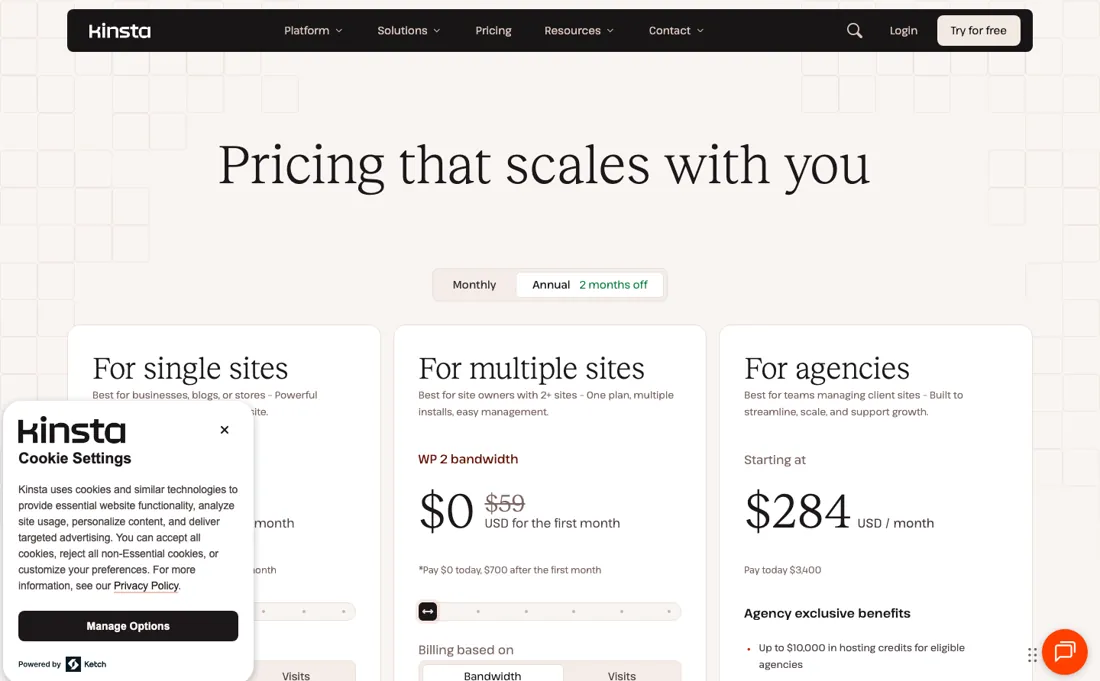
Managed WordPress hosting from $35/mo for a single site, or $30/mo billed annually at $350 a year, with the first month free on top — Kinsta advertises annual as two months off. That entry plan carries one WordPress install, 10GB storage, 20GB server bandwidth, 125GB CDN bandwidth and 14 days of backup retention, and you choose whether it is metered on bandwidth or on visits, which is a real change from the visit-only plans older reviews describe.
The multi-site ladder runs WP 2 at $70/mo or $59 billed annually ($700 a year), WP 5 at $115 or $96 ($1,150), WP 10 at $225 or $188 ($2,250), WP 20 at $340 or $284 ($3,400) and WP 40 at $450 or $375 ($4,500). Agency plans start at that same $340/mo, or $284 billed annually. Above them sits an Enterprise line our earlier readings missed entirely: it starts at $500/mo, or $417 billed annually, with $5,000 payable on signup.
Full pricing notes (3 more paragraphs)
Several things that look like plan features are priced separately — dedicated servers from $300/mo, PHP performance at $10 per 500MB a month, external backups to AWS or Google Cloud at $2 per site a month plus $1 per GB, and more frequent backups at $20 a site for six-hourly or $100 for hourly. It is a premium tier — cheaper shared hosts exist.
There is no exclusive discount code to look for: Kinsta confirmed to us on 28 Jul 2026 that it gives no partner-only or affiliate-only discounts. Read on 3 October 2026 every figure above was unchanged, and the page also carries a visit-metered business ladder beside the install-counted one: Launch at $35/mo or $30 billed annually (1 install, 75,000 estimated visits, 15GB storage), Launch Plus $59 or $50 (1 install, 125,000), Build $69 or $58 (2 installs, 200,000), Expand $99 or $83 (5, 350,000), Scale $169 or $141 (10, 650,000) and Lead $299 or $250 (20 installs, 1,500,000 visits).
Kinsta's overage documentation puts visit overage at $0.50 per 1,000 visits and bandwidth overage at $0.50 per GB.
Plans change — always verify the live price on their site.
Category context: IT & Productivity. Across the 37 tools in this category that we researched with a public US-dollar price, the median entry price is $14 a month (lowest paid plan as listed, per seat where the vendor prices per seat). Kinsta’s entry price of $35 a month sits above that median. Compare pricing conditions in the Software Cost Atlas →
What the price did
We capture Kinsta’s own pricing page every month and keep the figures, so this is our record of the page — not a forecast, and not someone else’s summary.
We capture Kinsta's plans page every month. July 2026, August 2026 and our own re-reads on 17 August and 14 September 2026 all return the same entry figures: $35 a month, $30 a month on annual billing, $350 for the year, and the same $70 annual saving. The sticker has not moved this summer. What has changed is the packaging: a bandwidth-based metering option now sits alongside the visit-based one, the plans are named for the number of WordPress installs (WP 2 through WP 40) rather than numbered Business tiers, and an Enterprise line from $500 a month sits above the agency plans. Re-read on 3 October 2026: the same $35, $30 and $350 entry figures and the same WP 2 to WP 40 ladder.
Kinsta’s pricing page, as we read it
Watch the video review
The video version of this review, from our YouTube channel.
⚡ Short on time? Watch the 30-second verdict Short.
What Kinsta does
Managed WordPress hosting on Google Cloud, with free migrations and 24/7 support. Overage bills per 1,000 extra visits; Kinsta gives no partner-only discount codes.

What buyers report about Kinsta
Hands-on: not tested by usReported by buyers: Trustpilot, G2, TrustRadius and independent hosting tests, read August 2026
Themes from the buyer-review sites listed at the foot of this page, read in August 2026. We have not run Kinsta ourselves, so this is other buyers' experience rather than ours. We summarise it here because the complaints are usually the part a vendor page leaves out.
- • 4.8 on both Trustpilot (1,000+ reviews) and G2 — performance and support are what reviewers rate, consistently.
- • It does what managed WordPress hosting is supposed to do, and testers running multiple sites confirm it.
- • TrustRadius reviewers who run client sites name the staging environment and the dashboard as the reasons they moved, and several describe migrations that were handled for them without downtime.
- • From $35/month, roughly ten times entry-level shared hosting. Price appears in nearly every critical review.
- • Visit-based plans charge overage when traffic spikes, and reviewers report being caught out. There is now a bandwidth-based option that avoids this — ask for it if your traffic is spiky.
- • In August 2026 reviewers said CDN overage charges had pushed them toward a $625 Enterprise package; Kinsta's plans page lists different Enterprise figures today, so check the price section.
- • 2025-2026 reviews mention longer support response times as the customer base grew, and difficulty reaching the billing team specifically.
- • The TrustRadius complaints are about missing conveniences rather than about performance, and they are specific: only one staging environment per site, no way to restore just the database or just the files from a backup, no integrated email hosting (you need a separate provider), and limited Cloudflare control from inside the Kinsta panel.
- • One reviewer notes the help centre is thorough but assumes technical knowledge — worth knowing if you are buying managed hosting precisely to avoid that.
Where the ratings disagree. TrustRadius is the outlier and the reason is the sample: its Kinsta reviews are few, mostly from 2022, and several carry an 'Incentivized' label. That is a snapshot of Kinsta before the price and support complaints of 2025-2026 that Trustpilot and G2 carry. Read it for the feature gaps, not for the current state of support.
Pages read (August 2026): Trustpilot
When the paid plan is worth it
There is no free tier and no discount code — Kinsta told us directly on 28 July 2026 that it gives no partner-only or affiliate-only discounts, and that the two months free on annual plans is open to everyone. So the decision is how many installs you need, not which coupon to hunt for. A single site starts around $35 a month, or $30 on annual billing. Above it the ladder counts WordPress installs rather than the old Business numbering: WP 2 at $70 a month, WP 5 at $115, WP 10 at $225, WP 20 at $340 and WP 40 at $450.
Divide those by the installs and the shape of the deal appears — $35, $23, $22.50, $17 and $11.25 a site. WP 2 costs exactly twice the single-site plan, so the second install buys consolidation and nothing else; the per-site price only starts falling at WP 5, and the real saving is at WP 20 and above. The crossover for a freelancer is around four or five client sites — below that you are paying for headroom you will not use.
The number that decides it is not the plan price but the overage behaviour. Exceeding your visit cap bills $0.50 per 1,000 additional visits, with email warnings at 80% and 100% and again at 10% over. Once an overage equals the cost of your plan or $500, whichever is less, Kinsta's overage documentation says it may require immediate payment or an upgrade. On a client site during a traffic spike that is a decision made under pressure — ask about the bandwidth-based plan instead if your traffic is spiky.
How to actually use Kinsta
Start with the migration, because it is free and most people do not realise how free. Kinsta's own docs describe basic migrations as free and unlimited, with the only limit being the number of WordPress installs your plan allows. Request one with Request migration on the Sites page in MyKinsta — either from your current host or from a backup link on Drive or Dropbox. Budget the time honestly: their FAQ states a turnaround of up to 2 business days, migrations run Monday to Friday only, and you are told if it will take longer.
If you need it faster, expedited migration is $49 per site, targeting 8 hours between 09:00 and 23:00 UTC on weekdays, with the fee refunded if that target is missed. Agency plans include free expedited credits scaled to the number of sites, so check what you already have before paying. Then set the traffic alerts up before you need them. The 80% and 100% warnings are the only thing standing between a normal month and an upgrade you did not plan — make sure they reach a person, not a shared inbox nobody reads.
Distilled from Kinsta's own migration docs and changelog on free and expedited migrations, plus their published overage terms, read 2 August 2026; plans page re-read 3 October 2026 (served HTML and a headless browser), plus Kinsta's overage documentation (last updated 9 March 2026), its migration guide and its migration FAQ, read 3 October 2026. Downloadable-backup frequency and the 48-hour download window from Kinsta's backup docs, https://kinsta.com/docs/wordpress-hosting/wordpress-backups-and-disaster-recovery/wordpress-backups/, read 22 October 2026.
Kinsta vs Cloudways, side by side
Each column shows the vendor’s own published entry price, read on the date shown. Entry prices can cover different services or units, so check what each one buys. We do not average them into a score.
Both names above are affiliate links: we may earn a commission if you sign up, at no extra cost to you. Neither changes what this table says.
The natural comparison is SiteGround or Cloudways — cheaper managed-WordPress hosts. Weigh it against WP Engine on the job you actually need done.
Frequently asked questions
What does Kinsta cost for one WordPress site?
$35 a month billed monthly, or $30 a month billed annually, charged as $350 for the year with the first month free — read on their own plans page on 17 August 2026 and unchanged on 3 October 2026, in USD and excluding tax. That buys one WordPress install, 10GB storage, 125GB CDN bandwidth and 14 days of backups.
Will a traffic spike push me over my plan?
Less likely than it used to be. Kinsta now lets you meter the plan on bandwidth instead of visits: the entry single-site plan is either 20GB of server bandwidth or 35,000 visits, and you pick which. Overage on visit-based plans is the complaint that recurs in older reviews, so if your traffic is spiky, choose the bandwidth option deliberately rather than accepting the default.
Is there a Kinsta discount code worth hunting for?
No, and that is worth saying plainly because the search results are full of pages implying otherwise. Kinsta told us directly on 28 July 2026 that it offers no partner-only or affiliate-only discounts. The two months free on annual billing and the free first month are the public offers, available to everyone, and they were still on the page on 3 October 2026.
How often can I download a full backup of my WordPress site to keep myself?
Once a week. Kinsta's WordPress backups documentation (read 22 October 2026) says you can create a downloadable backup once per week, and the generated file stays available to download for 48 hours, so grab it the same day or wait until next week to generate another. A higher plan is not named as lifting this weekly limit.
Is this a hands-on review of Kinsta?
This is a researched assessment, not a hands-on test — where we've used a tool ourselves, we say so explicitly. We name what each tool is good and bad at, and we earn a commission only if you sign up, at no cost to you.
- Buyer reviews on Trustpilot, G2, TrustRadius and independent hosting tests, read August 2026.
- Re-verified 2026-10-03 on their own plans page, USD, tax excluded.
- A dated screenshot of that pricing page, kept on this site as the receipt.
Others in this category
Reviewed it & productivity tools that share ground with Kinsta — comparable in what they do, not drop-in swaps:
New reviews, price changes we recorded, and the cost conditions we found. No sponsored placements. Unsubscribe anytime.
This is our researched assessment — not a paid placement. The “Visit” links on this page are affiliate links: we may earn a commission if you sign up, at no extra cost to you, and it never changes our take. How we review →