 SMTP.com Review (2026)Dedicated IP Starts at $80
Transparency: the “Visit” links on this page are affiliate links — we may earn a commission if you sign up, at no extra cost to you. No vendor can pay for a better review or verdict. How we make money →
SMTP.com is a veteran, reliable relay, but two honest notes.
Visit SMTP.com → Affiliate link — we may earn a commission if you sign up; it does not change what this page says.
Watch the 2-minute review
The video version of this review, from our YouTube channel.
⚡ Short on time? Watch the 30-second verdict Short.
Pricing (2026)
✓ Pricing re-verified 24 Sep 2026
Fixed-volume plans, all billed monthly: Essential $25 (50,000 emails, shared IP), Starter $80 (100,000, dedicated IP begins here), Growth $300 (500,000), Business $500 (1,000,000). Above that, High Volume Senders is quote-only and starts at a minimum of 250 million emails a month, with a dedicated platform instance, dedicated IP and MTA and no shared mail queue. Reputation Defender and Insight Engine are optional add-ons at 20% of plan cost each, available on all plans.
No free tier or published trial. The terms (effective 28 July 2025 for new subscribers) add three things the pricing page leaves out: email above the plan's allowance is charged automatically as a usage fee at a rate the page does not publish, unused allowance does not carry over, and cancelling takes 30 days' notice by phone or by email to support@smtp.com.
Payment by card or PayPal. The site is operated by J2 Global Canada, a Ziff Davis company. Plans change — always verify the live price on their site.
Category context: IT & Productivity. Across the 35 tools in this category that we researched with a public US-dollar price, the median entry price is $15 a month (lowest paid plan as listed, per seat where the vendor prices per seat). SMTP.com’s entry price of $25 a month sits above that median. Compare pricing conditions in the Software Cost Atlas →
What the pricing page doesn’t say
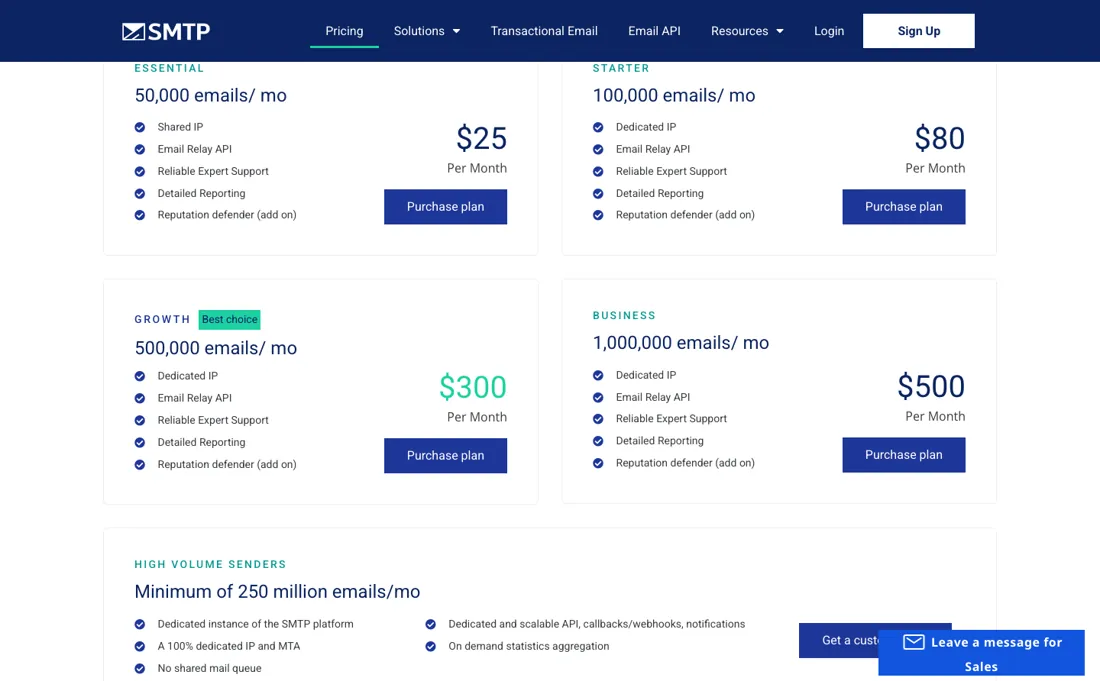
Pricing is volume-tiered, so a shared IP on the cheapest plan is fine for low volume while serious senders need the dedicated-IP tiers (and the IP warm-up discipline that comes with them). And the value-add features — reputation and verification — are metered on top at ~20% of plan cost, so the real bill is higher than the base tier. It's infrastructure, not a marketing suite; you bring the campaigns.
What SMTP.com does
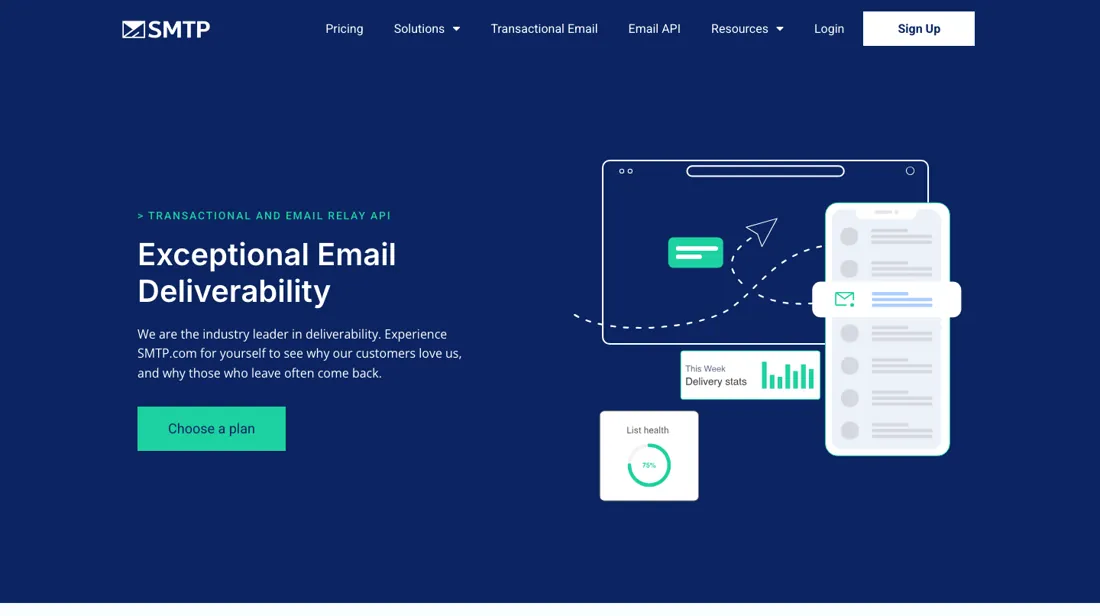
Reliable transactional and bulk email delivery via SMTP relay and API: high-deliverability sending for app notifications, receipts and campaigns, with real-time analytics and dedicated IPs — built for volume senders.
What buyers report about SMTP.com
Recurring themes from the buyer-review sites listed at the foot of this page, read in August 2026. We have not run SMTP.com ourselves, so this is other buyers' experience rather than ours. We summarise it here because the complaints are usually the part a vendor page leaves out.
- • 98%+ average deliverability with managed services and reputation protection built into the plan — for high volume that dedicated guidance is what you are paying for.
- • Reviewers running serious volume call the deliverability really good.
- • Cancellation needs 30 days' notice and there are no refunds for unused service in that cycle. That is the consistent complaint.
- • No free plan and no free trial, with the lowest tier at $25/month — expensive against modern alternatives with free tiers.
- • One customer reports emails that previously reached inboxes landing in spam after installing the plugin, costing them contacts. Test before you cut over.
- • The interface is dated against Mailtrap or Postmark.
Pages read (August 2026): Trustpilot
The same price per email at both ends
Fixed-volume plans: Essential at $25 a month for 50,000 emails on a shared IP, Starter at $80 where dedicated IPs begin, Growth at $300, Business at $500 for roughly a million emails, plus custom high-volume tiers above that. Do the division on the two ends of that range and something odd falls out. Essential is $0.50 per thousand emails. Business is also $0.50 per thousand. Across a twentyfold increase in volume the unit price does not move at all — there is no volume discount here in the sense that word usually carries.
Whatever the higher plans are buying you, it is not cheaper email. What they are buying is the dedicated IP, and that is a real distinction rather than a packaging one. A shared IP means your deliverability is partly a function of other people's sending; a dedicated IP means it is entirely yours, for better and worse, and it comes with the warm-up discipline that any serious sender already knows about.
Dedicated IPs start at Starter, so the practical entry price for a serious sender is $80 rather than $25 — 3.2× the headline. Then add the meter on top. Reputation Defender and Insight Engine are each an optional add-on at 20% of your plan cost, available on every plan, so a Business deployment running both is $700 rather than $500 — and the honest way to compare this against anything is to price the whole stack rather than the tier.
What buying a bigger plan does not fix is the top of the ladder. The published tiers stop at Business and one million emails; the next published step, High Volume Senders, starts at a minimum of 250 million emails a month and carries no price at all, only a quote form. Between one million and 250 million there is nothing posted, so the moment you outgrow Business the price stops being something you can look up.
Nor does any tier come with a free allowance or a published trial: the cheapest way in is $25 a month, billed from the start. One useful cross-reference from our own dossiers, since both sit in the same category: at 50,000 emails a month, SMTP.com's Essential is $25, while SMTP2GO would be its $15 Starter plus 40,000 emails of overage at about $1 per thousand — $55, or 2.2× more.
At the low end of the volume range SMTP.com is materially the cheaper relay. It is a veteran and it is reliable, but be clear about what it is: infrastructure, not a marketing suite. You bring the campaigns, the list hygiene and the authentication records; it brings the pipe.
Our monthly capture read this vendor's pricing page in July 2026 and again in August 2026, and the amounts were the same both times. We keep watching — the registry records what moves.
How to actually use SMTP.com
Decide whether you need a dedicated IP, because that is the real tier boundary rather than volume. Dedicated IPs begin at Starter at $80, so a serious sender's entry price is $80 rather than $25 — and the unit cost per thousand emails is identical at both ends of the range anyway, so you are not buying cheaper mail as you climb. If you do take a dedicated IP, plan the warm-up before you migrate.
A new IP has no reputation, so volume has to ramp gradually over weeks; moving your whole send to a fresh dedicated IP on day one is the classic way to make deliverability worse by paying more for it. Set up SPF, DKIM and DMARC before the first send regardless of tier. A relay delivers what your domain has earned, and switching provider does not reset that — half-configured authentication is the most common reason a change of relay disappoints.
Then budget the meters on top: Reputation Defender and Insight Engine are each 20% of your plan cost and available on any plan, so a Business deployment running both is $700 rather than $500. And be clear what you are buying — this is infrastructure rather than a marketing suite. You bring the campaigns, the list hygiene and the content.
Distilled from SMTP.com's own pricing page (www.smtp.com/pricing/), read 5 September 2026 — the four fixed-volume plans with their monthly amounts and email allowances, which tier the dedicated IP starts on, the 250-million-a-month floor and quote-only status of the High Volume Senders tier, the 20%-of-plan-cost pricing on both the Reputation Defender and Insight Engine add-ons, the accepted payment methods, and the absence of any free tier, trial, published overage rate or email-verification price on that page. Re-read 24 September 2026 with all amounts unchanged, together with the terms and conditions (www.smtp.com/policies/terms-and-conditions/, effective 28 July 2025 for new subscribers): automatic usage fees above the allowance, no rollover of unused allowance, subscription fees payable in advance and non-refundable, 30 days' notice to cancel, and the 30-day refund for unused service less a 20% administration fee.
The natural comparison is SendGrid or Postmark — close relay/API peers — Postmark leans transactional-fast, SendGrid broader; compare on IP options and deliverability at your volume.
Frequently asked questions
What happens if we send more than our plan's allowance?
You are billed for the excess automatically, at a rate the pricing page does not show. SMTP.com's terms (effective 28 July 2025, read 24 September 2026) say that once you exceed your plan's allotted allowance you are charged usage fees for each email over it, and that unused allowance does not transfer from month to month. The pricing page lists the four plans (50,000, 100,000, 500,000 and 1,000,000 emails for $25, $80, $300 and $500) but no per-email overage figure. Ask support for that rate before a campaign spike, and move up a plan if you regularly go over.
Can we get a refund if deliverability disappoints?
Only if you never sent anything. The refund clause in the terms, read 24 September 2026, offers a 30-day refund for unused services: the amount paid for the first 30 days, less a 20% administration fee, and only if no emails were sent from the account and it was not on a seasonal hold. Senders terminated for poor practices get nothing back. Subscription fees are otherwise payable in advance and non-refundable. In practice, once you have tested a single send, the money for that month is spent, so treat the $25 Essential month as the cost of the test.
How do we cancel, and how much notice does it take?
Thirty days, by phone or email. The termination clause, read 24 September 2026, lets month-to-month subscribers upgrade, downgrade or cancel at any time with 30 days' notice, by calling the number on smtp.com/contact or emailing support@smtp.com; a signed written agreement follows its own terms. There is no cancel button described. Because fees are paid in advance and the notice runs 30 days, give notice as soon as you decide, not in the last week of a billing month.
What should I weigh before buying IT & Productivity software?
Judge it on evidence rather than adjectives. Look for a published security page, single sign-on and role controls on the plan you would actually buy (they are often gated to higher tiers), a status page with real incident history, and a clear answer on where your data is stored. If the tool will hold anything sensitive, those four answers matter more than any feature comparison.
Is this a hands-on review of SMTP.com?
This is a researched assessment, not a hands-on test — where we've used a tool ourselves, we say so explicitly. We name what each tool is good and bad at, and we earn a commission only if you sign up, at no cost to you.
- Buyer reviews on Trustpilot, Capterra and Software Advice, read August 2026.
- Price re-verified 24 September 2026, unchanged since 5 September.
- A dated screenshot of that pricing page, kept on this site as the receipt.
Others in this category
Reviewed it & productivity tools that share ground with SMTP.com — comparable in what they do, not drop-in swaps:
New reviews, price changes we recorded, and the cost conditions we found. No sponsored placements. Unsubscribe anytime.
This is our researched assessment — not a paid placement. The “Visit” links on this page are affiliate links: we may earn a commission if you sign up, at no extra cost to you, and it never changes our take. How we review →