 Miro Review (2026)Three Boards, Workspace-Wide
Transparency: the “Visit” links on this page are affiliate links — we may earn a commission if you sign up, at no extra cost to you. No vendor can pay for a better review or verdict. How we make money →
Per-member pricing charges for every member added to the workspace, so an org-wide rollout multiplies at full headcount — and the free plan's 3-board cap is workspace-wide, not per person, so a team reaches it as soon as it needs a fourth editable board. Model who truly needs to edit before you buy seats.
Visit Miro → Affiliate link — we may earn a commission if you sign up; it does not change what this page says.
Watch the 2-minute review
The video version of this review, from our YouTube channel.
⚡ Short on time? Watch the 30-second verdict Short.
Pricing (2026)
✓ Pricing re-verified 23 Sep 2026
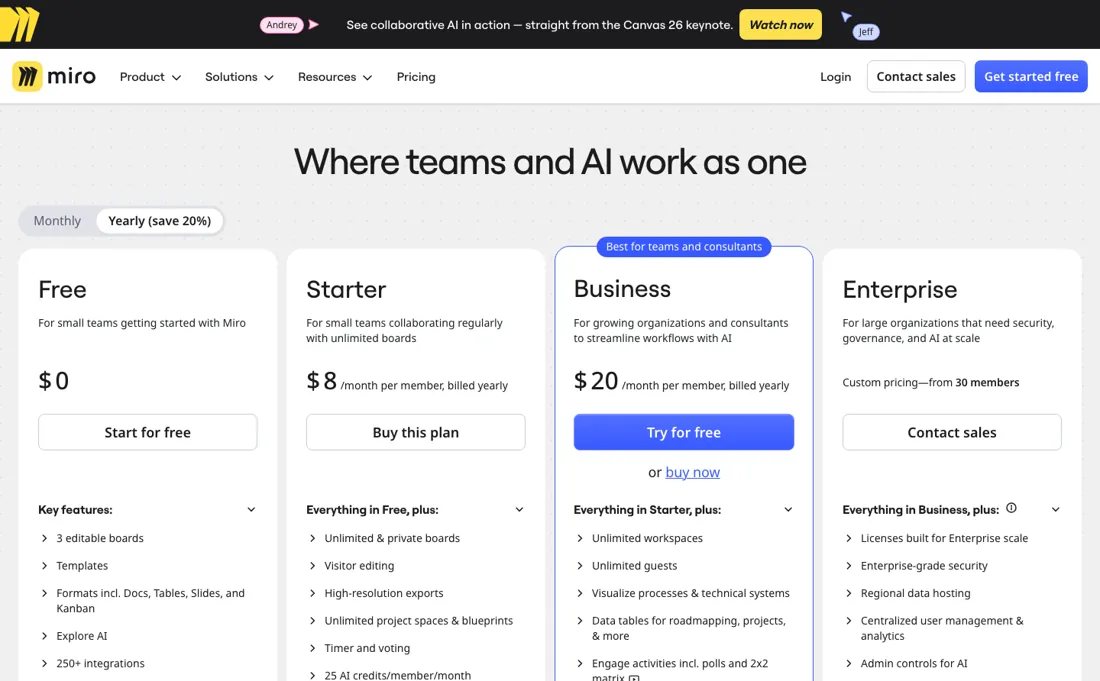
Free plan: 3 editable boards workspace-wide, unlimited members, AI shown as a limited trial in the plan table, which the FAQ puts at 10 credits a month. Starter $8/member/mo and Business $20/member/mo, both billed yearly; Enterprise custom priced from 30 members. The yearly toggle is marked save 20%, which puts the monthly rates at $10 and $25. AI credits are published per plan: 25 per member per month on Starter, 50 on Business.
MCP calls are a separate published meter: 500 a day on Starter, 2,000 on Business. Currency note: the served page defaults to USD, but rendered from a Dutch connection the same numerals appear as €8 and €20, so the symbol follows the visitor region. Enterprise starts from 2,500 AI credits a month, scaling with seats and pooled org-wide, and 10,000 MCP calls a day; Free gets 100 MCP calls a day.
Credits are pooled across the organisation, reset monthly without rollover, and extra credit packages can be bought. Guests (free accounts invited to specific boards, no paid seat) exist only on Business and Enterprise; on Free anyone invited becomes a member. 14-day Business trial. Startups under 30 employees can get $500 or $1,000 in Miro credits. Plans change — always verify the live price on their site.
Category context: Operations & Workflow. Across the 51 tools in this category that we researched with a public US-dollar price, the median entry price is $25 a month (lowest paid plan as listed, per seat where the vendor prices per seat). Miro’s entry price of $8 a month sits below that median. Compare pricing conditions in the Software Cost Atlas →
Miro’s pricing page, as we read it
What Miro does
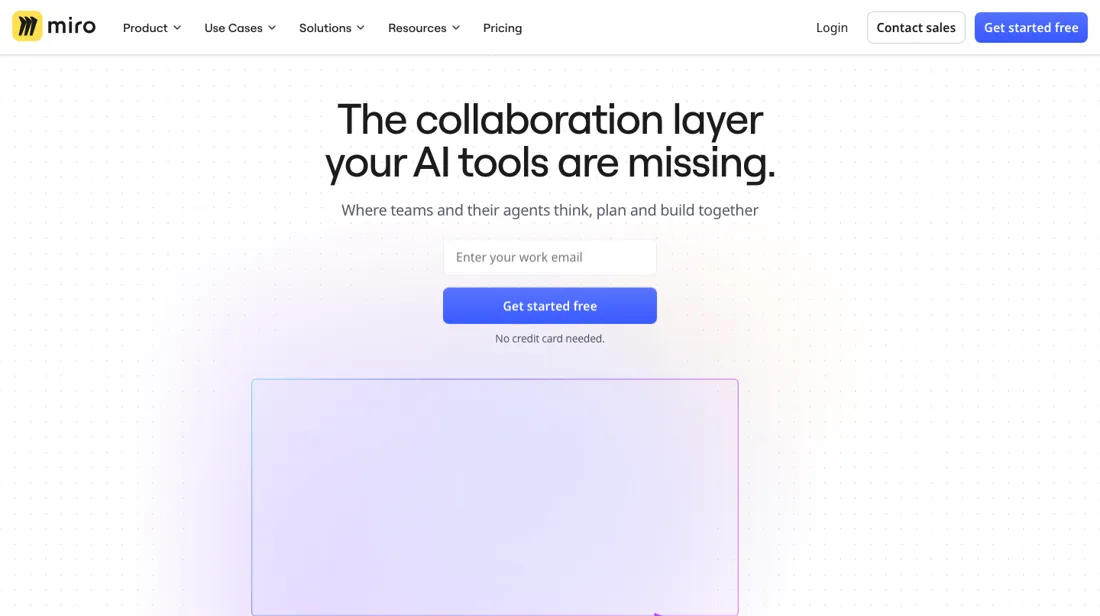
Visual collaboration platform: an infinite online whiteboard for brainstorms, diagrams, workshops and planning — with templates, voting and AI that generates diagrams and summaries, built for real-time and async teamwork.
What buyers report about Miro
Recurring themes from the buyer-review sites listed at the foot of this page, read in August 2026. We have not run Miro ourselves, so this is other buyers' experience rather than ours. We summarise it here because the complaints are usually the part a vendor page leaves out.
- • The canvas is fast, there are 7,000+ templates, and real-time collaboration simply works — 4.6 on G2 across 12,000+ reviews.
- • Miro AI turning a wall of sticky notes into a structured diagram is the feature reviewers name as genuinely new.
- • The one-star reviews are not about the whiteboard. They are about seats added without explicit approval, view-links triggering paid licences, auto-renewal charges, and a refund path reviewers describe as obfuscated. Check who counts as a billable seat before you share a board externally.
- • Boards with thousands of objects slow down; lag is one of the review topics G2 lists for Miro.
- • The learning curve is another review topic G2 lists: there is so much here that new users do not know where to start.
- • Starter is $8 per member a month and Business $20, both billed yearly. The free plan's three-board limit is workspace-wide.
Where the ratings disagree. 4.6 on G2 against 2.2 on Trustpilot across 109 reviews. Almost the entire gap is seat billing and cancellation — the product is not in dispute.
Pages read (August 2026): G2, Trustpilot
When the paid plan is worth it
Starter is $8 per member a month billed yearly, Business $20, Enterprise custom from 30 members; the yearly toggle is marked save 20%, putting the monthly rates at $10 and $25. The number that actually decides whether you can stay free is easy to miss: the free plan allows 3 editable boards for the WHOLE workspace, not 3 per member, while members themselves are unlimited. That is generous on people and strict on projects -- so the limit binds when you start a fourth thing, not when you add a fourth person.
Teams often misjudge this and assume they are near a seat limit when they are actually near a board limit. Business is two and a half times Starter, which is a large step for a collaboration tool, so identify the specific capability you need from it rather than treating it as “the proper version”. And note the Enterprise floor of 30 seats: below that headcount it is not available at any price, which caps what you can negotiate.
Miro AI credits are published, not quoted on request: 25 per member a month on Starter, 50 on Business, a limited trial on Free. MCP calls are a second meter, 500 a day and 2,000. Those allowances, not the seat price, decide your next upgrade.
How to actually use Miro
Model who genuinely needs to edit before you buy seats, because per-member pricing charges for everyone added to the workspace. Most people in a workshop are reading, reacting and voting rather than building, and an org-wide rollout multiplies at full headcount — so decide the editor list deliberately rather than adding everyone by default. Know where the free plan's wall is before you build a process on it. Three editable boards is workspace-wide rather than per person, so a real team reaches it in days rather than months.
Unlimited members make it a genuine trial; Free's AI is a limited trial: the table prints no number, the FAQ says 10 credits a month. It is not a plan. Read the AI allowance off the plan table rather than asking: 25 credits per member a month on Starter, 50 on Business, with MCP calls metered at 500 and 2,000 a day. Those allowances, not the seat price, force your next upgrade.
Annual billing saves roughly 20% ($8 against $10 on Starter, $20 against $25 on Business), and Enterprise starts at 30 seats.
Where this section comes from: our research notes (96 words)
miro.com/pricing/, re-read 23 September 2026 (first read 2 September 2026) — the annual rates, the 30-member Enterprise floor, the per-plan AI credit allowances and the MCP call limits from the plan cards and the comparison table; credit pooling, monthly reset without rollover, extra credit packages, the Free plan's 10 credits, member/guest/visitor roles, the Business trial and startup credits from the FAQ on the same page. The monthly rates are not printed until the Monthly toggle is used; $10 and $25 follow from the published annual rates and the stated 20% yearly saving, which the FAQ repeats.
The natural comparison is FigJam or Lucidspark — FigJam wins if your designers already live in Figma, Lucidspark on diagram-heavy work; Miro wins on breadth: templates, integrations and workshop facilitation.
Frequently asked questions
Do clients I invite to a Miro board need a paid seat?
Not if you are on Business or Enterprise and invite them as guests. Read 23 September 2026, the pricing FAQ says members consume a paid seat, guests have a free Miro account and do not, but can only reach the boards they are invited to, and visitors open a board through a public link without an account. The plan table gives guests only to Business ($20 per member a month billed yearly) and Enterprise. On Starter you can still share boards with visitors, but on Free there are no guest or visitor roles at all and anyone you invite becomes a member. So for an agency or consultant working with outside clients, the real comparison is Business at $20 against Starter plus clients on view-only links.
Do unused Miro AI credits roll over?
No. Read 23 September 2026, the FAQ says credits are pooled across your organisation, consumed per AI action with usage varying by feature, and reset monthly without rolling over. The allowance is 25 per member a month on Starter and 50 on Business; Free shows a limited trial in the table and 10 credits a month in the FAQ; Enterprise starts from 2,500 a month, scaling with seats. Because the pool is shared, a handful of heavy AI users can drain it for everyone, and the FAQ says additional credit packages can be bought when you run out, without printing their price. Budget on the pool, not per person.
Is Miro's free plan really limited to three boards?
To three editable boards. Read 23 September 2026, the Free card says you can create and share unlimited boards, but only the three most recent stay editable. That limit is for the whole workspace, while members are unlimited, so a team hits it on its fourth project rather than its fourth person. Free also has no guest or visitor roles and makes every board visible to all team members by default. Starter at $8 per member a month billed yearly removes the board cap and adds private boards; Business at $20 has a 14-day trial if you want to test guests and AI workflows first.
What should I weigh before buying Operations & Workflow software?
Usually it sits on top rather than replacing everything. Tools in this class tend to become the layer where work is tracked and handed off, while your existing systems stay the source of truth for their own data. Before you buy, map which tools it would replace outright and which it would merely sync with. If the answer is that it syncs with all of them, you are adding a layer rather than removing one.
Is this a hands-on review of Miro?
This is a researched assessment, not a hands-on test — where we've used a tool ourselves, we say so explicitly. We name what each tool is good and bad at, and we earn a commission only if you sign up, at no cost to you.
- Buyer reviews on G2, Capterra, Gartner Peer Insights and Trustpilot, read August 2026.
- Price re-verified 2026-09-23 on miro.com/pricing/.
- A dated screenshot of that pricing page, kept on this site as the receipt.
Others in this category
Reviewed operations & workflow tools that share ground with Miro — comparable in what they do, not drop-in swaps:
New reviews, price changes we recorded, and the cost conditions we found. No sponsored placements. Unsubscribe anytime.
This is our researched assessment — not a paid placement. The “Visit” links on this page are affiliate links: we may earn a commission if you sign up, at no extra cost to you, and it never changes our take. How we review →