Audiorista Review (2026)
 By Daan Haket · Researched and written with an AI assistant · who does what
The $29 Demo tier cannot actually publish to the App Store or Google Play — real branded apps start at $240 a month.
creators and media brands with a real audio catalog — podcasts, audiobooks, meditations, courses — ready to monetize subscriptions in their own branded apps.
you are still validating an audio idea on a small catalog or budget: the tier that actually ships to the app stores starts at $240 a month, before store commissions.
Transparency: the “Visit” links on this page are affiliate links — we may earn a commission if you sign up, at no extra cost to you. No vendor can pay for a better review or verdict. How we make money →
Pricing (2026)
✓ Pricing re-verified 27 Sep 2026
| Plan | Price | What you get |
|---|---|---|
| Demo | $29/mo | All Lite features except app store publishing; monetization disabled; catalogue capped at 100 titles |
| Lite | $240/mo | iOS and Android apps; 200 monthly active users; catalogue capped at 100 titles |
| Business | from $400/mo per app, plus from $0.80 per monthly active user | Unlimited users; catalogue capped at 10,000 items |
| Enterprise | $400 per app plus further fees, floor $5,000/mo | Unlimited users and catalogue; fees based on services, features, extensions, commitment |
Summarised from the pricing notes below; the notes carry the conditions.
Demo is $29/mo and Lite $240/mo for iOS and Android apps. Business is from $400/mo per app, plus a tiered variable fee from $0.80 per monthly active user. Enterprise sits on that same $400 per app with further fees based on services, features, extensions and commitment, and the plan card quotes a floor of $5,000/mo. 30-day free trial. Demo carries all Lite features except publishing to the App Store and Google Play, and monetization is disabled on it — a preview tier rather than a product.
Paid app sales, RevenueCat in-app subscriptions and Zapier webshop sync start at Lite; the web app, Stripe web payments and push-notification campaigns start at Business. Read the quotas beside the prices, because they decide the tier as much as the money does: Demo and Lite both cap the catalogue at 100 titles, Lite includes only 200 monthly active users, Business lifts users to unlimited but caps the catalogue at 10,000 items, and only Enterprise is unlimited on both counts. Push notifications are still marked Coming Soon on Demo and Lite. Plans change — always verify the live price on their site.
What the pricing page doesn’t say
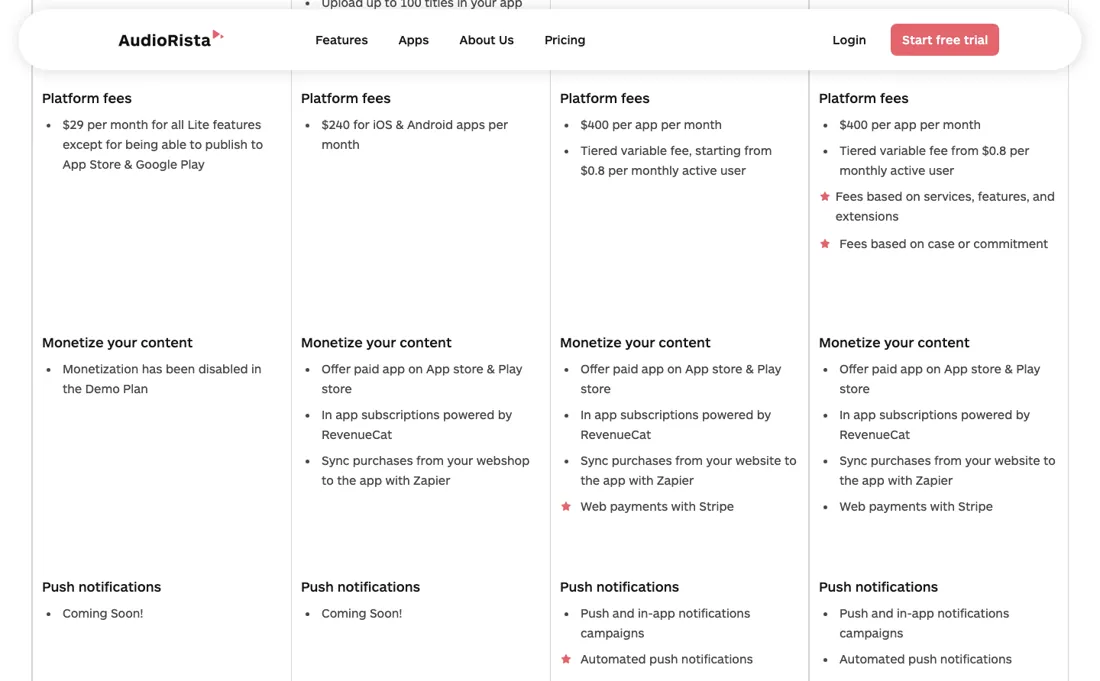
The Business tier adds a per-active-user fee from $0.80 on top of $400 per app, so growth literally raises the bill — and Apple and Google's own store commissions still apply to in-app sales on top of everything.
Watch the 2-minute review
The video version of this review, from our YouTube channel.
⚡ Short on time? Watch the 30-second verdict Short.
What Audiorista does
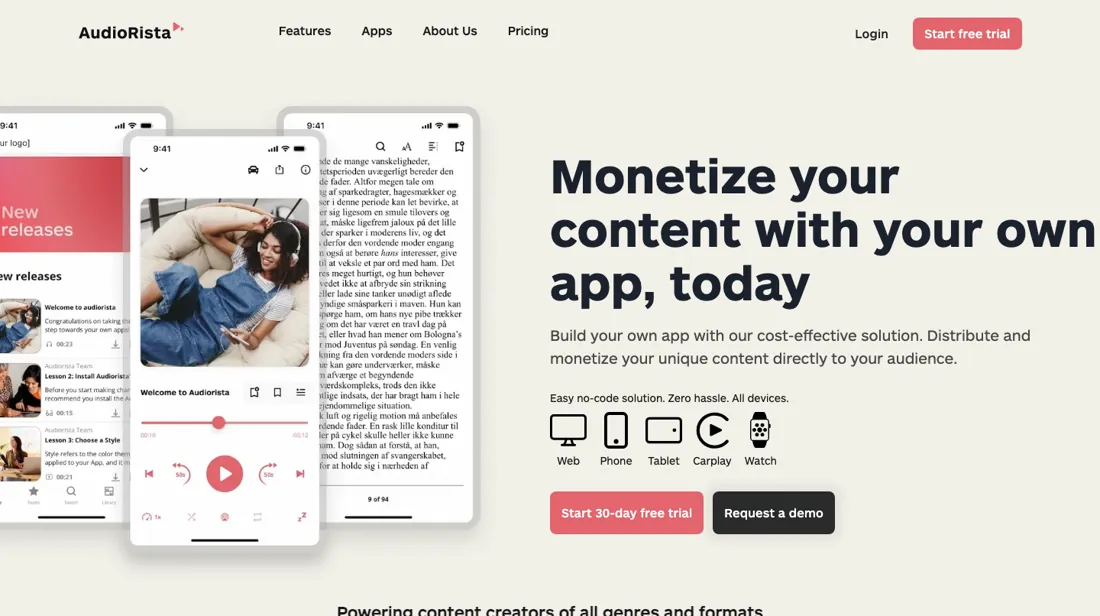
No-code platform for launching branded audio apps — podcasts, audiobooks, meditation and courses with subscriptions, on iOS, Android and web.
What buyers report about Audiorista
Hands-on: not tested by usReported by buyers: G2, Capterra, AppSumo and Software Advice, read August 2026
Themes from the buyer-review sites listed at the foot of this page, read in August 2026. We have not run Audiorista ourselves, so this is other buyers' experience rather than ours. We summarise it here because the complaints are usually the part a vendor page leaves out.
- • A white-label app carrying your own audio, video, ebooks and text under your brand, with the monetisation built in — for a podcaster or educator that is the whole proposition.
- • iPhone, Android and iPad apps, with phone as well as online support.
- • One AppSumo buyer reports the presentation being impressive but the actual offering misleading, with features listed for their Tier 2 licence not included. Verify feature-by-feature against your tier before buying.
- • Content organisation is described as rigid enough to be genuinely frustrating.
- • Design options are limited for a product sold on being your own branded app.
When the paid plan is worth it
The $29 Demo tier is a sandbox rather than a product: Audiorista's own comparison table says monetization is disabled there, statistics are off, and you cannot publish to the App Store or Google Play. Audiorista told us by email (2026-09-03) that the tier exists for pre-launch stretches — internal sign-off, investor demos, agency pitches — that outrun the 30-day Lite trial, not as a cheap way to run a live app.
Fair as a purpose; it still ships nothing. The first tier that ships anything is Lite at $240/mo, covering up to 100 titles, up to 200 included active monthly users, one admin and simple stats — workable for a single creator with a fixed catalog. It stops paying back as soon as you pass those limits, because the next step is Business at $400 per app per month plus a tiered variable fee starting from $0.8 per monthly active user, capped at 10,000 catalog items; Enterprise starts from $5,000/mo.
Business is also where the web app, Stripe web payments, push-notification campaigns, multiple admins and automated RSS syncing live — on Demo and Lite the pricing table still marks push notifications as coming soon. Upgrading does not remove Apple's and Google's commission on in-app subscriptions, does not supply the developer accounts (you bring those), and does not cap the per-user fee: growth raises the bill.
How to actually use Audiorista
Sign up, choose a plan, and a Project Wizard sets the foundation — template, theme, layout, language, integrations, app name — then hands you a Launch Checklist in the dashboard that runs from branding and first titles through to requesting iOS and Android builds. You preview on a real phone through TestFlight or Firebase App Tester, logging in with your Audiorista credentials.
Where this section comes from: our research notes (321 words)
Vendor material only. Built on the Audiorista pricing page including its full "Compare plans" table (www.audiorista.com/pricing), and on the Audiorista Zendesk help center: the "Get Started" category ("Getting started with the Audiorista wizard", "The Launch Checklist", "How to install the preview app on Audiorista"), the "Publishing & Distribution" category ("How to create a distribution certificate on App Store Connect", "How to generate a Keystore for Android distribution on Google Play", "Submit Your iOS App", "What is a D-U-N-S number, and how do I get one?"), the "Content Management" article "How to import content with an RSS feed", and the FAQ articles "What is transcoding, and why does it take so long?" and "Caching, or: Why Isn't My Content Appearing In The App?".
The help center's HTML pages return HTTP 403 to non-browser clients, so the article text was read through the public Zendesk help-center API on the same host; the API URLs are the ones cited in cijfers. No independent walkthrough was found. The only third-party hands-on material located was an AppSumo lifetime-deal listing and a YouTube review of that same deal — both deal-promotion channels, not independent reviews — plus directory listings with no setup detail.
Re-read 27 September 2026 by plain fetch of www.audiorista.com/pricing (www.audiorista.com/llms.txt returns 404): Demo $29, Lite $240, Business from $400 per app plus from $0.8 per monthly active user, Enterprise from $5,000, the quotas (100 titles, 200 users, 10,000 catalog items) and the Coming Soon push notifications on Demo and Lite - unchanged. The page FAQ: the free trial needs a valid credit card and is not charged if cancelled before it ends; the trial includes all Lite features including publishing, and with an active Apple or Google developer account you can publish during the trial; cancelling after the trial takes effect at the end of the billing period; you retain full ownership of subscriber and listening data; registered non-profits get discounted pricing through sales.
Common Audiorista setup mistakes
Where Audiorista setups actually go wrong, and what it costs you when they do. Same sources as the setup notes above — not from a walkthrough we ran ourselves.
The friction sits downstream.
- Uploads are transcoded to encrypted HLS before they play; Audiorista's stated baseline is a 5 minute wait, longer at peaks (their number, not our timing).
- Publishing is yours to own: you supply the Apple Developer and Google Play accounts, generate an iOS distribution certificate and an Android keystore, and upload both to Audiorista.
- Apple organisation enrolment needs a D-U-N-S number, and Audiorista tells you to allow up to 5 business days for it.
- On Demo and Lite, RSS import is manual and one-time; automated syncing is Business-only and support has to switch it on.
- The 30-day Lite trial requires a credit card.
The natural comparison is Uscreen — Uscreen is the video-first heavyweight for creator apps; Audiorista is audio-native — leaner for podcasts and audiobooks, with per-user fees appearing at the Business tier.
Frequently asked questions
Can I publish a real app during the Audiorista free trial?
Yes, if you already have the developer accounts. The pricing FAQ (read 27 September 2026) says the 30-day trial includes all Lite features, publishing included, and that with an active Apple or Google developer account you can publish during the trial. It needs a valid credit card and is not charged if you cancel before it ends. Allow for Apple's review and, for an organisation account, the D-U-N-S number, which Audiorista says can take up to 5 business days.
What happens if I cancel Audiorista after the trial?
It runs to the end of the period you paid for. The FAQ (read 27 September 2026) says cancellations after the trial take effect at the end of the current billing period with no further charges, and that you keep full ownership of your subscriber and listening data. It does not say what happens to the published app in the stores once the subscription ends, so ask before relying on it.
Does Audiorista offer a non-profit discount?
Yes, but not a published one. The FAQ (read 27 September 2026) says registered non-profit organisations get discounted pricing and should contact sales; no percentage or eligible tier is given. The list prices it would discount are $240 a month for Lite and from $400 per app plus from $0.80 per monthly active user for Business.
Is this a hands-on review of Audiorista?
This is a researched assessment, not a hands-on test — where we've used a tool ourselves, we say so explicitly. We name what each tool is good and bad at, and we earn a commission only if you sign up, at no cost to you.
- Buyer reviews on G2, Capterra, AppSumo and Software Advice, read August 2026.
- Re-verified 2026-09-14 and re-read unchanged 2026-09-27 on their own pricing page, USD.
- A dated screenshot of that pricing page, kept on this site as the receipt.
Others in this category
Nothing we have reviewed in content & media does the same job as Audiorista; these are neighbours by category only:
New reviews, price changes we recorded, and the cost conditions we found. No sponsored placements. Unsubscribe anytime.
This is our researched assessment — not a paid placement. The “Visit” links on this page are affiliate links: we may earn a commission if you sign up, at no extra cost to you, and it never changes our take. How we review →